• Which the release of FS2020 we see an explosition of activity on the forun and of course we are very happy to see this. But having all questions about FS2020 in one forum becomes a bit messy. So therefore we would like to ask you all to use the following guidelines when posting your questions:

    • Tag FS2020 specific questions with the MSFS2020 tag.
    • Questions about making 3D assets can be posted in the 3D asset design forum. Either post them in the subforum of the modelling tool you use or in the general forum if they are general.
    • Questions about aircraft design can be posted in the Aircraft design forum
    • Questions about airport design can be posted in the FS2020 airport design forum. Once airport development tools have been updated for FS2020 you can post tool speciifc questions in the subforums of those tools as well of course.
    • Questions about terrain design can be posted in the FS2020 terrain design forum.
    • Questions about SimConnect can be posted in the SimConnect forum.

    Any other question that is not specific to an aspect of development or tool can be posted in the General chat forum.

    By following these guidelines we make sure that the forums remain easy to read for everybody and also that the right people can find your post to answer it.

FS2004 Mesh with SBuilder, problem

Messages
217
Country
venezuela
Hello FSDeveloper guys

I was trying to made a Mesh with SBuilder but no success

I dowloaded the .HGT files from the NASA website, converted it to .BSQ and .BMP, then used the .BMP as a map, calibration was correct because was the original calibration from the .HGT file

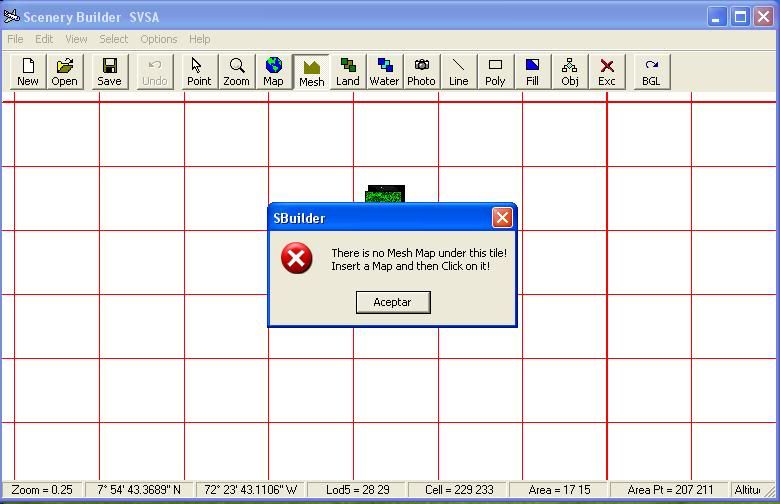
And for a unknow reason, SBuilder modified the calibration of the mesh map and it looks very small now after clicking the Mesh button

Then click in one of the tiles where the mesh map is and I got this message

problemsbuilder.jpg


Help please
 
Compiled now, thank you PakMac ;)

But with another problem, the mesh isn't showing up in FS :(

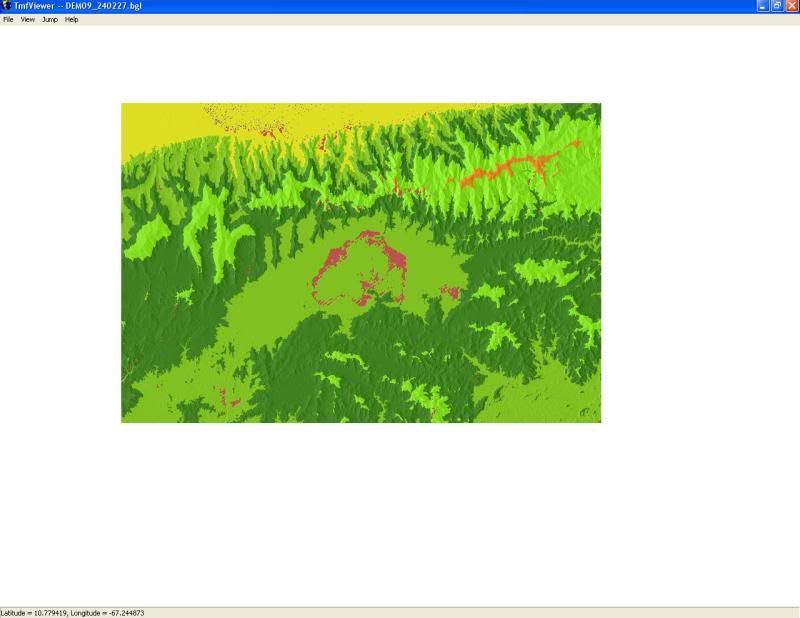
Loaded it with Tmfviewer

meshproblem.jpg


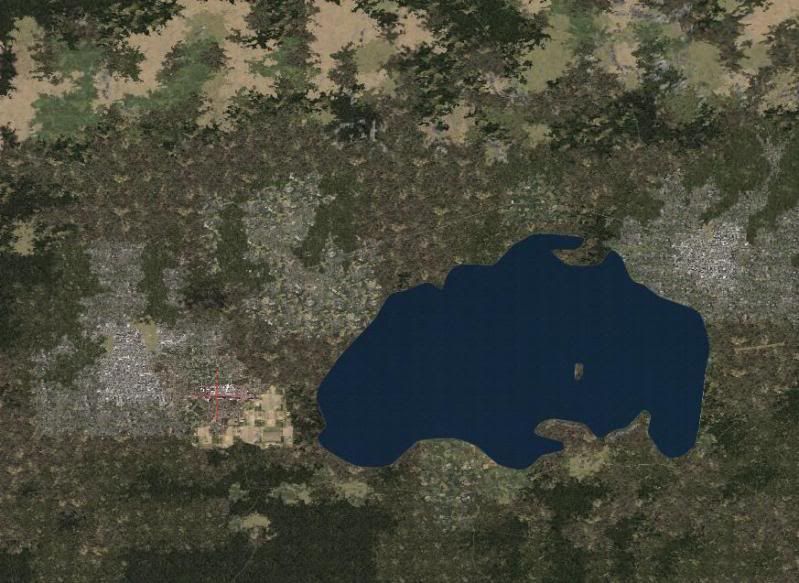
And loaded with FS

meshproblem2.jpg


I don't know but looking at the lake, the FS isn't showing the same mesh that showed the Tmfviewer, only the default lake :confused:

I downloaded the .HGT files from this site

http://dds.cr.usgs.gov/srtm/version1/South_America/

The Mesh is from Valencia, Venezuela

Here the BGL and the INF files (attached) and the BSQ file: http://uploading.com/files/1dd3mefa/DEM_001.BSQ/

Help please
 

Attachments

Last edited:
Compiled now, thank you PakMac ;)

But with another problem, the mesh isn't showing up in FS :(

Loaded it with Tmfviewer

meshproblem.jpg


And loaded with FS

meshproblem2.jpg


I don't know but looking at the lake, the FS isn't showing the same mesh that showed the Tmfviewer, only the default lake :confused:

I downloaded the .HGT files from this site

http://dds.cr.usgs.gov/srtm/version1/South_America/

The Mesh is from Valencia, Venezuela

Here the BGL and the INF files (attached) and the BSQ file: http://uploading.com/files/1dd3mefa/DEM_001.BSQ/

Help please

I think in this case, the default lake is overriding the mesh, the only solution would be I think to go to the HP file and fix it, though this solution is not often the best because you would be altering a default file, don't know if there is another way to exclude the default Hydro polygon. in FSX of course you can exclude, FS2004 is not too exclude friendly for these things...
 
Hi Roland81, in that case, I found in the forum a way to exclude, but still don't understand it

Hi Alfredo:

With SBuilder for FS9 you can "Append" a copy of the HP*.BGL and FL*.BGL for the area in question.

[EDITED]
If uncertain as to which BGL files pertain to the FS9 scenery area of interest, this can be determined by using LWMViewer 1.x or 2.x:

http://www.jimkeir.co.uk/FlightSim/


Once loaded up in SBuilder, the object outline for your water body and associated flatten are located among the many others likely to also be inside that large area of the BGL file.

Once located, the object in question is selected, the selection is then "inverted" so that all other objects EXCEPT that object are selected instead; then the selected objects are deleted.

The object which remains is then used to edit the water poly to the desired shape, and will be used to replace the former default water poly and its associated water flatten.


Once again with SBuilder for FS9 you "Append" a copy of the ORIGINAL HP*.BGL and FL*.BGL for the area in question, and the object outline for your water body and associated flatten are located.

Once located, the water poly in question is selected and this time ONLY that poly is deleted similarly from both the HP*.BGl and FL*.BGL files.


To edit the BGL(s) containing only the water poly and water flatten in question, they should be Appended to SBuilder along with the edited BGL(s) containing all other water polys and water flattens except the one you are editing so you can identify any conflicting overlaps in the new shape of your edited water poly.


When finished, one would need to distribute BOTH sets of the edited HP*.BGl and FL*.BGL files... the ones with, and the ones without your modified water poly and flatten objects.

This is best done with a batch file (or very clear instructions) for the intended end user to avoid loss of a backup of original HP*.BGL and FL*.BGL files.


Jim Keir once wrote a prototype of a batch routine to implement these changed files on an end users system, and I believe it was called "BGLPatcher"... I can't locate the info right now, and I don't know if the project was ever released in any final form except in his SlartiBartFast utility.

[EDITED] 12-28-2009
Just found the info on Jim Keir's utility (actually named "BGLPatch"):

http://www.jimkeir.co.uk/FlightSim/Autogen/FAQ.html#FAQ13


Thus one can edit out the original water poly and flatten, then add back the desired water body LWM file in the appropriate shape to replace the original object that you took out.


Hope this helps ! :)

GaryGB
 
In FS2004, flattens cannot be excluded. The default lake is probably the culprit.

To get rid of the lake, you'd need to make a replacement for the original HP BGL, as noted.

Dick
 
Hi Dick

So I have to make an LWM Polygon covering all the lake in SBuilder and save it overwritting the FL and HP files?? I have to overwritte both files??

Another question, I downloaded the LWMViewer because according to a thread in this forum, that program can tell me the name of the default files I have to overwritte, so I tested it and it only gives me the name "??929280.BGL" and "??930280.BGL" (those are the files in my case) the "??" prefix mean FL and HP, right??
 
The offending flatten is most probably in the HP file. FS2004 LWM water has elevation ( flatten qualities ) in it. You need to replace the entire HP930280.BGL file. And there's no guarantee another scenery developer won't overwrite your replacement.

This is one reason some scenery developers do not like FS2004. You can't just exclude the flattens, like you can in FSX. You have to replace a rather large area ( LOD 5 sized ). Another problem is that the use of LWM AreaFills will cause problems in the sim.

SBuilder for FS2004 can import the HP BGL, and allow you to make changes, and resave under a different name.

The FL files are usually the airport flattens, so they won't have any bearing here.

Dick
 
Well, I already modified the HP930280.BGL and overwritted the default with the new one, and I got this

lake.jpg


The only difference are the borders of the lake, this is what I did:

1. Appended the HP930280.BGL in SBuilder
2. Deleted all the Water polys of the lake
3. Compiled it
4. Kept a Backup of the original HP930280.BGL file in a different directory
5. Installed the modified HP930280.BGL file overwritting the default file
 
What you are now seeing is probably a landclass that shows water as it's type. Make a new landclass file to delete the water squares.


Dick
 
Hello again Dick :D

I tried to do a Landclass over the lake but everytime I click at the tiles, SBuilder tells me that "This Point is outside the Area Coverage for LandClasses", I don't understand because I used a satelital image calibrated as a Class Map and tried to select the tiles inside the bmp file :confused:
 
You may need to reset the properties of the project.

File|Properties menu...Class Scenery tab, and set the latitude and longitude to the center of your project.

Dick
 
I compiled the LandClass as a separated file from the HP******.bgl (SBuilder named it as LD_2928.bgl) and installed in my addon scenery folder

lake2.jpg


Apparently the lake is gone, but...

lake3.jpg


The map is still showing a part of the lake :confused:
 
Last edited:
I compiled the LandClass as a separated file from the HP******.bgl (SBuilder named it as LD_2928.bgl) and installed in my addon scenery folder

lake2.jpg


Apparently the lake is gone, but...

lake3.jpg


The map is still showing a part of the lake :confused:

Don't worry about that map view, the only way to fix that I think would be to either 1- make photo scenery there, or 2 make an area fill, and the option 2 as mentioned is not the best since it causes issues.
 
I believe the original file is HP929280.bgl

The map is showing the original worldlc.bgl... not something you should mess with.

Doesn't that lake actually exist in the real world? If so, why worry about the map showing it... it should show it.

The important thing would be to deactivate the original HP929280.bgl ( best done by renaming it HP929280.bgl.old ), and replacing it with a corrected LWM bgl ( maybe named HP929280_new.bgl ). That fixes the elevation problems. .. add the new lake poly to this file.

The shoreline can be excludes by a polygon of type exclude, and excluding the shoreline layer 8 ( that exclude could be named !exHL929280.bgl ).

And a new shoreline of Layer 8 could be named HL929280_new.bgl.

And you'd have a landclass file ( maybe named LC929280.bgl )

Dick
 
Hi Dick, I'll try excluding the shoreline

The files (of my scenery) in the "Flight Simulator 9\Scenery\Same\scenery" directory are

AB929280.bgl
AP929280.bgl
FL929280.bgl
HL929280.bgl
HP929280.bgl
RD929280.bgl
RR929280.bgl
ST929280.bgl
UT929280.bgl

I didn't found the LC929280.bgl or any file with the LC prefix
 
There isn't any LC prefix... you would make a landclass BGL and possibly name it that way.

The only file that needs actual replacing is the HP file... and that's because it has elevations in the water polys. Those elevations can't be excluded in FS9, so the only way to get rid of them is to deactivate the default HP ( usually by renaming the file extension to .OLD or .ORIG ), and replace it with a new HP file.

All the VTP files can use exclusion polys in SBuilder9. I usually rename these with a ! prefix, as the sim loads scenery alphanumerically... so the scenery folder can load the excludes first this way. Otherwise the excludes might exclude my new lines and polys.

AB are airport backgrounds ( VTP poly files )
AP are your airport 'afcads'
FL are flattens ( LWM files that flatten the ground... usually for airports )
HL are shorelines ( VTP )
HP are land/water masks ( LWM )
RD are roads ( VTP )
RR are roads ( VTP )
ST are streams & rivers ( VTP )
UT are utlity line paths ( VTP high tension wire paths ).

Dick
 
Last edited:
Well, now the lake is pretty good ;)

lake5.jpg


But I got two very rare holes :eek:

mesh1.jpg


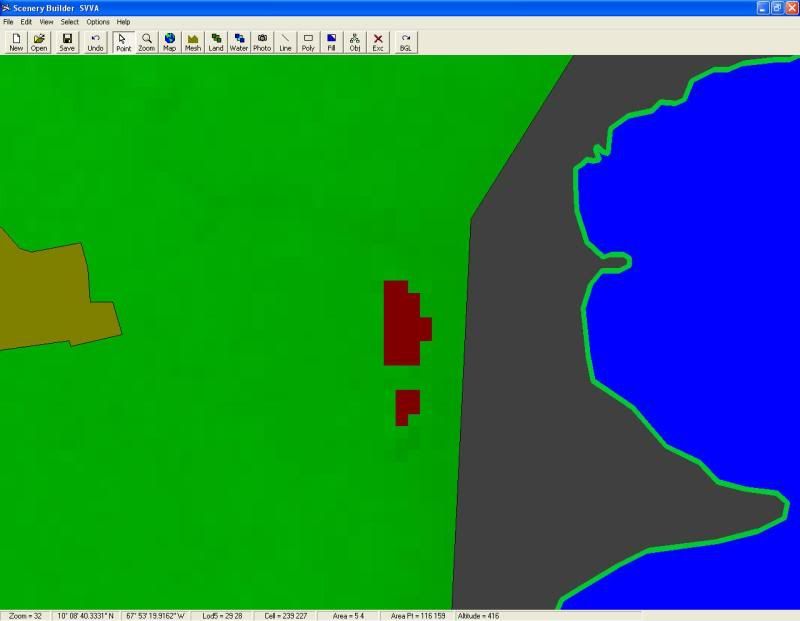
Maybe it's because of this two red wine spots in the Meshmap, because they're in the same location where the holes are

sbuilderspots.jpg


I don't know why those spots appears and don't know how to fix it, I downloaded the HGT files from http://dds.cr.usgs.gov/srtm/version1/South_America/ and converted them to BSQ and BMP using the SBuilder converter tools :confused:
 
Back
Top