• Which the release of FS2020 we see an explosition of activity on the forun and of course we are very happy to see this. But having all questions about FS2020 in one forum becomes a bit messy. So therefore we would like to ask you all to use the following guidelines when posting your questions:

    • Tag FS2020 specific questions with the MSFS2020 tag.
    • Questions about making 3D assets can be posted in the 3D asset design forum. Either post them in the subforum of the modelling tool you use or in the general forum if they are general.
    • Questions about aircraft design can be posted in the Aircraft design forum
    • Questions about airport design can be posted in the FS2020 airport design forum. Once airport development tools have been updated for FS2020 you can post tool speciifc questions in the subforums of those tools as well of course.
    • Questions about terrain design can be posted in the FS2020 terrain design forum.
    • Questions about SimConnect can be posted in the SimConnect forum.

    Any other question that is not specific to an aspect of development or tool can be posted in the General chat forum.

    By following these guidelines we make sure that the forums remain easy to read for everybody and also that the right people can find your post to answer it.

MSFS20 ADE 2020 Alpha 13 Released

scruffyduck

Administrator
Staff member
FSDevConf team
Resource contributor
Messages
34,981
Country
unitedkingdom
This is primarily a bug fix and tidy up release. From the notes

Added
  • Copy/Paste support for scenery polygons, painted lines, painted polygons and painted hatched areas
  • Option to hide taxiway markings created at junctions by the high number of nodes used. (This may be temporary until the lines can be properly handled by ADE) see Section 26
  • User accessible taxiway path coloration property
Updated
  • View Menu to match MSFS Element Types.
Fixed
  • Further culture issues with decimal separator
  • Loading painted hatched areas from stock airports
  • False positive Issue Manager items for taxi sign labels starting ‘r’ or ‘u’
  • False positive Issue Manager item when apron count exceeds 254.
  • Build error with taxiway path coloration property
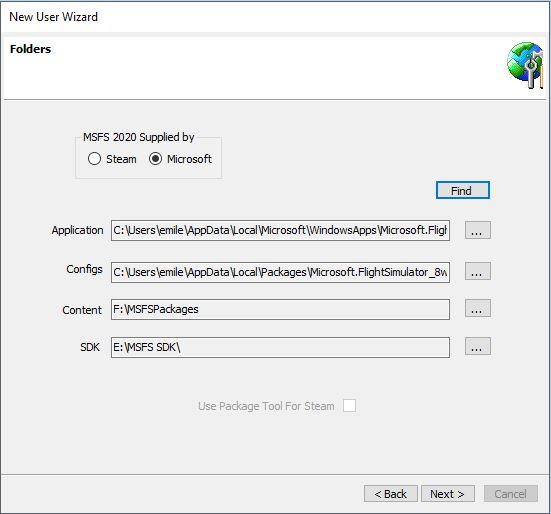
  • Paths Find for Steam version settings
It is a full installer that can be downloaded from here https://www.mediafire.com/file/e5qio48c00k9xwa/ade20_alpha_13_installer.zip/file I recommend you install this in a fresh folder.

Please report new issues, bugs etc in their own threads and not on this thread.
 
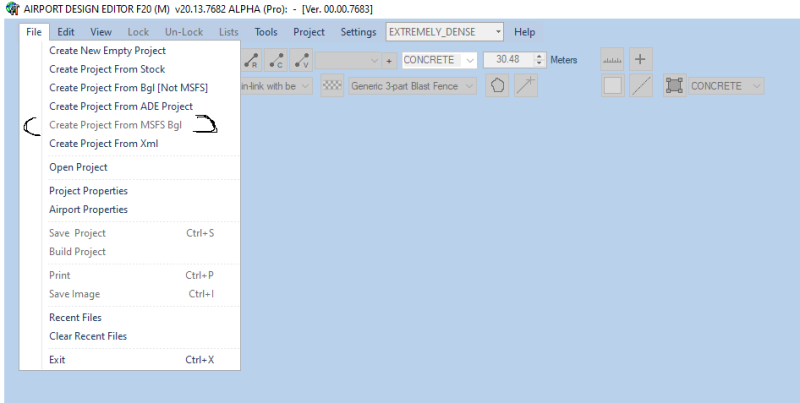
Yes it is - in the notes we say that it is in testing, However if you want to create a project from a MSFS base airport then use Create Project From Stock
 
Do you mean that the new version should be installed in a new folder? Will that incorporate acces to files created with the earlier alpha versions, or should we install in a new folder and copy the earlier version subfolders to the new location?
 
As per sods law as soon as something gets released a problem is found. I did not, as I hoped, entirely fix the auto find for paths with Steam and MS. If you have downloaded the full installer then this small patch provides a couple of files which hopefully deal with things


If you have not yet downloaded it then the installer link in the top post is updated with the fix
 
I have not installed the new version yet, but tried to avoid problems because of not understanding the instructions, Thanks for being so quick with updated alpha releases and answers to our quieries!
 
Do you mean that the new version should be installed in a new folder? Will that incorporate acces to files created with the earlier alpha versions, or should we install in a new folder and copy the earlier version subfolders to the new location?

Install in a new folder. If you have followed the general installation advice then you would have set up a folder for projects which is independent (not part of the folder structure) of any existing version. If this is the case then you just point the new version to the independent folder.

If you are storing your projects in a current installation (say alpha 12) then I strongly recommend you create an independent folder for your projects, move existing projects to it and point alpha 13 to use that folder

If you have added library objects to an existing alpha (other than the base ones) then you would need to reload those into the Alpha 13 Library Object Manager. I am sorry if this seems a bit fiddly but it is an alpha ;)
 
Yes. Although I call it an installer it is just a zip file containing the ADE installation so there are no registry entries and no actual installer exe. You just copy all the files from the zip into a new folder where you want this version of ADE to be.
 
Back
Top