• Which the release of FS2020 we see an explosition of activity on the forun and of course we are very happy to see this. But having all questions about FS2020 in one forum becomes a bit messy. So therefore we would like to ask you all to use the following guidelines when posting your questions:

    • Tag FS2020 specific questions with the MSFS2020 tag.
    • Questions about making 3D assets can be posted in the 3D asset design forum. Either post them in the subforum of the modelling tool you use or in the general forum if they are general.
    • Questions about aircraft design can be posted in the Aircraft design forum
    • Questions about airport design can be posted in the FS2020 airport design forum. Once airport development tools have been updated for FS2020 you can post tool speciifc questions in the subforums of those tools as well of course.
    • Questions about terrain design can be posted in the FS2020 terrain design forum.
    • Questions about SimConnect can be posted in the SimConnect forum.

    Any other question that is not specific to an aspect of development or tool can be posted in the General chat forum.

    By following these guidelines we make sure that the forums remain easy to read for everybody and also that the right people can find your post to answer it.

FSXA Animated Jetway, how it affect fps.

jtanabodee

Resource contributor
Messages
3,924
Country
thailand
Hi,
I'd like to do animated jetway but I still wonder if it worth to get though the difficulty of making it. I'd to ask your experience about this.
1. How it affect the performance of the FSX? Does it terribly bad? since it moves with AI too.
2. If it does affect, how many jetways in the airport that you would recommend to have to make the fps acceptable.
3. I wonder if it is better to let AES does the job? However, they seem to be too busy adding airports around. Lots of requests are not answered.


Thanks for any comments and answers.
Best Regards,
Tic
 
Last edited:
How it affect the performance of the FSX?

Depends on how many texture draws you have and how many poly's are being
used in 1 model. And how many models you are using for 1 gate. I have used up to 8 positions.

If it does affect, how many jetways in the airport that you would recommend to have to make the fps acceptable.

I suggest using a small airport or using a few static objects too. No need to animate all of them and this saves you FPS.

-----------------------------------------------------------------------

Use those tips and you will save many frames. Here is another trick. Make the back half of the gate static and as it's own object. Then the front end will be smaller in frames and easy to compile.

If you tag then as the default gates, they will only work for the default aircraft and AI....All other addon aircraft will not work. This is why i only released my Animated Gates 2011 for FS2004 only.


Good Luck:eek:
 
Hi Tic,

I have no good comparison yet for performance, we are still working on the gates for our Amsterdam scenery. But from what I have heard and read I don't think it should be a terrible performance hit. Although animations will always cost some performance of course.

Just minimize the amount of drawcalls you use (the animation will always give you more than 1 drawcall of course).

I don't expect too much different in performance because the AI also uses the animation. Even when the gate is not moving, the scenery engine would still need to check if it is not supposed to move.

I would just try it. Make one model, install it on your airport and see how many you can put in for good performance.
 
Thanks guys.
I'll try one jetway then and see how it does with the fps.
 
It is quite difficult than I thought. Anyone has the example model to study? The video is small and quite difficult to see what it is.
Do we need all the bones as the same as the video?
I found that the exclusion also exclude the jetway too.
I need to put smaller exclusion on each default building to make jetway visible.
 
Last edited:
Wow! I just discovered this.
Almost no affect at all from animated jetway. I have LOD for animated ones. But static ones, I use drawcall batching instead since each jetway contain only 400 polygons. Both version are exactly the same just only jetway is different.
This is static jetway version. FPS is around 30+.
animatedNofps.jpg


This is animated jetway version. FPS is about the same.
animatedfps.jpg


I would recommend to do animated jetway. Although it is more difficult and the animation is not without problem but the fps is almost the same. No worry about this.
 
From what I understand, the frame rate hit comes in when you have many AI aircraft being serviced by the jetways, causing the simulator to calculate and run through multiple instances of the animations.
 
Oh I see.
Thanks for the comment. I'll try that later. I agree with you too.
But I'd like to see how the fps affect by skin and bone animation at static first.
 
The effect to fps is not much. Please take a look:
Animated Jetway
vtspfpsanimated.jpg


Non-animated jetway
vtspfpsnoanimated.jpg


Around 2 fps from 27, about 10%.
I think I prefer animated jetway to non-animated one.
 
Thanks for sharing, these are interesting experiences to know. And good to see the performance hit is not that high.
 
Your welcome, Arno.
But I don't see jetway serve AI. Any thing wrong with that, or I need to do something else.
Anyway, this is more difficult. I need to do small exclusion to prevent something visible from stock airport.
If I exclude all in a wide area, my jetways also diappear.
 
Last edited:
Um, no, not really.

The simplest solution that I imagine right now is to use FSX native AI, such as the default.
 
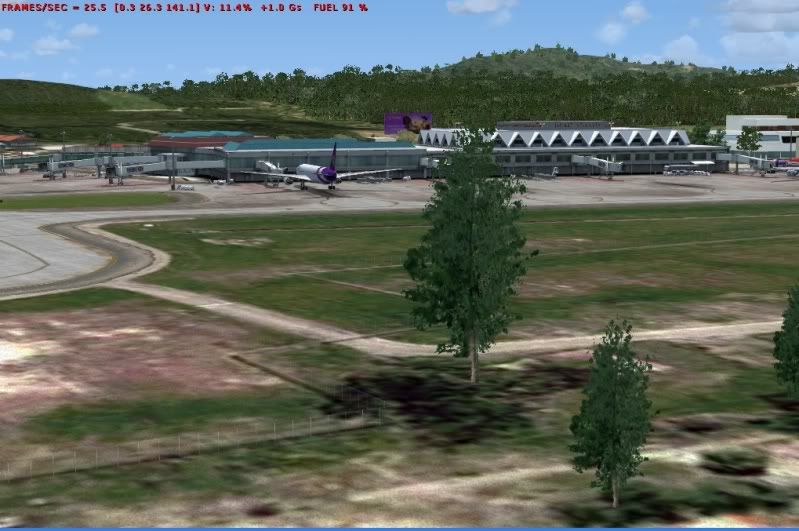
I have made animated trees. I don't think it affect fps so much. Please take a look at the video.
http://www.youtube.com/watch?v=fm8mRNXfagw&feature=youtu.be
Please see fps on these two pictures.
No animation fps is 25.3 on average
treenoanimatedfps.jpg

Animated trees (lots of them but only one model), fps is 21.2
treeanimatedfps.jpg


I think I can live with that fps.
The trees is very obvious while landing on this airport and taxi around. Those tree are nearby the sea.
I did that on purpose. The trees on the parking lot not visible by the airplane are not animated.
 
Back
Top