• Which the release of FS2020 we see an explosition of activity on the forun and of course we are very happy to see this. But having all questions about FS2020 in one forum becomes a bit messy. So therefore we would like to ask you all to use the following guidelines when posting your questions:

    • Tag FS2020 specific questions with the MSFS2020 tag.
    • Questions about making 3D assets can be posted in the 3D asset design forum. Either post them in the subforum of the modelling tool you use or in the general forum if they are general.
    • Questions about aircraft design can be posted in the Aircraft design forum
    • Questions about airport design can be posted in the FS2020 airport design forum. Once airport development tools have been updated for FS2020 you can post tool speciifc questions in the subforums of those tools as well of course.
    • Questions about terrain design can be posted in the FS2020 terrain design forum.
    • Questions about SimConnect can be posted in the SimConnect forum.

    Any other question that is not specific to an aspect of development or tool can be posted in the General chat forum.

    By following these guidelines we make sure that the forums remain easy to read for everybody and also that the right people can find your post to answer it.

Arch

Messages
334
Country
france
Hello
I need to create archs.
Has anybody allready done it and could post the part file?
To get the lower part of arch (half cylinder)I intend to use a box cut by a cylinder and boolean tool.
Thanks for help.
Pierrot - FMEP
 
Shape one 3-section cylinder - Assume it's the "inside", so flip the normals "in".

Note that the "middle" section is going to be the real inside of the arch.

Copy/paste the shaped cylinder, scale/adjust to shape/size. Flip the ploygon normals - this is the "outside".


Now, to close the ends, move the end points of the "inner cylinder" to the corresponding points of the outer cylinder, snap to vertex.

Since you're using round cylinders, just delete the "bottom" points of the two cylinders.

To clarify: In the process above, you are creating two cyllinders - the inside and outside of the arch, and then "folding" the outer sections of the inside arch to snap to the outside arch.

Alternatively, you can create the inside and outside cylinders, and then just create the necessary filler polygons.

......

or if you're REALLY masochistic, build it block by block :)
 
Last edited:
Other solution :

4 sides vertical tube with 5 sections (more sections = smoother curve). Build the half of the arch and give it the shape you want. Once finished, copy/flip to make the other half and join the two halfs. Smooth the finished object and apply texture.
arch.jpg
 
Last edited:
Thanks for answers for arch (recangular section tube, then bend following half-circle).
Sorry, I had not explained correctly; I need arch with horizontal upper part (as roman triump arch). I succeeded with boolean (box + cylinder tool). But it creates many polygons.
I join thumbs for single arch, and 3-arch set.
If you have a better solution????
Pierrot - FMEP
 

Attachments

  • arch.jpg
    arch.jpg
    6.2 KB · Views: 493
  • arch3.jpg
    arch3.jpg
    6.7 KB · Views: 446
Thanks for answers for arch (recangular section tube, then bend following half-circle).
Sorry, I had not explained correctly; I need arch with horizontal upper part (as roman triump arch). I succeeded with boolean (box + cylinder tool). But it creates many polygons.
I join thumbs for single arch, and 3-arch set.
If you have a better solution????
Pierrot - FMEP


Using my two clylinder method, just shape the "outer" cylinder in your block shape, and connect the points of the "inner" cylinder's folded sections. You don't get away from having to form the "end" polygons.


Even if you were to create a template of your basic arch, and extrude, you still have to create the end polygon caps.
 
Last edited:
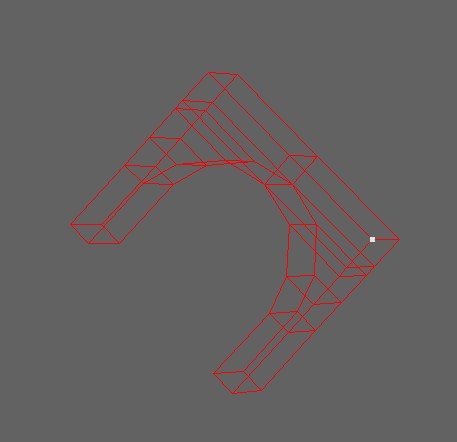
This screenshot shows the arches and in wireframe.

It's probably more complicated than needed, but "cleaner" than a boolean.
 

Attachments

  • arches.jpg
    arches.jpg
    41.8 KB · Views: 429
So many ways to do the same thing, I will thro my two cents in. I would vote for making it out of separate blocks, this makes putting the all important textures on it so much easier and after all unneeded polygons are removed it only has 59 polygons.
Farfy:D
 
Last edited:
Hello
I tested Felix way and find interesting. I didn't use "snap to vertex" so far. I tested to create an hexagonal bolt; inner 6 points / 3 sections tube; outer 6 points / 1 section tube; then "folding" end parts of inner tube .
After joining both parts, we have the minimum number of polys (18) we could expect. Then, points can be moved if we need to model an other outer form.

I tested with directly a box as outer part, but "snap" operation has to be prepared: some points of inner cylinder have to be previously moved to be closer from point we want to snap to.
Pierrot - FMEP
 

Attachments

  • hexa.jpg
    hexa.jpg
    5.6 KB · Views: 469
You just made me realize an even easier way!

Instead of making two cylinders, just make one.

Your bolt, as you show it has four sections - you just fold them inside!
 
Back
Top