• Which the release of FS2020 we see an explosition of activity on the forun and of course we are very happy to see this. But having all questions about FS2020 in one forum becomes a bit messy. So therefore we would like to ask you all to use the following guidelines when posting your questions:

    • Tag FS2020 specific questions with the MSFS2020 tag.
    • Questions about making 3D assets can be posted in the 3D asset design forum. Either post them in the subforum of the modelling tool you use or in the general forum if they are general.
    • Questions about aircraft design can be posted in the Aircraft design forum
    • Questions about airport design can be posted in the FS2020 airport design forum. Once airport development tools have been updated for FS2020 you can post tool speciifc questions in the subforums of those tools as well of course.
    • Questions about terrain design can be posted in the FS2020 terrain design forum.
    • Questions about SimConnect can be posted in the SimConnect forum.

    Any other question that is not specific to an aspect of development or tool can be posted in the General chat forum.

    By following these guidelines we make sure that the forums remain easy to read for everybody and also that the right people can find your post to answer it.

Custom Panel Size Tool... Anyone Interested?

Messages
142
Country
us-georgia
First,

I was over at Pete Dowson's FSUIPC site looking for help for FSX on how to get panels to stay in the size and position I require. He was unable to supply us with any sort of fix as he did with FSUIPC in FS9.

SO,

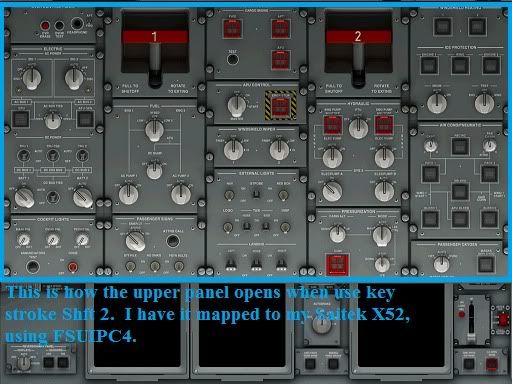
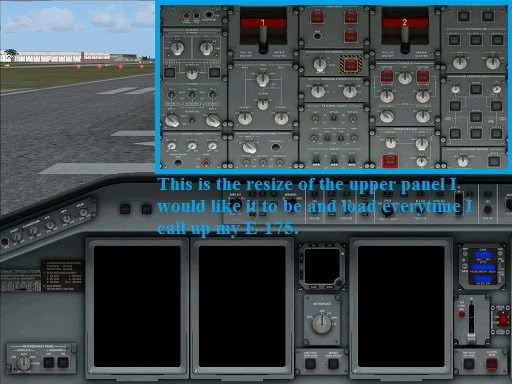
Here is what I want to do. I want to be able to change whatever needs to be changed so that I can have my panel(s) come up in the same place and size ALL THE TIME. I figure it MUST be able to be done since the default size (screen shots) come up NO PROBLEM! :mad: Instead of the way I want them to :D. See below screen shots.

2011-4-11_8-14-40-955.jpg


DEFAULT :mad:

2011-4-11_8-15-33-509.jpg


DESIRED :D


I know that I am not alone on this by anymeans out there. IF THERE IS a fix out there that I don't know about yet I figured you guys would surely be the ones to know about it. If Pete Dowson is stumped, I am figuring it is not easy to do, but is must be do able again as the program somehow resizes screen back to default when I DONT want it to.

EVEN saving flights does not gaurentee that you will have your panels (2D Panels) come up the same way all the time.

Ok! FIRE AWAY! (Thanks folks)!!
 
That's where FS Panel Studio really shines! It allows us to visually size our popup panels to display in very precise size and position on the screen.

The only real fault of FSPS is that it was written for 4:3 ratio monitors. Since the majority of us now use 16:9 or 16:10 ratio monitors, a bit of trial-and-effort is required to "squish" the width enough to display "normally," but...

...it sure beats the heck out of burning out our brains trying to wrap around all the math mentally!!! :rotfl:
 
Thanks so much N4. I will definately look into that.

As I sat for two hours trying to do just that. Mental math to resize et all ad nauseum. :eek:

:o
 
Universal Screen Coordinates

Hi jetblst,
I am not sure if it would help. But I can tell you my observations with additional windows in FSX.
  • the screen position is only stored if you save your startup situation in a FLT file (menu Flights/save...)
  • There is a known bug with Universal Screen Coordinates. The size of a window defaults to a standard size when reloading the flight.
  • You can find the values in the corresponding FLT file under [window.n] ScreenUniCoords.
Regards
Mike
 
Mike, the first step is to set up the panel.cfg with the desired default size and position parameters.

size_mm=456,686 (* Note that this is 4:3 ratio x,y "size" in mm/pixels *)

window_size= 0.280, 0.630
(* Note the width (x) is proportionally less than the size in mm/pix to compensate for the wider screen of 16:9 ratio *)

window_pos= 0.720, 0.360 (* This is the absolute top-left corner of the sub-window in mm/pix *)

Now any changes made in real-time within the sim are saved in the FLT file as you've indicated, but ideally this won't be necessary provided that these three parameters in the panel.cfg file are set up correctly to begin with. :D
 
View window Size and Positions

Hi n4gix,
I probably misunderstood the problem. The situation I described is basically for additional view windows. I believed that panel windows belong to that category. Nevertheless , thank you.
Regards
Mike
 
Back
Top