
• Which the release of FS2020 we see an explosition of activity on the forun and of course we are very happy to see this. But having all questions about FS2020 in one forum becomes a bit messy. So therefore we would like to ask you all to use the following guidelines when posting your questions:

    • Tag FS2020 specific questions with the MSFS2020 tag.
    • Questions about making 3D assets can be posted in the 3D asset design forum. Either post them in the subforum of the modelling tool you use or in the general forum if they are general.
    • Questions about aircraft design can be posted in the Aircraft design forum
    • Questions about airport design can be posted in the FS2020 airport design forum. Once airport development tools have been updated for FS2020 you can post tool speciifc questions in the subforums of those tools as well of course.
    • Questions about terrain design can be posted in the FS2020 terrain design forum.
    • Questions about SimConnect can be posted in the SimConnect forum.

    Any other question that is not specific to an aspect of development or tool can be posted in the General chat forum.

    By following these guidelines we make sure that the forums remain easy to read for everybody and also that the right people can find your post to answer it.

Exclude problem at EKCH

Messages
13
Country
denmark
Hey,

I have some problems with excluding a buildning as well as a couple of taxiway signs in the south-east end at EKCH, so I hope you guys will be able to help me out here.

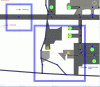
As showen in the picture bellow, I want to exclude the building beside the Red arrow. But the only way for me to make that work, is to make the retangle so big, that it will also exclude the building beside the Blue arrow, and I don't want that to happen.

I am also having problems exculding a couple of Taxiway signs, as shown in the picture.
I have marked the "Exculde All Objects" also tryed marked the "Exculde All Taxiway Signs" without any help.


Hope you have enough data for you to help me out.
Thanks in advance :)
 

Attachments

  • FSX-Planner.gif
    FSX-Planner.gif
    49.8 KB · Views: 716
  • EKCH.xml
    EKCH.xml
    598.2 KB · Views: 533
  • Exclude-building.gif
    Exclude-building.gif
    96.4 KB · Views: 639
Hey,

I have some problems with excluding a buildning as well as a couple of taxiway signs in the south-east end at EKCH, so I hope you guys will be able to help me out here.

As showen in the picture bellow, I want to exclude the building beside the Red arrow. But the only way for me to make that work, is to make the retangle so big, that it will also exclude the building beside the Blue arrow, and I don't want that to happen.

I am also having problems exculding a couple of Taxiway signs, as shown in the picture.
I have marked the "Exculde All Objects" also tryed marked the "Exculde All Taxiway Signs" without any help.


Hope you have enough data for you to help me out.
Thanks in advance :)

To exclude a building you need to find and exclude the reference point. This will be the lat/lon position that you placed the object at (or the object is located at. The exclude can be quite small - 10m or so per side is plenty. From your picture I can't tell where you are at the airport. However FSX has a number of objects that are placed for airport terminal buildings. These sometimes contain multiple builging pieces. It is therefore possible that the two buildings are part of the same object. If that is the case then you will not be able to remove one without the other.

If you can provide me with the coordinates of the building I can probably tell you what type it is and whether you can remove it on its own or not.

This is the area at the south side of the airport that contains such an object. The area looks a bit like the one you show

ekch_1.png


The semi transparent rectangles are autogenerated objects and may well contain several buildings.
 
Last edited:
Hey Jon,


Ok, I understand what you are saying.

The center of the building I want to exclude is located more or less at Latitude: 55.6066554176 Longitude: 12.6542797353.
And the building I don't want to be excluded is just to the right of the building in question Latitude: 55.6063784616Longitude: 12.6567666777

The two taxiway signs are at.. Latitude: 55.6085721616 Longitude: 12.6543524922 and Latitude: 55.6090903240 Longitude: 12.6501751233.


PS. Ohh.. your picture did'nt show up, before I replyed to your post. But if I understand you right and looking at the picture, it means that the two buildings in question are connected together ?

Thank you for your quick help and support :)
 
Last edited:
Jon doesn't have the thumbnails for that object, but it contains two sets of buildings:


You can't exclude one without the other.
 
I didn't see the answers to your question of taxiway signs mentioned above. To delete taxiwway signs you need to delete the main taxiway sign. However, you may not know which sign this is. So it's best to actually delete all the signs and then replace only those that you actually want.
 
Golf-HotelDelta: Ok, nice to know that it is two sets of buildings and thanks for your answer. Now I just need to find the right place for the retangle to be placed, for the building to be excluded.

Btw. What editor is that you and Jon are using ? Looks different from my FSX Planner V28!

rf360m: Ahh.. ok, I see. Thanks for your answer to my Taxiway sign question.
 
Btw. What editor is that you and Jon are using ? Looks different from my FSX Planner V28!

That is because it is another tool. The name is Airport Design Editor. There is a dedicated forum here in the tools section, if you are interested to have a look.
 
Golf-HotelDelta: Ok, nice to know that it is two sets of buildings and thanks for your answer. Now I just need to find the right place for the retangle to be placed, for the building to be excluded.

I think George is saying, and I agree, that there is more than one building in the object. This means you can't exclude one without excluding the other.
 
Thanks all for you answers :) I'll have to see what I can do about thoes two buildings then :confused:

Btw. I have been having a look at that ADE program and it seems to do some things better then FSX-Planner (update through internet works!!, able to see thumbnails of senery objects, more easy to add background images and so on...) but I hope it gets a better feel and look in the furture versions and hopefully being able to manage all the Parking spots and there AI Airlines connected more easyly!
Hope we will see some of all this in next version of FSX-Planner ;)

ups.. off topic :o

Thanks again for your answers.
 
Back
Top