

v1.07 beta has been released.
Please see the WIKI for download instructions and manual
http://www.fsdeveloper.com/wiki/index.php?title=FSX_KML#Downloading_FSX_KML
The FSX KML forum can be found here
http://www.fsdeveloper.com/forum/forumdisplay.php?f=81
=== v1.07 Beta - 25th Apr 2007 ===
New features:-
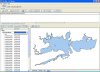
* Added "Shape" tab with support for shape viewing. Select single (or multiple) polygon/polylines to see its shape. Selecting a folder will show all shapes in that folder and any sub folders.
* Added "Select All" function (Ctrl A) to select all polylines/polygons
* Added "New" button to Vertices form to insert vertice.
* Added "Copy" button to Vertices form to copy the selected vertice.
* Added "Delete" button to Vertices form to delete selected vertice.
* Added "Move Up" and "Move Down" button to Vertices form to move selected vertice up or down in list.
* Added Options menu to main form. Moved "Save Backups" to this menu
* Added "Remember Window Position and Size" to the options menu
Issues resolved:-
* Updated the "About" form to credit the 3rd party development libraries used (eg Shapelib)
* Fixed misplaced longitude and latitude labels on vertice grid
Images below show new shape viewer and vertice editing features.
Please see the WIKI for download instructions and manual
http://www.fsdeveloper.com/wiki/index.php?title=FSX_KML#Downloading_FSX_KML
The FSX KML forum can be found here
http://www.fsdeveloper.com/forum/forumdisplay.php?f=81
=== v1.07 Beta - 25th Apr 2007 ===
New features:-
* Added "Shape" tab with support for shape viewing. Select single (or multiple) polygon/polylines to see its shape. Selecting a folder will show all shapes in that folder and any sub folders.
* Added "Select All" function (Ctrl A) to select all polylines/polygons
* Added "New" button to Vertices form to insert vertice.
* Added "Copy" button to Vertices form to copy the selected vertice.
* Added "Delete" button to Vertices form to delete selected vertice.
* Added "Move Up" and "Move Down" button to Vertices form to move selected vertice up or down in list.
* Added Options menu to main form. Moved "Save Backups" to this menu
* Added "Remember Window Position and Size" to the options menu
Issues resolved:-
* Updated the "About" form to credit the 3rd party development libraries used (eg Shapelib)
* Fixed misplaced longitude and latitude labels on vertice grid
Images below show new shape viewer and vertice editing features.
Attachments

Last edited by a moderator:
