

Hey guys! Wanted to share some images of my first completed project, proudly uploaded to flightsim.com a few days ago. Nah, it's not perfect, but I'm VERY happy (and proud) of the results!
It started as a "simple" project to update all the parking spots after a new computer and re-install of FS9. I'm using WOAI this time, and my framerates are MUCH better. The file is "KLASver1.zip" at flightsim.com.
Here are the parking stand stripes:

Here is the original "mess" (stock) in FS9 - notice the poor placement of jetways and ground service veh's that you have to taxi through in order to get anywhere...

Here's a night-shot, after moving/removing the jetways and veh's, as well as showing the new taxi routes that makes AI traffic flow a LOT better:

In FS9, the "D" terminal wasn't completed. Here's a shot of the original:

And here's a shot of my completed version. I know the buildings don't quite match, but since I'm not an object creator/designer, I went with a stock building that was available. I had to enlarge it quite a bit to get the dimensions to work (I used a google earth image as the background to draw the physical size/shape, then stretched the dimensions of the building to fit).

Here's a night-shot of the same terminal ("D"), that shows the optional RWY12 ramp lighting I added. It was these lights that seemed to make the only real impact to framerates (only slightly, on my computer, and still way above "acceptable"). You can see the new buildings are a bit "skewed" with the night textures, due to the resizing. I wish the concourses were separated from the main building so I could have used them instead.

Here are the buildings I added for the cargo area. The buildings simply didn't exist in the stock scenery. They also have the RWY12 ramp lights covering the whole apron.

Here's the "Southwest" (airlines) terminal after the jetways were repositioned and the correct parking assignments were made:

I also played around with the approach editor. I've tried doing it on other projects directly with XML, but it never worked. ADE made it VERY easy (comparatively speaking), so I adjusted all of the ILS approaches to more closely match the real thing, as well as adding some missing approaches.

I won't bore you with other generic images (although I added the airport fire station with a few fire engines parked outside, as well as creating the "Janet" parking specific to C40 aircraft and added an executive jet terminal at the NW part of the airport.
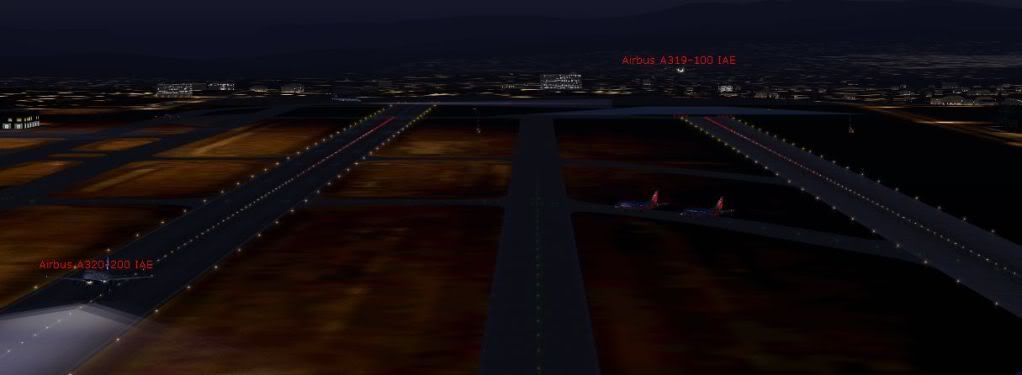
But, the last shot is of the dual-runways in use (25L and 25R), showing much less traffic congestion, although there is still an occasional wait to cross an active runway (as in real life!), and I have activated crosswind runways, so lots of activity! (It made better traffic flow to have 25R open for takeoffs and only use 25L for landings).
It started as a "simple" project to update all the parking spots after a new computer and re-install of FS9. I'm using WOAI this time, and my framerates are MUCH better. The file is "KLASver1.zip" at flightsim.com.
Here are the parking stand stripes:
Here is the original "mess" (stock) in FS9 - notice the poor placement of jetways and ground service veh's that you have to taxi through in order to get anywhere...
Here's a night-shot, after moving/removing the jetways and veh's, as well as showing the new taxi routes that makes AI traffic flow a LOT better:
In FS9, the "D" terminal wasn't completed. Here's a shot of the original:
And here's a shot of my completed version. I know the buildings don't quite match, but since I'm not an object creator/designer, I went with a stock building that was available. I had to enlarge it quite a bit to get the dimensions to work (I used a google earth image as the background to draw the physical size/shape, then stretched the dimensions of the building to fit).
Here's a night-shot of the same terminal ("D"), that shows the optional RWY12 ramp lighting I added. It was these lights that seemed to make the only real impact to framerates (only slightly, on my computer, and still way above "acceptable"). You can see the new buildings are a bit "skewed" with the night textures, due to the resizing. I wish the concourses were separated from the main building so I could have used them instead.
Here are the buildings I added for the cargo area. The buildings simply didn't exist in the stock scenery. They also have the RWY12 ramp lights covering the whole apron.
Here's the "Southwest" (airlines) terminal after the jetways were repositioned and the correct parking assignments were made:
I also played around with the approach editor. I've tried doing it on other projects directly with XML, but it never worked. ADE made it VERY easy (comparatively speaking), so I adjusted all of the ILS approaches to more closely match the real thing, as well as adding some missing approaches.
I won't bore you with other generic images (although I added the airport fire station with a few fire engines parked outside, as well as creating the "Janet" parking specific to C40 aircraft and added an executive jet terminal at the NW part of the airport.
But, the last shot is of the dual-runways in use (25L and 25R), showing much less traffic congestion, although there is still an occasional wait to cross an active runway (as in real life!), and I have activated crosswind runways, so lots of activity! (It made better traffic flow to have 25R open for takeoffs and only use 25L for landings).
