• Which the release of FS2020 we see an explosition of activity on the forun and of course we are very happy to see this. But having all questions about FS2020 in one forum becomes a bit messy. So therefore we would like to ask you all to use the following guidelines when posting your questions:

    • Tag FS2020 specific questions with the MSFS2020 tag.
    • Questions about making 3D assets can be posted in the 3D asset design forum. Either post them in the subforum of the modelling tool you use or in the general forum if they are general.
    • Questions about aircraft design can be posted in the Aircraft design forum
    • Questions about airport design can be posted in the FS2020 airport design forum. Once airport development tools have been updated for FS2020 you can post tool speciifc questions in the subforums of those tools as well of course.
    • Questions about terrain design can be posted in the FS2020 terrain design forum.
    • Questions about SimConnect can be posted in the SimConnect forum.

    Any other question that is not specific to an aspect of development or tool can be posted in the General chat forum.

    By following these guidelines we make sure that the forums remain easy to read for everybody and also that the right people can find your post to answer it.

Loss of Detail

Messages
26
Have been trying to design vehicles in skethcup and on converting them to dae files and reloading into ModelconverterX a lot of the edges on my models that respresent doors, panelling have disappeared and all i can see is a very basic vehicle. Have tried saving edges when converting under options on skethcup but havent had any luck. Any advice on what im doing wrong is appreciated. Tom
 
It's weird, I think I haven't had problems exporting those model, look at the export option before if something is missed.
 
If you mean the "lines" that Sketchup displays between polygons (for example), these will not be displayed in FS. I don't believe that edges can be visible in FS?
 
I am able to use complex curvature in my models that successfully show in MCX.
can you copy your logfile from the mcx import?
I think it may be more of a dae export problem than an mcx read problem.
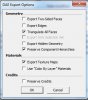
I use the following settings when exporting (see img)

You may want to try the export 2sided.

Take a couple before xport and after import to mcx screen shots and put here so we can see what you are talking about. Explaining how a jet engine looks is easy with a picture.
 

Attachments

  • skp.jpg
    skp.jpg
    33.1 KB · Views: 448
Last edited:
Back
Top