• Which the release of FS2020 we see an explosition of activity on the forun and of course we are very happy to see this. But having all questions about FS2020 in one forum becomes a bit messy. So therefore we would like to ask you all to use the following guidelines when posting your questions:

    • Tag FS2020 specific questions with the MSFS2020 tag.
    • Questions about making 3D assets can be posted in the 3D asset design forum. Either post them in the subforum of the modelling tool you use or in the general forum if they are general.
    • Questions about aircraft design can be posted in the Aircraft design forum
    • Questions about airport design can be posted in the FS2020 airport design forum. Once airport development tools have been updated for FS2020 you can post tool speciifc questions in the subforums of those tools as well of course.
    • Questions about terrain design can be posted in the FS2020 terrain design forum.
    • Questions about SimConnect can be posted in the SimConnect forum.

    Any other question that is not specific to an aspect of development or tool can be posted in the General chat forum.

    By following these guidelines we make sure that the forums remain easy to read for everybody and also that the right people can find your post to answer it.

Matching satellite images with FSX

Messages
8
Country
costarica
Hi guys I just started using Sbuilder but I'm having a lot of trouble matching the little piece of scenery I made to FSX.

It looks on FSX like its almost 45-60 degrees off of what it should be.

Also when I tried to make another part of the city, the airport is not in the same spot in FSX than real life so the airplane actually sits on top of a house in a neighborhood.

How do I get around fixing this? Can you point me in the right direction?

Here are some pics to illustrate the problem I'm having.

This is how it should look (My base image):
L17X69375X69390Y123804Y123823.jpg


This is how it looks! (Not only geographically incorrect (bad angle) but crappy resolution compared to the base image).

sceneryproblem.jpg


I'm far from understanding the full potential of sbuilderx but I have seen people do scenery on youtube easily without having to modify the terrain just using the masks.

Maybe there is a way that I can use the FS map as reference on sbuilder and that can help?

Any ideas?

Thanks.
 
Last edited:
From your screenshots I cannot tell if it is as far off as you say, I can only take your word for it. Best if you would have posted a top-down screenshot capture in FSX to compare against your raw image. But no matter. Couple of things come to mind:

Issue 1 - Bad geographic location of your scenery.

As you have discovered having a good reference point is key to lining up your scenery correctly. I use a runway as a reference point usually but I see no airport in your scenery so you will need to pick an easily identifiable object as a reference. Like a corner of one of those large, white buildings by the ships that are docked.

You can have SBuilderX show where your aircraft is in FSX so I would take the default Cessna and move it to the corner of one of those buildings. Then, 'Show Aircraft' in SBuilderX to see if indeed is at the same location. (to have this work you must have both programs running). If it is off as much as you say I would do another capture and try again or else you will have to manually coordinate your image which is also possible in SBuilderX.

Issue 2 - Bad resolution

You may need to zoom in more to capture the area in a better resolution. This may require more captures that you will need to "stitch" together to cover the same amount of area. It also may be there is just no higher resolution you can capture for that area. Try capturing at different zoom levels, going further down until you get some sort of error message saying it cannot capture an image.

Hope this gives you a few ideas.

Clutch
 
First of all thanks a lot for the reply, I apologize if the images are too big.

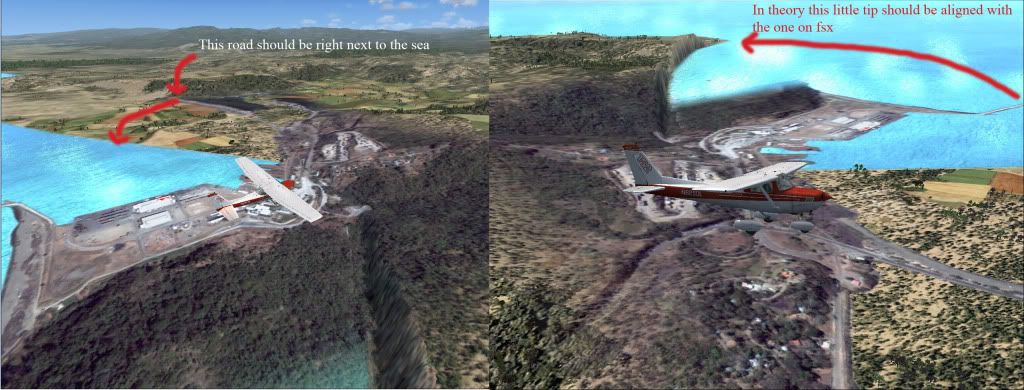
Here is a set of pictures of the problems I'm having with 2 areas I'm trying to build for FSX both are very close to one another Puntarenas to the north and Caldera to the south.

First of all here is the pictures for Caldera what was originally being discussed and the picture (top down) view for this section.

Side view with explanations:
sceneryproblemcopy.jpg


TOP-DOWN FSX/REAL:
calderacompare.jpg


Puntarenas area notice how the aircraft is not aligned with the runway
sbuildcompposcopy.jpg


Puntarenas area extremely different geographically, will it be a huge endeavor repairing this?
puntarenascompare.jpg


Thanks!

Konrad.
 
Ah, much clearer now on the issue. So there is a little airport there. I suspect the airport is off in FSX and is correct in SBuilderX's image. If so, then you need to move the entire airport to it's proper lat/lon.

I believe it is possible to do this using the free program Airport Design Editor (ADE), an excellent program. Huge endeavor? Probably is this is your first time as it will probably take you longer to learn ADE and move the airport than to actually move the airport itself, ha! But if you were able to create scenery using SBX then you should be able to pick it up pretty fast. Plus you'll probably want to add detail to the airport where ADE can help with that as well.

Ok, I just did a quick read-up in the ADE manual (a well written manual), and they have a feature called... Move Airport, just what you want BUT this is only available in the pro version. But it is only $10 USD so it's a bargain. They also have a 15 day free trial so you could try that first.

Their website is:

http://www.airportdesigneditor.co.uk/index.html

and they have a great support forum right here as FS Developer.

Otherwise you will have to move and align everything manually. Just depends if you have more time or more money to do your project. Also looks like you will have to correct/adjust the shorelines to match up with the photoscenery.

Hope that helps,

Clutch
 
Thanks a lot for the reply! I will definitively try that tool.

The shorelines are a big concern as they seem to be really off.

Is there a way I can overlay the FSX image combined with the satellite one so I can see where I should create land and were to create water?

I guess I can do all of this with sbuilder but will require some more research.

Can you give me any tips on manually calibrating scenery?

If I ever finish these I will post in avsim, flightsim.com for anyone interested in flying in Costa Rica!

Thanks tons.

Konrad.
 
I want to mention that there is a package for Costa Rica airports here;

http://www.flightsim.com/file.php?cm=SEARCH1&fname=costarica_toda__fsx_v2_0.zip

I don't mention that to discourage you, but to say take a look at it, as it might make your work easier? Maybe not?

What you have to realize is that for a lot of the world the data that Micorsoft had to work with is/was very "primitive". Or if there was better commercial data available, it didn't fit into MS' budget. So coastlines are lucky if they are realistic, along with a lot of other types of data. Try bringing in accurate data and it exposes the flaws or errors in the default scenery. Notice in one of your pictures how you have a shear cliff that runs down to the ocean? That's usually because the ocean's polygon ( set at 0 feet) clips the mesh data into a vertical slope. If that water polygon was redone accurately, you would probably find the sheer cliff now continues out to the right another 100, 200 feet.

I've not had a problem with SBuilderX and correct placement of data, be it photo source or other GIS data. The data could be wrong, but that's not an issue with SBX.
 
Thanks I did used that package for Costa Rica but wasn't as realistic as I was aiming for basically just some hangars and such added with object placement tool.

The thing I wanted to do the most is correct landclasses and do photoreal scenery as there a more cities and towns in the real life than wahat fs shows.

For example the whole central valle y is a big city and fsx only shows fields and small towns, for VFR flying the towns and landmarks I want to add are a must.

Guess I will need to become an sbuilderx guru!
 
Hi,

Before you start moving airports around, I would first double (or triple) check that you placed the photo accurately. In most cases the problem is that the data has been placed wrong, while the airport is actually right.

I don't know where you got your imagery from. But to work in FSX it is easiest to have the data in WGS84 projection. If it is not, you might get offsets.
 
In most cases the problem is that the data has been placed wrong, while the airport is actually right.

They usually (but not always) get the runways correct, but the taxiways and aprons are a bit imaginitive ;)

Here are two from Hawaii, Hilo isn't bad, but at Honokaa, the runway is way off.


Edit. Paauilo is even worse :stirthepo
 
Last edited:
For the imagery I used the google satellite with the latest dll.

Good idea to check on the actual coordinates for the airport anyway I will have to create new land and new water around this zones in order to get them to look correctly.
 
Hi George,

Yes, you are right. The runways are usually correct, so it's those that you should check. For most airports with paved runways they are positioned very well in FSX. Airports with grass runways are not always so accurate.

The taxiways are also not accurate, but that is not weird if you keep in mind that MS did draw these manually based on the charts of the airports.
 
Back
Top