
-
Which the release of FS2020 we see an explosition of activity on the forun and of course we are very happy to see this. But having all questions about FS2020 in one forum becomes a bit messy. So therefore we would like to ask you all to use the following guidelines when posting your questions:
- Tag FS2020 specific questions with the MSFS2020 tag.
- Questions about making 3D assets can be posted in the 3D asset design forum. Either post them in the subforum of the modelling tool you use or in the general forum if they are general.
- Questions about aircraft design can be posted in the Aircraft design forum
- Questions about airport design can be posted in the FS2020 airport design forum. Once airport development tools have been updated for FS2020 you can post tool speciifc questions in the subforums of those tools as well of course.
- Questions about terrain design can be posted in the FS2020 terrain design forum.
- Questions about SimConnect can be posted in the SimConnect forum.
Any other question that is not specific to an aspect of development or tool can be posted in the General chat forum.
By following these guidelines we make sure that the forums remain easy to read for everybody and also that the right people can find your post to answer it.
You are using an out of date browser. It may not display this or other websites correctly.
You should upgrade or use an alternative browser.
You should upgrade or use an alternative browser.
FSX My tunnel jumping up
- Thread starter F70
- Start date

Set the elevation of your tunnels absolutely(i.e., ASL), not AGL.
As the user aircraft gets further away from a flattened area, it averages adjacent poly elevations and displays larger polys. In your case, you have a few points belop ground but others at ground level. The average is half-way between, and the ground level rises. Unless you specify elevation AASL, so will your tunnels.
Don
As the user aircraft gets further away from a flattened area, it averages adjacent poly elevations and displays larger polys. In your case, you have a few points belop ground but others at ground level. The average is half-way between, and the ground level rises. Unless you specify elevation AASL, so will your tunnels.
Don

- Messages
- 337
- Country

Sometime is it easy if you know it.
It happened only inside the flatten of the airport,the tunnels outside the flatten don't move.
Outside jumping to so i switch of AGL for the tunnels.
So i have un-tick the AGL and set it in my situation to 0.2 M and the tunnels don't jump anymore.
Thanks Don for the help,Jan
Outside jumping to so i switch of AGL for the tunnels.
So i have un-tick the AGL and set it in my situation to 0.2 M and the tunnels don't jump anymore.
Thanks Don for the help,Jan
Last edited:
- Messages
- 337
- Country
Martin,
The taxiway is a normal taxiway for my airplane or AI airplanes.
I have made a small drawing as example.
If you have a airport with a flatten made by your self,then you can make a hole with the dimensions you want.
In my example the red color is the flatten 5,2 M
The green trapeziums are the walls with a slope,edit the individual points the corner on the red side need 5,2 M,the corner on the blue side is 0.2 M
And the bottom ,the blue rectangle is 0.2 M.
This is how it's works by me,if someone have a better workaround tell it.
Jan
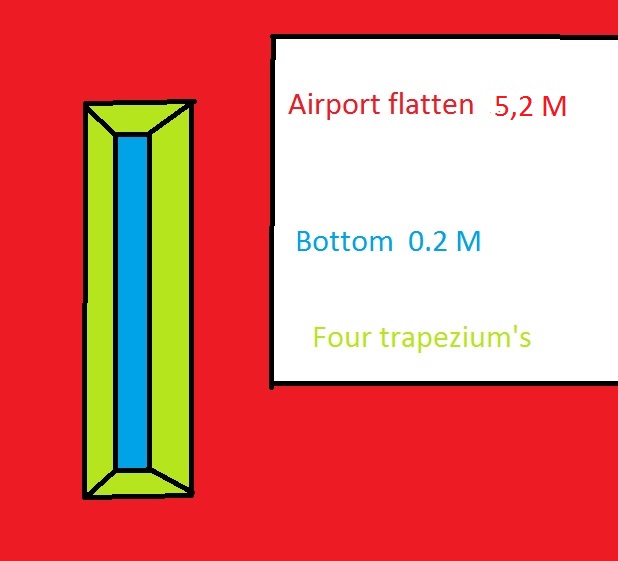
The taxiway is a normal taxiway for my airplane or AI airplanes.
I have made a small drawing as example.
If you have a airport with a flatten made by your self,then you can make a hole with the dimensions you want.
In my example the red color is the flatten 5,2 M
The green trapeziums are the walls with a slope,edit the individual points the corner on the red side need 5,2 M,the corner on the blue side is 0.2 M
And the bottom ,the blue rectangle is 0.2 M.
This is how it's works by me,if someone have a better workaround tell it.
Jan

- Messages
- 183
- Country

Jan,
I have tried your 'hole in the flatten' method, but I can't seem to make it work. I used airport background flatten mask class map for everything as shown in the example; airport flatten, bottom and sides with sloping sides.
Any idea what I am doing wrong?
Thanks,
Alan
I have tried your 'hole in the flatten' method, but I can't seem to make it work. I used airport background flatten mask class map for everything as shown in the example; airport flatten, bottom and sides with sloping sides.
Any idea what I am doing wrong?
Thanks,
Alan
- Messages
- 337
- Country
Alan,
I will try to explain step by step, my language is not English, so
Usually when I start with an airport i remove the flatten,Terrain Polygon > Exclude General > Airport Background,done by a small square.
Is it a third part airport i also remove the XXX_CVX.bgl ,start FSX and look what happened.
Then i draw a Flatten or a other Flatten Exclude this or that,it's what you need.
If you have the Flatten then you can make a hole in it,cut out a rectangle in the red from the picture above.
Have you the hole,rectangle or square it's what you need,then can you draw the rectangle the blue one,set this for example 5 M lower as the Flatten.
If this is done draw the trapeziums and set the Set Individual Points,the points ,vertex,by the red side they stay what are and by the blue side they are 5 M lower.
For clarity, draw the green and blue but not on top of the flatten but inside the Flatten.
I hope you can read this,and good luck,Jan
I will try to explain step by step, my language is not English, so
Usually when I start with an airport i remove the flatten,Terrain Polygon > Exclude General > Airport Background,done by a small square.
Is it a third part airport i also remove the XXX_CVX.bgl ,start FSX and look what happened.
Then i draw a Flatten or a other Flatten Exclude this or that,it's what you need.
If you have the Flatten then you can make a hole in it,cut out a rectangle in the red from the picture above.
Have you the hole,rectangle or square it's what you need,then can you draw the rectangle the blue one,set this for example 5 M lower as the Flatten.
If this is done draw the trapeziums and set the Set Individual Points,the points ,vertex,by the red side they stay what are and by the blue side they are 5 M lower.
For clarity, draw the green and blue but not on top of the flatten but inside the Flatten.
I hope you can read this,and good luck,Jan

- Messages
- 337
- Country
Hi,
And it would work even better if you would use triangles instead of trapeziums.
Roby,
Yes I knew but I try it this way, I was a going a little mad that small triangles.
Jan

For some considerations regarding creation of sloped terrain flattens using "triangles" for potentially better FS run time:
* accuracy of terrain 'shape'
* scenery rendering performance
...as well as FS requirements for display of such detailed terrain scenery content with the precision which may have been intended by the author / developer, you may wish to review:
http://www.fsdeveloper.com/forum/threads/flattens.425495/page-2
Hope this helps !
GaryGB
* accuracy of terrain 'shape'
* scenery rendering performance
...as well as FS requirements for display of such detailed terrain scenery content with the precision which may have been intended by the author / developer, you may wish to review:
http://www.fsdeveloper.com/forum/threads/flattens.425495/page-2
Hope this helps !
GaryGB
Last edited:

connomar
Resource contributor
- Messages
- 266
- Country

Thanks Jan,Martin,
The taxiway is a normal taxiway for my airplane or AI airplanes.
I have made a small drawing as example.
If you have a airport with a flatten made by your self,then you can make a hole with the dimensions you want.
In my example the red color is the flatten 5,2 M
The green trapeziums are the walls with a slope,edit the individual points the corner on the red side need 5,2 M,the corner on the blue side is 0.2 M
And the bottom ,the blue rectangle is 0.2 M.
This is how it's works by me,if someone have a better workaround tell it.
Jan
View attachment 20917
I will have to play for some time, but the idea of punching a hole in your own flatten hadn't occurred to me.
Thanks for you help.
- Messages
- 183
- Country
Alan,
If you have the Flatten then you can make a hole in it,cut out a rectangle in the red from the picture above.
Thanks Jan,
Now if I can figure out how to cut the hole in my flatten
 .
.Alan