
• Which the release of FS2020 we see an explosition of activity on the forun and of course we are very happy to see this. But having all questions about FS2020 in one forum becomes a bit messy. So therefore we would like to ask you all to use the following guidelines when posting your questions:

    • Tag FS2020 specific questions with the MSFS2020 tag.
    • Questions about making 3D assets can be posted in the 3D asset design forum. Either post them in the subforum of the modelling tool you use or in the general forum if they are general.
    • Questions about aircraft design can be posted in the Aircraft design forum
    • Questions about airport design can be posted in the FS2020 airport design forum. Once airport development tools have been updated for FS2020 you can post tool speciifc questions in the subforums of those tools as well of course.
    • Questions about terrain design can be posted in the FS2020 terrain design forum.
    • Questions about SimConnect can be posted in the SimConnect forum.

    Any other question that is not specific to an aspect of development or tool can be posted in the General chat forum.

    By following these guidelines we make sure that the forums remain easy to read for everybody and also that the right people can find your post to answer it.

Prepar3d V 3.2 in GPU melt mode -

Messages
11
Country
unitedkingdom
Hi,

**NOTE - SINCE POSTING I NOTICED THIS HAPPENS EVEN ON DEFAULT GRAPHICS> OTHER AREAS RUN AT THESE GRAPHICS WITHOUT PROBEMS - THE PROBLEM TURNED OUT TO BE AN ISSUE WITH A 3rd PART MESH THAT THE DEVELOPER ADMITTED TO IN HIS DEVELOPMENT NOTES- thanks for the interest and help**

I am not sure if there is anything wrong exactly, its more that I want to understand Graphic generation a bit better. Please see Photo attached:
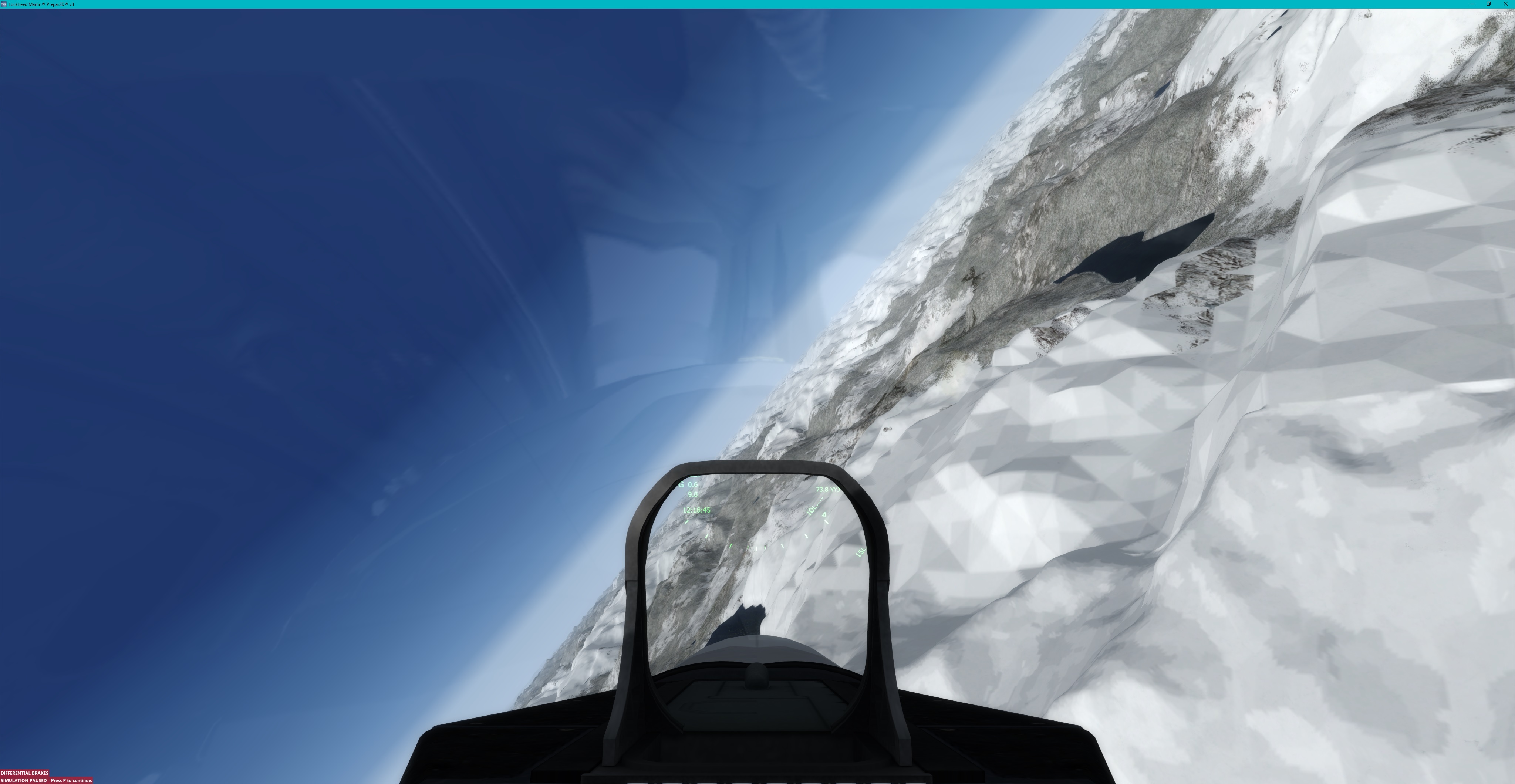
P3D Canada.jpg
I am flying over Canada in a stock F-22. I put all the graphics settings onto max to see what happens.

The issue is, the colour palette in snow has kind of gone to a 256 colour format. The tessellation is very crude. However in the distance and out of the snow, its generally excellent. Is it that I have simply overdone it or are my settings wrong? The sim runs faultlessly.

System .. I7 CPU, 16MB memory, GTX 760 2MB Graphics Card. 4K monitor. 30 fps.
Software: Windows 10 and Prepar3d V302
All graphics settings to max. This includes Image and Texture Quality, Mesh, the lot really.
Airport: CBB7 and snow capped area to the north.
 
Last edited:
You can not run graphics at max settings with that hardware and you see the consequence.
 
You can not run graphics at max settings with that hardware and you see the consequence.
I beg to differ, I am afraid I can and DO run it like that without consequence. the only other thing I noticed is a free copy of Dubai slowed its frame rate. I am investigating further.
 
You can not run graphics at max settings with that hardware and you see the consequence.

ISSUE PARTIALLY SOLVED -
I am happy to say the issue is mostly resolved. I removed Freemesh and the issue went away totally. However its a lower resolution mesh, so in general I will keep the mesh that I downloaded for north America. The clash between lower and higher resolution areas caused a patching effect, kindly supplied to me on the Lockheed Martin Forum. thanks to that guy.

the issue with the 256 color bitmap "effect" in the snow seems to have remained. Even at default level.
 
Last edited:
The simulator is designed so something like a Cray can run on max settings, all others must throttle. But go ahead and knock yourself out. This from the DubaiX page:
NOTE: BEWARE THIS SCENERY IS HIGHLY DETAILED AND CAN MOVE DOWN YOUR FPS
To raise it : two ways :
- reduce AI traffic
- reduce detailed level
 
The simulator is designed so something like a Cray can run on max settings, all others must throttle. But go ahead and knock yourself out. This from the DubaiX page:

Thanks for the info on Dubai, that confirms the only problem I had. I just spent all morning trying different settings. The 256 color bitmap issue remains even on low settings. I can confirm that I am not getting any issues with graphics on Max and a 4K TV set as a monitor. So I am not knocking myself out.

I think what this shows is that Prepar3d 3.2 has probably come on a long way in terms of GPU usage. Probably a lot of work under the hood been done to improve efficiency.. Having said that, the GTX 760 is one hell of a graphics card and can run 4K at 30fps smoothly, so that help a lot too. Possibly the option to transfer processing onto the GPU also helps since the GPU has better processors than the CPU (that's why bitcoin miners use the GPU).


Optimal seems 3804p rather than the full 4K - possibly because the TV set actually runs at that in reality even though marketed as 4K.
 
the GPU has better processors than the CPU (that's why bitcoin miners use the GPU).
Where do you get this stuff? If a "Graphics Processing Unit" had better "processors" than a "Central Processing Unit," everybody would be Facebooking and emailing with video cards.

You can enhance your bitcoin hash rate by adding graphics hardware to your desktop computer. Graphics cards feature graphical processing units (GPUs). These are designed for heavy mathematical lifting so they can calculate all the complex polygons needed in high-end video games. This makes them particularly good at the SHA hashing mathematics necessary to solve transaction blocks.
The operative terms being "bitcoin hash rate" and "SHA hashing."
One of the nice things about GPUs is that they also leave your options open. Unlike other options discussed later, these units can be used with cryptocurrencies other than bitcoin. Litecoin, for example, uses a different proof of work algorithm to bitcoin, called Scrypt. This has been optimized to be friendly to CPUs and GPUs, making them a good option for GPU miners who want to switch between different currencies.
Apparently there is another school of thought. Definitively:
GPU mining is largely dead these days. Bitcoin mining difficulty has accelerated so much with the release of ASIC mining power that graphics cards can't compete. If you do want to use them, you'd best equip yourself with a motherboard that can take multiple boards, to save on running separate PSUs for different boards.

www.coindesk.com

I think what this shows is that people have opinions and even find evidence to support them.
 
Where do you get this stuff?

15 years as a Visual C++ windows programmer perhaps.

If a "Graphics Processing Unit" had better "processors" than a "Central Processing Unit," everybody would be Facebooking and emailing with video cards.

"Better" is a quote mine (excuse the pun). A GPU is better at GRAPHIC tasks and certain mathematical calculations. (Go figure!). That's why bitcoin mining went through a phase of GPU processors being used for heavy calcs work, before specific hardware was developed.

Possibly, LM shifted graphic intensive tasks from the CPU over to the GPU. I can't prove it, but that's what I would have done to get over the limitations of 32 bit compilers.

I think what this shows is that people have opinions and even find evidence to support them.

Really? I have the evidence of the system running smoothly at this rate on the hardware quoted. In your opinion it does not run on that hardware and you have no evidence to the contrary.
 
Last edited:
Hello Mike, welcome to FSDeveloper,

We may all run the same FS programs, but our computers and what's inside them are all over the spectrum, so discussions of hardware often become like discussions of politics and religion. Try not to get in those types of discussions if possible, and approach subjects from a wider viewpoint which will apply to the most members.

Having ruffled my fair share of feathers over the years, I can tell you that keeping your focus on the discussion will probably be the best way to go, it is not the arguments being won or lost that are important, it is the lasting record of the problems and possible solutions being discussed which often add up to suggestions to others who will find the thread later, and thereby find the impetus to solve their own similar problems.

Be advised, this is a highly opinionated forum, and while your opinion is welcome, you have to ease your way into the flow, and depending on the topics discussed, it can sometimes take a few attempts to gain credibility. You will likely do well to remember that calm discussions gauged not only on finding solutions to your problems, but also on providing detailed solutions for others down the road, are better than discussions which give readers the feeling that you may be taking comments as personal criticism, rather than acknowledging the give and take of troubleshooting.

At any rate, if someone in your opinion is being disagreeable, let that be their problem, thank them for their views and then stick with discussing the problems and finding the solutions, and if someone else can help at some point, they usually will. If you can't respond to comments without taking exception, just ignore the comments, and continue to document the process of solving your issues for the sake of future readers.

Cheers
Gman
(edited for no longer pertinent content)
 
Last edited:
If this issue is a function of distance (the missing textures are always in the foreground), I'm almost certain it's from a lack of video memory. Textures are mip-mapped (different versions exist of the same ground textures, such as high resolution, mid-resolution, and low resolution for showing at close, mid-range and far positions respectively) and if video memory runs out, it makes more sense to simply discard the memory-hogging high resolution textures and see this artifact rather than blank out the other 80% of the terrain, or plummeting the framerate by fetching textures from main memory every frame.

Try a card with more than 2GB video RAM and I bet the problem will go away.
 
Hi - thanks for the reply, but please see the note I added at the top. The problem exists even in fast default graphics well within the capability of the Card. It turned out actually that there is an issue with the mesh in that area as newer and older meshes intersect. Nothing can be done (except remove the 3rd party mesh) as this is still a very remote part of the Globe even though its the Pacific NW. However the colour palette problem did not go away either, I suspect its an issue with a 256K colour bitmap being used because someone wanted to save memory with P3D only being 32 bit. The 32bit compilers used to make these apps are restricted by the target OS in the amount of Pool and Stack memory they can access per variable and for the program as a whole. As a result, savings have to be made, little shavings here and there and I guess this was one of them. Its only a theory, but I am sure its not a Hardware Issue.
 
Last edited:
Its only a theory, but I am sure its not a Hardware Issue.
kabekew seems very informed. Why don't you put your hardware where your confidence is and ask him, or someone else, to reproduce the condition with his own system. I'm sure the feedback would be much more useful for definitive answers than roaming around the Alps looking for more instances of when P3D fails.
Really? I have the evidence of the system running smoothly at this rate on the hardware quoted. In your opinion it does not run on that hardware and you have no evidence to the contrary.
I don't need evidence to supply the advice you requested posting here and I don't expect it will go over so well with kabekew if you start telling him what his opinion is as well.
 
kabekew seems very informed. Why don't you put your hardware where your confidence is and ask him, or someone else, to reproduce the condition with his own system. I'm sure the feedback would be much more useful for definitive answers than roaming around the Alps looking for more instances of when P3D fails.
I don't need evidence to supply the advice you requested posting here and I don't expect it will go over so well with kabekew if you start telling him what his opinion is as well.

Can I respectfully point out that I only asked for "evidence" because you were telling me that what I was seeing was wrong (or that I was lying) despite the fact I had evidence to back it up. I also ran some tests and changed some things and the problems went away. i.e. it was a 3rd party mesh problem. I therefore supplied a definitive answer but you did not seem to see this answer.

Now you are asking me to ask Kebekew to reproduce the problem, which would involve him installing my mesh (which caused the problem) even though I uninstalled that mesh to remove said problem. I, again, respectfully do not think that you liked the fact that I solved it myself or that I disagreed with your incorrect diagnosis and told you that although I was grateful for your input, I had to tell you that you were on the wrong tack.

In retrospect I should have really ignored your misleading "advice", which would have been the mature thing to do, and for that I completely apologise.
 
Sometimes things are just opinions, Mike, with no personal agenda involved; but I agree how advice can seem misleading and accept your apology.
 
Back
Top