• Which the release of FS2020 we see an explosition of activity on the forun and of course we are very happy to see this. But having all questions about FS2020 in one forum becomes a bit messy. So therefore we would like to ask you all to use the following guidelines when posting your questions:

    • Tag FS2020 specific questions with the MSFS2020 tag.
    • Questions about making 3D assets can be posted in the 3D asset design forum. Either post them in the subforum of the modelling tool you use or in the general forum if they are general.
    • Questions about aircraft design can be posted in the Aircraft design forum
    • Questions about airport design can be posted in the FS2020 airport design forum. Once airport development tools have been updated for FS2020 you can post tool speciifc questions in the subforums of those tools as well of course.
    • Questions about terrain design can be posted in the FS2020 terrain design forum.
    • Questions about SimConnect can be posted in the SimConnect forum.

    Any other question that is not specific to an aspect of development or tool can be posted in the General chat forum.

    By following these guidelines we make sure that the forums remain easy to read for everybody and also that the right people can find your post to answer it.

FS2004 SBuilder and Photoreal textures

Messages
217
Country
venezuela
Hello, I used Sbuilder (FS9 version) to make a photoreal scenery, but I got this

SVZ009.jpg


I don't know why the black borders are visible, because I activated the Alpha option in SBuilder and make the alpha channel in Photoshop for all the 61 256x256 bmp files generated by Sbuilder

What I'm doing wrong??? :confused:

BTW: the bmp files are in format DXT1 with mipmaps
 
Honestly I know nothing at all about SBuilder, but I have checked your bitmaps and see nothing at all wrong with them.

They are indeed in the correct DXT1 w/Alpha 16bit format...
 
A very rare thing happened to me today, or it's normal???

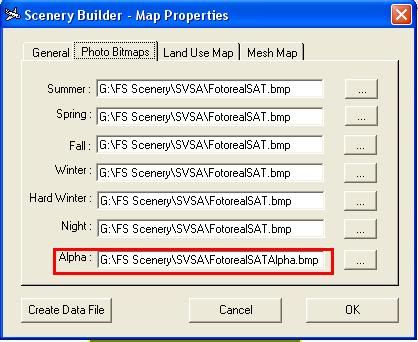
Well, I was trying to do the photoreal scenery again in SBuilder, I used the satelital image (original size: 23,7MB 1716x3633, 32bit with the Alpha channel included) I used the same photo properties (checked the Alpha map option) and when I checked all textures with the Imagetool I realised there's not alpha channel in the 256x256 textures :confused: I don't understand because I thought if the satelital image have the alpha channel, the 256x256 textures should have the alpha channel too, right????

Juan
 
JCRL, did you create the alpha layer on your own or did SBuilder do this?
What kind of BMP did you use for the summer and alpha texture? 32bit with or without alpha?

Did you use the VTP option on compiling or the highres photo option?

I seem to be stuck at the same point as you were before.
 
Hi Horst18519

JCRL, did you create the alpha layer on your own or did SBuilder do this?

I created the Alpha layer using Photoshop 7

What kind of BMP did you use for the summer and alpha texture? 32bit with or without alpha?

Alpha BMP 8bit
Summer BMP 24bit
Night BMP 24bit

Did you use the VTP option on compiling or the highres photo option?

I seem to be stuck at the same point as you were before.

I used the VTP photo scenery option
 
Alpha BMP 8bit
Summer BMP 24bit
Night BMP 24bit
Next time I'll try it with those bitmap settings, but for now I'm through with this, I'll just use the 2002 ground polys.

Thanks anyway!
 
Back
Top