
• Which the release of FS2020 we see an explosition of activity on the forun and of course we are very happy to see this. But having all questions about FS2020 in one forum becomes a bit messy. So therefore we would like to ask you all to use the following guidelines when posting your questions:

    • Tag FS2020 specific questions with the MSFS2020 tag.
    • Questions about making 3D assets can be posted in the 3D asset design forum. Either post them in the subforum of the modelling tool you use or in the general forum if they are general.
    • Questions about aircraft design can be posted in the Aircraft design forum
    • Questions about airport design can be posted in the FS2020 airport design forum. Once airport development tools have been updated for FS2020 you can post tool speciifc questions in the subforums of those tools as well of course.
    • Questions about terrain design can be posted in the FS2020 terrain design forum.
    • Questions about SimConnect can be posted in the SimConnect forum.

    Any other question that is not specific to an aspect of development or tool can be posted in the General chat forum.

    By following these guidelines we make sure that the forums remain easy to read for everybody and also that the right people can find your post to answer it.

FSXA Scenery Library

Messages
383
Country
unitedkingdom
Hi

just wondering if anyone can shed any light on this issue

I seem to have lost all the paths to each scenery folder? If I click Edit it just shows MY Documents for every entry.

Default FSX entries in the scenery.cfg file are there but all my additions have gone, however all scenery (default & my custom scenery) still loads & shows ok in FSX.
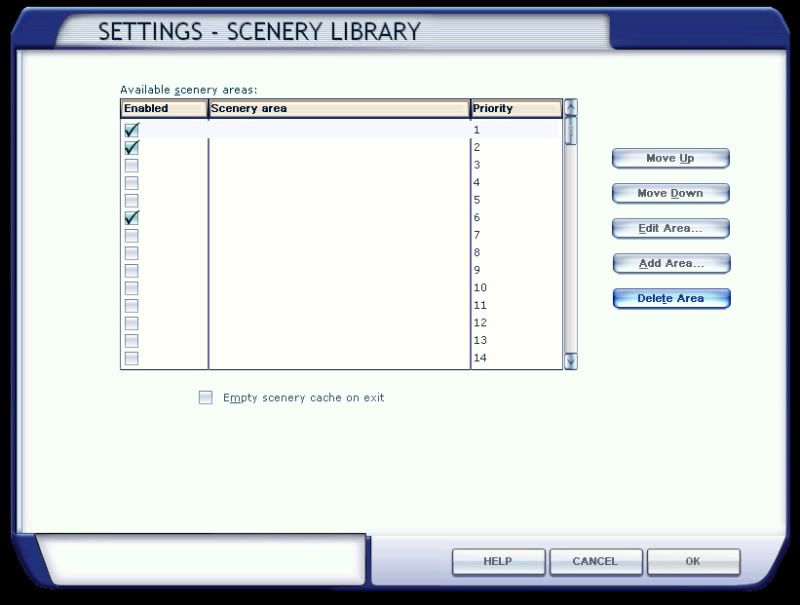
Untitled-1-1.jpg


Any thoughts anyone?

Stevo ;)
 
I do not know what is wrong either but I'd start with
'Add area' instead of 'editing area' and then browse to your addon scenery and add all sceneries again.
 
I do not know what is wrong either but I'd start with
'Add area' instead of 'editing area' and then browse to your addon scenery and add all sceneries again.

I don't think add area would work, they are already present (if invisible).

Have you looked at your scenery.cfg?

I would suggest a repair, either from the Acceleration disk (if installed) or from the FSX disk.
 
Hi

Thanks for the suggestion. I tried repairing Accel but it didn't work however I have fixed it.

The main main main scenery.cfg file (not the one in the main FSX folder) is located (on my PC) in C:\Documents and Settings\All Users\Application Data\Microsoft\FSX had some how lost the 'title=xxxxx' line for every entry which is why they where all working but had no names.

The Scenery.cfg file that was in the main FSX folder which had only the main FSX default entries did have the 'title=' line. So I simply copied it over the corrupted one and hey presto the names have returned.

I don't know why when I pressed edit it took me to my documents, that has also been solved.

I don't know what the scenery.cfg file is for in the main FSX folder? it must be needed though because if it is deleted FSX wont start. In FS9 the scenery.cfg file in the main FS9 folder was the main .cfg file, in fsx it is not.

I just need to re-add my custom addons.

Stevo ;)
 
The cfg file in the FSX folder contains the default areas and will be used when FSX cannot find the active copy.
 
Hello:

I have seen this on a Vista OS computer when an end-user deleted or moved the [FSX install path]\Addon Scenery\Scenery sub-folder; when that folder was restored or re-created (even if empty !) the names for all end-user add-ons became visible again upon the next re-start of FSX. Very odd. :confused:


As George stated, the copy of Scenery.cfg in the main root [FSX install path] contains default FSX scenery data and is used as a "template" when a new Scenery.cfg needs to be re-created (usually by FSX itself).


The copy in C:\Documents and Settings\All Users\Application Data\Microsoft\FSX is the actual working "active" Scenery.cfg file. ;)

GaryGB
 
The copy in C:\Documents and Settings\All Users\Application Data\Microsoft\FSX is the actual working "active" Scenery.cfg file. ;)

...and the reason it is the only one of the .cfg files in the "All Users" folder path is because you really can NOT have multiple scenery.cfg files for each individual user...

...that would be a nightmare! :yikes:
 
Back
Top