• Which the release of FS2020 we see an explosition of activity on the forun and of course we are very happy to see this. But having all questions about FS2020 in one forum becomes a bit messy. So therefore we would like to ask you all to use the following guidelines when posting your questions:

    • Tag FS2020 specific questions with the MSFS2020 tag.
    • Questions about making 3D assets can be posted in the 3D asset design forum. Either post them in the subforum of the modelling tool you use or in the general forum if they are general.
    • Questions about aircraft design can be posted in the Aircraft design forum
    • Questions about airport design can be posted in the FS2020 airport design forum. Once airport development tools have been updated for FS2020 you can post tool speciifc questions in the subforums of those tools as well of course.
    • Questions about terrain design can be posted in the FS2020 terrain design forum.
    • Questions about SimConnect can be posted in the SimConnect forum.

    Any other question that is not specific to an aspect of development or tool can be posted in the General chat forum.

    By following these guidelines we make sure that the forums remain easy to read for everybody and also that the right people can find your post to answer it.

MSFS20 SDK materials - possible to bend the texture?

Messages
413
Country
norway
Hello.
I am working on making a road material for my scenery project but I am struggling to find out if it is possible to adjust the material so that it bends into a curve. Is that possible at all?

Screenshot 2025-06-12 185831.png


Screenshot 2025-06-12 185844.png
 
Last edited:
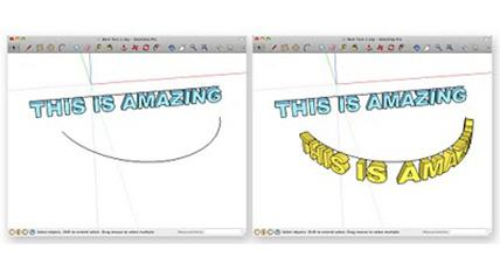
A Google query yields some possible ways to do this; here is (2) candidates for tutorials: :idea:


https://blog.sketchup.com/article/bend-it-fullmer-all-about-shape-bender


GaryGB
Ah, I should have been more precise. Sorry. I was aware of that approach, but I am thinking about the MSFS SDK materials, if it is possible to bend the materials selected for a polygon, for example.
 
So, you are not able to map the cited MSFS SDK Materials onto Face(s) in a Sketchup 3D model imported to MCX ? :scratchch

MCX can convert / export MSFS default Materials as generic PNG textures for use in Sketchup on 3D models.

A procedure described by Dick uses 32-bit (24-bit RGB color + an 8-bit 256 grayscale Alpha channel) PNGs converted by MCX from MSFS DDS default textures.

The MCX Material Editor "Material Template" feature can save the Material 'attributes' from a MSFS default / other 3D model.

The Material Template can be 'applied' to a 3rd party texture mapped onto Faces(s) in a Sketchup 3D model imported to MCX.


GaryGB
 
Last edited:
So, you are not able to map the cited MSFS SDK Materials onto Face(s) in a Sketchup 3D model imported to MCX ? :scratchch

MCX can convert / export MSFS default Materials as generic PNG textures for use in Sketchup on 3D models.


The MCX Material Editor "Material Template" feature can save the Material 'attributes' from a MSFS default / other 3D model.

The Material Template can be 'applied' to a 3rd party texture mapped onto Faces(s) in a Sketchup 3D model imported to MCX.


GaryGB
I want to exclude Sketchup with this approach, so that I do not have to "model" the road, but instead can use the apron-placement tool within the SDK. I can only find rotation of the whole material and moving it along the axis.
 
Google AI has this to say regarding use of default Material for Aprons:

https://www.google.com/search?q=MSFS Docs Apron versus road texture&ie=utf-8&oe=utf-8&client=firefox-b-1-m

Of particular note is the latter section that addresses rain effects: 😉

"Projection Issues: Projected meshes (which can be used for roads) need to be "covered" by a default detail texture (like asphalt or concrete) to receive rain and snow effects. However, this can result in blurriness of the underlying texture."

Potentially related info on use of MSFS default textures via 3D modeling applications (including Sketchup ?) to make detail textures that may become projected textures merged with terrain Polygon textures:

https://www.fsdeveloper.com/forum/threads/re-using-msfs-textures.456467/

https://www.fsdeveloper.com/forum/threads/comparing-the-3-ways-to-texture-the-ground.451660/

https://www.fsdeveloper.com/forum/threads/custom-markings-using-projected-mesh.454932/

https://www.fsdeveloper.com/forum/threads/projected-mesh-short-explanation.452324/

Note that the MSFS Projected Mesh function Dick alludes to is equivalent to a "drape" of a mapped texture image Material from a Face in Sketchup onto another (sur-)Face when performed on / within the same base 3D layer 0 (zero) and not between different Groups or Components.

This is also referred to in Sketchup as "Projected" Material mapping onto a nearby 3D object or adjacent Face.

So, AFAIK, one can use CurviLoft to configure the desired texture image Material into the required size and shape for the area shown in your OP above, then "Project" that 3D object onto the terrain surface below.

The Material should cover up the default aerial imagery, merge with the ground layers, and by default, it will be covered by the MSFS default or custom "detail" texture top layer ...which enables environmental display of rain effects etc. :wizard:

GaryGB
 
Last edited:
Back
Top