• Which the release of FS2020 we see an explosition of activity on the forun and of course we are very happy to see this. But having all questions about FS2020 in one forum becomes a bit messy. So therefore we would like to ask you all to use the following guidelines when posting your questions:

    • Tag FS2020 specific questions with the MSFS2020 tag.
    • Questions about making 3D assets can be posted in the 3D asset design forum. Either post them in the subforum of the modelling tool you use or in the general forum if they are general.
    • Questions about aircraft design can be posted in the Aircraft design forum
    • Questions about airport design can be posted in the FS2020 airport design forum. Once airport development tools have been updated for FS2020 you can post tool speciifc questions in the subforums of those tools as well of course.
    • Questions about terrain design can be posted in the FS2020 terrain design forum.
    • Questions about SimConnect can be posted in the SimConnect forum.

    Any other question that is not specific to an aspect of development or tool can be posted in the General chat forum.

    By following these guidelines we make sure that the forums remain easy to read for everybody and also that the right people can find your post to answer it.

FSXA Spline Mapping / spline wrap / issue

Messages
1,749
Country
unitedstates
I should be getting the mapping to wrap the tube from the spline inside. I keep getting a strange result. I not sure if some mode has changed or this version of 3DS MAX is causing the issue. Or maybe with the later version i need another step.

Anyway i should be able to do this with ease and i am not sure why i am having bad results can someone please help. Here is a image where you can see i am selecting polygon and highlighting the entire part then selecting spline mapping under wrap category and then selecting the spline inside which then should wrap this with rings around the tube. I keep getting a circular ball or if i change to planner i get a 45 degree flat wrap. The 2 setting s should not effect the mapping and it should just wrap based on the spline layout. So i am lost on why i am now having issues.
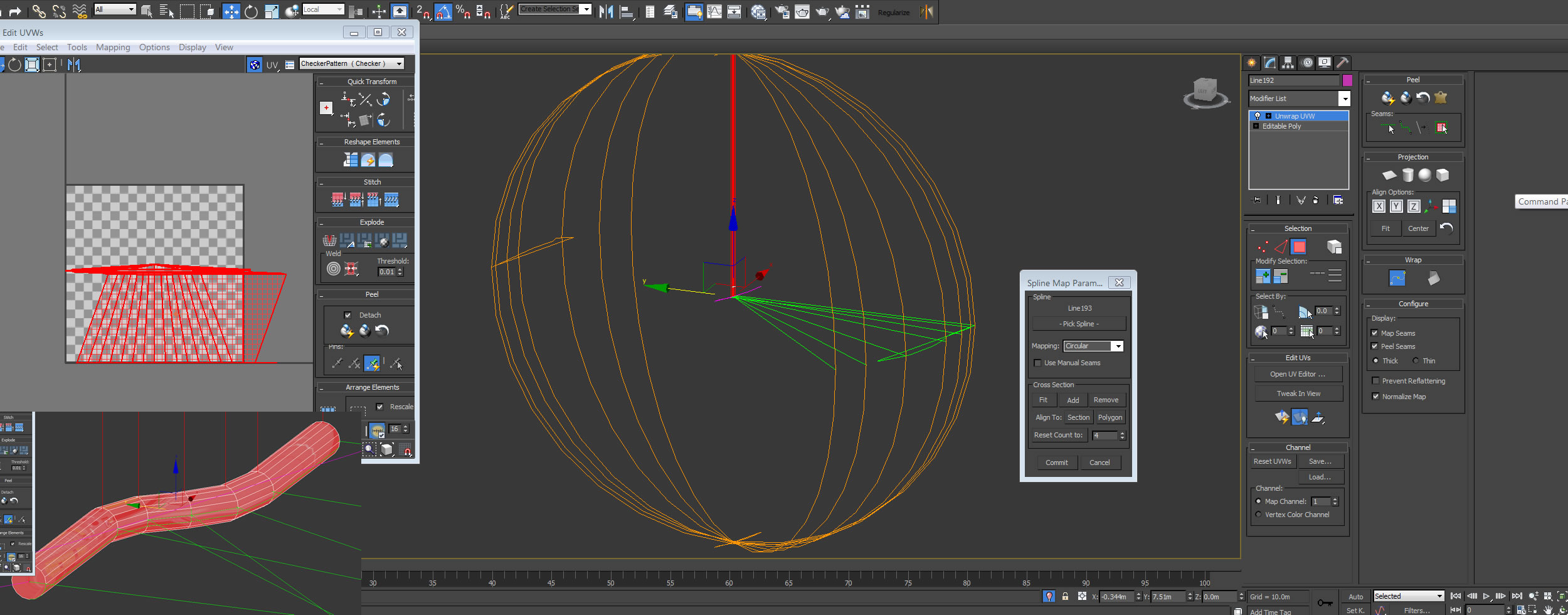
spline_mapping.jpg
 
SOLVED:

Seems odd but i do not need the spline inside. This is what i did.

1. I select edge.
2. Then select 1 edge section on the tube. Then loop edges and ring edges.
Now all the ring edges along the tube are selected.
3. Now i click "unfold strip from loop" under "wrap".
And now the tube is mapped the way a tube should be mapped.

But this still makes me wonder why the tutorials and instructions i have read in the past use the spline mapping. o_O
 
Hello DG

I am not sure if I follow... There's more than one way to skin a cat. In the tutorials you've seen, have any mentioned "automatically generate mapping coordinates"?

When you are creating your spline:
  1. Under "Rendering" scroll menu, make sure you check "automatically generate mapping coordinates".
  2. Design your spline as usual.
  3. Add an "Editable Poly" modifier on top of your spline (do not collapsed the stack yet...).
  4. Add an "Unwrap UVW" modifier, scale as necesary horizontally and vertically and verify if the result is what you need.
I personally found this useful, because it is not a "destructive" method and you can always come back if you need to modify your spline. This tip came to me from Lionheart. On the other hand, the image really shows a weird behavior.

Glad you sorted out.
Sergio.

P.S. This video is interesting as well:
 
Last edited:
Hello DG

I am not sure if I follow... There's more than one way to skin a cat. In the tutorials you've seen, have any mentioned "automatically generate mapping coordinates"?

Yes i was using "automatically generate mapping coordinates".
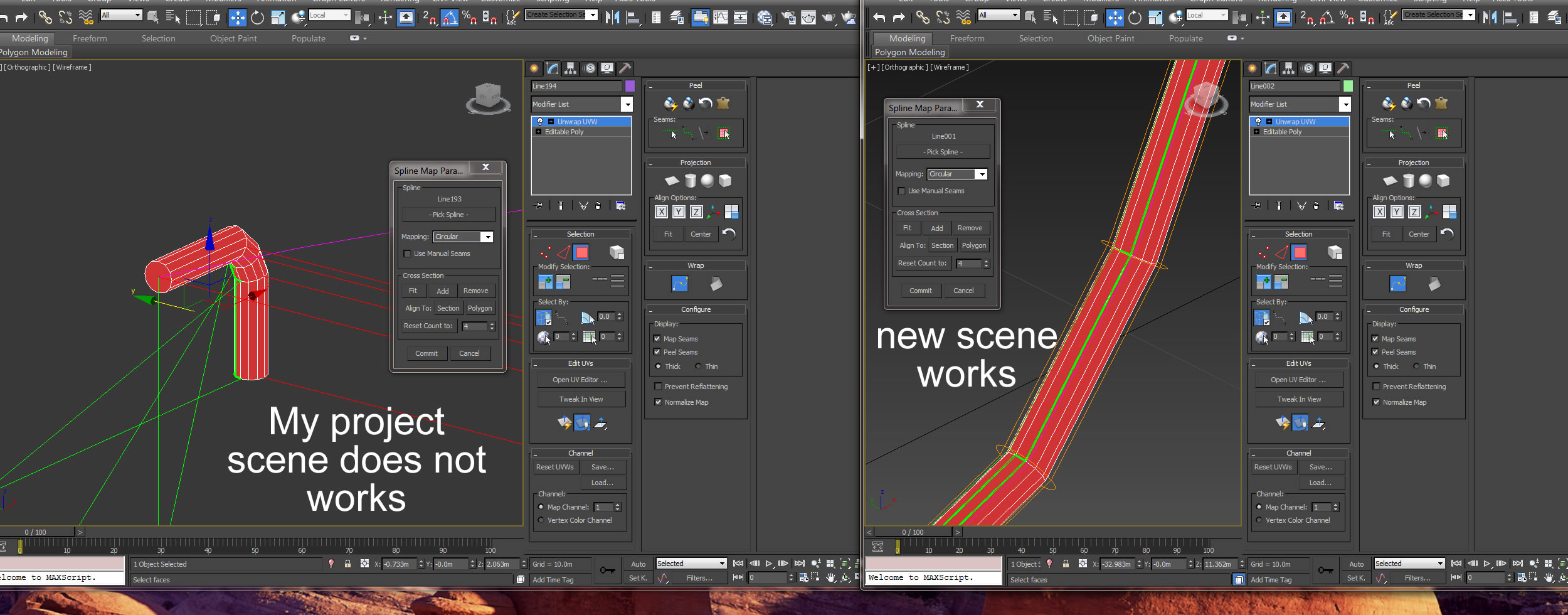
So i tried a new test tonight since you replied. I used a new scene and it works just as i always new. So then i tried again in my working scene and it failed using the exact same settings.
So the new question is why is my working project scene not working?

P.S. You can collapes the stack by converting to poly then adding UVW. I confirmed this using both methods just to be sure.

mapping_coordinates.jpg
 
So the new question is why is my working project scene not working?

P.S. You can collapes the stack by converting to poly then adding UVW. I confirmed this using both methods just to be sure.

Since you've collapsed the spline into an editable poly, my first thought is to unlink the offending part (if it has been parented to an another part) and then reset the XForm. Then try again the Unwrap UVW modifier. I hope this may be helpful.

Regards,
Sergio.
 
Since you've collapsed the spline into an editable poly, my first thought is to unlink the offending part (if it has been parented to an another part) and then reset the XForm. Then try again the Unwrap UVW modifier. I hope this may be helpful.

Regards,
Sergio.

has nothing to do with collapsing. I have also created a new part with the instruction above without collapsing. And ion a new scene you can collapse and it still works. So the newest question is why is my working scene failing and the new scene works when creating the same part and using the same settings. i can only think the scene is corrupted. i will try to merge into a new scene tomorrow.
 
Merged all parts into new scene and got the same strange results where it's stuck on a shape like geosphere.
So this has got me stumped. o_O
 
I am thinking about software integrity; some files or settings could been corrupted. Wouldn't harm to verify this issue with this approach.
Try to repair the Max installation and check every item in your settings. :confused:
 
I am thinking about software integrity; some files or settings could been corrupted. Wouldn't harm to verify this issue with this approach.
Try to repair the Max installation and check every item in your settings. :confused:
But a new scene works. So no files are corrupted. Something in my scene is causing the issue. It's a very large scene.
 
Don't bring in the whole scene at one time. Start with a new scene, but slowly bring parts in, checking as you go. Eventually you should be able to narrow it down to the offending part. It's a PITA, but when trying to find a dud part it's the only way.
 
Don't bring in the whole scene at one time. Start with a new scene, but slowly bring parts in, checking as you go. Eventually you should be able to narrow it down to the offending part. It's a PITA, but when trying to find a dud part it's the only way.

I totally agree. I always use process of illumination when looking for a corrupt part. This time i would not think of a corrupt part as i export my scene all the time into a model with no errors. But i have to agree with you this time one of the parts has to be the cause.;)
 
Solved:

Before i tried process of illumination i decided to see if it's something to do with the size since 3DS max likes large parts but not normal real life parts we use everyday. When you build at a small scale 3DS max will sometimes force you to create an object larger them change the values to get back to smaller size. And this was the issue i was having. So now it's working if i build at a larger scale. So i create the part i want then make a copy scale it up and then map it and now it works perfect. :yikes:

But i am glad i opened this thread. Here is why. I found using my other method is better. First off you can build at the correct scale. And the second reason is the mapping is 100% more accurate on the UV layout and is always aligned straight. So i will use the tutorial i posted earlier in this thread.
 
Last edited:
You have me pretty confused. I have worked multiple projects using the US Standard scale of feet w/fractional inches-1/64 of an inch with no issues to date.
 
You have me pretty confused. I have worked multiple projects using the US Standard scale of feet w/fractional inches-1/64 of an inch with no issues to date.
Nothing to do with the type of scale. I am saying when you make a part really small you can run into issues. This seems to be one example.

For example when you try to create a box really small 3DS will force you to make it larger than you really want to make it. Then you have to go back and reduce the size. Does that make sense.
So when i made the tube/hose it was so small that the type of mapping i want would not work unless you increase the size of the object. But what i found is i can use my newest method and it will work for any size and the mapping layout is perfect compared to the method this topic is on. So i am going to use my new trick for now on.

Go back to my first post and look at the image. Those are the rings and the smallest size the rings can go. So that is why it looks like a geo sphere. really they are all the rings grouped together.

[I found under wrap that Spline mapping has limitations. Unfold strip from loop does not and is far more accurate on the UVW mapping.]
 
Last edited:
Nothing to do with the type of scale. I am saying when you make a part really small you can run into issues. This seems to be one example.

For example when you try to create a box really small 3DS will force you to make it larger than you really want to make it. Then you have to go back and reduce the size. Does that make sense.
So when i made the tube/hose it was so small that the type of mapping i want would not work unless you increase the size of the object. But what i found is i can use my newest method and it will work for any size and the mapping layout is perfect compared to the method this topic is on. So i am going to use my new trick for now on.

Go back to my first post and look at the image. Those are the rings and the smallest size the rings can go. So that is why it looks like a geo sphere. really they are all the rings grouped together.

[I found under wrap that Spline mapping has limitations. Unfold strip from loop does not and is far more accurate on the UVW mapping.]
I am familiar with what you are saying but after creating the object you have the ability of resizing using the measurement spinner. Also, rather than using drag to create a primitive use the measurements input for creating an object.
 
I am familiar with what you are saying but after creating the object you have the ability of resizing using the measurement spinner. Also, rather than using drag to create a primitive use the measurements input for creating an object.

But for example this part is a hose and needs to snake along a path around other parts that are already at the correct scale. So i found using my new method works perfect. And 3DS needs to work on making these tools work for smaller parts that are a very common size for modeling.
 
Back
Top