• Which the release of FS2020 we see an explosition of activity on the forun and of course we are very happy to see this. But having all questions about FS2020 in one forum becomes a bit messy. So therefore we would like to ask you all to use the following guidelines when posting your questions:

    • Tag FS2020 specific questions with the MSFS2020 tag.
    • Questions about making 3D assets can be posted in the 3D asset design forum. Either post them in the subforum of the modelling tool you use or in the general forum if they are general.
    • Questions about aircraft design can be posted in the Aircraft design forum
    • Questions about airport design can be posted in the FS2020 airport design forum. Once airport development tools have been updated for FS2020 you can post tool speciifc questions in the subforums of those tools as well of course.
    • Questions about terrain design can be posted in the FS2020 terrain design forum.
    • Questions about SimConnect can be posted in the SimConnect forum.

    Any other question that is not specific to an aspect of development or tool can be posted in the General chat forum.

    By following these guidelines we make sure that the forums remain easy to read for everybody and also that the right people can find your post to answer it.

Water polygon affects the terrain in FSX

Messages
6
Country
hungary
Hello everyone,

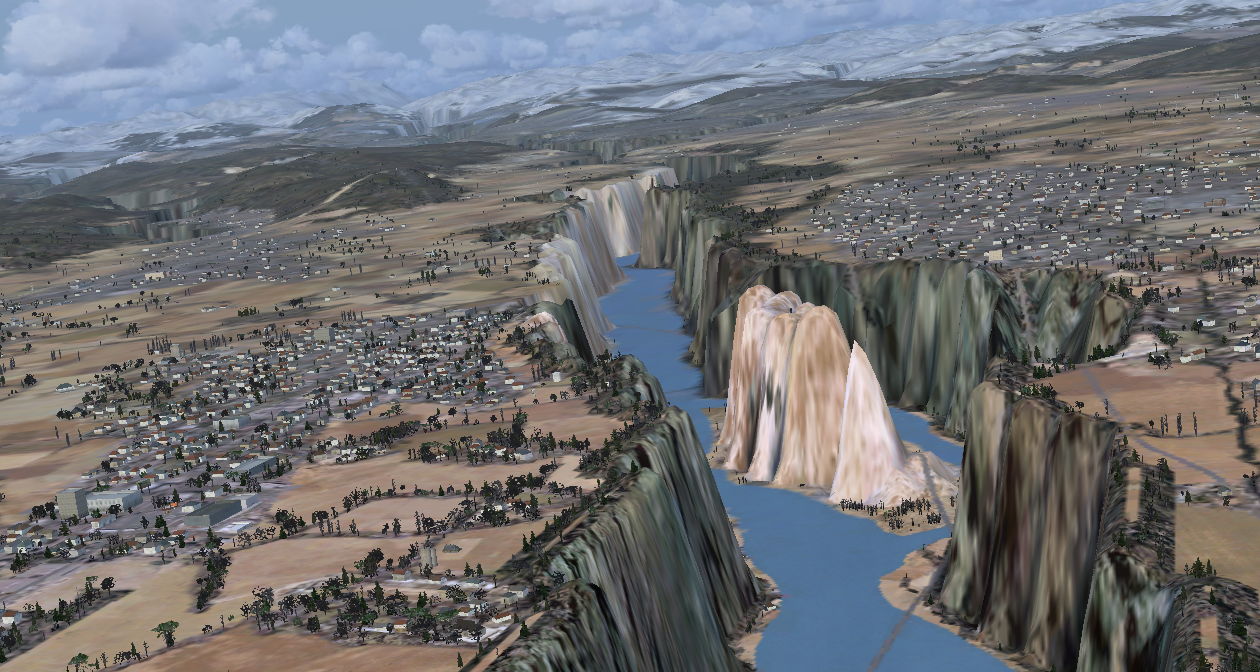
I'm trying to do a landclass scenery for Romania using OSM data. Everything works fine, the forest, residential polygons and roads follow the form of the terrain but the water polygon dosn't do that. It makes big holes in the ground and puts the water on the bottom.

How can I fix that?
a.png
 
Hello:

CVX vector water (aka "Hydro") attribute polygons are flattens textured with a water class "color"; these require an assigned elevation for all vertex points ...which is set in the SBuilderX properties for the object as a "constant altitude" value.

See:

SBuilderX Menu > Help > Contents > Making Scenery with SBuilderX > Make Polygons > Polygons >Textured Polygons

GaryGB
 
Last edited:
Hi,

I've already found the solution. You just need to go to your FSX folder, find the terrain.cfg file, then open it in notepad and change flatten method to none, then overwrite the file. After that you can compile the shapefiles again to BGL. That's what I did and it worked for me perfectly.
 
https://www.fsdeveloper.com/forum/t...affects-the-terrain-in-fsx.444185/post-811180

Hi,

I've already found the solution. You just need to go to your FSX folder, find the terrain.cfg file, then open it in notepad and change flatten method to none, then overwrite the file. After that you can compile the shapefiles again to BGL. That's what I did and it worked for me perfectly.

Hello:

Thank you for taking the time to post your work-around. :)

However, I recommend NOT doing that, as it will change the attributes of all default and 3rd party custom add-on CVX vector objects in the FSX world which use that same GUID, and may result in many terrain scenery anomalies. o_O

This may prove to be a problem even if you do not release your scenery to anyone outside your own computer. :alert:


If you wish to use "terrain-mesh-clinging" water polygons to make custom scenery, you can use:

* "Legacy_LWM_Water_Flatten"

...and/or:

* "Legacy_LWM_Water_NoFlatten"

...as another type of FSX-compatible CVX vector polygon objects from the land class pick-list in SBuilderX; these are enabled by installation of the "Modified Terrain.Cfg" at the time that SBuilderX is installed.

NOTE: These 'emulate' the way that legacy FS8 / FS9-type LWM vector objects function in FS at run time.

https://www.fsdeveloper.com/forum/t...ropolys-to-follow-the-underlying-mesh.440317/


FYI: If you already have SBuilderX installed now, but did not allow installation of "Modified Terrain.Cfg" you can:

* use it as is, if you do not plan to utilize some of the enhanced and legacy-compatible scenery creation features

...or

* you can manually install the "Modified Terrain.Cfg" available via links in this thread:

https://www.fsdeveloper.com/forum/threads/terrain-cfg-fix.3290/


CAVEAT: Terrain.Cfg should ONLY be manually edited by advanced users who know what they are doing, and who check their work at least 3 times after doing so ! :pushpin:

It is best to not modify default or 3rd party add-on entries within the Terrain.Cfg file.

Only after considerable study should one add custom entries within the Terrain.Cfg file.

Please note that any modification of the default Terrain.Cfg file that is utilized in making custom scenery will require that any end-user of that scenery must also have the same custom entries within their own Terrain.Cfg file; otherwise custom scenery based on a modified Terrain.Cfg may not display properly ...or at all. :duck:

GaryGB
 
Last edited:
1/ As said above, the quick way is to draw a poly for your river, and tag it with Legacy_LWM_Water_Flatten. So, you do not have to worry with elevations! This will just "color" your poly as water, following the surface, even if there are hills or holes; that may give a strange render. It may be enough in some cases, or to have a quick view of your project.
2/ Better (but very longer) is first to analyse elevation (river profile) with GEearth or Mapcarta; then draw as many polygons as you need: some of them with constant elevation (for sections where it doesn't vary much), other with sloped polygons (here is the great work!); then tag as Hydro_Generic_River_Perrenial. It's a hard work, but you'll get a very good render.
PM
 
Back
Top