• Which the release of FS2020 we see an explosition of activity on the forun and of course we are very happy to see this. But having all questions about FS2020 in one forum becomes a bit messy. So therefore we would like to ask you all to use the following guidelines when posting your questions:

    • Tag FS2020 specific questions with the MSFS2020 tag.
    • Questions about making 3D assets can be posted in the 3D asset design forum. Either post them in the subforum of the modelling tool you use or in the general forum if they are general.
    • Questions about aircraft design can be posted in the Aircraft design forum
    • Questions about airport design can be posted in the FS2020 airport design forum. Once airport development tools have been updated for FS2020 you can post tool speciifc questions in the subforums of those tools as well of course.
    • Questions about terrain design can be posted in the FS2020 terrain design forum.
    • Questions about SimConnect can be posted in the SimConnect forum.

    Any other question that is not specific to an aspect of development or tool can be posted in the General chat forum.

    By following these guidelines we make sure that the forums remain easy to read for everybody and also that the right people can find your post to answer it.

XML Mask Images

Messages
37
Country
us-florida
I'm trying to create a gauge that reads Turbine %RPM (Left and Right) in each engine. The gauge works fine, however when I try to add a mask image to the '%RPM meter' strips, the strip completely disappears.

I tried to create the mask image using Paint and Gimp, however every time I color the Mask Image with two different colors (0,0,0 and 1,1,1) it all just seems to blend into one (0,0,0); therefore making the whole thing transparent. Can anyone explain to me how to create mask images using Paint or Gimp?
Is it not keeping the color properties because it needs to be 36bit? I'm really lost so plz help

Doia
 
Most probably your color depth isn't deep enough. You need to define your image as 32-bit full color, or fine gradations like that will get lost.

This baffled me for a while too!

Hope this helps,
Dutch
 
Na using paint is fine in 256 or 16bit
Mask image's have a whole different axis set up to normal bmp.Ive never been able to full grasp the whole mask image rule but even when you do sometimes it go's pair shaped anyways :)
what I do is make the mask image all 1,1,1 load the gauge and watch where the strip moves to then just fudge the axis's to suit then redo the mask image with the correct 0,0,0 and 1,1 ,1 cutout .
Have a look at the sdk on mask images as this will help sort it out but every now and then it wont work due to stacked elements of some other bug further up or down the code line.
Wozza
 
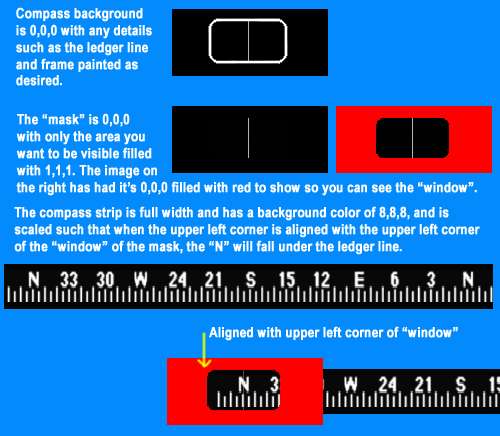
compassgaugepartsrn5.jpg
 
Thanks a lot guys! I followed your advice and finally got it working, the axis coordinate system was indeed a bit tricky however.
:D:D:D
Doia
 
Great information but I think, relative to compasses, it's called a "lubber" line, not "ledger" line, yes? :)
 
Last edited by a moderator:
256-bit is fine with mask-images provided your paint program does proper paletting. GIMP can be a pain, as it will happily change things around, while photoshop is much more reliable...also has the option to force black&white, good for gauge bitmaps. As for mask images it works 100% as it will create a 2-color only palette.

MaskImage coordinate reference is better if "ignored". It seems to me that they just work as all other bitmaps. Only thing is that you need to use the coordinates of your SHIFT block to position the underlying lubber line. They appear to be in absolute pixels saving the confusion of relativity, unless you place a shift one after the other... then the second one is relative, and entering 0 px will cause no movement instead of displacing to 0,0. Did this for a whiskey compass where it (appropriately) shifts the lubber in X with heading, and in Y with G-Force....
 
7 year old thread guys.

No need to answer the OP's question unless you have something pertinent to add which will assist future researchers.
 
Back
Top