• Which the release of FS2020 we see an explosition of activity on the forun and of course we are very happy to see this. But having all questions about FS2020 in one forum becomes a bit messy. So therefore we would like to ask you all to use the following guidelines when posting your questions:

    • Tag FS2020 specific questions with the MSFS2020 tag.
    • Questions about making 3D assets can be posted in the 3D asset design forum. Either post them in the subforum of the modelling tool you use or in the general forum if they are general.
    • Questions about aircraft design can be posted in the Aircraft design forum
    • Questions about airport design can be posted in the FS2020 airport design forum. Once airport development tools have been updated for FS2020 you can post tool speciifc questions in the subforums of those tools as well of course.
    • Questions about terrain design can be posted in the FS2020 terrain design forum.
    • Questions about SimConnect can be posted in the SimConnect forum.

    Any other question that is not specific to an aspect of development or tool can be posted in the General chat forum.

    By following these guidelines we make sure that the forums remain easy to read for everybody and also that the right people can find your post to answer it.

Place lights

Messages
596
Country
us-california
Hello Arno, first a BIG THANK YOU
my name is Chris Bell; an avid fan of your work

adding import function had made such a huge improvement
i wanted to share a technique i recently developed to create non autogen objects with scenproc

i was able to accomplish an extremely complicated task thanks to your work

using scenproc i made the standard lightpole alignment with trunk layer
after agn have been created, i imported them back with scenproc and saved the new shp
next i open the new shp file with QuantumGIS and save as kml
i then drop the kml file to kml2bln.exe
the result bln file i import into SBuilderX > then save as SBuilder SBX
i now can edit the saved SBX file with txt editor
replacing GUID with GUID for the object i want to place (in this case, light poles with interval) > and save
open a new project with SBuilderX > import my edited SBX file > select all lines > then create BGL

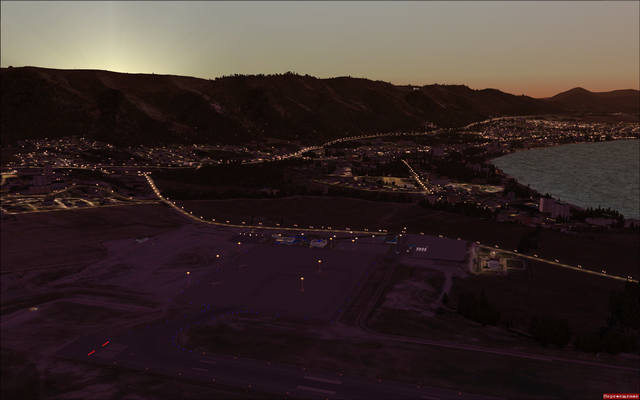
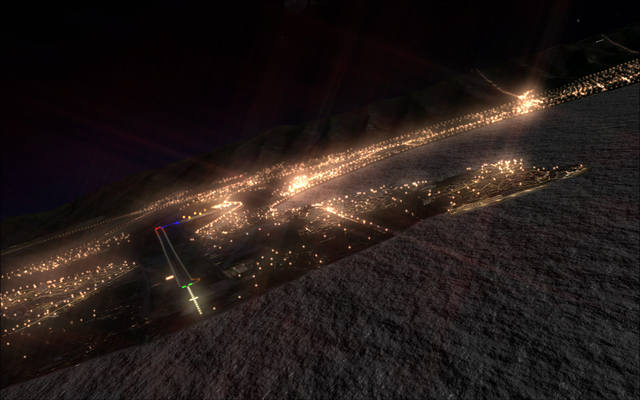
here are the results

image.jpg


image.jpg


image.jpg


image.jpg


image.jpg
 
Hi,

There might be an even faster way :D.

After you have used the scenProc PLACEPOINTSALONGLINE step to create the light points, you could just directly use CREATEXMLLIBOBJ to place XML library objects (instead of creating autogen). The code below shows roughly how those two steps can be used together.

Code:
PLACEPOINTSALONGLINE|filter|150|5|OBJ|LIGHT|HDG
CREATEXMLLIBOBJ|OBJ=LIGHT|objectGuid|HDG
 
Awsome work; an old dream comes true for me!

A bit complicated process but what a result!!

Thanks a lot

JpP
 
Hi,

There might be an even faster way :D.

After you have used the scenProc PLACEPOINTSALONGLINE step to create the light points, you could just directly use CREATEXMLLIBOBJ to place XML library objects (instead of creating autogen). The code below shows roughly how those two steps can be used together.

Code:
PLACEPOINTSALONGLINE|filter|150|5|OBJ|LIGHT|HDG
CREATEXMLLIBOBJ|OBJ=LIGHT|objectGuid|HDG

TYVM Arno
i will play with the suggested steps and see how i do

Awsome work; an old dream comes true for me!

TY JpP
same for me, long awaited to be able to achieve this

im sure in no time others will come up with even faster ways
with Arno's tools; the sky is the limit

Best

Chris
 
Hey, are those actual poles with lights I'm seeing there or something else. Can't tell without a closeup screenshot.

Interesting, after adding my first custom autogen to some photoreal ground scenery, I too had lots of light poles and lights. But guess what... I did not make them!

I have the payware add-on 'night experienceX' which is a lighting replacement program. But by default it does not work on photoreal because it is like autogen itself. However, in the area I created some test autogen the highways lit up will all these light poles and lights.

I guess it is just a result of having custom autogen applied?

Guess I sort of got a "2-fer" :p

Clutch
 
Last edited:
Clutch; these are non autogen objects!
possibilities are endless now
just think outside the box

i tested ExpirianceX; but couldn't get the lights to show over PH
im uploading a short video; will complete in an hour or so
you can see the lights at dawn over the photoreal scenery im developing atm

i used rhumbaflappy's 3D light balls effect in the pics posted above and in my video as well
http://forum.avsim.net/topic/296289-looking-for-some-light-balls/#entry1834567
 
Last edited:
I did that in 2005 in FS9, initially as custom autogen objects.


For FSX I create bgl placements using paths created in Afcad2.

 
Last edited:
This looks beautiful George
Id love to know where you got these light poles; they look perfect

To illustrate the technique and what scenproc is capable in the right hands
I placed these light balls across a whole country's main route (aka trunk route)

The video was taken where the little red circle is
The lights were placed alongside all the lines you see in the pic

Trunk.jpg
 
Last edited:
Hello Arno, first a BIG THANK YOU
my name is Chris Bell; an avid fan of your work

adding import function had made such a huge improvement
i wanted to share a technique i recently developed to create non autogen objects with scenproc

i was able to accomplish an extremely complicated task thanks to your work

using scenproc i made the standard lightpole alignment with trunk layer
after agn have been created, i imported them back with scenproc and saved the new shp
next i open the new shp file with QuantumGIS and save as kml
i then drop the kml file to kml2bln.exe
the result bln file i import into SBuilderX > then save as SBuilder SBX
i now can edit the saved SBX file with txt editor
replacing GUID with GUID for the object i want to place (in this case, light poles with interval) > and save
open a new project with SBuilderX > import my edited SBX file > select all lines > then create BGL

here are the results
<pictures>
First, sorry my English.

Awesome work!
I tried to repeat the sequence of your actions. A BLN-file had been succesfully created, using kml2bln.exe, then I imported it to SbuilderX and finally got SBX.
Tell me, please, how do you edit SBX? If I only change GUIDs, import the edited file into SbuilderX and select all lines, I can't export BGL (all checkboxes are inactive).
 
Last edited:
First, sorry my English.

Tell me, please, how do you edit SBX? If I only change GUIDs, import the edited file file into SbuilderX and select all lines, I can't export BGL (all checkboxes are inactive).

Cheers

TYVM operator
im glad you were able to follow

you can open SBX file with any text editor like notepad for editing
SBX file content is text

if no data is selected (select all lines), selection will remain gray in Sbuilder compile screen
make sure path are properly defined for SBuilderX and FSX SDK installed
 
Hi,

There might be an even faster way :D.

After you have used the scenProc PLACEPOINTSALONGLINE step to create the light points, you could just directly use CREATEXMLLIBOBJ to place XML library objects (instead of creating autogen). The code below shows roughly how those two steps can be used together.

Code:
PLACEPOINTSALONGLINE|filter|150|5|OBJ|LIGHT|HDG
CREATEXMLLIBOBJ|OBJ=LIGHT|objectGuid|HDG

Hello, Arno.
I tried to do it, but no succsess. I can't find any new files though ScenProg created objects:

19:21 CREATEAGNLIBOBJ Information Creating autogen library objects with filter FTYPE=POINT;type=light...
19:21 CREATEAGNLIBOBJ Information Created 1528 autogen objects

Below is my simplificated configuration file. Probably I do something wrong?

Code:
IMPORTOSM|E:\Modeling\OSM\RU\URKG2.osm|*|*
FILTERDUPLICATELINES
SPLITGRID|AGN

PLACEPOINTSALONGLINE|FTYPE=LINE;highway=trunk|50|7|type|light|hdg

CREATEXMLLIBOBJ|FTYPE=POINT;type=light|{0017a263-464f-14fd-f77f-2996fed44864}|hdg
 
Last edited:
TYVM operator
im glad you were able to follow

you can open SBX file with any text editor like notepad for editing
SBX file content is text

if no data is selected (select all lines), selection will remain gray in Sbuilder compile screen
make sure path are properly defined for SBuilderX and FSX SDK installed

I often used SbuilderX before and, of course, SDK is installed. But I'm not sure that SBX-file is correct. Here is a part of it (with only one model):

Code:
[Main]
CopyRight=PTSIM SB313
Name=PROJECT
NoOfMaps=0
NoOfLands=0
NoOfLines=8827
NoOfPolys=8827
NoOfWaters=0
NoOfObjects=0
NoOfExcludes=0
NoOfLWCIs=0
BGLProjectFolder=C:\Program Files (x86)\SBuilderX313\Scenery
LatDispCenter= 38.7813203
LonDispCenter=-9.136076
Zoom= 8

[Line.1]
Name=Step2
Type=
Guid={be03303c-4515-4883-b4f5-18f652baa6d4}
Color=FFFF0000
NoOfPoints=1
Lat1= 44.81636
Lon1= 37.5867001
Alt1= 0
Wid1= 35

Can't you please show me your example? I suspect there is my mistake at the stage of converting shp->kml->bln->sbx...
 
Last edited:
i just compared mine is the same as yours
just different GUID and Type

Code:
[Main]
CopyRight=PTSIM SB313
Name=PROJECT
NoOfMaps=0
NoOfLands=0
NoOfLines=77480
NoOfPolys=77480
NoOfWaters=0
NoOfObjects=0
NoOfExcludes=0
NoOfLWCIs=0
BGLProjectFolder=D:\Program Files\FSX\SBuilderX313\Scenery
LatDispCenter= 0
LonDispCenter=-9.136076
Zoom= 20

[Line.1]
Name=Trunk
Type=OBJ|.01|.01|2
Guid={16d7c28b-9da4-496e-a594-012c0e592f5c}
Color=FF000080
NoOfPoints=1
Lat1= 33.090925145355
Lon1= 35.1094047689201
Alt1= 10
Wid1= 1

don't use my GUID or type!
since you don't have my lights library, using the same GUID wont work

be sure you don't use AGN GUID's
 
Last edited:
i just compared mine is the same as yours
just different GUID and Type
Thank you, Chris.
I think that 'Name' is not critical, but I'll check them.
The other question is: what about heading? If the model contains only a BGL_Light or a small part with attached effect, that doesn't matter, but if we have completed lightpoles, they must follow for road's curves, changing direction. I don't see appropriated strings in the SBX code.

Upd. I found that 'Type' string is very important. It seems exactly contains information about size and heading of a model, but I need to check it out. Now Sbuilder able to compile BGL at least.
 
Last edited:
YVW Vitaly
name has no effect
Type= is important though, i set traffic direction with this param
Code:
[Line.1]
Name=FreewayTraffic
Type=FWX[B]2T[/B]

or references the center and heading with lights object
Code:
[Line.1]
Name=Trunk
Type=OBJ|[B].01|.01|2[/B]

i noticed that Sbuilder doesn't show me the lines in the SBX file
they are there, but clear; until i select all, they get highlighted
then they can be processed
 
So, I did it.
The problem was in the 'Type' string indeed. Also I changed the altitude of lights up to 20 meters.
Now my scenery looks far better:


All I need now is create a new light library, tweaking bounding boxes to prevent autogen exclusion and assign various light colors to the different type of roads.

Thank you very much for the tutorial sharing, Chris!
 
Last edited:
Bravo Vitaly
this looks absolutely gorgeous

i didn't do much other then point the way, its Arno who deserves all the credits
 
Back
Top