• Which the release of FS2020 we see an explosition of activity on the forun and of course we are very happy to see this. But having all questions about FS2020 in one forum becomes a bit messy. So therefore we would like to ask you all to use the following guidelines when posting your questions:

    • Tag FS2020 specific questions with the MSFS2020 tag.
    • Questions about making 3D assets can be posted in the 3D asset design forum. Either post them in the subforum of the modelling tool you use or in the general forum if they are general.
    • Questions about aircraft design can be posted in the Aircraft design forum
    • Questions about airport design can be posted in the FS2020 airport design forum. Once airport development tools have been updated for FS2020 you can post tool speciifc questions in the subforums of those tools as well of course.
    • Questions about terrain design can be posted in the FS2020 terrain design forum.
    • Questions about SimConnect can be posted in the SimConnect forum.

    Any other question that is not specific to an aspect of development or tool can be posted in the General chat forum.

    By following these guidelines we make sure that the forums remain easy to read for everybody and also that the right people can find your post to answer it.

FSX ADE Lighting Objects

Messages
142
Country
us-georgia
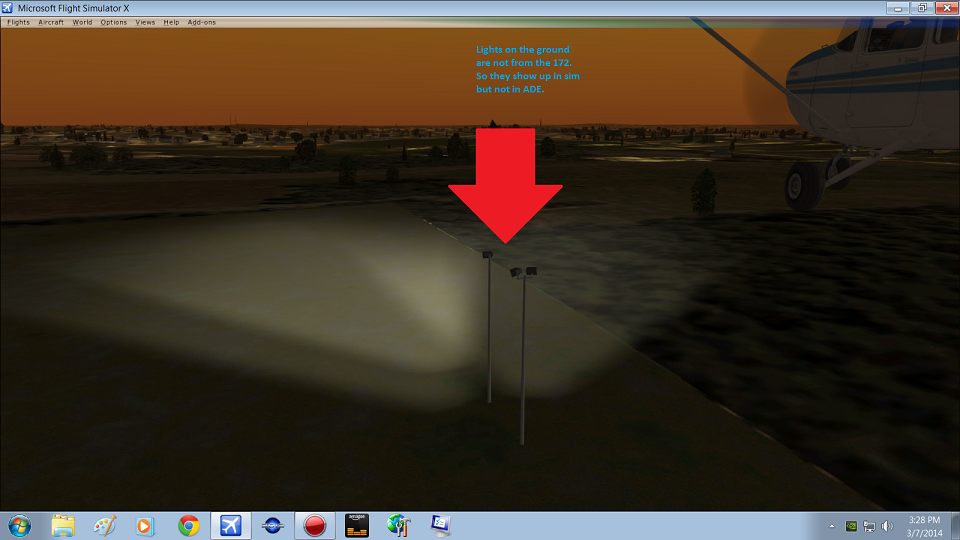
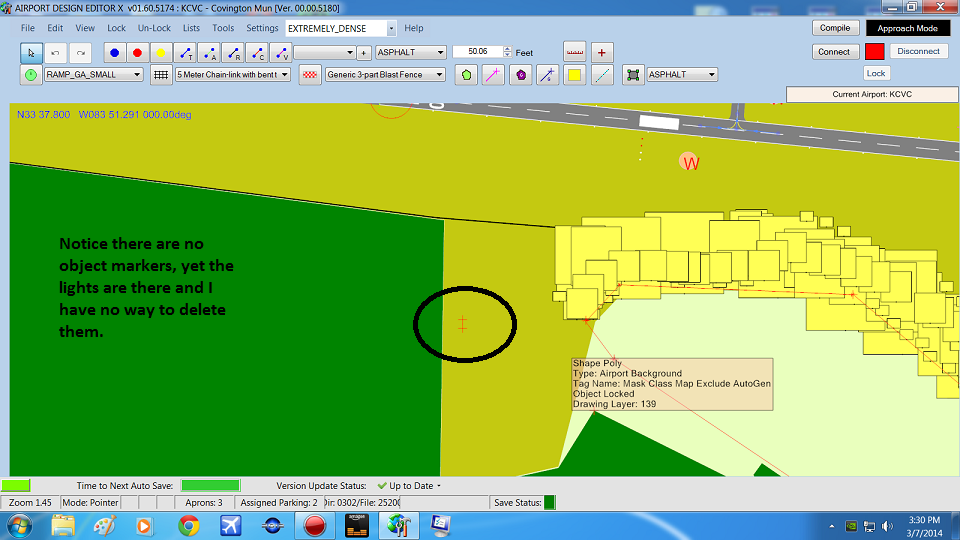
I have strange problem, I cannot seem to figure out how to solve it. If you look at the images, I put in lights to see what they looked like on my airport project and they wont go away.

I figured they would be trouble when I placed them in ADE when I noticed right after I put them there that there was no ICON or marker as the these Library Objects.

I really hate to say I don't recall the lighting library itself it came from but I think it was Iflights1.bgl.
It was in a library that came with the big file Tom had suggested "Classic Library File".

I am otherwise finished with my project except to edit out these lights. IF I knew how. :)

LightPost 1.png
LightPost 2.png
 
Nice to learn something new everyday! That did the trick. The lighting library were the RamplightLibrary.bgl So they are nice lights if you need big floods for a ramp but they dont show in ADE.

Thanks for the tip robystar.

Mark
 
I see what you mean. Went to check these lights out for myself. Wanted to see if they would work better than the ones I'm currently using for a project. Once you place them, thats it. They are gone. There is no object display to even figure out where to place them in your scenery. The only way to highlight them again is to use the above method and all you get is the rotation dial. Never saw that before. Is there a way to add a marker/display to see these objects when working with them??

Regards,
Rob
 
They have a very small footprint. They are there in ADE. Zooming right in can help. There is an update in the works to provide a 'halo' for very small objects to make them easier to see and work with.

Sent from my Sony Xperia with Tapatalk
 
Hi Jon,

Tried that, working with them as we speak. Taking thumbs to add to the folder. Will have another look. Maybe I didn't zoom in close enough.

Regards,
Rob


Update: Zoomed in all the way. Still no object.
 
Last edited:
The trouble is that the footprint is so small (1ft x 1ft or so) that is is just not visible. Putting a rubber band selector around the area or selecting it from the list will show it. I really need to get the 'halo' into a production version :oops:
 
Hi Jon,

Small footprint. That makes sense. When I select it from the list all that shows is the rotation bug. There is nothing visible to grab and move the object. How do put a rubber band selector around the area?? Is that a reference to moving vertices for aprons and such.

Regards,
Rob
 
Last edited:
There are default lights in FSX that will light up the ramp. They are in the FSXP_FillerObjects.bgl and listed as lightpost (3 total).
 
Hi Jim,

I didn't know that. Appreciate the tip. I will take a look at the objects.

Regards,
Rob
 
Hi Jon,

Small footprint. That makes sense. When I select it from the list all that shows is the rotation bug. There is nothing visible to grab and move the object. How do put a rubber band selector around the area?? Is that a reference to moving vertices for aprons and such.

Regards,
Rob


Rubber Band - Hold down the 'R' key. Left Click and drag the mouse out to create a rectangle. Let go the left mouse button and any objects with their reference point inside the rectangle get selected. You can move a selected object using the arrow keys if you can't move it with the mouse. In any case not being able to get or drag very small objects is not good. Not related to vertices - to move them just select the apron (or whatever) then select the vertex and drag it.
 
Hi Jon,

Didn't know that either.........made a note of that to add to my ADE tutorial folder. The object highlights correctly but when I use the arrow keys the entire screen moves vertically or horizontally. Do I perhaps have a wrong setting applied somewhere?? With enough trial and error, you should be able to place the light objects even though all that shows is the rotation bug.

Regards,
Rob
 
Mea Culpa - you are correct. Arrow keys shift the display and not a selected object. I am not near my copy of ADE at the moment so can't check the keys list - sorry about the mis-information
 
Hi Jon,

No worries.......I am sure you're having a busy day and have nothing better to do than tend to the late night postings of a guy in the states who can't seem to see/move a library object in ADE.....lol :rolleyes:

Regards,
Rob
 
I think i have the same issue, i cant seem to find these apron lights even on the this path (Lists > scenery objects > select > delete?)
They really are a nuisance that idk how to deal with...
 

Attachments

  • 1688317675257.png
    1688317675257.png
    21.8 KB · Views: 265
  • 1688317687310.png
    1688317687310.png
    833.2 KB · Views: 284
  • 1688317879454.png
    1688317879454.png
    2.6 MB · Views: 280
Back
Top