• Which the release of FS2020 we see an explosition of activity on the forun and of course we are very happy to see this. But having all questions about FS2020 in one forum becomes a bit messy. So therefore we would like to ask you all to use the following guidelines when posting your questions:

    • Tag FS2020 specific questions with the MSFS2020 tag.
    • Questions about making 3D assets can be posted in the 3D asset design forum. Either post them in the subforum of the modelling tool you use or in the general forum if they are general.
    • Questions about aircraft design can be posted in the Aircraft design forum
    • Questions about airport design can be posted in the FS2020 airport design forum. Once airport development tools have been updated for FS2020 you can post tool speciifc questions in the subforums of those tools as well of course.
    • Questions about terrain design can be posted in the FS2020 terrain design forum.
    • Questions about SimConnect can be posted in the SimConnect forum.

    Any other question that is not specific to an aspect of development or tool can be posted in the General chat forum.

    By following these guidelines we make sure that the forums remain easy to read for everybody and also that the right people can find your post to answer it.

FSXA BN-2Islander damage mod - Beta released

Kekelekou

Resource contributor
Messages
226
Country
france
Hello!

Being a huge fan of Flight1's BN-2 Islander, I am developping a Damage Mod for it from Ismail Hakki Güzel's and Didier Lagaffe's versions.

The following systems will wear out and will be inflicted damage in case of improper use :
- engines
- generators
- propellers
- flaps
- flaps motor
- flight controls
- autopilot
- vacuum
- pitot tubes
- brakes
- structural deicing

Some extra features will be implemented :
- avionics dying if on when engine starts
- blown tires in case of hard landing
- foul spark plug if engine runs at low rpm and rich mixture for too long
- engine dies in case of quick throttle movement with fuel pump off
- door lock and alarm

All extra features were tested and work fine.
System wear and failure gauges were tuned from Ismail's and Didier's work for the Islander, but have not been added to the aircraft nor tested yet.

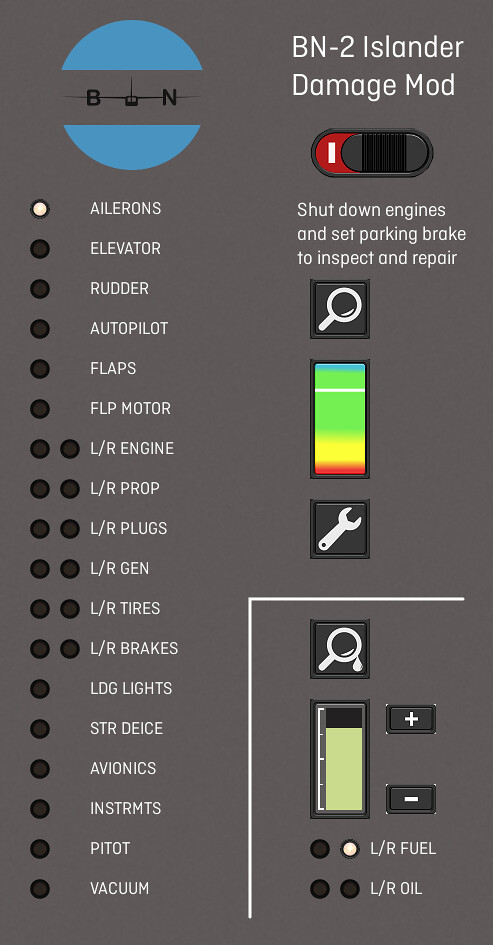
I have designed an "Inspect & Repair" panel which needs to be tested too.

I'll keep you updated with the progress of the project, but it should be ready by Christmas!

See you then!
 
One question, im from Brazil, and instruments already on strange position for us... you know how we can move the gauges?

Original is

Air Speed | ADI | VSI
Altimeter | HSI | Turnbank

The normal configuration on South America is:

Air Speed | ADI | Altimeter
Turnbank | HSI | VSI
 
One question, im from Brazil, and instruments already on strange position for us... you know how we can move the gauges?

Original is

Air Speed | ADI | VSI
Altimeter | HSI | Turnbank

The normal configuration on South America is:

Air Speed | ADI | Altimeter
Turnbank | HSI | VSI

They are modeled in 3D, so there is no means of swapping the gauges for correct ones unless you can obtain the original source files which is highly unlikely since it is a commercial product and is still on sale.
 
Hi,

Did request this also direct to Virtuala, response was that the developer left the company, so there is no source-code anymore.

Marcel
 
Hi,

Did request this also direct to Virtuala, response was that the developer left the company, so there is no source-code anymore.

Marcel

Sadly... i love the BN2, but the panel configuration really bothered me.
 
Euroastar350 is right, unfortunately I just can not change the instruments location on the 3D panel.
I hope the damage mod will be good enough to have you give the British Islander a try!
 
Hello!

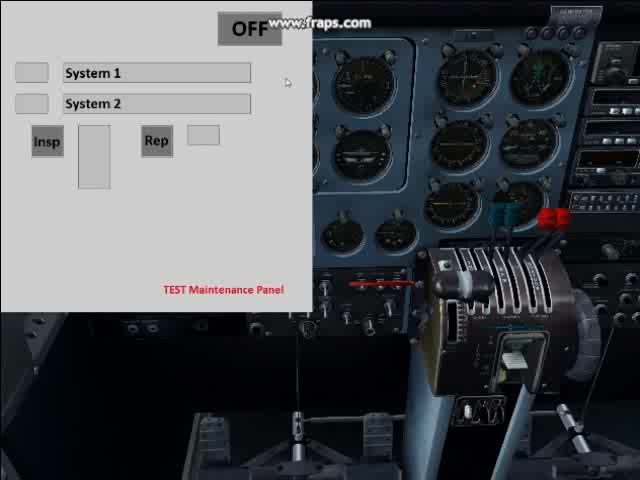
A quick update about how the BN-2 Damage Mod is coming along. Quite nicely I must say : I have been pretty glad that the maintenance panel code was not too buggy. So here is a link to a video showing the main features on a 2 system test gauge :
- Activation if engines cut and park brake set
- system selection
- system inspection and repair
I have also implemented what I think a big improvement from the existing damage mods : the inspection and repair are not instantaneous (even though I had them pretty short for the video). Fixing a failed system costs you a bit of time, hence teaching you a lesson so that you will not do the same mistake again. What is the whole point about the damage mod : paying attention to the gauges on the instrument panel. If you can fix evreything with one single click, why bother with these darn figures?

I have not been able to embed the video in my message, so please follow the link to watch the video.

The work on the other gauge has been mainly focused on finding a way to "hijacking" FSX logic so that I can model a sluggish, cold engine or the RPM loss on a faulty plug magneto dead cut test. Thanks to Tom Aguilo's XMLTools and Herectic's help, I am pretty close to reaching this target.

See you soon!

https://www.flickr.com/photos/80582198@N05/37648814706/in/datetaken-public#

What's below is a PICTURE, not a video. Click on the link above to watch the video :

37648814706_e72f1f12c3_z.jpg
 
Code for a vertical progress bar (you'll have to take the input variable and divide it to obtain the progress bar's pixel height; 50 pixel in this example):
Code:
<Element>
<Position X="1" Y="50"/>
<Shift>
<Value>(A:PAYLOAD STATION WEIGHT:6, pounds) (A:EMPTY WEIGHT, pounds) 50000 &lt; if{ 111.9 } els{ 50000 54000 (A:EMPTY WEIGHT, pounds) rng if{ 149.2 } els{ 54000 59000 (A:EMPTY WEIGHT, pounds) rng if{ 126.6 } els{ 59000 62500 (A:EMPTY WEIGHT, pounds) rng if{ 152.4 } els{ 161.7 } } } } / 50 min</Value>
<Scale Y="-1"/>
</Shift>
<Rectangle Width="40" Height="50" FillColor="Limegreen" Bright="Yes">
<HeightCode>(A:PAYLOAD STATION WEIGHT:6, pounds) (A:EMPTY WEIGHT, pounds) 50000 &lt; if{ 111.9 } els{ 50000 54000 (A:EMPTY WEIGHT, pounds) rng if{ 149.2 } els{ 54000 59000 (A:EMPTY WEIGHT, pounds) rng if{ 126.6 } els{ 59000 62500 (A:EMPTY WEIGHT, pounds) rng if{ 152.4 } els{ 161.7 } } } } / 50 min</HeightCode>
</Rectangle>
</Element>
 
I feel like you are suggesting something to me! ;)
I’ll probably use that for the fuel/oil inspection gauge, but I do not want to show the wear level too accurately. In real life, I suppose a pilot always acts if something could go wrong. If the health status is known too precisely, the sim pilot knows that this system will not fail soon, so a bit of mishandling won’t harm too much. I don’t want that. The 4-color indicator keeps a certain amount of uncertainity, since the color breakdown is as follows (not explained in the vid, granted):
- blue : 100 to 90% health
- green : 90 to 30%
- yellow : 30 to 10%
- red : 10 to 0%
So a green light could mean an almost new part as well as a aging one. You still get a nice margin before a failure though.
Besides, this way things are a bit more challenging : am I repairing it, and then have to wait 5 min before I start, or am I leaving now with a risk of failure?
I feel that flying is more fun that way, bur your input would be appreciated!
 
For uncertainty, there's random number generators for failure accumulation rates and damage tolerance.

Since you won't be able to simulate a slightly rough running engine or a work out oil pump, a status bar is everything a user will have to judge the condition of the engine.
Besides that, it's hard to judge the exact amount of damage without seeing a percentage superimposed on the bar. And by using color codes, you can even use your coloring scheme.
 
So, what's up regarding the Islander?

I have mostly fiddled with the MDL lately.
Thanks to Arno's MCX, the throttle levers' positions are not depending on the A:var anymore, but on a L:var. So now the power loss due to a faulty mag during the dead cut test does not end up in a automoving throttle lever, and power restricted engine can be pushed to 100% without the lever springing back to 50%. It does not sound very impressive, but it's really nice immersion-wise.
One last point being tackled right now is trying to get rid of the overriding joystick's throttle movement. This means SimConnect and the C++ universe that is very, very intimidating. I have managed to compile and run two samples from the SDK so far, and Simon856 gave precious tips about how implementing a intercept and mask C++ gauge. So I see the light at the end of the tunnel.

Heretic, my point is precisely preventing the sim-pilot to "judge the exact amount of damage". During the preflight visit of a real plane, there are no percentage readers telling the pilot that the engine is 36% worn, or the tires 96% new. The pilot has to make an educated guess. That is why I don't want to be too accurate.
But I could do is randomly change the failure threshold for each system.

Stay tuned for the next updates!
 
XMLKeys or one of the other classes in XMLTools can interact with joystick axes. Might be worth checking out.

If you need a random number generator: http://www.fsdeveloper.com/wiki/index.php?title=XML:_Random_Number_Generators
Example number one works very well for me and is used (with a bit of post processing) by MI Tool.

You can implement an optional overlay showing the percentages for each parameter. Will also help with debugging and retains the "hard" mode as default.
Personally, I'd like to know when exactly to repair or refill things because life's too short to have a major malfuction during a flight.
 
Hello,
Just a little comment about the last developments of the Damage Mod for the Islander with one good and one bad pieces of news.
I am finished with the systems gauges (tested and validated in sim), except the engine ones that are more complicated. The panel gauge will be dealt with later.
The prop pitch levers anim is going to be amended just like the throttle levers with the “Intercept, Mask and Pass” C++ gauge, since a damaged prop will not be able to be set to lower pitch.
The bad news is that my FSX files somehow got corrupted in the last few days, what has forced me to uninstall the sim and reinstall evertything from scratch. I am not done getting everything back to the normal, so my slow development pace is not accelerating much.
I am really sorry about that L
The good news is that the FSCaptain team has agreed to slightly adapt their code, so that failures will be passed from one module to the other! For instance, a wear-induced failed generator from “my” DM will be detected by FSCaptain, and a bird strike in the engine will modify the wear index in the DM.
So, as a former French president put it : “the slope is steep, but the path is straight”!
I wish you a pleasant year, clear skys in sim and in the real life. Stay tuned for the next update!
 
So, what’s up with the Damage Mod for the Islander?
The engine gauges needed a bit of work to have all the individual failures work together (warming up, wear, dead cut mag test). The missing bits are now ironed out. I have also taken the opportunity to simulate the sluggish response to throttle input of a cold engine.
The Joystick throttle Intercept, mask and pass C++ gauge was cloned to « hijack » prop pitch input from an external controller, so that the pitch response test can be fully and accurately simulated.
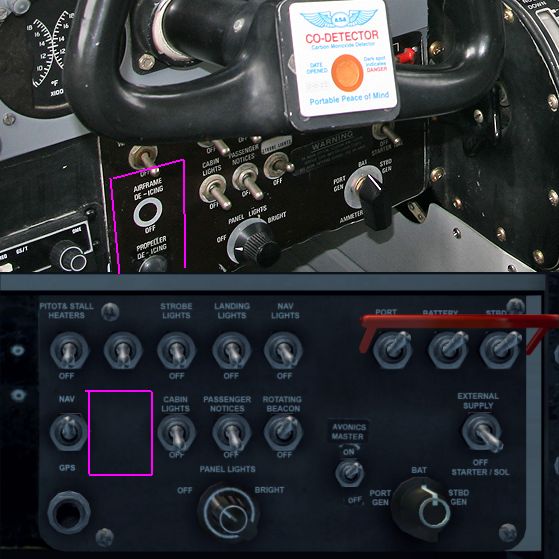
The Islander VC was missing a switch to toggle structural deice on and off, but such a switch is now standing just left of the airspeed indicator (thanks to Blender and the Blender2FSx toolkit).

Coding-wise, the last task is to amend my test control panel to handle the 36 systems and corresponding buttons. I have not decided yet if I want to include the FSCaptain interface as a default feature or an addon. The timeline for the release of the v1.81 beta will tell!

Releasing the Damage Mod has never been so close! So stay tuned for more!
 
Last edited:
"The Islander VC was missing a switch to toggle structural deice on and off, but such a switch is now standing just left of the airspeed indicator (thanks to Blender and the Blender2FSx toolkit)."
Does Flight1 know that you have modified their .mdl file?
 
Flight1 has very kindly allowed me to modify their VC model file.
I wouldn't have fiddled with it without their written consent.

But thanks Robert for asking before the mod is out.
 
Hiya,

Really looking forward to this. Still love to fly the islander, especially in the Caribbean.

Question about the de-icing switch, is below on the switch-panel not a better suited place? In real-life it's also placed there and in FSX there is also place for a switch.
islander-deice.png


BTW if you need a beta-tester, should give a shout!

Regards,

Marcel
 
Back
Top