
• Which the release of FS2020 we see an explosition of activity on the forun and of course we are very happy to see this. But having all questions about FS2020 in one forum becomes a bit messy. So therefore we would like to ask you all to use the following guidelines when posting your questions:

    • Tag FS2020 specific questions with the MSFS2020 tag.
    • Questions about making 3D assets can be posted in the 3D asset design forum. Either post them in the subforum of the modelling tool you use or in the general forum if they are general.
    • Questions about aircraft design can be posted in the Aircraft design forum
    • Questions about airport design can be posted in the FS2020 airport design forum. Once airport development tools have been updated for FS2020 you can post tool speciifc questions in the subforums of those tools as well of course.
    • Questions about terrain design can be posted in the FS2020 terrain design forum.
    • Questions about SimConnect can be posted in the SimConnect forum.

    Any other question that is not specific to an aspect of development or tool can be posted in the General chat forum.

    By following these guidelines we make sure that the forums remain easy to read for everybody and also that the right people can find your post to answer it.

MSFS20 New Addon: MSFS LOD Maker - Simplify LOD Creation for MSFS

Messages
454
Country
senegal
Hello everyone,

I'm happy to share a new addon I've developed called MSFS LOD Maker. It was inspired by the Lodify addon and aims to simplify the process of creating Levels of Detail (LODs) for Microsoft Flight Simulator objects.
I was tired of manually doing the LODs for all my scenes so I thought about this.

Key features:
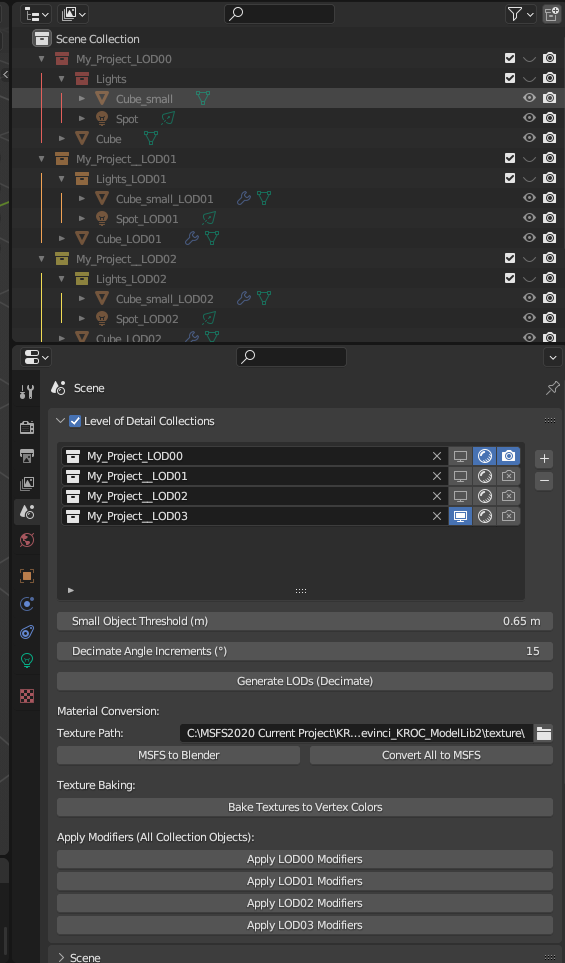
  • Automatic LOD generation using decimation
  • Material conversion between MSFS and Blender
  • Texture baking to vertex colors
  • Easy management of LOD collections
LOD_maker.png

You can find the addon and full documentation on GitHub: https://github.com/Devinci297/MSFS-LOD-Maker


I'd greatly appreciate if you could check it out and provide any feedback or suggestions.
This is an early release, so your input would be invaluable in improving the tool.
I'm also just learning about github and python also using claude to help me in the process.

Thank you,

Devinci
 
Last edited:
Trying to install in Blender 3.6:
Traceback (most recent call last):
File "D:\Blender\blender-3.6.14-windows-x64\3.6\scripts\modules\addon_utils.py", line 333, in enable
mod = __import__(module_name)
ModuleNotFoundError: No module named 'MSFS-LOD-Maker-0'
It installs but cannot be activated.
 
I think another user had the same issue. Here is their response from the Github:
"Yes it works, but by default the plugin can't write in the Blender folder. It's a Windows restriction. It is needed for the users to give the appropriate access rights to the folder where Blender is installed. Perhaps can you place that log file in another folder (documents or temp) ? It will ease the installation for people that don't know how to change folders access rights. If not, they have the solution in that thread."

I would investigate it if I could but I don't have my work PC at the moment.

Hope you are able to get it working
 
I think another user had the same issue. Here is their response from the Github:
"Yes it works, but by default the plugin can't write in the Blender folder. It's a Windows restriction. It is needed for the users to give the appropriate access rights to the folder where Blender is installed. Perhaps can you place that log file in another folder (documents or temp) ? It will ease the installation for people that don't know how to change folders access rights. If not, they have the solution in that thread."

I would investigate it if I could but I don't have my work PC at the moment.

Hope you are able to get it working
I am using Blender 3.6.5 and MSFS gltf exporter thats all
 
I think another user had the same issue. Here is their response from the Github:
"Yes it works, but by default the plugin can't write in the Blender folder. It's a Windows restriction. It is needed for the users to give the appropriate access rights to the folder where Blender is installed. Perhaps can you place that log file in another folder (documents or temp) ? It will ease the installation for people that don't know how to change folders access rights. If not, they have the solution in that thread."

I would investigate it if I could but I don't have my work PC at the moment.

Hope you are able to get it working
I hope you can work on this issue, because it has a lot of potention. Doing the LODs for MSFS2024 on international terminal models is a headache. 😄
 
Back
Top