• Which the release of FS2020 we see an explosition of activity on the forun and of course we are very happy to see this. But having all questions about FS2020 in one forum becomes a bit messy. So therefore we would like to ask you all to use the following guidelines when posting your questions:

    • Tag FS2020 specific questions with the MSFS2020 tag.
    • Questions about making 3D assets can be posted in the 3D asset design forum. Either post them in the subforum of the modelling tool you use or in the general forum if they are general.
    • Questions about aircraft design can be posted in the Aircraft design forum
    • Questions about airport design can be posted in the FS2020 airport design forum. Once airport development tools have been updated for FS2020 you can post tool speciifc questions in the subforums of those tools as well of course.
    • Questions about terrain design can be posted in the FS2020 terrain design forum.
    • Questions about SimConnect can be posted in the SimConnect forum.

    Any other question that is not specific to an aspect of development or tool can be posted in the General chat forum.

    By following these guidelines we make sure that the forums remain easy to read for everybody and also that the right people can find your post to answer it.

MSFS24 SimPropContainers

rhumbaflappy

Administrator
Staff member
Resource contributor
Messages
6,521
Country
us-wisconsin
Just to start a conversation about SimPropContainers.
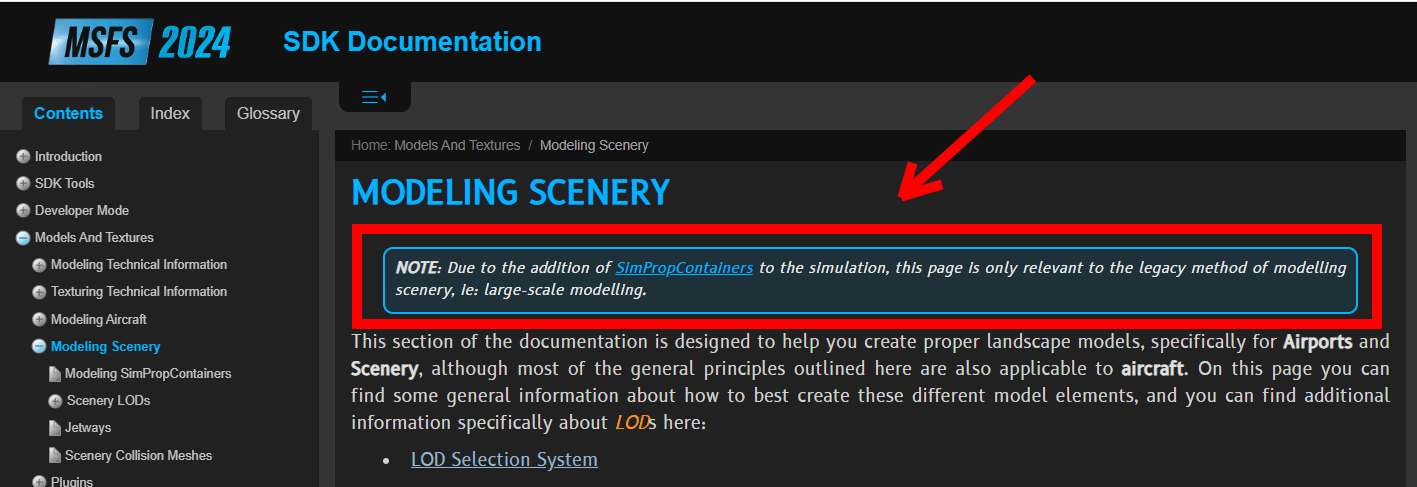
This is a new thing introduced in MSFS 2024. Why do we need to be concerned with it?
Why.png


You can create quite complex scenery models (and aircraft?) with this method. For example, instead of modeling windows into your wooden_shack_027 model, you can create a SimPropContainer to add SimProp windows.
That means you can create assets (windows, doors, vents, chairs, rooftop AC units...) as library objects with proper LODs for their size and complexity, and stick them onto other objects. The result is an XML file which will be compiled to .spb and each object having it's own LOD setup.

The SimPropContainer system allows a modular approach to creating objects in the sim by controlling LODs to it's modular parts, without the need for massive destructive decimation to a single model. Examining some of the default SimPropContainers (for example, the oil rigs) shows just how complex a container can become, while easily controlling LODs for the object, and allowing higher FPS for the sim.

So let's start a discussion. Is anyone doing this with their scenery models or SimObjects? How is this done? How hard is this? Are there assets already in the default objects we can use for our own SimPropContainers?
AirportLFPG2024 in the SDK samples has a complex usage of SimPropContainers for us to look at. But there may be some advantage to using SPCs for less complex projects.
 
KPNN-terminal-Simprop.png


My SimPropContainer proof of concept. Four parts: the main building (converted into a SimPropContainer), 3 outdoor lamps (two on the other sides) and AC unit as simple SimObject with a rotating fan that turns on when the temperature exceeds 65°F.

All works very well and i kind of like it. Process is simple, like a block constructor, each part is a separate object with your own LODs, so its easy to made another building with the same AC unit for example. In this particular case SimProp maybe not necessary, but in more complex constructions very usefull imho.

Have to make lights with "invisible cube" trick, but its okey, i think.
 
An interesting topic!

@Heermeyer
May I ask how you created the building? Did you first create the entire model with all its details and then detach the details from the model? And how did you process the detached parts, as Scenery Objects or as Simobjects?

My questions relate to a problem I'm having with a model. The model is very large, both in its dimensions (80m x 80m x 95m) and in the number of polygons/verticals (5.5 million polygons/2.7 million vertices). Yesterday, I de-engineered the model, leaving only the basic structure. The basic structure now has 1 million polygons and 540,000 vertices. The level of detail (LOD) representation has improved somewhat. But what's the next step? Do I need to export all the 33 detached parts as individual objects and create them as scenery objects with their own LODs? Or do they need to be Sim objects?
 
First Scenery Object: building with only dummy cubes instead of lamps and AC just for AO baking in Substance Painter. LODs in WIP right now, but i suggest about 5 levels of it.
Second Scenery Object: lamp with standard "MSFS2024 Advanced Light" with same texture but different material. 2 LODs and invisible cube.
Third SimObject: AC unit with four LODs.
All three separated from the beginning and combined within SimPropContainer with standard sdk gizmo tool.

The same as putting them together right in SDK, but now it is a single object.
For large objects, I would probably do the same: a main big object, to which attach the remaining smaller ones. A kind of detailing. But such large objects is uncharted territory for me too, want to try a little later.
Do I need to export all the 33 detached parts as individual objects and create them as scenery objects with their own LODs? Or do they need to be Sim objects?
So i think answer is yes on first question. And no, they don't need to be done as SimObject. I did one just for testing purpose.
 
I'm not sure commercial projects could use the simprop objects already in the game, but for non-commercial projects, There are a bunch of objects ready for use. You just assemble them in DevMode. They have their own LODs, and you could study them by using the vfsprojection and MCX to break down the LOD system used.
 
I just tried twice to convert the rebuilt model to a SimProbContainer, but both times it resulted in an MSFS24 crash. I've reached the end of the line with this model. It simply doesn't work, and I suspect the problem lies with the model itself. I've been trying for three days to get it working properly, but nothing has helped. All my other models work fine; only this one is causing problems. It seems the model has become unusable in MSFS24 :-(
 
On my first attempt, i created an empty container and placed the models in it, "the right way," according to the documentation, but it didn't work. But when i "converted" the model into container, everything worked fine. On a global scale, i think this tool is best suited for Asobo itself, when you need many similar complex objects, oil platforms is a good example. For individual scenery objects it's simply a matter of structural organization.
 
Things like antennas or light enclosures or posts should disappear from your models as you decimate the model for more distant LODs. If those are separate models, you can control the decimation of the main building without worrying about how they are handled by the sim. I think you can also snap elements to curved surfaces in DevMode when creating the simpropcontainer.
 
Untitled.png


This is a Microsoft SimPropContainer. All these elements have their own LODs. What if you wanted a campsite with a dozen tents and reusable accessory objects? You'd need a library of the tents and objects. To make a scene with the tents and objects without the container feature might be more difficult, as the SimPropCreation has snapping, so each tent would have accessories snapped in place, and the whole container can then me moved around with everything properly placed. The chair, for example could be used in several different tent containers, and when you adjust the position of the tents, the chairs would all be aligned. Maybe the chair needs only 4 LODs. The tent needs six? Not a problem because they are separate.

So the SimPropContainers solve some LOD problems, but also solve some placement problems. And it becomes one object in case you want a library of tents or complex camping sub-scenes. Or maybe a library of pickup truck SimPropContainers, with different items loaded or near the trucks. There are lots of possibilities. And the sim has lots of assets that can be used in containers, just like the above tent scene. You could have a collection of basic barns or watertowers that reuse assets and can be configured more easily. You can reuse windows, doors, vents, aircons, lights, antennas... and SimPropContainers have that snapping feature that makes their creation easy.
 
While studying MSFS 2024 SDK Docs on SimPropContainers last night, (1) of multiple linked sub-topics in the docs was this:

https://docs.flightsimulator.com/msfs2024/html/2_DevMode/Scenery_Editor/Objects/Light_Objects.htm

"LIGHT OBJECTS

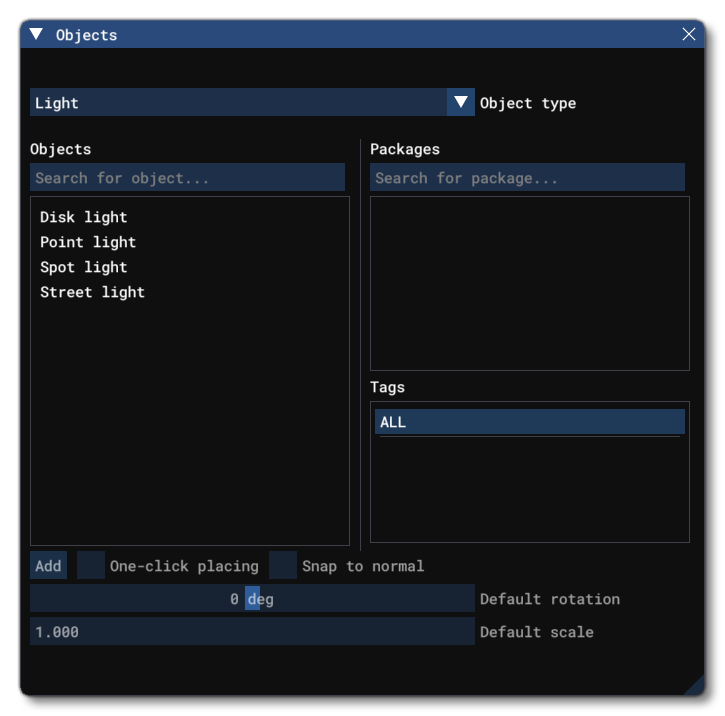
A Light object is an object element that is used to add different kinds of lights to a SimPropContainer Object only. When you select this object type you will be presented with a list of different light object elements listed in the Objects window:


The Light Object Elements Listed In The Objects Window

Light object elements are a visual effect that can be used to create different types of lights within a SimProp Container object, and initially you can create one of the four main light types: Disk, Point, Spot and Street Light. Note that the different light types shown in the Objects window are simply different configurations of the same properties, so you can quickly place lights of the same type, but once placed, they are all fully configurable."


IIRC, MSFS "visual effect" lights can also be used to create different types of lights NOT within a SimPropContainer object ? :scratchch


What about the info in this (and other) threads:

https://www.fsdeveloper.com/forum/threads/msfs-scenery-lights.455868/

https://www.fsdeveloper.com/forum/attachments/light-preset-png.85454/


Also, consider MCX' ability to "attach" light objects to 3D models (not explicitly specified via XML as SimPropContainers) ? o_O


Is Asobo changing the rules for the SDK (again), or is it just... "Broken English" ?:duck:

Code:
https://www.youtube.com/watch?v=90WD_ats6eE

Code:
https://www.youtube.com/watch?v=gHrsv0NVa6k

GaryGB
 
Last edited:
We used SimPropContainers in this project. We exported the Main Terminal / Control Tower / Terminal 2 and others in different parts each with their LODs. Then all the separate parts are put together in the SDK.

The only feature I wish it had would be to create empties or nodes in Blender and have the parts attach to those nodes of the main object by just typing the node name or selecting it. Kind of how the beacons are attached to objects

 
The only feature I wish it had would be to create empties or nodes in Blender and have the parts attach to those nodes of the main object by just typing the node name or selecting it. Kind of how the beacons are attached to objects
Thank you for this, now I know where the Gemini hallucinations about this feature came from:

1773103305243.png


Eventually I realized you can only snap to vertices. :)

So right now I'm trying to optimize my airport terminal by replacing a bunch of arrays of terminal chairs with distinct objects that each have their own LOD. I've already created a "skeleton" object that has vertices at each location where a chair should go, and I can just go into the SDK and add a chair, snap it to a vertex, then add another chair snap it to a vertex... The problem is, I have to do this a few hundred times, and also many chairs have different arrangements and orientations. Has anyone figured out a way to snap or place objects in a SimPropContainer programmatically, or export a SimPropContainer from a Blender scene where the objects are already in the correct location?
 
Second proof of concept. Populating area with multiple of an identical (almost) hangars. This is where SimProps shines in all its glory. First image is an exploded view of all parts and next one how it looks in the sim. Plus there is a two grunge textures (decal material) with randomized UVs for break up repetitions in walls and roofs, also a parts of the SimProps.

PM2-explode-view.jpg


PM2-hangars.png


14 hangars in one day. Personally i like LOD control and much easier construction process. I will use it more.
 
Your grunge and texture layers for the doors are overlapping simprops? There are no clipping/flickering issues if they’re separate objects in MSFS?
 
Second proof of concept. Populating area with multiple of an identical (almost) hangars. This is where SimProps shines in all its glory. First image is an exploded view of all parts and next one how it looks in the sim. Plus there is a two grunge textures (decal material) with randomized UVs for break up repetitions in walls and roofs, also a parts of the SimProps.

(Original images not included in quote)

14 hangars in one day. Personally i like LOD control and much easier construction process. I will use it more.

This is a good (and intriguing) worked example.

I would like to better understand what you are describing when you use the term "randomized UVs".

I recently started looking through the online texture download websites, and was disappointed how badly many of the "seamless" / auto-tiling textures look mapped over even a small surface, due to integral image repetition / redundancy.

That implies we may otherwise have to do more work editing our Albedo images after combining a larger merged / combined matrix of seamless image tiles for our 3D model surfaces.

That will likely be subject for a separate thread, unless SimPropContainers can somehow be 'snapped' on top of an existing 3D model surface to serve as a decal to minimize the visually perceptible image redundancy.


BTW: IIUC, your example hangars appear to be wall segments, which I would assume are joined together to make (part of) the hangar bases along with a separate set of SimPropContainer roof 3D models.

When the hangar SimPropContainers are assembled, do you (or does the MSFS compiler) "weld" the vertices to form a 'manifold' 3D model (which AFAIK is an essential attribute to optimize performance, proper shadow casting, and general object rendering in FS at run time) ?

I use extruded footprints and carve down primitive blocks that are already 'manifold' 3D objects, to form solids that in most cases are not intended to be 'open' to the surrounding 3D world environment as what technically could be regarded as "non-solids" (which requires special procedures to ensure proper shadow casting unless flat walls made of double-sided surfaces or dimensionally correct 'manifold' 3D walls are used).

Thanks in advance for a further explanation of your workflow and testing results. :-)

PS:

Your grunge and texture layers for the doors are overlapping simprops? There are no clipping/flickering issues if they’re separate objects in MSFS?

Grunge decal only on roofs and walls, 1mm off base mesh, no issues.

Would you please ZIP and link (1) of your example sets of hangar SimPropContainer "components" so we can test this in a 3D modeling application, and analyze for whether the resulting assembled composite hangar 3D model meets criteria for being a manifold solid ? :scratchch

Also, I believe it would be a good idea that we test how MSFS' compiler processes the 'grunge decal' at a 1 mm separation distance, so we can see whether or not it results in "flickering" (aka Z-buffer fighting Moire artifacts) if viewed from multiple tangents of view in FS at run time. ;)

GaryGB
 
Last edited:
Thank you for this, now I know where the Gemini hallucinations about this feature came from:

( Original image not copied)

Eventually I realized you can only snap to vertices. :)

So right now I'm trying to optimize my airport terminal by replacing a bunch of arrays of terminal chairs with distinct objects that each have their own LOD. I've already created a "skeleton" object that has vertices at each location where a chair should go, and I can just go into the SDK and add a chair, snap it to a vertex, then add another chair snap it to a vertex... The problem is, I have to do this a few hundred times, and also many chairs have different arrangements and orientations. Has anyone figured out a way to snap or place objects in a SimPropContainer programmatically, or export a SimPropContainer from a Blender scene where the objects are already in the correct location?

Sketchup uses a sophisticated inferencing engine which can be used with both normal and grouped / component objects:

Code:
https://www.youtube.com/watch?v=oHHYCwSlUjk

https://www.google.com/search?q=Ske...FCwgcKMi0xMy4zNy4xM8gHqwaACAE&sclient=gws-wiz


Inferencing, Groups, Components, Profiles, and parametric object assembly infrastructure via Ruby plugin scripts can create any 3D object.

One can semi-automatically do what you describe via Ruby plugin scripts.


A notable Ruby plugin script for this type of 3D modeling task is Profile Builder:

Code:
https://profilebuilder4sketchup.com/


But more often may use the Move tool to drag objects into alignment with inferenced vertices / other Points on another object's geometry.


I do not know if Blender has any or all of these capabilities via Python plugin scripts.


An interesting workflow used by an experienced Blender user / tutor is in this video (...might be good for making custom trees also):

Code:
https://www.youtube.com/watch?v=flkFn4mEdYc

GaryGB
 
Last edited:
I would like to better understand what you are describing when you use the term "randomized UVs".


PM2-blender-UV.jpg


"Random" UV position for different roof and walls decals. The only way i know to solve texture repetition problem.
Components are not welded, but as far i know the MSFS graphics engine is completely indifferent to this.
I use extruded footprints and carve down primitive blocks that are already 'manifold' 3D objects, to form solids that in most cases are not intended to be 'open' to the surrounding 3D world environment as what technically could be regarded as "non-solids" (which requires special procedures to ensure proper shadow casting unless flat walls made of double-sided surfaces or dimensionally correct 'manifold' 3D walls are used).

Can you give an example? This is very interesting.

And this is my project to examine, i would be very glad to hear your comments!

Edit: i cant remember what exactly the distance between base mesh and decals, maybe 5mm, or even 10
 
Last edited:
To ensure I am seeing everything you see, please state which version of Blender you are using for this task, and for creating this specific object set. :pushpin:

I'll try to take a look at this tomorrow (Sunday) when I get back to my main FS development computer. :)

GaryGB
 
Back
Top