
I've mentioned Tripo before, I think, it's a subscription 3D AI creation tool which I've found handy for 'clutter' and smaller objects which would require a lot of modelling time. Tripo offers two generation methods HD Model and Smart mesh. For the simulator I mostly use smart mesh as this gives a lot less vertices so that your models won't overwhelm the sim. Yesterday I noticed a preview of version 2 of Smart mesh, with two free tries, so I took a look. This seems to be a great improvement, giving a tidier, more logical topology. My first test was this little tractor which I've modeled by hand previously for my Taieri scenery. I just dropped an image into Tripo and in a few seconds it gave me this:

This was dropped into Blender, the material changed to MSFS, LODs added, and exported to the sim. It's not perfect, but very usable as-is. My default for this sort of thing is 5000 triangles, but this reverted to quad, so it actually ended up around 9000 triangles in the sim. It takes a couple of minutes to make LODs in Blender using Decimate.
You can view this model on Tripo for a 3D view by clicking here. Note that this is also a referral link, which gives me extra credits for every download or signup. You are free to download this model, and could even use it if it was useful.
You can have Tripo generate PBR textures, but this just includes a reduced roughness in Blender. I can choose the rendered texture resolution, from 512 to 8K. Note that texture rendering on Smartmesh costs 20 credits, on top of the model generation cost of 35 credits for the previous Smart mesh, although it looks like the new Smart mesh might cost 100 credits eventually.
Some models are more suited to Tripo, and not everything will give great results first time. Here's an example of something which took some experimenting to get right. This beat-up little woodshed is behind the aeroclub at Masterton, which I'm working on at the moment. I took a few photos, but using any one of these, or even multi images, didn't get close enough to the real shed.

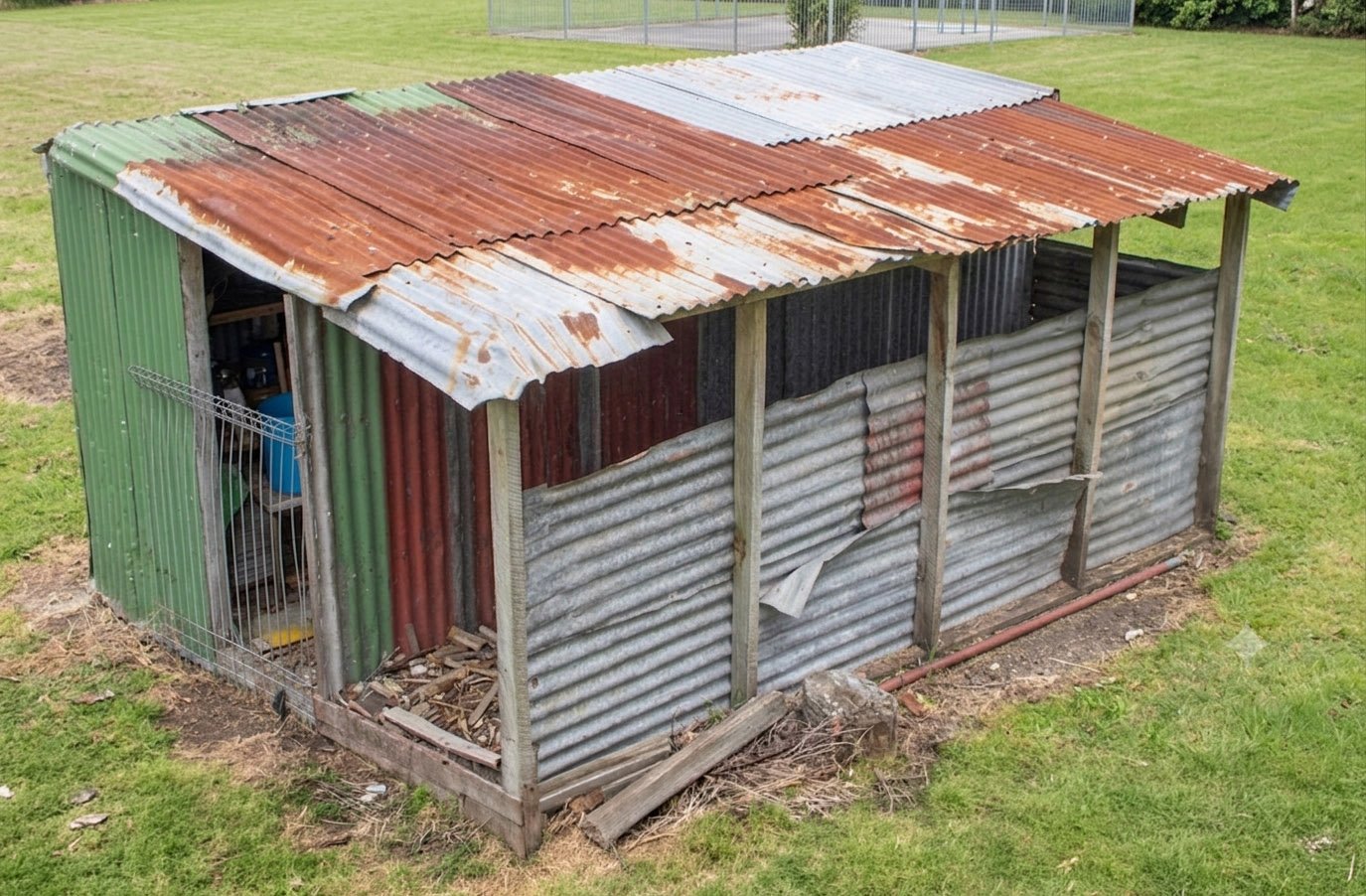
The problem was that I didn't have a photo showing more roof detail, which added a lot to the character, and the AI couldn't quite figure out where the openings were. I gave this photo to Google Gemini (free) and asked it to raise the view a bit and remove the bushes, and it gave this:
This gave a much better result, but still wasn't good enough, as the Smartmesh tool doesn't do a good job on the hidden sides. However it does give the ability to generate multi views, which gave me these images: (I've combined them into 1 and reduced the size here)

Here's the result in the sim:

The BBQ in the background is also AI, from a photo.
I did make a conventional model of this shed, just in case, and I'm not sure which will end up in the finished scenery. However this was a good test of Gemini for texture generation, I gave it the photo of the shed and asked it to give a texture image for the roof, and it gave this:

That's pretty impressive, and 100% usable.
I've previously used Tripo for cars, as you can just type a make/model/colour and it'll give a great result. In the top image here, the cabbage tree and birdbath in the background were AI generated.
A lot of Masterton (Hood) aerodrome is devoted to vintage aircraft, and I do hope to include a lot of these as static models, using Tripo from my own photos, which I hope to take in the spring when there'll be more accessible.
I'd certainly recommend giving Tripo a try, you can sign up for a free account, although the credits are somewhat limited, and I don't think it allows downloads of Smartmesh models, just HD. At the moment I'm continuing with my US$20 a month sub, I probably have too many subs for a pensioner, but what the heck, this is fun. I get 3000 credits a month, and a normal smartmesh model costs 55 credits including the texture.
Here's the Tripo link again.
This was dropped into Blender, the material changed to MSFS, LODs added, and exported to the sim. It's not perfect, but very usable as-is. My default for this sort of thing is 5000 triangles, but this reverted to quad, so it actually ended up around 9000 triangles in the sim. It takes a couple of minutes to make LODs in Blender using Decimate.
You can view this model on Tripo for a 3D view by clicking here. Note that this is also a referral link, which gives me extra credits for every download or signup. You are free to download this model, and could even use it if it was useful.
You can have Tripo generate PBR textures, but this just includes a reduced roughness in Blender. I can choose the rendered texture resolution, from 512 to 8K. Note that texture rendering on Smartmesh costs 20 credits, on top of the model generation cost of 35 credits for the previous Smart mesh, although it looks like the new Smart mesh might cost 100 credits eventually.
Some models are more suited to Tripo, and not everything will give great results first time. Here's an example of something which took some experimenting to get right. This beat-up little woodshed is behind the aeroclub at Masterton, which I'm working on at the moment. I took a few photos, but using any one of these, or even multi images, didn't get close enough to the real shed.
The problem was that I didn't have a photo showing more roof detail, which added a lot to the character, and the AI couldn't quite figure out where the openings were. I gave this photo to Google Gemini (free) and asked it to raise the view a bit and remove the bushes, and it gave this:
This gave a much better result, but still wasn't good enough, as the Smartmesh tool doesn't do a good job on the hidden sides. However it does give the ability to generate multi views, which gave me these images: (I've combined them into 1 and reduced the size here)
Here's the result in the sim:
The BBQ in the background is also AI, from a photo.
I did make a conventional model of this shed, just in case, and I'm not sure which will end up in the finished scenery. However this was a good test of Gemini for texture generation, I gave it the photo of the shed and asked it to give a texture image for the roof, and it gave this:
That's pretty impressive, and 100% usable.
I've previously used Tripo for cars, as you can just type a make/model/colour and it'll give a great result. In the top image here, the cabbage tree and birdbath in the background were AI generated.
A lot of Masterton (Hood) aerodrome is devoted to vintage aircraft, and I do hope to include a lot of these as static models, using Tripo from my own photos, which I hope to take in the spring when there'll be more accessible.
I'd certainly recommend giving Tripo a try, you can sign up for a free account, although the credits are somewhat limited, and I don't think it allows downloads of Smartmesh models, just HD. At the moment I'm continuing with my US$20 a month sub, I probably have too many subs for a pensioner, but what the heck, this is fun. I get 3000 credits a month, and a normal smartmesh model costs 55 credits including the texture.
Here's the Tripo link again.


