
• Which the release of FS2020 we see an explosition of activity on the forun and of course we are very happy to see this. But having all questions about FS2020 in one forum becomes a bit messy. So therefore we would like to ask you all to use the following guidelines when posting your questions:

    • Tag FS2020 specific questions with the MSFS2020 tag.
    • Questions about making 3D assets can be posted in the 3D asset design forum. Either post them in the subforum of the modelling tool you use or in the general forum if they are general.
    • Questions about aircraft design can be posted in the Aircraft design forum
    • Questions about airport design can be posted in the FS2020 airport design forum. Once airport development tools have been updated for FS2020 you can post tool speciifc questions in the subforums of those tools as well of course.
    • Questions about terrain design can be posted in the FS2020 terrain design forum.
    • Questions about SimConnect can be posted in the SimConnect forum.

    Any other question that is not specific to an aspect of development or tool can be posted in the General chat forum.

    By following these guidelines we make sure that the forums remain easy to read for everybody and also that the right people can find your post to answer it.

Blender [2020] What is wrong with this object? Solved (I hope)

Messages
1,819
Country
australia
I have a very simple object (a floating dock with a mesh with material MSFS collision set) which is part of a larger object which I created by simply loading the larger object into Blender, removing part of it and then exporting via (MSFS) Multi exporter glTF addon.
When in devmode and I select the object and then 'Add' it does not display correctly maybe not even display at all.
It has been suggested that the geometry may be wrong but I can't see anything wrong.

The blender file can be downloaded via https://mega.nz/file/pJQiBYwS#kqMT0jFtff4YuBi2-qADD_Mzj1vmj95puFA7iXa_1Bs

This is how it displays in devmode -
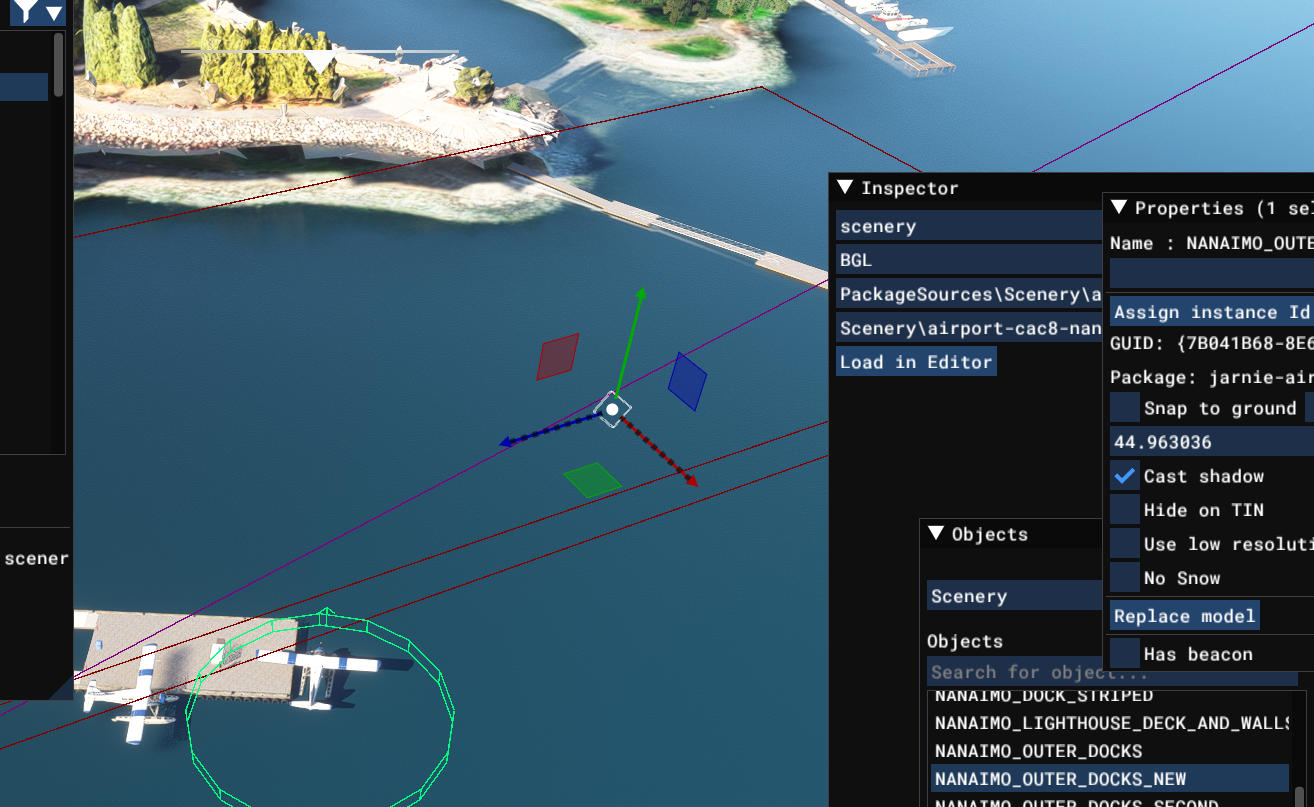
cac8_new.jpg
 
Last edited:
I had a quick look at your materials. One of the textures shows as a .jpg format file, which in my experience Blender does not handle.

Another has its properties in MSFS showing as "Invisible."

When I changed all the materials to simple MSFS colours, it all rendered ok, suggesting to me that the geometry is OK and the issue lies with your materials.

I think if you work through the materials and check that the texture is .png and not .jpg; and that MSFS colours are set to "Standard" you may be ok.

Hope this helps.
 
Sorry,

I was lazy - textures are "brown_planks_03_diff_4k_brown2.jpg" and "concrete tiles rotated_DARKER.jpg"

Material 002 and Material 005 show as "Invisible" in MSFS Material Parameters
 
Thanks Sperx.
I will try your suggestions. Also I am now using Blender 3.6 and the original object was created with 3.1 and I had no problems originally using .jpg materials and MSFS materials set to invisible (for the collission) which I found strange. The mesh set to invisible was done so that it doesn't display in MSFS as it is only there to ensure that floatplanes can't go over the dock ie collide.

Anyway thanks again I will convert the .jpgs to .pngs.
 
Hello again Sperx

I removed all material images and just assigned a base color and also made the MSFS material Standa5rd instead on Invisible and I still have the same problem.

Mamu suggested in Discord that it could be in the geometry but using standard Blender cubes surely it is something else/
 
I use standard Blender cubes to prevent the result from incurring any unwanted 'flavor' from the process.

But things can still get 'mixed up'.

Seems to happen more when the Materials I put in the Blender contain volatile spirits. ;-)

GaryGB
 
Last edited:
I also am using standard Blender cubes adjusted to a rectangular shape.
Now here comes something interesting.
I found the original Blender model file has a recent date so must have been saved regardless of any changes I may have made. I then loaded the backup Blender file and exported and when I build in MSFS there are HEAPS of warnings such as cube.023_primitive defines tangent not currently supported and also window_866_primitive.
I might be onto something. Strangely there are less than 23 cubes in the Blender file for the model.
 
As a more serious reply, this is what Google AI says regarding your Blender alert messages (if one can cautiously take a Google AI reply ...'seriously'):

https://www.google.com/search?clien...ly+supported+window_866_primitive#lfId=ChxjMe


Also, you may recall the info regarding essential principles for constructing properly functioning Blender "Collider" objects as cited in your prior FSDEV threads ...from some of these query hits:

[EDITED]

https://www.fsdeveloper.com/forum/threads/how-are-scenery-objects-made-to-be-obstacles.453785/


https://www.google.com/search?client=firefox-b-1-m&q=site: www.fsdeveloper.com Blender COLLIDER

I do not yet use Blender to any significant extent, however I would suggest checking whether MSFS exporter and FSPackageTool can correct 3D mesh for any Blender 3D modeling methods that utilize loop cuts, n-gons and tangents, as AFAIK, these do not compute well- if at all- with the Triangle engine used by Windows Direct-X infrastructure that underlies all FS SDK compilation and run time rendering.


As FS renders in Direct-X, Blender default Quad-based mesh geometry predisposes to trouble vs. Sketchup's default Triangulated geometry. :pushpin:

One must perform additional work to overcome Blender's default Quad-based methods to meet FS SDK Triangulated geometry requirements.


https://www.google.com/search?q=Ble...AHALIHALgHAMIHAMgHAIAIAA&sclient=gws-wiz-serp


https://www.google.com/search?q=Ble...iATCBwcwLjMuMS4zyAcrgAgA&sclient=gws-wiz-serp

[END_EDIT]


MCX' MSFS glTF export resolves issues with some non-triangulated geometry generated in 3D modeling apps like Blender. :wizard:


https://www.fsdeveloper.com/forum/t...r-tool-add-on-for-sketchup.434704/post-717861


https://www.google.com/search?clien...ling+using+standard+Blender+cubes#lfId=ChxjMe

https://www.google.com/search?q=site:+www.fsdeveloper.com+GaryGB+n-gons&sca_esv=977e0bbde19a8b17&biw=1088&bih=504&ei=fFGdaczyH-LsptQPko3qgAY&ved=0ahUKEwjMoInly_GSAxVitokEHZKGGmAQ4dUDCBE&oq=site:+www.fsdeveloper.com+GaryGB+n-gons&gs_lp=Egxnd3Mtd2l6LXNlcnAiJ3NpdGU6IHd3dy5mc2RldmVsb3Blci5jb20gR2FyeUdCIG4tZ29uczIFECEYoAEyBRAhGKABMgUQIRigATIFECEYoAEyBRAhGKABSM0ZUMoNWMoNcAF4AJABAJgBcKABcKoBAzAuMbgBDMgBAPgBAZgCAaACjQGYAwCIBgGSBwMwLjGgB8IEsgcDMC4xuAeNAcIHAzMtMcgHEIAIAA&sclient=gws-wiz-serp

https://www.google.com/search?q=site:+www.fsdeveloper.com+GaryGB+"n-gon"&sca_esv=977e0bbde19a8b17&biw=1088&bih=504&ei=rVKdadq_KYWxptQPrJX44AI&ved=0ahUKEwiaysr2zPGSAxWFmIkEHawKHiwQ4dUDCBE&uact=5&oq=site:+www.fsdeveloper.com+GaryGB+"n-gon"&gs_lp=Egxnd3Mtd2l6LXNlcnAiKHNpdGU6IHd3dy5mc2RldmVsb3Blci5jb20gR2FyeUdCICJuLWdvbiIyBRAhGKABMgUQIRigATIFECEYoAEyBRAhGKsCMgUQIRirAjIFECEYqwJIxhxQ1Q5YyBhwAXgAkAEAmAF9oAHkAaoBAzAuMrgBA8gBAPgBAZgCA6ACtQLCAggQABiwAxjvBcICCBAhGKABGMMEmAMAiAYBkAYBkgcDMS4yoAeuB7IHAzAuMrgHpwLCBwcyLTEuMS4xyAcrgAgA&sclient=gws-wiz-serp


GaryGB
 
Last edited:
Thanks Gary for trying to help me sort out the problem.

Well it seems that my problem is not object related as I created a brand new object in Blender, exported it and added to my project and the same problem happens. Something in the project itself must be screwed up. Not sure if I want to spend any more time on it looking for something I know little or nothing about.
Either that or the addon for Blender which allows for Blender to export an object for MSFS.
 
Last edited:
Since the task is creating a Collider object that by design criteria has less complex geometry, I'd import / export it via MCX.

I may try Sketchup to examine the attached object above, then import to MCX, and export a MSFS glTF to test in DevMode.

GaryGB
 
Thanks Sperx.
I will try your suggestions. Also I am now using Blender 3.6 and the original object was created with 3.1 and I had no problems originally using .jpg materials and MSFS materials set to invisible (for the collission) which I found strange. The mesh set to invisible was done so that it doesn't display in MSFS as it is only there to ensure that floatplanes can't go over the dock ie collide.

Anyway thanks again I will convert the .jpgs to .pngs.
Ah. There you have the advantage over me as I am at the very basic level of being happy to produce a structure which sits on an airfield. Collisions are way beyond me. TBH I thought Blemder 3.4 was the only version with a viable exporter. Anyway, let us know if the issue was with materials.
Thanks Gary for trying to help me sort out the problem.

Well it seems that my problem is not object related as I created a brand new object in Blender, exported it and added to my project and the same problem happens. Something in the project itself must be screwed up. Not sure if I want to spend any more time on it looking for something I know little or nothing about.
Either that or the addon for Blender which allows for Blender to export an object for MSFS.
One other issue I have encountered with scenery objects created in Blender and apparently exported correctly but being invisible in MSFS2020 has been resolved by unifying all the component objects within Blender. In object mode select ALL objects and then Ctrl-J to join them. I have no explanation for why this might have worked for me, it just has on occasions. I always save the Blender file before I do this, and then "save as" again with a "J" suffix to the file name, that way I can revert to the Blender file with separate objects if necessary.
 
I changed some things. You didn't apply transforms, or center the object on the world center. And there was something wrong with the invisible materials, so I recreated them. You definitely can use jpgs, but they will be saved as pngs on export.
 

Attachments

Thanks Dick,

Still no go. It seems that it has something to do with the actual project as I have no problem using it in other projects.
I also tried loading the Blender file into Blender v3.1 (which seems to have a different MSFS exporter than v3.6) and still it does not display in MSFS correctly.

All I can think of is that very recently I moved the 'location' (geo references) of the airport as before when starting a flight MSFS displayed the map of the area showing the actual starting locations which required dragging the 'map' to the correct area where the starting location were displayed and selectable.
Anyway I might send you a private message together with the entire project zipped and if you get time maybe you could check it out. Very strange.
Thanks
 
Last edited:
I now think that I have solved this problem.

I think I know what has caused the problem. I have done a lot of changes taking many hours even going back to past versions of the project when I had no problems. I then decided NOT to rename the package before copying to the community folder (which I did to ensure it was loaded after mamu's marinas addon scenery for populating docks, boats etc) and also used an old package copied to the community folder. Voila the object then displayed correctly. Maybe it is a no no to simply rename a package rather than modify the different files (.xml) and file names so that the package gets created with the correct name. Anyway I now have the objects displaying correct when add(ing) from the objects list.
Thanks for trying to solve the problem for me.
I am thinking now a guid conflict?
 
Last edited:
Hi John:

Are you saying that you placed both the new package and the older package into MSFS \Community folder to be loaded at run time ? :scratchch

If so, there 'could' be GUID conflicts, although I am not certain in MSFS that can cancel / exclude display for MSFS 3D models as glTF's.


Other objects such as airport / terrain polygons and vector objects with matching GUIDs can cancel / exclude display of both objects.


MCX would be the quicker means to view GUID info between various builds of your 3D models. ;)

GaryGB
 
Yes Gary.

I had the renamed package in the community folder and opened the original (named) project in DevMode.

I had no idea that it was a problem with GUID (otherwise I may have used MCX) and was chasing other possibilities especially after someone suggested there could be a problem with the model's geometry.

It's really annoying that MSFS loads files from the community folder in alphabetical order (the reason why I renamed the package to be 'after' mamu's marina addon). Wasn't there a method in FSX to change the order of loading with 'priorities' to ensure loading order?

Anyway using Didier's method I renamed relevant file names and xml data in the project so that the project now builds the package with the new name.

To anyone reading this. ensure the project name starts with a letter which is alphabetically after any know addon which auto populates scenery where your parking/starting locations are located. As mamu's marinas (seems to) auto populates areas which have satellite imagery 'ghosts' of existing docks that resulted in aircraft being tipped over by mamu's boats populating the docks as it was loaded after my airport with a name starting with Jarnie or CAC8 (now named Nanaimo). This was also a problem with my Sechelt package until renamed.

If there was a method to set priorities then this would not happen IMHO.
 
AFAIK, a way to enforce loading priorities for Packages in \Community is to use increasingly longer alpha-numeric filenames.

Using 1, 2, or 3-character prefixes may not be enough to work around MSFS' current Package loading sequence mechanism.

AFAIK, even MSFS Package-type "Hints" are not enough to ensure preferred Package loading order.

GaryGB
 
Thanks Gary,

The problem I encountered was simply fixed by the selection of the first character for the package name.

Mamu's marina package is named mamudesign-marinas so I just made sure my package(s) were named anything which didn't start with the letter 'm' eg. Nanaimo_CAC8 and Sechelt_CAX3. It gets difficult when the airport name and ICAO starts with a letter alphabetically before the letter 'm' eg Lake Powell CAQ8.
It was suggested that I prefix my packages with zz but I don't like that.

The problem of 'conflicts' in scenery would not happen very often IMHO and probably only with scenery packages which place objects automatically.
 
I hope that works into the future, both for your MSFS installation, as well as that of end users. :)


I suggested the use of multiple prefix alphanumeric characters because your package must contend with numerous packages out in the wild.

Some end users may have many packages which might be mis-interpreted as to priority by Asobo's recent non-alpha-numeric 'Hint' system.

But it would be quite an encumbrance to use 32-characters such as are contained in the current GUID system now in use for FS and Windows.


IIRC, OrbX, in the FSX / P3D add-on file / folder system, found it preferable to use triple characters to reduce mis-allocation of priority.

You may recall that the 'add-on XML' system was implemented by P3D as layer priority by Area entry position in Scenery.Cfg sometimes failed.

GaryGB
 
Back
Top