
• Which the release of FS2020 we see an explosition of activity on the forun and of course we are very happy to see this. But having all questions about FS2020 in one forum becomes a bit messy. So therefore we would like to ask you all to use the following guidelines when posting your questions:

    • Tag FS2020 specific questions with the MSFS2020 tag.
    • Questions about making 3D assets can be posted in the 3D asset design forum. Either post them in the subforum of the modelling tool you use or in the general forum if they are general.
    • Questions about aircraft design can be posted in the Aircraft design forum
    • Questions about airport design can be posted in the FS2020 airport design forum. Once airport development tools have been updated for FS2020 you can post tool speciifc questions in the subforums of those tools as well of course.
    • Questions about terrain design can be posted in the FS2020 terrain design forum.
    • Questions about SimConnect can be posted in the SimConnect forum.

    Any other question that is not specific to an aspect of development or tool can be posted in the General chat forum.

    By following these guidelines we make sure that the forums remain easy to read for everybody and also that the right people can find your post to answer it.

Adding Static Aircraft

Messages
34
Country
turkey
I designed and published a scenery of a local airport that is missed in MSFS 2020.

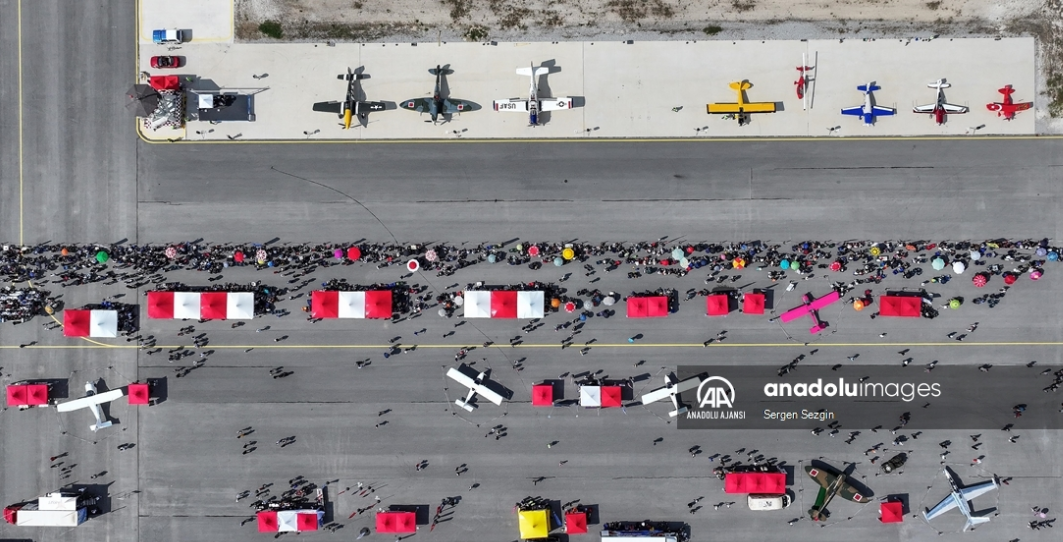
Every year there is an airshow at this ari park and mostly historic aircraft flies. Now I am trying to desing the airshow version of the revenue, but I am having hard time to figure out how to add static aircraft.

This is how the place looks like during the airshow.
1759087269006.png


I almost have all these aircraft and liveries in my sim and I can add these to the scenery. But it seems when some who doesn't have these models, the aircraft does not show up.

Is there an easy way to solve this? How can add these aircraft as static to my scenery?

Thanks.
 
These extra aircraft are not part of the default object or simobject libraries, so you must include those libraries. If they are not your models, you'll need to get permission to use those objects in your own library, or make sure anyone using that scenery downloads and installs packages that have those libraries.
 
Am I after something that is not achievable?
It is achievable, but as Rhumbaflappy has said, to use other creators' models you need to secure their permission. FWIW in my experience that permission is generally readily given if youask first and are going freeware.

The workflow I use is :-

a) Import the source model to MCX and re-export as a .gltf
b) Note, MCX will not export any animations, so you generally lose any retractable landing gear.
c) Import the .gltf to Blender
d) Replace any missing components, such as landing gear. You can dissect out stowed landing gear and reposition it, but I find it quicker to make my own representative gear - we are talking static scenery objects here after all.
e) Check that all the textures are in .png format to a power of two. You may need an App to convert old .bmp textures to .png. Be aware older versions of Flightsim had aircraft specific folders for textures, but in MSFS2020 your model objects will share a single texture folder, so you need unique names for textures for each aircraft and each marking variation.
f) Correlate the .png textures to Blender materials slots
g) Export the airplane as an MSFS static object
h) Build the object into your scenery.

If you had a lot of these models, you could build them as a ModelLib.

There is a lot of trial and error learning this process as some models just do not want to be processed in this way.
 
Thank you very much for your feedback. I was thinking about asking permissions from the copyright owners but
I have created a collection of static aircrafts, including some warbirds, that can be used in exhibitions, among other things. Search for Collection d'avions pour FS2020 on this page https://www.jpfil.com/quebec-fs2020/collections.htm
Thank you very much. I will.

🙏
It is achievable, but as Rhumbaflappy has said, to use other creators' models you need to secure their permission. FWIW in my experience that permission is generally readily given if youask first and are going freeware.

The workflow I use is :-

a) Import the source model to MCX and re-export as a .gltf
b) Note, MCX will not export any animations, so you generally lose any retractable landing gear.
c) Import the .gltf to Blender
d) Replace any missing components, such as landing gear. You can dissect out stowed landing gear and reposition it, but I find it quicker to make my own representative gear - we are talking static scenery objects here after all.
e) Check that all the textures are in .png format to a power of two. You may need an App to convert old .bmp textures to .png. Be aware older versions of Flightsim had aircraft specific folders for textures, but in MSFS2020 your model objects will share a single texture folder, so you need unique names for textures for each aircraft and each marking variation.
f) Correlate the .png textures to Blender materials slots
g) Export the airplane as an MSFS static object
h) Build the object into your scenery.

If you had a lot of these models, you could build them as a ModelLib.

There is a lot of trial and error learning this process as some models just do not want to be processed in this way.

Thank you very much for all these detailed explanations... A great deal of my motivation had disappeared now, but we'll see. :)
 
I've tried a couple of planes with ChatGPT's guidance but this method turned out not to be working. At least I couldn't. :)

Full, concrete steps (do this once per aircraft you want to ship with the scenery)​


  1. Check redistribution permission (very important).
    If the aircraft is payware or a third-party asset you don’t own, you must get permission before redistributing its model/textures. If you can’t get permission, either recreate a simplified static model yourself or use freely redistributable static packs.
  2. Locate the aircraft model files on your PC
    Typical path for community/free aircraft:

  3. Create or open your scenery project and add a ModelLib asset group
    • Open Developer Mode → Project Editor → your scenery project (or create a new package if you prefer a separate library package).
    • Add an Asset Group of type ModelLib (this is where custom models go). The SDK sample “SimpleScenery” shows the structure.
  4. Place the model files into PackageSources/modelLib/<YourStaticPlaneName>/
    Folder contents should look like the SDK sample: one or more *.gltf/*.bin LOD files, an accompanying <YourModel>.xml and textures in the package texture folder (or inside that model folder), and optionally a .Max2016 or Blender source if you have it. Example from SimpleScenery: PackageSources/modelLib/Light_Sample/Light_Sample_LOD0.gltf, etc.
  5. Edit model.cfg so the sim only uses the exterior (optional but recommended)
    If the original aircraft includes an interior/cockpit you don’t want, edit the model.cfg in your copied model folder to point only to the exterior model (or leave interior= blank). Example:
  6. Fix pose / gear / animations if needed
    If you copy an AI/exterior that ends up with gear up or wrong pose, simplest is to open the glTF in Blender (Asobo glTF exporter/importer for MSFS) and set the pose (gear down), then re-export. Tools like ModelConverterX or the Asobo Blender add-on are commonly used. If the model relies on animation XML, you can also edit the <model>.xml to remove animation entries (so it stays static).
  7. Build the package
    In Project Editor (Inspector) click Build Package (or Build All). this compiles glTF → .glb, textures → .dds and creates the package BGL files. the Scenery Editor will only list new ModelLib objects after the package is built.
  8. Place the object in your scene
    Load the compiled package in Scenery Editor (or use the package’s ModelLib objects), place the static plane where you want and save the scene.
  9. Distribute the package
    • Either include the ModelLib inside the same scenery package (so the scenery package alone is enough), or build a separate small “library” package containing only the modelLib and distribute it alongside your scenery (users install both). Many devs prefer the separate library approach so multiple sceneries reuse the same models. (see community discussion/samples).
 
When I try this method, I get these errors in the console:

INTERNAL COMPILER ERROR: #C2965: GLTF : XML version is invalid! (valid versions are : 1.1)
'Relative model behavior includes' not supported for binary file formats (e.g. ModelLib BGL).
Behaviors XML
File:
Component:
Include : Can't find file ..\..\..\..\MODELBEHAVIORDEFS\AHP51_TEMPLATES.XML.
UseTemplate Path:
Behaviors XML
File:
Component: Lights_external
Template 'AH_Material_Emissive' not found.
UseTemplate Path:
INTERNAL COMPILER ERROR: #C2006: Parse failed (0x80004005)
INTERNAL COMPILER ERROR: #C2340: Failed to finalize MODEL_DATA!
INTERNAL COMPILER ERROR: #C2032: XML Parse Error! Element tree follows:
ERROR: <FSData
ERROR: version = 9.0
ERROR: >
ERROR: <GLTFData
ERROR: sourceFile = I:\MSFS\Sceneries\Sceneries\SHGAirshows\_PackageInt\_tempFiles\tcds-airport-sivrihisar-havacilik-merkezi\Modeller\AH_p51_exterior.xml
ERROR: >
ERROR:

INTERNAL COMPILER ERROR: #C2024: Failed to process closing element tag <GLTFData> near line 14!
INTERNAL COMPILER ERROR: #C2607: Compilation errors detected, compilation failed!
INTERNAL COMPILER ERROR: #C2006: Parse failed (0x 0)
 
Any other (easier) methods that comes to your mind, considering all the permissions are secured?
When I try this method, I get these errors in the console:

INTERNAL COMPILER ERROR: #C2965: GLTF : XML version is invalid! (valid versions are : 1.1)
'Relative model behavior includes' not supported for binary file formats (e.g. ModelLib BGL).
Behaviors XML
File:
Component:
Include : Can't find file ..\..\..\..\MODELBEHAVIORDEFS\AHP51_TEMPLATES.XML.
UseTemplate Path:
Behaviors XML
File:
Component: Lights_external
Template 'AH_Material_Emissive' not found.
UseTemplate Path:
INTERNAL COMPILER ERROR: #C2006: Parse failed (0x80004005)
INTERNAL COMPILER ERROR: #C2340: Failed to finalize MODEL_DATA!
INTERNAL COMPILER ERROR: #C2032: XML Parse Error! Element tree follows:
ERROR: <FSData
ERROR: version = 9.0
ERROR: >
ERROR: <GLTFData
ERROR: sourceFile = I:\MSFS\Sceneries\Sceneries\SHGAirshows\_PackageInt\_tempFiles\tcds-airport-sivrihisar-havacilik-merkezi\Modeller\AH_p51_exterior.xml
ERROR: >
ERROR:

INTERNAL COMPILER ERROR: #C2024: Failed to process closing element tag <GLTFData> near line 14!
INTERNAL COMPILER ERROR: #C2607: Compilation errors detected, compilation failed!
INTERNAL COMPILER ERROR: #C2006: Parse failed (0x 0)

I managed to get rid of these errors after editing the XML and the plane showed at Modellib, but although I added the textures to the designated folder, this was what I get:

1759250930735.png


Feeling I am getting closer. :)
 
I am stuck.
My gltf points to right folder for textures, I copy all the textures from aircraft's folder in Community folder to the texture folder in Modellib, but no matter what I do (I even tried to convert dds files to png) textures do not show.
 
I am stuck.
My gltf points to right folder for textures, I copy all the textures from aircraft's folder in Community folder to the texture folder in Modellib, but no matter what I do (I even tried to convert dds files to png) textures do not show.
You have a 3D model, so the pink checker points to a textures issue. Did you retain the name of each texture file when you converted them?

Also, did the original model use multiple textures in each component - I am unsure of the correct term, but I have seen models with two or more textures layered to create, for example, metallic effect.

Assuming you retained the names and do not have a sophisticated multi-layered texturing to deal with, I would suggest that you do the following

A) check that the textures are ,png
B) check that the textures are sized to a power of 2 - 256, 512, 1024, 2048 and so on
C) check that the colour depth of the textures is compatible with MSFS
D) check that within Blender each material is linked to the correct texture used in the original model
 
I am stuck.
My gltf points to right folder for textures, I copy all the textures from aircraft's folder in Community folder to the texture folder in Modellib, but no matter what I do (I even tried to convert dds files to png) textures do not show.
Something else occurred to me. When I export and model from, for example, FSX .mdl to a .gltf, I find that when I import the .gltf in Blender the materials will have generic names, such as “material01” and “material02” and so on. Almost always at that stage the model will appear pink checkered. You need to re-associate a texture file to the material applied to each component or group of components of the model.

Within Blender I need to do the following :-

A) in the materials menu, click on base colour and select “image texture”
B) that should cause the texture name in the open texture box to populate with the texture file name that was used in the original model. This is why it is important to retain the original texture file name when converting textures, OR, rename the textures using a system that allows you to reference the correct texture file
C) use the open file dialogue to assign your texture converted to .png to that material. I also usually rename the material to make more sense of what it relates to eg “tail fin”, “wheels”, “left wing” or whatever you find convenient.
D) save the file at each step

I also find that some older models have just one texture with everything packed onto it. This tends to mean less complicated markings with less fine detailing, but as I mentioned before, as these are for static objects, I can live with unsophisticated markings on the model.
 
Last edited:
Dear @SPerx, thank you very much for all your efforts to help me but my abilities in Blender are so much lower and I am a noob. :) I installed Blender 3.6 and managed to import one plane to Blender but couldn't do anything afterwords. the steps beyond that point is beyond my abilities.

How I was trying to do is...

1. Copy an aircraft's LOD00 gltf and bin files, it's xml file and it's model.cfg file from the Community folder to a Modellib folder in my scenery.
2. Edit the cfg file to force the model to show just the exterior.
3. Add the textures from Community folder to a texture folder in the Modellib folder, keeping the names as they are.
4. Then I Build Package, but when I left the aircraft.xml file as it is, I got errors at the Console.
5. Then I thought I should compare other xmls that are already working with my newly added aircraft.xml. Then I copied a working xml's content, add it to my aircraft's xml, changed the GUID and pointing the plane's gltf. It worked and I was able to add the model to the scenery. But the textures were not there (see the picture below).

I am not sure this is a valid method but if I can manage to load the textures in some way, everything will be fine. (These aircraft will be static and won't move at all, and I am going to ask permissions from the owners.) I then thought maybe the textures are not loading because they are DDS and the working models have in the Modellib textures folder are pngs and I converterted DDSs to png using an online converter but that didn't work either.

1759319973758.png


Started thinking that this is too much effort for something roughly 300 people will use at best. Maybe I should add the planes I already have to the scenery and provide people with a list of aircraft that they need to have to see the scenery as I intended.

Thank you very much once again.
 
Dear @SPerx, thank you very much for all your efforts to help me but my abilities in Blender are so much lower and I am a noob. :) I installed Blender 3.6 and managed to import one plane to Blender but couldn't do anything afterwords. the steps beyond that point is beyond my abilities.

How I was trying to do is...

1. Copy an aircraft's LOD00 gltf and bin files, it's xml file and it's model.cfg file from the Community folder to a Modellib folder in my scenery.
2. Edit the cfg file to force the model to show just the exterior.
3. Add the textures from Community folder to a texture folder in the Modellib folder, keeping the names as they are.
4. Then I Build Package, but when I left the aircraft.xml file as it is, I got errors at the Console.
5. Then I thought I should compare other xmls that are already working with my newly added aircraft.xml. Then I copied a working xml's content, add it to my aircraft's xml, changed the GUID and pointing the plane's gltf. It worked and I was able to add the model to the scenery. But the textures were not there (see the picture below).

I am not sure this is a valid method but if I can manage to load the textures in some way, everything will be fine. (These aircraft will be static and won't move at all, and I am going to ask permissions from the owners.) I then thought maybe the textures are not loading because they are DDS and the working models have in the Modellib textures folder are pngs and I converterted DDSs to png using an online converter but that didn't work either.

View attachment 97879

Started thinking that this is too much effort for something roughly 300 people will use at best. Maybe I should add the planes I already have to the scenery and provide people with a list of aircraft that they need to have to see the scenery as I intended.

Thank you very much once again.
OK, should I assume you have abandoned the plan to add static aircraft? I think you were over-complicating your workflow, but then when I see you editing the aircraft .cfg file I begin to think you are working in FSX or FS2004 maybe? My experience is in MSFS2020.
 
Well, something in me says I should abandon, but I guess deep down I want to keep pushing. No, I am in MSFS as well.
I need more Blender skills I guess.
I import the plane to Blender, delete all animations.
It looks so overwhelming.
I am trying to associate the plane to the textures I want to use at the moment. And deleting unnecesseary elements.
 
I have created a collection of static aircrafts, including some warbirds, that can be used in exhibitions, among other things. Search for Collection d'avions pour FS2020 on this page https://www.jpfil.com/quebec-fs2020/collections.htm

Many thanks to jpfil, for sharing; here is a translation via Google:

https://www-jpfil-com.translate.goo...tr_sl=fr&_x_tr_tl=en&_x_tr_hl=en&_x_tr_pto=sc


[EDITED]

An additional option is to utilize FS9 and/or FSX aircraft processed initially using Static Aircraft Model Maker (aka "SAMM") by Don Grovestine:

https://www.fsdeveloper.com/forum/forums/static-aircraft-model-maker.114/

[END_EDIT]


...and then by Arno's ModelConverterX (aka "MCX"):

https://www.fsdeveloper.com/forum/forums/modelconverterx.87/


Be certain in MCX' > Material Editor > {Textures} tab to first browse and set the intended output path for all mapped Texture Materials before conversion

FYI: Many libraries of static aircraft (and scenery objects) exist for FS9 and FSX than MSFS ...which still look quite good after conversion to glTF.


IMHO, complex work-flow in Blender may "lose" would-be end-users in general, and also critical FS 3D model Material mapping info MSFS requires.

GaryGB
 
Last edited:
Thank you very much for your input, Gary.

jpfil's collection is great but it wouldn't help me much, as this is a scenery of an airfiled that has a museum and if I can't put the exact planes and paint schemes it wouldn't be realistic.

I tried SAMM but is says no flightsim found in the system registry and refuses to launch.

How to use MCX is a total mystery to me. I was able to import aircraft without textures (I am getting unable to load texture errors) and couldn't find a tutorial of some sort to guide me.

1759335984286.png

FYI: There are many more libraries of static aircraft (and scenery objects) that exist for FSX than MSFS which still look quite good after conversion to glTF.

This I have never thought of an option, will check.

Thank you very much.
 
Last edited:
Thank you very much for your input, Gary.

jpfil's collection is great but it wouldn't help me much, as this is a scenery of an airfield that has a museum and if I can't put the exact planes and paint schemes it wouldn't be realistic.

I tried SAMM but is says no flightsim found in the system registry and refuses to launch.

IIUC, you do not have FSX installed on your computer ?

I'll try to refresh my memory on how SAMM works, to see if it was only providing a convenient pointer to [FSX install path]\SimObjects\Airplanes.

I suspect one 'may' need to make a "virtual" entry in Windows Registry to indicate FSX is installed, as SAMM would not likely use FSX files.


[EDITED]

"SAMM does not affect the Windows Registry"

Please RTFM; "SAMM Static Aircraft .mdl Maker.pdf" and "Version History_2.pdf" are located in the SAMM install folder.

[END_EDIT]


IIRC, FSX SDK 'may' be required, which is best substituted by using P3Dv1.4x SDK (compatible with FSX and "most" P3D version features):

https://www.fsdeveloper.com/forum/resources/prepar3d-v1-sdk.227/

How to use MCX is a total mystery to me. I was able to import aircraft without textures (I am getting unable to load texture errors) and couldn't find a tutorial of some sort to guide me.

View attachment 97885


This I have never thought of an option, will check.

Thank you very much.

There are YouTube video tutorials:

https://www.youtube.com/results?search_query=ModelConverterX


Note especially, in the MCX install folder is the MCX Manual in PDF file format; view this in a web browser ...or Adobe Acrobat Reader DC:

https://get.adobe.com/reader/


I use Google to search FSDEV forum as it is a better search engine than the one built into FSDEV forum itself.

You can use this query prefix with Google:

site: www.fsdeveloper.com ModelConverterX MCX [insert other pertinent query keywords here]


An example (note the query strings used):

https://www.google.com/search?q=site:+www.fsdeveloper.com+ModelConverterX+MCX+SAMM&client=firefox-b-1-e&sca_esv=e7d00f27e8568604&channel=entpr&ei=K2bdaMLhNfPgp84PquW68A8&ved=0ahUKEwiCo4zCxIOQAxVz8MkDHaqyDv4Q4dUDCBA&uact=5&oq=site:+www.fsdeveloper.com+ModelConverterX+MCX+SAMM&gs_lp=Egxnd3Mtd2l6LXNlcnAiMnNpdGU6IHd3dy5mc2RldmVsb3Blci5jb20gTW9kZWxDb252ZXJ0ZXJYIE1DWCBTQU1NMgUQIRigATIFECEYoAFI44MpUOIGWK_7KHACeACQAQCYAYwCoAGLEKoBBjQuMTAuMrgBA8gBAPgBAvgBAZgCCaAC4wnCAg4QABiABBiwAxixAxiDAcICCBAAGIAEGLADwgILEAAYgAQYsAMYsQPCAhEQABiABBiwAxixAxiDARiKBcICDRAAGIAEGLADGEMYigXCAg4QABiwAxjkAhjWBNgBAcICFBAuGIAEGLADGLEDGIMBGMgD2AEBwgIXEC4YgAQYsAMYsQMY0QMYxwEYyAPYAQHCAgUQABjvBcICCBAAGIAEGKIEwgIFECEYqwKYAwCIBgGQBhO6BgYIARABGAmSBwUxLjYuMqAH3CiyBwUwLjYuMrgH2gnCBwcwLjguMC4xyAcW&sclient=gws-wiz-serp


After submitting this query, a couple of initially cited threads at FSDEV are of particular interest: :idea:

https://www.fsdeveloper.com/forum/t...raft-to-use-as-static-objects-in-msfs.457651/

https://www.fsdeveloper.com/forum/threads/a-couple-of-questions-on-samm-ver2-x.446763/

GaryGB
 
Last edited:
IIUC, you do not have FSX installed on your computer ?

I'll try to refresh my memory on how SAMM works, to see if it was only providing a convenient pointer to [FSX install path]\SimObjects\Airplanes.

I suspect one 'may' need to make a "virtual" entry in Windows Registry to indicate FSX is installed, as SAMM would not likely use FSX files.


[EDITED]

"SAMM does not affect the Windows Registry"

Please RTFM; the "SAMM Static Aircraft .mdl Maker.pdf" and "Version History_2.pdf" are located in the SAMM install folder.

[END_EDIT]


IIRC, FSX SDK 'may' be required, which is best substituted by using P3Dv1.4x SDK (compatible with FSX and "most" P3D version features):

https://www.fsdeveloper.com/forum/resources/prepar3d-v1-sdk.227/


In the MCX install folder is the MCX Manual in PDF file format; view this in a web browser ...or Adobe Acrobat Reader DC:

https://get.adobe.com/reader/


I use Google to search FSDEV forum as it is a better search engine than the one built into FSDEV forum itself.

You can use this query prefix with Google:

site: www.fsdeveloper.com ModelConverterX MCX [insert other pertinent query keywords here]


An example (note the query strings used):

https://www.google.com/search?q=site:+www.fsdeveloper.com+ModelConverterX+MCX+SAMM&client=firefox-b-1-e&sca_esv=e7d00f27e8568604&channel=entpr&ei=K2bdaMLhNfPgp84PquW68A8&ved=0ahUKEwiCo4zCxIOQAxVz8MkDHaqyDv4Q4dUDCBA&uact=5&oq=site:+www.fsdeveloper.com+ModelConverterX+MCX+SAMM&gs_lp=Egxnd3Mtd2l6LXNlcnAiMnNpdGU6IHd3dy5mc2RldmVsb3Blci5jb20gTW9kZWxDb252ZXJ0ZXJYIE1DWCBTQU1NMgUQIRigATIFECEYoAFI44MpUOIGWK_7KHACeACQAQCYAYwCoAGLEKoBBjQuMTAuMrgBA8gBAPgBAvgBAZgCCaAC4wnCAg4QABiABBiwAxixAxiDAcICCBAAGIAEGLADwgILEAAYgAQYsAMYsQPCAhEQABiABBiwAxixAxiDARiKBcICDRAAGIAEGLADGEMYigXCAg4QABiwAxjkAhjWBNgBAcICFBAuGIAEGLADGLEDGIMBGMgD2AEBwgIXEC4YgAQYsAMYsQMY0QMYxwEYyAPYAQHCAgUQABjvBcICCBAAGIAEGKIEwgIFECEYqwKYAwCIBgGQBhO6BgYIARABGAmSBwUxLjYuMqAH3CiyBwUwLjYuMrgH2gnCBwcwLjguMC4xyAcW&sclient=gws-wiz-serp

GaryGB

Thank you, Gary.
 
Back
Top