

- Messages
- 572
- Country

Aerofly FS 2 VR Hands Have Arrived!

After much effort working to get universal advanced motion control to work across multiple VR headsets we are proud to say that it was worth the wait.
We originally planned on releasing ‘VR Hands’ only for Oculus users but decided to go all in and offer this spectacular new feature to everyone! The wait is over!
With the need to make this available for both Oculus Touch and Vive, and to present a universal code to add support for other motion control devices in the future, we opted to write our very own version of ‘VR Hands’ that we know you will enjoy.
With the addition of this exciting new feature, Aerofly FS 2 blurs the line between reality and virtual flying even further.
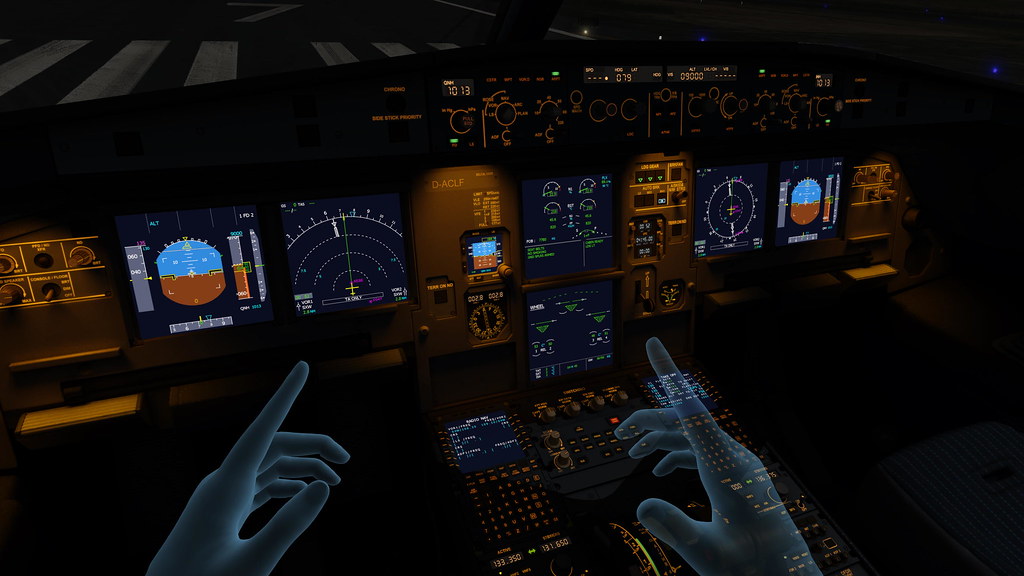
VR pilots with motion controllers can now fully operate any Aerofly FS 2 aircraft with your own hands; every button, every switch, every lever that is currently operational in the aircraft can be operated with your virtual hands, using real-world gestures the same natural way that you would in real life.


So what about the flight controls? We have you covered! Grabbing the yoke with your virtual hand(s) gives you full control of the yoke.
So what happens if my arms get tired keeping my hands in the air while flying? We have you covered here too! We have designed a system that will allow you to fly with the analog sticks/pads of your motion controllers so that you can not only put your hands down for a rest during your flight but also give you the ability to keep control of your aircraft while in other views.
This new feature will also allow you to use one or two motion controllers in conjunction with other physical controllers, so whether you have your own flight yoke and rudder pedals or just a basic joystick that you can’t part with you can now add this new freedom to your configuration for an ultimate flying experience. The possibilities are endless.

Your new VR Hands were designed to use your motion controllers as the only controllers that you will ever need to fully operate Aerofly FS 2 and fly like a real-world pilot, so there is no need for additional controllers or even your keyboard if you so choose.
Let your new virtual hands and full freedom take your flight simulator experience to the next level.
Try this out today and be warned, you will be hooked.
For detailed instructions on how to use your new virtual hands check out the Aerofly FS 2 user manual on our official wiki at https://www.aerofly.com/dokuwiki/doku.php/manual:virtual_reality
After much effort working to get universal advanced motion control to work across multiple VR headsets we are proud to say that it was worth the wait.
We originally planned on releasing ‘VR Hands’ only for Oculus users but decided to go all in and offer this spectacular new feature to everyone! The wait is over!
With the need to make this available for both Oculus Touch and Vive, and to present a universal code to add support for other motion control devices in the future, we opted to write our very own version of ‘VR Hands’ that we know you will enjoy.
With the addition of this exciting new feature, Aerofly FS 2 blurs the line between reality and virtual flying even further.
VR pilots with motion controllers can now fully operate any Aerofly FS 2 aircraft with your own hands; every button, every switch, every lever that is currently operational in the aircraft can be operated with your virtual hands, using real-world gestures the same natural way that you would in real life.
So what about the flight controls? We have you covered! Grabbing the yoke with your virtual hand(s) gives you full control of the yoke.
So what happens if my arms get tired keeping my hands in the air while flying? We have you covered here too! We have designed a system that will allow you to fly with the analog sticks/pads of your motion controllers so that you can not only put your hands down for a rest during your flight but also give you the ability to keep control of your aircraft while in other views.
This new feature will also allow you to use one or two motion controllers in conjunction with other physical controllers, so whether you have your own flight yoke and rudder pedals or just a basic joystick that you can’t part with you can now add this new freedom to your configuration for an ultimate flying experience. The possibilities are endless.
Your new VR Hands were designed to use your motion controllers as the only controllers that you will ever need to fully operate Aerofly FS 2 and fly like a real-world pilot, so there is no need for additional controllers or even your keyboard if you so choose.
Let your new virtual hands and full freedom take your flight simulator experience to the next level.
Try this out today and be warned, you will be hooked.
For detailed instructions on how to use your new virtual hands check out the Aerofly FS 2 user manual on our official wiki at https://www.aerofly.com/dokuwiki/doku.php/manual:virtual_reality