• Which the release of FS2020 we see an explosition of activity on the forun and of course we are very happy to see this. But having all questions about FS2020 in one forum becomes a bit messy. So therefore we would like to ask you all to use the following guidelines when posting your questions:

    • Tag FS2020 specific questions with the MSFS2020 tag.
    • Questions about making 3D assets can be posted in the 3D asset design forum. Either post them in the subforum of the modelling tool you use or in the general forum if they are general.
    • Questions about aircraft design can be posted in the Aircraft design forum
    • Questions about airport design can be posted in the FS2020 airport design forum. Once airport development tools have been updated for FS2020 you can post tool speciifc questions in the subforums of those tools as well of course.
    • Questions about terrain design can be posted in the FS2020 terrain design forum.
    • Questions about SimConnect can be posted in the SimConnect forum.

    Any other question that is not specific to an aspect of development or tool can be posted in the General chat forum.

    By following these guidelines we make sure that the forums remain easy to read for everybody and also that the right people can find your post to answer it.

aifp3 not detecting my fsx.

Messages
2
Country
india
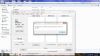
hello guys. today i have downloaded aifp3 from stuffs4fs. when ever i click on aifp3, a window opens and says fsx not found . i have also uploaded a screenshot of the problem. please help...
 

Attachments

  • Untitled.png
    Untitled.png
    291.2 KB · Views: 397
Aswin, the message (which, incidentally, doesn't say "fsx" but, rather "Flight Simulator or Prepar 3D") means exactly what it says. You must have at least one properly-installed version of Microsoft Flight Simulator or Lockheed Martin Prepar3D installed on your system to use AIFP.

Don
 
Hi,

If you do have FS installed, try fixing the Registry using the Flight1 Registry Fix program. It's free from their downloads page.
 
aswin, in my first response above, you'll note I said installed properly. By that I meant that Flightsim has been installed in the usual way, resulting in the associated registry items being set. If Flightsim has not been properly installed, some required registry items may be missing. Of course, it's also possible those entries in your system registry have somehow become corrupted.

AIFP looks in the registry to discover what is installed where. If the registry items aren't properly set, then AIFP has no way of knowing what versions of FlightSIm are installed.

As Tom has said twice, now, you could try fixing your system registry. Alternately, uninstall and re-install FlightSIm.

Don
 
Have you set the path to were your flight sim is installed
That's the purpose of the registry entry which seems to be missing. It's not something one usually does manually.

Don
 
Back
Top