• Which the release of FS2020 we see an explosition of activity on the forun and of course we are very happy to see this. But having all questions about FS2020 in one forum becomes a bit messy. So therefore we would like to ask you all to use the following guidelines when posting your questions:

    • Tag FS2020 specific questions with the MSFS2020 tag.
    • Questions about making 3D assets can be posted in the 3D asset design forum. Either post them in the subforum of the modelling tool you use or in the general forum if they are general.
    • Questions about aircraft design can be posted in the Aircraft design forum
    • Questions about airport design can be posted in the FS2020 airport design forum. Once airport development tools have been updated for FS2020 you can post tool speciifc questions in the subforums of those tools as well of course.
    • Questions about terrain design can be posted in the FS2020 terrain design forum.
    • Questions about SimConnect can be posted in the SimConnect forum.

    Any other question that is not specific to an aspect of development or tool can be posted in the General chat forum.

    By following these guidelines we make sure that the forums remain easy to read for everybody and also that the right people can find your post to answer it.

Aircraft cockpit glass hud visibillity adjustment

Messages
102
Country
sweden
In the Modelconverter X I try to improve the glass properties from the external view which in the original converted ac is "foggy".
According to the SDK I utilize the setting under Material Editor and parameter "p3d_glass_canopy" changing the "Framebuffer Blend" -Destination and Sorce to ONE- this cause the exported ac to crash MSFS. If not, it works fine but the hud is "milky". Perhaps I am changing the wrong parameter or changing it not correctly?
Any help appreciated.

Åke

 
Photo that explain the issue-any help available? Can I adjust any parameter in the Converter Material settings?
 

Attachments

  • Hud issue.JPG
    Hud issue.JPG
    61.6 KB · Views: 136
Is this for MSFS or P3D? You mention a P3D material. And if using in MSFS is the model imported as glTF or mdl?
 
Hi Arno- MSFS
The aircraft is originally for P3d/FSX and converted for MSFS. The model folder in the MSFS version contain two mdl-files and one cfg file. Also the imported aircraft for the conversion in the ModelXConverter is in the mdl format in the model folder.

Also - is it possible to edit a mdl-file from a MSFSLegacyImporter aircraft in the Material Editor and save it accordingly or is the only possible process order to first use the ModelXConverter with changes in the Material Editor trying to solve the issue followed by the LegacyImporter before installing in the Community folder?

I hope this was understandable...
 
Last edited:
I have no experience with the legacy importer, so I can't comment on the workflow. But I would expect that if you make changes to the material, so need to export the mdl file again to store them.
 
Unfortunately if I make changes to the general (external) mdl and export it it cause the MSFS to crasch. The interior mdl is editable and exportable but there are no such window issue that I can find there.. dead end
Is it crashing because of the "mouse click" issue i.e. do I have to do it again before exporten the revised mdl?
 
What do you mean with crashing due to mouse click issue? Is that something in MCX or in MSFS?
 
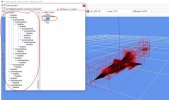
It is a well known circumstance that when importing a FSX ac into MSFS the Mouse click function needs to be disabled in the Object hierarchi. This is one of few actions in the MCX before Importing by the Legacy Importer, see pictures. If not, the imported ac will crash MSFS.
So my question was simply if I take the interior or external mdl from the imported functional in MSFS ac and make changes in the MCX and export them over the imported files, is this process above with the mouse click abortion not valid anymore and cause the crash?

I assume this way of doing it without making a new Import do not work.

I am now doing the process from scratch again with the additional changes to the hud environment to see if I could come across a solution, i.e. FSX original> MCX changes> Legacy Importer> test in MSFS

Quite time consuming as I have to restart MSFS everytime which take 5-6 minutes...

Åke
 

Attachments

  • Skärmklipp.JPG
    Skärmklipp.JPG
    143.9 KB · Views: 138
Back
Top