
-
Which the release of FS2020 we see an explosition of activity on the forun and of course we are very happy to see this. But having all questions about FS2020 in one forum becomes a bit messy. So therefore we would like to ask you all to use the following guidelines when posting your questions:
- Tag FS2020 specific questions with the MSFS2020 tag.
- Questions about making 3D assets can be posted in the 3D asset design forum. Either post them in the subforum of the modelling tool you use or in the general forum if they are general.
- Questions about aircraft design can be posted in the Aircraft design forum
- Questions about airport design can be posted in the FS2020 airport design forum. Once airport development tools have been updated for FS2020 you can post tool speciifc questions in the subforums of those tools as well of course.
- Questions about terrain design can be posted in the FS2020 terrain design forum.
- Questions about SimConnect can be posted in the SimConnect forum.
Any other question that is not specific to an aspect of development or tool can be posted in the General chat forum.
By following these guidelines we make sure that the forums remain easy to read for everybody and also that the right people can find your post to answer it.
You are using an out of date browser. It may not display this or other websites correctly.
You should upgrade or use an alternative browser.
You should upgrade or use an alternative browser.
P3D v1 Ambient Occlusion Settings
- Thread starter lionheart
- Start date


- Messages
- 10,163
- Country

LOLOLOL...... Smacks self.
I didn't even save it to Bookmarks. I looked for it again, and found a copy of it at the Max web manual here;
http://download.autodesk.com/global...usionShaderOptions.htm,topicNumber=d30e374210
They use the same photos of the truck, so its the same, but they added Normals as well, which is interesting.
Spread should never exceed 1.0, as you get unsmoothing in the shading.
Note that zero setting on Max distance will go into automatic shading distance, and you will have what the program algorithm wants you to have, so experiment.
I tried a setting of 100+ feet on Max setting and it was interesting. (Shading on a jet cockpit, a lot of shade from the panel hood). It came out dark-ish.
About the only way to get the short area's that are shadowed 'deeper' is to stack 2 or 3 AO layers, and or to use Brightness Contrast, and tune up the Contrast a bit, and perhaps increase brightness as well. If you then need to double or triple stack these, do it, for increase of close proximity shading. To brighten something up, lower your max distance to something like 12 or 3 or 2. (Again, experiment). One guy at cgsociety.org uses distances of 140' or more. Interesting results. This means that tons of area around the scene effect shading of small parts. But it can get bad, dark.
If only they had a darkness setting around the parts. I cant figure out why they don't have that adjustable.
Sorry I missed the link. Probably a blessing as this one is better, more things are discussed.
Bill
I didn't even save it to Bookmarks. I looked for it again, and found a copy of it at the Max web manual here;
http://download.autodesk.com/global...usionShaderOptions.htm,topicNumber=d30e374210
They use the same photos of the truck, so its the same, but they added Normals as well, which is interesting.
Spread should never exceed 1.0, as you get unsmoothing in the shading.
Note that zero setting on Max distance will go into automatic shading distance, and you will have what the program algorithm wants you to have, so experiment.
I tried a setting of 100+ feet on Max setting and it was interesting. (Shading on a jet cockpit, a lot of shade from the panel hood). It came out dark-ish.
About the only way to get the short area's that are shadowed 'deeper' is to stack 2 or 3 AO layers, and or to use Brightness Contrast, and tune up the Contrast a bit, and perhaps increase brightness as well. If you then need to double or triple stack these, do it, for increase of close proximity shading. To brighten something up, lower your max distance to something like 12 or 3 or 2. (Again, experiment). One guy at cgsociety.org uses distances of 140' or more. Interesting results. This means that tons of area around the scene effect shading of small parts. But it can get bad, dark.
If only they had a darkness setting around the parts. I cant figure out why they don't have that adjustable.
Sorry I missed the link. Probably a blessing as this one is better, more things are discussed.
Bill
Last edited:
- Messages
- 10,163
- Country
Yesterday I was really experimenting with things big time. During my experiments with renderings, I found that there is a panel of sliders on the 'recently rendered picture'. So you can adjust those, turn off Final Gather (FG) which takes a huge amount of time and resources, and you can adjust render speeds and qualities. If you are not careful, it might take a very long time on a massive part (many sub parts attached together, like a panel). But... Quality is job 1, so if it takes 45 min's to burn a panel texture AO map, so be it.... It will be worth it in the long run. But if all the parts, nuts and bolts and things, take this long, then your project will go into overbudget so you have to turn some sliders down to make the burn times faster.
In my case yesterday, I could not get the darn shadows to behave right, probably because of the panel hood, so I ended up using the AO map as the base texture map, then colorized it. I was also getting a weird dual shadow for some reason, one from each side, which hasn't happened, and the usual shading that occurs backwards (bazels have a shadow on top instead of underneath) which doesn't seem right as AO should not have directional light, only proximity shading, so go figure. I am using 2014, which probably explains it. :S
I wish I knew how to make or burn light maps that flow downward from above. (Not true lightmaps, but like an AO map layer that is based on a light source that is above (the sun) that casts shadows flowing downwards). That is also needed for a more realistic look, in my opinion. Some wouldn't agree, but that's just me.
I broke that panel up into 3 sections so I can have ledgible font on it, then I had to separate the floating sections from the main panel fronts so that AO maps could be burned properly. I also have the maps auto-located (centered) so that if I wanted to, I could now blend the hover sections back onto the main panel texture maps easily after all the AO stuff is finished (near completion). Each time I add or move things around on the panel area's, more AO maps have to be burned to counter the adjustments. And, per what this paragraph is about, you cant have a section of polygons hovering over a part, attached to the part, and AO map it. They will confuse the burner and it comes out double dark. So detach the hovering polygons and burn, then you can reattach later if needed.
Bill
In my case yesterday, I could not get the darn shadows to behave right, probably because of the panel hood, so I ended up using the AO map as the base texture map, then colorized it. I was also getting a weird dual shadow for some reason, one from each side, which hasn't happened, and the usual shading that occurs backwards (bazels have a shadow on top instead of underneath) which doesn't seem right as AO should not have directional light, only proximity shading, so go figure. I am using 2014, which probably explains it. :S
I wish I knew how to make or burn light maps that flow downward from above. (Not true lightmaps, but like an AO map layer that is based on a light source that is above (the sun) that casts shadows flowing downwards). That is also needed for a more realistic look, in my opinion. Some wouldn't agree, but that's just me.
I broke that panel up into 3 sections so I can have ledgible font on it, then I had to separate the floating sections from the main panel fronts so that AO maps could be burned properly. I also have the maps auto-located (centered) so that if I wanted to, I could now blend the hover sections back onto the main panel texture maps easily after all the AO stuff is finished (near completion). Each time I add or move things around on the panel area's, more AO maps have to be burned to counter the adjustments. And, per what this paragraph is about, you cant have a section of polygons hovering over a part, attached to the part, and AO map it. They will confuse the burner and it comes out double dark. So detach the hovering polygons and burn, then you can reattach later if needed.
Bill
Attachments


Last edited:

- Messages
- 453
- Country

Nice cockpit Bill, Like your approach..I have broken panel in more than 3 pieces so I can decide to use 3, 4 or 5 BTW typing "Ambient occlusion" in search area brings you to the same location as in your link.
Try Vray Dirt and you will have darker corner area as much as you want.
If only they had a darkness setting around the parts. I cant figure out why they don't have that adjustable.
Try Vray Dirt and you will have darker corner area as much as you want.


- Messages
- 10,163
- Country
Nice cockpit Bill, Like your approach..I have broken panel in more than 3 pieces so I can decide to use 3, 4 or 5 BTW typing "Ambient occlusion" in search area brings you to the same location as in your link.
Try Vray Dirt and you will have darker corner area as much as you want.
Thanks FSFox. I'll look for that and get it installed. Max should really have something like this.
Nice progress on the panel Bill. I think that covers a good representation of early and late models.
Greg
Thanks Greg. Coming from a LJ driver, that is a real complement.
Yesterday evening, I redid that top left area. I mis-took the manual circles for switches and they should have been markers. I also duplicated switch area's and sizes for that area off of your photos from LJ24's. The manual doesn't seem to be 'exact'.
I made the gauge wells a bit deeper then in reality as I use 2D gauges and then have glass over those and deep wells keep them from bleeding through via different graphics cards that have over-layer issues..
I also found a pretty smart system and way or work flow for just making the holes in the surface of the panel, so I can keep most of these things one piece for quickness in painting, AO maps, mapping, etc. Just align the part surface level with the surface of the panel area, delete the top area of the panel, and bridge it into the panel surface. You "MUST" (must) have a side band (ring, etc) of edges around the panel to do this, or you will have just deleted a lot of your panel face. You want to rebuild from the edges of the main panel faces to fit in new gauge openings.
- Messages
- 10,163
- Country
Try Vray Dirt and you will have darker corner area as much as you want.
FSFox,
Where do you get VrayDirt and will it work in Max alone or does one need Vray? The only place I mainly see it at is at the Vray site.
Last edited:
- Messages
- 453
- Country
Bill,
You need to install V-ray Rendering engine for 3ds max version 2.0 at least to get Vray dirt and/or Vray distance. If you have then go to the diffuse slot and instead of choosing bitmap, type "vrayd" and you will see two options of that... dirt and distance... #3 is you freedom of adjustments.. see pic.

You need to install V-ray Rendering engine for 3ds max version 2.0 at least to get Vray dirt and/or Vray distance. If you have then go to the diffuse slot and instead of choosing bitmap, type "vrayd" and you will see two options of that... dirt and distance... #3 is you freedom of adjustments.. see pic.

hairyspin
Resource contributor
- Messages
- 3,253
- Country

Doesn't V-Ray cost something like 1000 $...?
Yup, it does.
- Messages
- 453
- Country
People Who have decent PCs like i7, 36GB of ddr3 ram, Up to date GPU and over all decent Job that brings you 50K USD a Year is not a problem to Purchase MAX and Vray... May be someone wants to know how much I spent on shopping tonight ? Well, I think topic was about "how to" rather than "how much" and how good is someone's budget..
- Messages
- 10,163
- Country
Thanks FSFox. That's what I needed to know.
I have no issues with buying new software (when I can afford it). I would like to have Vray but cant afford it presently. :S Someday.
Took me several years to get Max. So glad I finally made it to this point. I am so loving this program.
Vray looks danged amazing. When I roam around on YouTube, they have tons of Vray tutorials, and in Google, doing 3DS Max rendering gallery searches, you see so many buildings and cars that are rendered in Vray, so its just as important for 3D model makers that are concept artists as much as 3DS Max is.
If only we could make payments, lol...
Bill
I have no issues with buying new software (when I can afford it). I would like to have Vray but cant afford it presently. :S Someday.
Took me several years to get Max. So glad I finally made it to this point. I am so loving this program.
Vray looks danged amazing. When I roam around on YouTube, they have tons of Vray tutorials, and in Google, doing 3DS Max rendering gallery searches, you see so many buildings and cars that are rendered in Vray, so its just as important for 3D model makers that are concept artists as much as 3DS Max is.
If only we could make payments, lol...
Bill
- Messages
- 453
- Country
BTW I can have a look if this feature presents in Blender Cycles Render Engine, If so, you can easily export/import FBX since Blender 2.69, make a desired rendered texture map there and bring it over to max if needed. UVW stay the same. I will let forum know if any success...
https://www.knaldtech.com/
Just leaving this here, might be of interest to some.
ps. If you find the contrast in your AO bakes to be lacking, you can always layer and blend multiple copies of the render output in Photoshop
Just leaving this here, might be of interest to some.
ps. If you find the contrast in your AO bakes to be lacking, you can always layer and blend multiple copies of the render output in Photoshop
- Messages
- 10,163
- Country
https://www.knaldtech.com/
Just leaving this here, might be of interest to some.
ps. If you find the contrast in your AO bakes to be lacking, you can always layer and blend multiple copies of the render output in Photoshop
Thanks Jan.
I have been doing that with mine, 2 or 3 layers of the same AO map. I guess that is the way to go. I usually Control/E and compress them. Works fine.

- Messages
- 453
- Country
I'm so sorry again for pushing you on paywares  When I was "young" in 3D modeling actually I was able to do ambient occlusion in sketchup too. I purchased Light-UP shortly before I moved to more advanced 3D modeling tools. So this tool is really amazing for rendering stuff and baking the textures, making baked textures. Not so expensive too...
Just make a model in GMax, export to Sketchup with Light-UP, do your art, export back if needed, apply texture - you've done.
When I was "young" in 3D modeling actually I was able to do ambient occlusion in sketchup too. I purchased Light-UP shortly before I moved to more advanced 3D modeling tools. So this tool is really amazing for rendering stuff and baking the textures, making baked textures. Not so expensive too... Just make a model in GMax, export to Sketchup with Light-UP, do your art, export back if needed, apply texture - you've done.

- Messages
- 244
- Country

Okay, I played with Knald a bit around. It's for sure a great program. It's really fast rendering. A 4096x4096 takes something between 30 and 40 seconds. And you get Height-, Normal-, Derivative-, AO-, Concavity-, Convexity and Transmission Map at once (I didn't know that there are so many different maps..  )
)
Here is my first try
Before:

After:
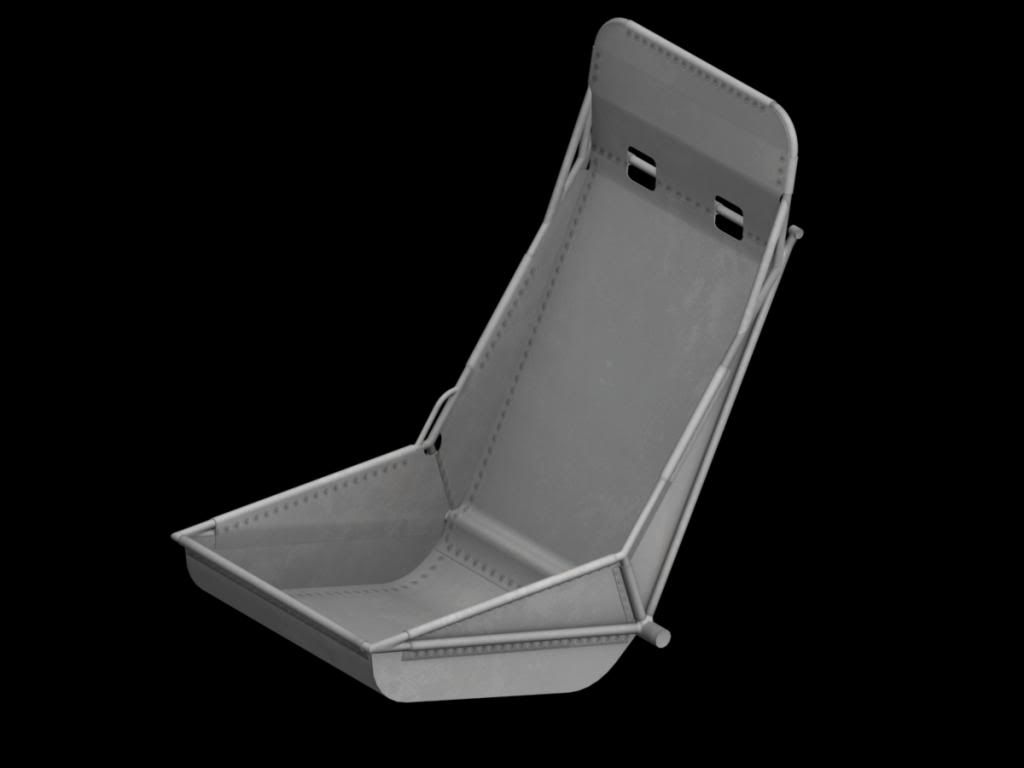
Sure, it was only a first try and settings can be still improved.
BUT.. There is no way to have two or more different maps in one scene, if I see it right. So, let's say if you have the fuselage on one texture sheet and the wings on an other, you will not be able to reder while both are in the scene (I hope, I'm wrong..).
Kai
)Here is my first try
Before:

After:

Sure, it was only a first try and settings can be still improved.
BUT.. There is no way to have two or more different maps in one scene, if I see it right. So, let's say if you have the fuselage on one texture sheet and the wings on an other, you will not be able to reder while both are in the scene (I hope, I'm wrong..).
Kai
- Messages
- 10,163
- Country
Really improves the seat. Thanks Kai for the heads up.
This then reminds me of another AO burner that also could not do more then one object per texture sheet. Perhaps cutting and pasting into a main sheet in a different folder will do the trick, assemble all the clippings somewhere else.
This then reminds me of another AO burner that also could not do more then one object per texture sheet. Perhaps cutting and pasting into a main sheet in a different folder will do the trick, assemble all the clippings somewhere else.