
• Which the release of FS2020 we see an explosition of activity on the forun and of course we are very happy to see this. But having all questions about FS2020 in one forum becomes a bit messy. So therefore we would like to ask you all to use the following guidelines when posting your questions:

    • Tag FS2020 specific questions with the MSFS2020 tag.
    • Questions about making 3D assets can be posted in the 3D asset design forum. Either post them in the subforum of the modelling tool you use or in the general forum if they are general.
    • Questions about aircraft design can be posted in the Aircraft design forum
    • Questions about airport design can be posted in the FS2020 airport design forum. Once airport development tools have been updated for FS2020 you can post tool speciifc questions in the subforums of those tools as well of course.
    • Questions about terrain design can be posted in the FS2020 terrain design forum.
    • Questions about SimConnect can be posted in the SimConnect forum.

    Any other question that is not specific to an aspect of development or tool can be posted in the General chat forum.

    By following these guidelines we make sure that the forums remain easy to read for everybody and also that the right people can find your post to answer it.

An unplanned new feature: Unwrap Texture Creator

arno

Administrator
Staff member
FSDevConf team
Resource contributor
Messages
34,335
Country
netherlands
Sometimes working on new features does not go as I expected. For example a few days ago I got the question on the forum is ModelConverterX can also export unwrap textures. So I replied to that user that this feature is on the wishlist (actually it has been on the wishlist since 2013), but that I could not promise that it would be implemented soon.

Within a day another bug in ModelConverterX was reported. Certain FS2004 aircraft model did display fully transparent in the preview. After analysing this bug I found out that it was caused by the way that ModelConverterX combined the diffuse colour alpha with the texture, as in FS2004 you can make the texture transparent without using an alpha channel for it. I had implemented this in such a way that the entire alpha channel would be set to the diffuse colour alpha value, but that was the cause of the bug where the entire aircraft became transparent. The solution was relatively easy, ModelConverterX should only set the alpha channel to the desired value for the parts of the texture that are mapped on the triangles with the diffuse colour alpha value. So I implemented that as a fix.

But hey, wait a second. With the logic to write only to the alpha channel for the areas that are mapped to triangles, I did make the basics for unwrap textures as well. So although I was not planning to implement that 13 year old feature from the wishlist on short notice, due to this unexpected coincidence between the feature request and the bug report, it became very easy to implement that feature as well now. So I made a new editor that allows you to create an unwrap texture and control which elements are shown on it. Below is a screenshot of this editor. You can find it in the special tools menu or in the context menu of the texture list in the material editor texture tab.

Enjoy this new feature, it’s available in the latest development release!
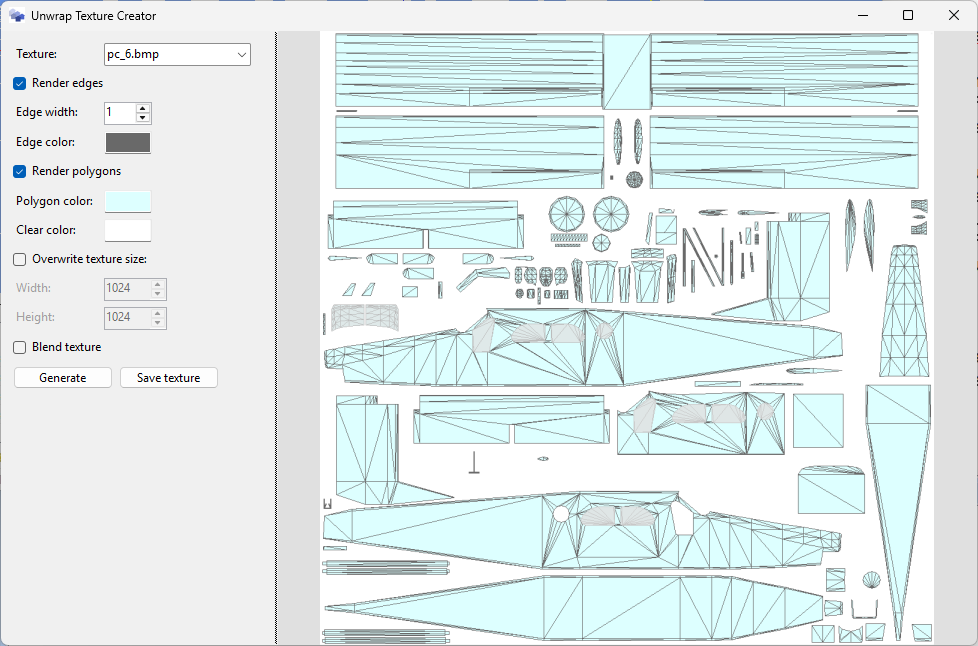


Continue reading...
 
I´ve install, but MCX wont open. Windows 7 64bits. Flash CMD window and nothing happens.

*Solved, install NET8.

But we have difficult to zoom objects.
 
Last edited:
Interesting. Supposedly the latest versions of MCX will not work with windows 7. Perhaps your Zoom problem might be that?
 
As long as you have .NET 8 it should work, but I thought that Microsoft does not support Windows 7 for the recent .NET versions indeed.

Zooming has not really changed in recent versions, so what kind of issues do you have?
 
Hello,

I have tested this function this morrning and note theses points: for a MSFS 2020 aircraft,
- the interface offers DDS files
- the unwrap display is reversed horizontally (maybe because the DDS were mirrored under FSX/P3D ...)
- when saving the unwrap by choosing a PNG extension, the file is always mirrored

For a livery creator who is not aware, this can lead to errors that he will not understand.
 
My zoom doesn't work no more too (Win 11, MCX latest ....)

But after changing from "Navigate" to "Select" and back, zoom worked!

Regards
Guenther
 
This could be a major asset to repainters when a full paintkit is not available. One of my biggest peeves is when a paintkit does not include the 'mesh' layer so you have no idea where parts are located and how far to extend paint beyond the mapping to get full coverage without running into other parts. This would really help when the developer just provides a plain white texture too and no paintkit, at least you would be able to see the mapping then!

Thank you Arno for doing this and have a great 2026. 🍻
 
I just installed the latest MCX version and then had to install the latest .NET and MS Visual C++ drivers to get it to run. I then tested out all the aircraft I currently have in my active P3D v4.5 'Aircraft' folders and they all opened and I could access the texture mapping except for one payware model. Every time I try to open that particular model file it causes MCX to CTD within a couple of seconds of starting to load and it is 100% repeatable. I am not sure if it's a MCX issue or a model issue at this point but I thought I'd give you the 'heads up' in case it's a bug.

It just seems odd that every other model I tested works fine except for this one! :scratchch
 
I will need to test with a MSFS model, I mainly used FS2004/FSX models now to test. Bit MSFS can remain tricky as the package tool often flips the texture, so the source and final version are not the same. Maybe I should add a flip open when saving

I'll check if I can find out why sometimes the zoom does not work. I haven't seen that before.
 
Ah, looks like the latest I have is 4.8. Standby...

OK, I have 8.0 now - all sorted! 😚
 
Last edited:
My zoom doesn't work no more too (Win 11, MCX latest ....)

But after changing from "Navigate" to "Select" and back, zoom worked!

Regards
Guenther

I´ve same way, after change navigate to select and back, zoom back to work.
 
I´ve same way, after change navigate to select and back, zoom back to work.
Thanks for confirming, there must be a bug there. For those of you when the zoom does not work, is it directly after starting MCX and loading the object or did you do other things first?
 
If i open a bgl from scenery, work ok, but if i open second bgl, the bug appear. From mdl, same thing, if im click on any menu option, the trick of navigate-select-navigate must be do to run ok - sorry the english.
 
Thanks, hopefully that will help to reproduce the issue.
 
I just installed the latest MCX version and then had to install the latest .NET and MS Visual C++ drivers to get it to run. I then tested out all the aircraft I currently have in my active P3D v4.5 'Aircraft' folders and they all opened and I could access the texture mapping except for one payware model. Every time I try to open that particular model file it causes MCX to CTD within a couple of seconds of starting to load and it is 100% repeatable. I am not sure if it's a MCX issue or a model issue at this point but I thought I'd give you the 'heads up' in case it's a bug.

It just seems odd that every other model I tested works fine except for this one! :scratchch
I tested ALL of my aircraft in my P3D v4.5 install and the back-up hangar where I store my 'non-current' aircraft today and I only found one aircraft that will not open and it crashed MCX to the desktop every time. I guess that is either an issue with the payware model or the publisher has somehow prevented MCX from opening the .MDL file which is odd as all my other aircraft from the same company open just fine. If anyone has the aircraft and wants to test/confirm at their end it is the Carenado TBM850 HD for P3D.
 
I do not have that specific add-on. What is the error message that you get when you try to load the model?
 
Virtavia freeware F-11 tigercat and F7U cutlass both CTD with error using both the lastest dev and stable. They do not CTD with stable 1.7. Other than the event viewer I don't know where to look
for and error reporting.

This is what the event view shows:

ication name: ModelConverterX.exe, version: 1.9.2026.104, time stamp: 0x68ff0000
Faulting module name: ntdll.dll, version: 10.0.26100.7462, time stamp: 0x9225342c
Exception code: 0xc00000fd
Fault offset: 0x0000000000042175
Faulting process id: 0x2128
Faulting application start time: 0x1DC7FB9D5356B34
Faulting application path: E:\mcx4aJan26\ModelConverterX.exe
Faulting module path: C:\WINDOWS\SYSTEM32\ntdll.dll
Report Id: de25c182-74dd-404a-9cd2-e73b1f09b679
Faulting package full name:
Faulting package-relative application ID:

These models are on virtavia.com/freeware site
 
I do not have that specific add-on. What is the error message that you get when you try to load the model?
There is no error message at all Arno, MCX just crashes to the desktop after about 2 seconds of loading time.
 
Back
Top