
-
Which the release of FS2020 we see an explosition of activity on the forun and of course we are very happy to see this. But having all questions about FS2020 in one forum becomes a bit messy. So therefore we would like to ask you all to use the following guidelines when posting your questions:
- Tag FS2020 specific questions with the MSFS2020 tag.
- Questions about making 3D assets can be posted in the 3D asset design forum. Either post them in the subforum of the modelling tool you use or in the general forum if they are general.
- Questions about aircraft design can be posted in the Aircraft design forum
- Questions about airport design can be posted in the FS2020 airport design forum. Once airport development tools have been updated for FS2020 you can post tool speciifc questions in the subforums of those tools as well of course.
- Questions about terrain design can be posted in the FS2020 terrain design forum.
- Questions about SimConnect can be posted in the SimConnect forum.
Any other question that is not specific to an aspect of development or tool can be posted in the General chat forum.
By following these guidelines we make sure that the forums remain easy to read for everybody and also that the right people can find your post to answer it.
You are using an out of date browser. It may not display this or other websites correctly.
You should upgrade or use an alternative browser.
You should upgrade or use an alternative browser.
MSFS20 Animated People (Character Animation)
- Thread starter Christian Bahr
- Start date


- Messages
- 204
- Country

I had some success with animating an animal, but it still had slight distortion, but I likely didn't have it lined up properly as I'm a rookie with animation.It's possible a rigged animation scratch built in Blender exports fine.
That's the case for other things with bones like flags and windsocks.
I seriously doubt I'll ever have the patience or knowledge to animate humans myself though.
I will probably just buy 3DS Max and learn that eventually.

- Messages
- 887
- Country

I had some success with animating an animal, but it still had slight distortion, but I likely didn't have it lined up properly as I'm a rookie with animation.
I will probably just buy 3DS Max and learn that eventually.
Maybe you can give a try at this,
All with Blender, mixamo is used only as a source of the fbx animation, but you can use any animation source
Takes some time to setup the character, but then you have full control over it
Basically the "big" deal beyond the bones/blender animation is that you must obey to a correct initial setup (origin of both mesh and armature at 0 and all transformation -loc/rot/scale applied + the armature parented to an empty before doing the bone/mesh parenting)
than everything goes smoothly (give that you don't touch anymore the mesh or the armature scale/rotation/location)
- Messages
- 204
- Country
I have a workflow now that works from Mixamo > Blender > MSFS (with no distortion)...
I actually imported multiple Mixamo animations into one Blender scene, combined them all, and then exported them with no distortion.
The biggest issue in the workflow is the TERRIBLE User Interface of the Blender NLA editor though.
That thing is just awful, it's the worst UI ever invented.
I actually imported multiple Mixamo animations into one Blender scene, combined them all, and then exported them with no distortion.
The biggest issue in the workflow is the TERRIBLE User Interface of the Blender NLA editor though.
That thing is just awful, it's the worst UI ever invented.
Last edited:

- Messages
- 6,534
- Country

I'm getting the hang of animating people via Mixamo and Blender. First I followed this guide exactly:
https://www.fsdeveloper.com/forum/t...istorted-animation-in-msfs.452304/post-885682
Then I added to it with this video guide:
Combine Mixamo Animations with the NLA Editor in Blender
I was able to create a gltf with several animations, and made XMLs to separate them as models... I could also have combined the animations as the video instructs.
https://www.fsdeveloper.com/forum/t...istorted-animation-in-msfs.452304/post-885682
Then I added to it with this video guide:
Combine Mixamo Animations with the NLA Editor in Blender
I was able to create a gltf with several animations, and made XMLs to separate them as models... I could also have combined the animations as the video instructs.
Attachments

- Messages
- 41
- Country

Thanks for sharing your files, i was looking at the folder structure and .xml files and i was wondering if the same structure will work as a SimObject in special when having the texture folder structure. I was reading in the sdk documentation but not sure if i am reading the correct information. Have you tried it? Thanks in advanced.
Attachments

Hi all
I try to make animated people. For this I follow the video above from Pinotti.
But I have a problem which I can't solve :
After import an animation from Mixamo, and reset rotation to 0, we have to retarget bones. The first is the armature root. When I retarget this one, my target character move away and some bones don't retarget in the good orientation.
Someone can tell me where this problem come from ?
I join a screen and my blender file just before retarget
I thank you for your help
Luc
I try to make animated people. For this I follow the video above from Pinotti.
But I have a problem which I can't solve :
After import an animation from Mixamo, and reset rotation to 0, we have to retarget bones. The first is the armature root. When I retarget this one, my target character move away and some bones don't retarget in the good orientation.
Someone can tell me where this problem come from ?
I join a screen and my blender file just before retarget
I thank you for your help
Luc
Attachments

- Messages
- 887
- Country
Eheh I know that guyHi all
I try to make animated people. For this I follow the video above from Pinotti.
But I have a problem which I can't solve :
After import an animation from Mixamo, and reset rotation to 0, we have to retarget bones. The first is the armature root. When I retarget this one, my target character move away and some bones don't retarget in the good orientation.
Someone can tell me where this problem come from ?
I join a screen and my blender file just before retarget
I thank you for your help
Luc

Sometimes mixamo comes with animations that are difficult to manage with that method
My friend @Losco Nosciuto came up with a stronger method
l'unica differenza da prima è questa:
- import the model from mixamo
- **write down the scale of thaf model**
- apply rotation and scale
- go to the graph editor
- search for Location in the filter
- go to frame 0
- set cursor interaction as 2D
- scale all locations keyframe on the Y axis according to the scale the model came with (noted above)
With this method, all the retargeting is not needed cause you use the armature from mixamo directly
Hello Mamu !!!
Waiting ananswer, I installed Blender 3.6. The problem above disappear. But Impossible to install MSFSToolkit 0.40.0 or the io_scene_gltf2_msfs. So I can't export the file
I tried 3.3. With the same result.
I don't understand why I can't install these plugins on these versions ....
In short I can work for MSFS only on my version 2.83 !!! So I'll go back to this one before going crazy and I'll try your solution.
I'll come back and tell you if it works
Thank for your help
Waiting ananswer, I installed Blender 3.6. The problem above disappear. But Impossible to install MSFSToolkit 0.40.0 or the io_scene_gltf2_msfs. So I can't export the file
I tried 3.3. With the same result.
I don't understand why I can't install these plugins on these versions ....
In short I can work for MSFS only on my version 2.83 !!! So I'll go back to this one before going crazy and I'll try your solution.
I'll come back and tell you if it works
Thank for your help
I come back
Well, I installed the version 3.1 of Blender and the io_scene_gltf2_msfs. The same version of Blender and the same addon used by Frederico Pinotti in his video
And this time the animation work !!!
I suppose that the cause was a problem of compatibility or conflict between Other versions of blender and of addons I Used.
Thank for your help Mamu and I'll keep your solution close by. We enver know !
Luc
Well, I installed the version 3.1 of Blender and the io_scene_gltf2_msfs. The same version of Blender and the same addon used by Frederico Pinotti in his video
And this time the animation work !!!
I suppose that the cause was a problem of compatibility or conflict between Other versions of blender and of addons I Used.
Thank for your help Mamu and I'll keep your solution close by. We enver know !
Luc
The come back of the guy you know !!! I need again a little help if possible. Please
I finally managed to make an animation in Blender 3.1 by following this tutorial from Pinotti. I exported it with the plugin glTF-Blender-IO-MSFS-main 1.3.2. I compiled it with fspackagetool. Without any problem or error.
The only difference is that I built the animation myself rather than downoading it from Mixamo.
But under MSFS, my character remains in T-pose, withour animation.
Do you have any idea of the problem? I followed the tutorial step by step, checked everything 10 times and I can't find any visible cause ....
I finally managed to make an animation in Blender 3.1 by following this tutorial from Pinotti. I exported it with the plugin glTF-Blender-IO-MSFS-main 1.3.2. I compiled it with fspackagetool. Without any problem or error.
The only difference is that I built the animation myself rather than downoading it from Mixamo.
But under MSFS, my character remains in T-pose, withour animation.
Do you have any idea of the problem? I followed the tutorial step by step, checked everything 10 times and I can't find any visible cause ....
- Messages
- 887
- Country
Latest exporter (1.3.2) requires all the "animation" checkboxes selected in the Exporter optionsThe come back of the guy you know !!! I need again a little help if possible. Please
I finally managed to make an animation in Blender 3.1 by following this tutorial from Pinotti. I exported it with the plugin glTF-Blender-IO-MSFS-main 1.3.2. I compiled it with fspackagetool. Without any problem or error.
The only difference is that I built the animation myself rather than downoading it from Mixamo.
But under MSFS, my character remains in T-pose, withour animation.
Do you have any idea of the problem? I followed the tutorial step by step, checked everything 10 times and I can't find any visible cause ....
also make sure you have the Animation tag in your XML with naming according to NLA track
Inviato dal mio Mi 9 Lite utilizzando Tapatalk
- Messages
- 887
- Country
I mean in the glTF multiexporter optionsHello mamu.
I don't understand : I've only one animation in the exporter options
(Well they are actually the glTF 2.0 exporter options!)

Inviato dal mio Mi 9 Lite utilizzando Tapatalk


Lagaffe
Resource contributor
- Messages
- 992
- Country

Good morning,
This 5 days that I study all the posts dealing with the subject "Animations people" and that I study the videos found (Mamu's videos) in their smallest detail but I still have the concern to have my animated character which is displayed in T-Pose and with no animation.
To clarify:
- I am still working with Blender 2.83 and the last pluggin of Vitus v0.41.4
- my character only uses animations created by me and not those of Mixamo (none of them match my need)
In these circumstances, I ask myself the following questions:
- The purpose of making a "Bake Animations" is to remove constraints, functions that are not accepted by MSFS, but in the case of personal animations on the bones as there is no constraint compared to another frame: Do you still need to "Bake Animations" ? (I think : no)
- My Blender/Pluggin version is less and less used but does it allow to animate characters or do you have to switch to the Asobo pluggin (1.3.1 / 1.3.2) and a Blender 3.3.x version to achieve this?
I already know some answers for the second question that will advise me to switch to a more recent version of Blender but I have a large number of projects in progress developed on this old Blender and the Vitus plugin and it slows me a little to switch with a risk of waste of time
This 5 days that I study all the posts dealing with the subject "Animations people" and that I study the videos found (Mamu's videos) in their smallest detail but I still have the concern to have my animated character which is displayed in T-Pose and with no animation.
To clarify:
- I am still working with Blender 2.83 and the last pluggin of Vitus v0.41.4
- my character only uses animations created by me and not those of Mixamo (none of them match my need)
In these circumstances, I ask myself the following questions:
- The purpose of making a "Bake Animations" is to remove constraints, functions that are not accepted by MSFS, but in the case of personal animations on the bones as there is no constraint compared to another frame: Do you still need to "Bake Animations" ? (I think : no)
- My Blender/Pluggin version is less and less used but does it allow to animate characters or do you have to switch to the Asobo pluggin (1.3.1 / 1.3.2) and a Blender 3.3.x version to achieve this?
I already know some answers for the second question that will advise me to switch to a more recent version of Blender but I have a large number of projects in progress developed on this old Blender and the Vitus plugin and it slows me a little to switch with a risk of waste of time

=rk=
Resource contributor
- Messages
- 4,702
- Country

I was having issues getting my pilot to animate until I decided to place a GUID entry for it the way we do for animated scenery SimObjects into the model_exterior.xml and that worked great. Shout out to Christian and thank you again for patiently coaching me.
Granted it is 3ds Max, but the procedure would be; from 3ds Max export as FBX, upload to Mixamo for rigging and animation, import back into the same 3ds Max scene to re apply materials, record the animations into Babylon Animations Groups even though it's probably not necessary (according to the SDK) and just need to make sure the animation name matches the one already in the model-exterior.xml.
It seems like the Mixamo rigs are so complete and nicely skinned once you remember to maximize the arm spacing, that even if you don't want the animations, it's worth getting the model rigged there. If you don't space the limbs you'll likely have to do some weight painting before you start repositioning them.
<Animation name="*name" guid="xxxxxxxx-xxxx-xxxx-xxxx-xxxxxxxxxxxx" type="Standard" typeparam2="*any_name" typeparam="AutoPlay,Random" />
Granted it is 3ds Max, but the procedure would be; from 3ds Max export as FBX, upload to Mixamo for rigging and animation, import back into the same 3ds Max scene to re apply materials, record the animations into Babylon Animations Groups even though it's probably not necessary (according to the SDK) and just need to make sure the animation name matches the one already in the model-exterior.xml.
It seems like the Mixamo rigs are so complete and nicely skinned once you remember to maximize the arm spacing, that even if you don't want the animations, it's worth getting the model rigged there. If you don't space the limbs you'll likely have to do some weight painting before you start repositioning them.
<Animation name="*name" guid="xxxxxxxx-xxxx-xxxx-xxxx-xxxxxxxxxxxx" type="Standard" typeparam2="*any_name" typeparam="AutoPlay,Random" />
Lagaffe
Resource contributor
- Messages
- 992
- Country
Thanks for your answer, RK but my problem is present on Blender and not 3DS.
I don’t need Mixamo animations: they don’t have in stock the animations I need ... so I created them myself, they are native Blender animation if I can say
For the XML which manage my "animated people", it is OK since I replace my GLTF file with another one, it works fine.
I repeat my question: by creating in blender your own animations for your character (without using mixamo animations and so without an armature constrainst), should you make a "bake animation" before exporting?
PS: my XML
I don’t need Mixamo animations: they don’t have in stock the animations I need ... so I created them myself, they are native Blender animation if I can say
For the XML which manage my "animated people", it is OK since I replace my GLTF file with another one, it works fine.
I repeat my question: by creating in blender your own animations for your character (without using mixamo animations and so without an armature constrainst), should you make a "bake animation" before exporting?
PS: my XML
<?xml version="1.0" encoding="utf-8" ?>
<ModelInfo version="1.1" guid="{593e2e7e-043e-4865-bccf-55e64ca0b82f}">
<LODS>
<LOD minSize="80" ModelFile="My_Pilote_Male_Vintage.gltf">
</LOD>
</LODS>
<Animation guid="48b5526a-b01a-4008-ae24-6e13c552ec91" length="100" name="ACTION1" type="Standard"/>
<Animation guid="d993ca8b-5d1d-4a7a-9db4-66696f277371" length="100" name="ACTION2" type="Standard"/>
<AnimGraph>
<DefaultState name="ACTION1"/>
<BlendTreeState name="ACTION1">
<Animations>
<Animation guid="48b5526a-b01a-4008-ae24-6e13c552ec91" loop ="True" speed="1"/>
</Animations>
</BlendTreeState>
<BlendTreeState name="ACTION2">
<Animations>
<Animation guid="d993ca8b-5d1d-4a7a-9db4-66696f277371" loop ="True" speed="1"/>
</Animations>
</BlendTreeState>
<!-- Transitions -->
<Transition name="ACTION1 to ACTION2" start="ACTION1" end ="ACTION2" duration="0.5">
<Condition>
(A:STALL WARNING, BOOL)
</Condition>
</Transition>
</AnimGraph>
</ModelInfo>
Last edited:

Christian Bahr
Resource contributor
- Messages
- 1,142
- Country

As far as I know from my own experience, this is not necessary. There is no baked animation in any of my models.I repeat my question: by creating in blender your own animations for your character (without using mixamo animations and so without an armature constrainst), should you make a "bake animation" before exporting?
What achieved my goal was to export the animation and the 3-D model separately.
The msfs_babylon exporter has a drop-down menu exactly for this approach:

There you can choose whether everything should be exported into a gltf file (3-d model & animation) or whether animation and 3-D model should be exported separately. As I said, in one of my projects Asobo did this exactly as intended: export the model and animation separately. This results in this folder structure:
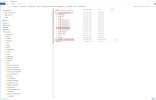
It's the same folder structure as the bear example from the SDK!
All Asobo airport people are also organized like this: 3-D model and the animation are separate, they are separate gltf files.
And one more thing
For example, if you want several 3-D models to share an animation, then there is the option "ASOBO_animation_retargeting" in the msfs_babylon exporter:
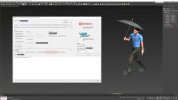
The prerequisite for this is a uniform rig. In 3dsm there is a biped for human characters. If you use a uniform biped system in all of your characters, then each of these models can access ANY separately exported animation.
If I understood correctly, this Asobo Method saves resources and memory. That is also obvious. Because if, for example, you create an offshore wind farm with hundreds of wind turbines and each turbine has its "own" animation, then it is much less efficient than if hundreds of wind turbines rely on a single animation.
I know this is all "hard reading"

Last edited:
Christian Bahr
Resource contributor
- Messages
- 1,142
- Country
With the greatest pleasureShout out to Christian and thank you again for patiently coaching me.
