• Which the release of FS2020 we see an explosition of activity on the forun and of course we are very happy to see this. But having all questions about FS2020 in one forum becomes a bit messy. So therefore we would like to ask you all to use the following guidelines when posting your questions:

    • Tag FS2020 specific questions with the MSFS2020 tag.
    • Questions about making 3D assets can be posted in the 3D asset design forum. Either post them in the subforum of the modelling tool you use or in the general forum if they are general.
    • Questions about aircraft design can be posted in the Aircraft design forum
    • Questions about airport design can be posted in the FS2020 airport design forum. Once airport development tools have been updated for FS2020 you can post tool speciifc questions in the subforums of those tools as well of course.
    • Questions about terrain design can be posted in the FS2020 terrain design forum.
    • Questions about SimConnect can be posted in the SimConnect forum.

    Any other question that is not specific to an aspect of development or tool can be posted in the General chat forum.

    By following these guidelines we make sure that the forums remain easy to read for everybody and also that the right people can find your post to answer it.

MSFS20 Animation in Edit mode with Animall

Messages
55
Country
spain
Hello,

I'm doing an animation to transform the fuselage, but with the normal procedure, animations in Object mode, I only can move the entire object and can't move only some vertices to do the animation I want.

So I found the Blender plugin Animall that allows you to record animations in edit mode. But once exported with the Asobo plugin actived, in the .gltf file there isn't any animation code. It's like if the animations made with Animall doesn't export.

Is there any way to animate vertices with this or another method?
 
Last edited:
I'm not sure is MSFS allows us to morph the shape of an object. We can move or rotate, and we can use bones. But no morphing, I think.
 
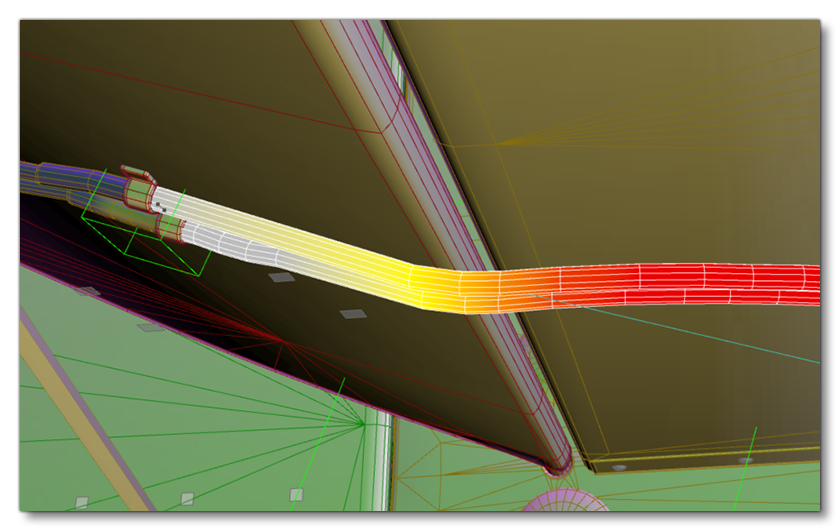
Yes, blended skinned meshes are allowed, as in the case of elevator cables, or brake hoses running to landing gear brakes. However these must be parented to the standard animation “format,” that uses helpers and nodes.

So what you could do is model the fuselage “skeleton,” basically building a bone structure, then you can “skin” the flexible fuselage and parent it to your skeleton.
 
Last edited:
After consideration, a flexible fuselage won't be enough, wingflex is modeled, but not "hull" flex. What you'll need to do, I think, is involve the control surfaces. Instead of a big wing with a tiny aileron, you could have the tip of a flexible wing be the aileron. The rudder and elevators could be more like a backbone and it seems like a blended wing lifting body would have to flex somewhere..
 
Yeah, that was my first thought to optimize it a little bit and to avoid to have numerous objects eating more memory. I think I need more knowledge to work with bones 😅 lets see.

Thanks all :)
 
Sure! Here's an image from the SDK, you'd kind of want to reverse it I think, with your little cable "hinge" driving the big skinned plane.

skin_5.png

To me the odd part is there are only two bones, or helpers, beginning and end. The flexible part is rendered in 3ds Max like heat and we're supposed to change that heat mapping to prevent the skinned part from bending into solid parts.
 
Back
Top