
• Which the release of FS2020 we see an explosition of activity on the forun and of course we are very happy to see this. But having all questions about FS2020 in one forum becomes a bit messy. So therefore we would like to ask you all to use the following guidelines when posting your questions:

    • Tag FS2020 specific questions with the MSFS2020 tag.
    • Questions about making 3D assets can be posted in the 3D asset design forum. Either post them in the subforum of the modelling tool you use or in the general forum if they are general.
    • Questions about aircraft design can be posted in the Aircraft design forum
    • Questions about airport design can be posted in the FS2020 airport design forum. Once airport development tools have been updated for FS2020 you can post tool speciifc questions in the subforums of those tools as well of course.
    • Questions about terrain design can be posted in the FS2020 terrain design forum.
    • Questions about SimConnect can be posted in the SimConnect forum.

    Any other question that is not specific to an aspect of development or tool can be posted in the General chat forum.

    By following these guidelines we make sure that the forums remain easy to read for everybody and also that the right people can find your post to answer it.

P3D v2 Aprroach lights, bgl lights (not bright enough at a distance)

Messages
177
Country
faroeislands
Hello community.

I have a problem with my bgl approach lights.
The problem is that the lights are not bright enough and hardly seen at a distance.

Only when I am close up the lights do work.
I made an approach light before for a different scenery and that one works perfectly.

So I guess my question is if some of you might know what I have forgotten?
This is only my 2'nd try with approach lights so any hints are welcome.

The following is the settings within MDCX.
And after comes a screenshot which shows how weak the lights are.

I would not come here asking before spending a lot of time finding a solution my self, but I have not been able to find any.

Like they say, two heads think better than one, right?
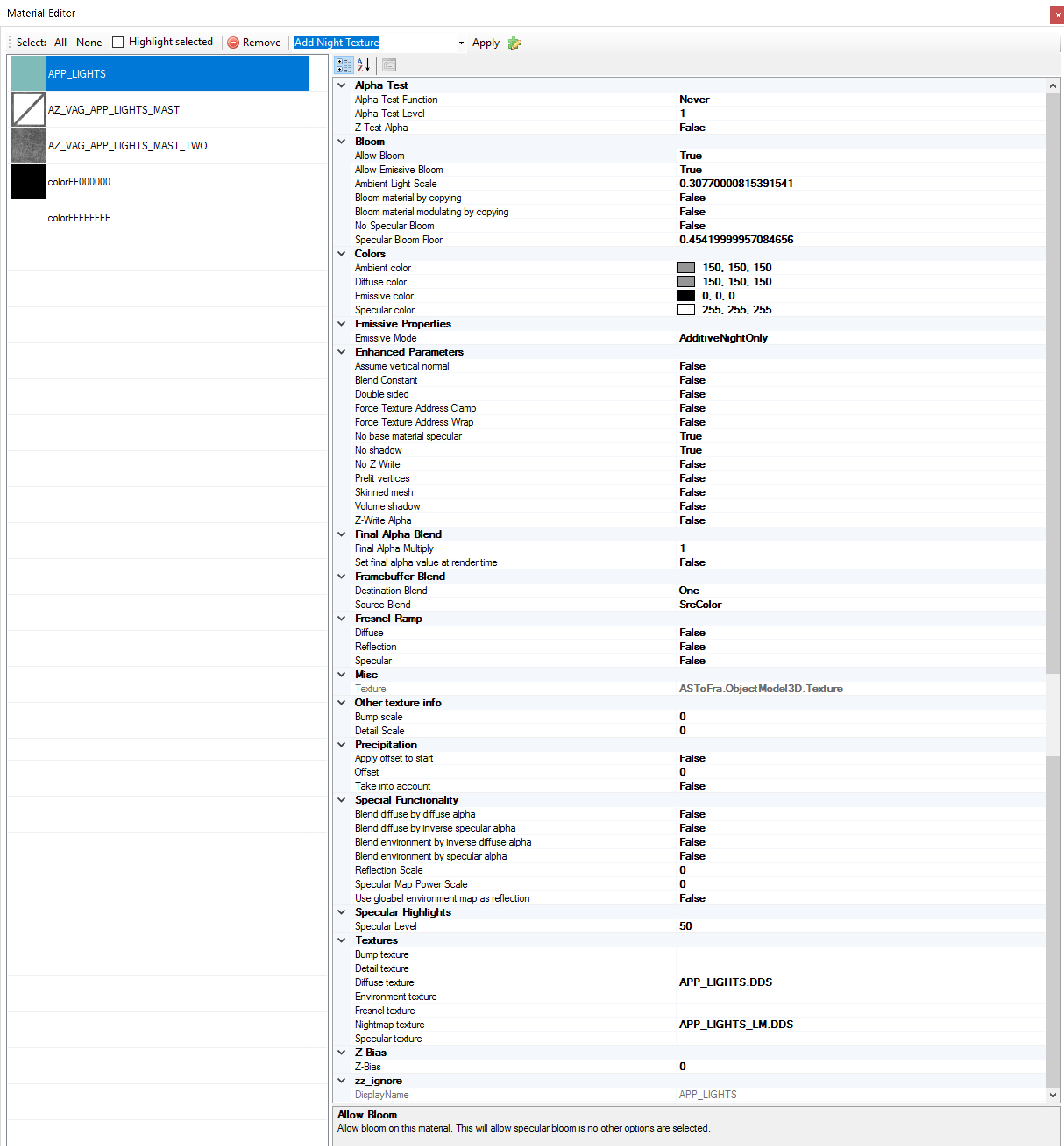
app_lights_settings_mdcx.jpg


App lights in P3Dv2

Prepar3D 2017-01-14 13-29-02-24.png

--------------------------------------------------

Here the other lights I made for my first project, they work perfectly, not sure where I have gone wrong.

Prepar3D 2017-01-14 13-32-41-60.png
 
Are both lights made with the same techniques? You show material settings, so I assume you made them with polygons. Or did you use BGL_LIGHT commands?
 
Are both lights made with the same techniques? You show material settings, so I assume you made them with polygons. Or did you use BGL_LIGHT commands?

Hello Arno.

I used polygons for both, not the BGL LIGHT commands.

Thanks for your reply.
 
Then I would just compare the materials.

Also if your object is smaller it will dissappear quicker, could it be the bounding boxes are different?
 
Then I would just compare the materials.

Also if your object is smaller it will dissappear quicker, could it be the bounding boxes are different?

Not sure about the bounding boxes but could be.

The light masts that are working are 6 to 8 times larger in height but a bit shorter in distance, but maybe the fact that the working model is so much higher is the reason that it works, and this way smaller one does not?

Could that be the reason?
If so then how would I best solve that without increasing the visual size of the model?

Because the approach light model is quite accurate in terms of its real world size.
 
ModelConverterX 2017-01-18 23-30-25-29.png
The approach light is in 5 different models, and this is the bounding box for the first section which is the largest ones.
Is this bounding box to small?
 
Biggest difference I see is that in one the origin is in the bounding box and the other not. Is that by intention?
 
Your bounding box technique is incorrect. Each light element needs to have its own transparent bounding box, not the whole assembly.<--- that is, if you are using an effect inside the bounding box. If it is a pure textured light, it will not look much better than what you have now. Textured lights work great for taxiways, but very mediocre for runway or approach lights, or anything you need to see from a distance.

I have experimented with this more than I care to acknowledge. The best approach lights are still SCASM created with Airport (v2.6?).
You can create the platform that you have for visual reference during the day, then at night your SCASM lights will work awesome.

David
 
Your bounding box technique is incorrect. Each light element needs to have its own transparent bounding box, not the whole assembly.<--- that is, if you are using an effect inside the bounding box. If it is a pure textured light, it will not look much better than what you have now. Textured lights work great for taxiways, but very mediocre for runway or approach lights, or anything you need to see from a distance.

I have experimented with this more than I care to acknowledge. The best approach lights are still SCASM created with Airport (v2.6?).
You can create the platform that you have for visual reference during the day, then at night your SCASM lights will work awesome.

David


Hello David.

This is not quite true because in the approach light from my other project ''which does work'' I use bgl lights, not effects, and I can see the approach lights far enough out in the distance.

But the same bgl method ''only for a new project'' does not work for some reason, but I am trying to do the exact same thing.

might perhaps not be as visible as scasm lights, but this does the job good enough, also on p3dv2 and p3dv3.

From what I have been reading, scasm lights have an effect in fps?

prepar3d-2017-01-14-13-32-41-60-png.32499
 
ModelConverterX 2017-01-19 12-36-07-50.png
Biggest difference I see is that in one the origin is in the bounding box and the other not. Is that by intention?

No, the model is in the bounding box, but the model and bounding box is not centered and the center.

This is seen in day time better.
Will a bigger model ''which would produce a bigger bounding box'' be a possible solution?
 
Last edited:
But why not center the model around the origin? That usually gives better performance and can also affect the visibility.
 
But why not center the model around the origin? That usually gives better performance and can also affect the visibility.

Normally I do center them but had forgotten.
I did center the object now but it did not improve any thing with the lights.
 
Your bounding box technique is incorrect. Each light element needs to have its own transparent bounding box, not the whole assembly.<--- that is, if you are using an effect inside the bounding box. If it is a pure textured light, it will not look much better than what you have now. Textured lights work great for taxiways, but very mediocre for runway or approach lights, or anything you need to see from a distance.

I have experimented with this more than I care to acknowledge. The best approach lights are still SCASM created with Airport (v2.6?).
You can create the platform that you have for visual reference during the day, then at night your SCASM lights will work awesome.

David

SCASM lights created with Airport v2.6, is is a tool that can be downloaded? and is this somewhat easy to make and fps friendly?

I only need the approach lights before I can release this scenery.
 
Azura I apologize I thought you were using the effects methods where your objects need a bounding box to really shine at a distance. BGLs are a different story.

Yes Airport can still be downloaded for free. It creates FS2000 style runway edge lights, approach lights and PAPI/VASI. I still use it for runway lights, no FPS impact that I can tell. These lights you can see from 10 miles away, similar to default airport lights.

It's easy. Start with the tutorial here: http://www.fsdeveloper.com/wiki/index.php?title=Light_over_ground_poly
Use the latest Airport version you can find.
If you want to try it out and get stuck, gimme a shout. Otherwise if you can get the bgl light to work, even better! (Ive given up)

David
 
Azura I apologize I thought you were using the effects methods where your objects need a bounding box to really shine at a distance. BGLs are a different story.

Yes Airport can still be downloaded for free. It creates FS2000 style runway edge lights, approach lights and PAPI/VASI. I still use it for runway lights, no FPS impact that I can tell. These lights you can see from 10 miles away, similar to default airport lights.

It's easy. Start with the tutorial here: http://www.fsdeveloper.com/wiki/index.php?title=Light_over_ground_poly
Use the latest Airport version you can find.
If you want to try it out and get stuck, gimme a shout. Otherwise if you can get the bgl light to work, even better! (Ive given up)

David

Hello David.

Thank you so much for your help and the link.
I will look into this for sure and send a message if I get stuck for to long.

I will do my best to follow the tutorial closely, thanks :)

Just a quick question.
Am I then able with scasm lights to attach those to my approach light 3d model?
 
You can get them pretty close, but once you are over the lights there will be a visible offset. The good thing is, since they only operate at night, the offset may not be too much of an issue. But generally no, they reside on an independent bgl...........you would need to tweak your light platform model to match the location of the lights as best as possible.

David
 
You can get them pretty close, but once you are over the lights there will be a visible offset. The good thing is, since they only operate at night, the offset may not be too much of an issue. But generally no, they reside on an independent bgl...........you would need to tweak your light platform model to match the location of the lights as best as possible.

David

Okay thanks, will keep that in mind :)
 
Back
Top