
• Which the release of FS2020 we see an explosition of activity on the forun and of course we are very happy to see this. But having all questions about FS2020 in one forum becomes a bit messy. So therefore we would like to ask you all to use the following guidelines when posting your questions:

    • Tag FS2020 specific questions with the MSFS2020 tag.
    • Questions about making 3D assets can be posted in the 3D asset design forum. Either post them in the subforum of the modelling tool you use or in the general forum if they are general.
    • Questions about aircraft design can be posted in the Aircraft design forum
    • Questions about airport design can be posted in the FS2020 airport design forum. Once airport development tools have been updated for FS2020 you can post tool speciifc questions in the subforums of those tools as well of course.
    • Questions about terrain design can be posted in the FS2020 terrain design forum.
    • Questions about SimConnect can be posted in the SimConnect forum.

    Any other question that is not specific to an aspect of development or tool can be posted in the General chat forum.

    By following these guidelines we make sure that the forums remain easy to read for everybody and also that the right people can find your post to answer it.

ATC Radar in my plane.

Messages
47
Country
us-illinois
Hello.

I incorporated the ATC Radar into my 737 panel. See the pic below. I really like having the radar in the plane so that I can act as tower and still fly. I like to fly in controlled sessions but what fun is it to circle an airport? I want to go places, see things. I enjoy a hops session much more. But not if landing is chaos. By having the radar, I can vector fellow pilots into our destination as I make my approach and keep everyone spaced out properly. It makes hops sessions a lot more fun.
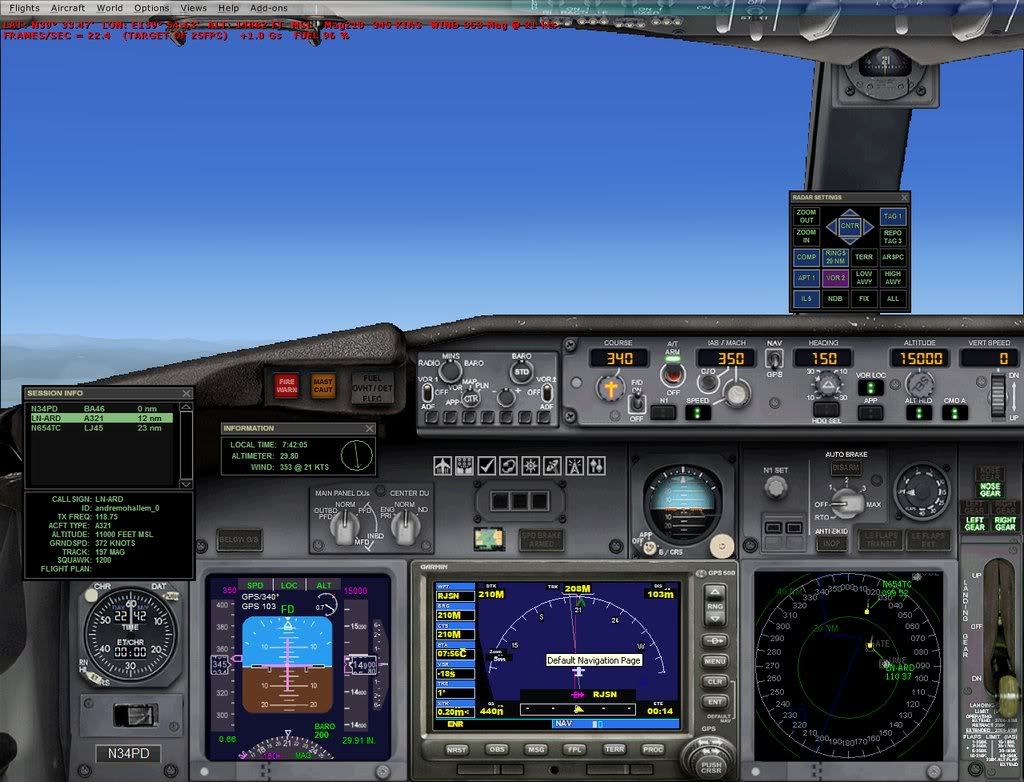
2008-7-14_16-24-29-165.jpg


Only trouble is, it does not show my plane. Anyone know how to tweak the radar so it would show a red cross hairs for my position? I know I am always in the dead center of the gauge but it would make life a lot simple to see a reference point.

It would also be a nice feature to add the course line (pink line like the one on the GPS) too.

P.S. If anyone wants the panel config, just let me know. All of the stuff is default so you don't need any gauges. You just need the config.
 
Here's some code I just added to my radar screen to
place a own plane icon and course line. The plane icon comes
from the GPS1000 cab and the course line is simply
a 1 x 380 bmp colored red, which I created with PSP.

The position data is for the 'map' used in the recently
released A2A B377. I added the course line to simulate
a line that is drawn on a chart. I choose red for best
visability with terrain shown or not.

Code:
               <Element id="Course line">
                    <FloatPosition>386.000,384.000</FloatPosition>
                    <Image id="CRS.bmp" Name="CRS.bmp">
                        <Transparent>True</Transparent>
                        <Axis>1.000,379.000</Axis>
                        <Bright>True</Bright>
                    </Image>
                    <Rotation id="Rotation">
                        <Expression id="Expression">
                            <Script>6.2828 (A:Plane heading degrees magnetic, Radians) -  /-/</Script>
                        </Expression>
                    </Rotation>
                </Element>
                
               <Element id="Airplane Icon">
                    <FloatPosition>386.000,384.000</FloatPosition>
                    <Image id="airplane_icon.bmp" Name="airplane_icon.bmp">
                        <Transparent>True</Transparent>
                        <Axis>15.000,8.000</Axis>
                        <Bright>True</Bright>
                    </Image>
                    <Rotation id="Rotation">
                        <Expression id="Expression">
                            <Script>6.2828 (A:Plane heading degrees magnetic, Radians) -  /-/</Script>
                        </Expression>
                    </Rotation>
                </Element>

Paul
 
Gypsy,

Thanks for the reply. As I look at that, it seems to make sense. But I have no idea how to add that. Would that be in the XML? I am guessing.
 
Gypsy,

Thanks for the reply. As I look at that, it seems to make sense. But I have no idea how to add that. Would that be in the XML? I am guessing.

Yes, it is XML code that gets inserted into the
radarscreen.xml file. You first have to 'de-cab'
the radar.cab file into a folder of the same name.

Then use any text editor to open the radarscreen.xml file
and insert the above code just after the 'Compass Rose' section
and above the 'MouseArea' section.

You also need to put the BMP files into the folder.
I simply copied the airplane_icon.bmp from the G1000
gauge and added that to the radar folder.
For the course line I used PaintShiop Pro ( use any paint program )
and create a 1 pixel by 380 pixel bmp colored red
or any other color you wish that will stand out on
the map with terrain enabled.
Name it CRS.bmp and put it in the folder.

You don't need to 're-cab' the folder as FSX will use the
folder contents first before it goes to the 'cab' file.

Short of time this AM but if you have further questions
ask away and I'll answer when I can.

Paul
 
Back
Top