• Which the release of FS2020 we see an explosition of activity on the forun and of course we are very happy to see this. But having all questions about FS2020 in one forum becomes a bit messy. So therefore we would like to ask you all to use the following guidelines when posting your questions:

    • Tag FS2020 specific questions with the MSFS2020 tag.
    • Questions about making 3D assets can be posted in the 3D asset design forum. Either post them in the subforum of the modelling tool you use or in the general forum if they are general.
    • Questions about aircraft design can be posted in the Aircraft design forum
    • Questions about airport design can be posted in the FS2020 airport design forum. Once airport development tools have been updated for FS2020 you can post tool speciifc questions in the subforums of those tools as well of course.
    • Questions about terrain design can be posted in the FS2020 terrain design forum.
    • Questions about SimConnect can be posted in the SimConnect forum.

    Any other question that is not specific to an aspect of development or tool can be posted in the General chat forum.

    By following these guidelines we make sure that the forums remain easy to read for everybody and also that the right people can find your post to answer it.

MSFS24 Biome Corrections

rhumbaflappy

Administrator
Staff member
Resource contributor
Messages
6,514
Country
us-wisconsin
In MSFS 2020, it was possible to overwrite the base biome XMLs to alter the vegetation types. MSFS 2020 had a huge data error in assigning the area "Central US forest-grasslands transition" as cold conifer. That gave us pine forests in Chicago, Milwaukee, St. Louis, all of Illinois. My solution was this: https://www.fsdeveloper.com/forum/threads/ecoregions.450706/post-870507

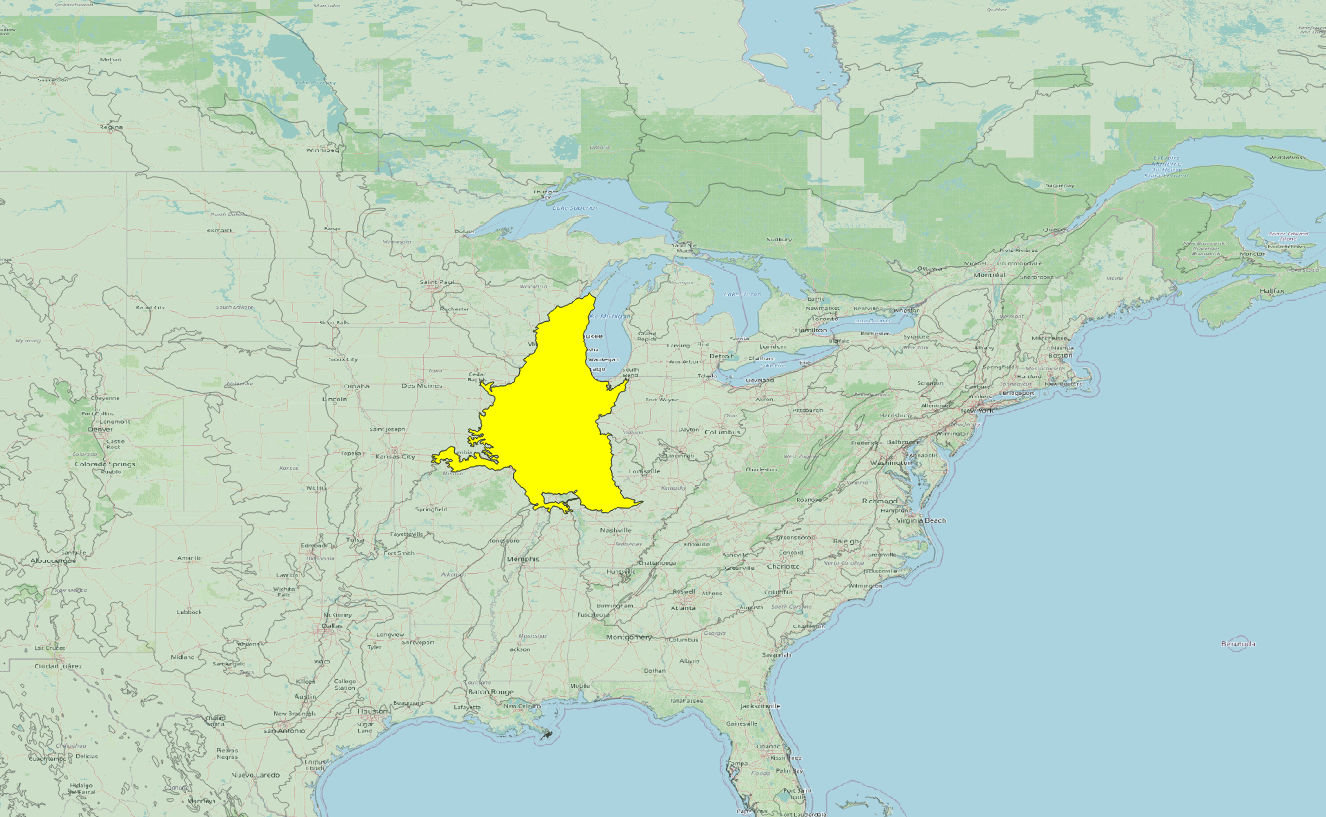
In MSFS 2024, this approach doesn't seem possible. I am unable to override the default biomes. But I did make a polygon covering the entire "Central US forest-grasslands transition" and assigned it as "Deciduous_NorthAmerica", and that gets rid of the pines, and replaces them with the deciduous trees. Here's the source and packages for that fix: Central US forest-grasslands transition.zip

The original area source was the Ecoregions2017 shapefiles. I extracted the Central US forest-grasslands transition polygon, and made a package. When saved from the MSFS 2024 DevMode, the data is converted to XML code, rather than shape, which is fine with me.

Central US forest-grasslands transition.png


It's a big area, with about 20,000,000 residents. The error existed in 2020, and nobody at Asobo reviewed the data for 2024. I complained a few years ago with no response, so I fixed it myself, and it is fixed here for 2024. Feel free to complain to Asobo, but don't hold your breath for a fix. My hometown isn't a pine forest. There shouldn't be pine forests in Chicago or St. Louis. Who knows what other mischief Asobo has given us?
 
Asobo probably needs to consult with a botanist, in order to improve the realism of their biomes. There also too many conifers in the NE USA at lower elevations.

This issue doesn't bother me too much. It has about the same "concern factor" as cloud type inaccuracies. You'd think that by now Asobo would have figured out a simple algorithm based on temperature, humidity and wind speed that could predict a realistic sky. Basically in MSFS, it's either billowing volcanic steam or flat gray overcast.
 
I just couldn't take the pine trees. I test things out at 41WI near my home. Grass strip and one parking spot. Perfect... except for the trees.
 
Hmm.
 
Wow. Much worse than I thought. I hadn't got around to exploring the planet yet. When I made a biome for 2020, it followed the Ecoregions. I just went to a sampling of locations with Google maps, and used photos and street views to try to match the biomes. It was a bit of a chore, but it worked. How did they develop such a detailed biome, and then botch it up by never checking the results against the real world?
 
Wow. Much worse than I thought. I hadn't got around to exploring the planet yet. When I made a biome for 2020, it followed the Ecoregions. I just went to a sampling of locations with Google maps, and used photos and street views to try to match the biomes. It was a bit of a chore, but it worked. How did they develop such a detailed biome, and then botch it up by never checking the results against the real world?
That's simple... they were forced to release when it wasn't ready. 😁.
 
Lol! No, Rick. It wasn't every student; just the one's their homework wasn't eatten by their dog or pet bug in this case. Lol
 
Last edited:
You can make your own EcoRegions as polygons (as the Central US forest-grasslands transition I did above). But we cannot change the biomes or their vegetation with a package in 2024. Currently, Asobo is working on SU2, so maybe this will change. For SU1, my fs-base-biomes is stored and used in my Steam folder: D:\Programs\Steam\steamapps\common\Limitless\Packages\fs-base-biomes. Asobo streams this folder, but the streamed folder is never used. I can replace these files to change BiomeRules, or add files to this folder to create new BiomeRules, and by fixing the fs-base-biomes' layout.json, I get the changes in the sim for the default EcoRegions. These changes are not reset to default unless you have your Steam app verify the files. So it remains changed for each session as you would hope.

The problem here, is that you are altering or adding default files. We should use packages instead that would be in Community. Then we could easily change biome rules back to default by removing the package. The fact that SU2 beta is messing with biomes tells me we can't count on Asobo making a permanent decision about where the biomes exist, and how we can alter them.

I think this package definition should have worked:
XML:
<?xml version="1.0" encoding="utf-8"?>
<AssetPackage Version="0.1.0">
    <ItemSettings>
        <ContentType>MISC</ContentType>
        <Title>Rhumbaflappy Biomes</Title>
        <Manufacturer>fs</Manufacturer>
        <Creator>fs</Creator>
    </ItemSettings>
    <Flags>
        <VisibleInStore>false</VisibleInStore>
        <CanBeReferenced>false</CanBeReferenced>
    </Flags>
    <GloballyOverridenBaseSimFiles>
        <GloballyOverridenBaseSimFile>fs-base-biomes\Biomes\BiomeRules\10-asobo_biomes.xml</GloballyOverridenBaseSimFile>
        <GloballyOverridenBaseSimFile>fs-base-biomes\Biomes\BiomeRules\15-asobo_biomes.xml</GloballyOverridenBaseSimFile>
    </GloballyOverridenBaseSimFiles>
    <AssetGroups>
        <AssetGroup Name="ContentInfo">
            <Type Version="0">ContentInfo</Type>
            <Flags>
                <FSXCompatibility>false</FSXCompatibility>
            </Flags>
            <AssetDir>PackageDefinitions\fs-base-biomes\ContentInfo</AssetDir>
            <OutputDir>ContentInfo\fs-base-biomes</OutputDir>
        </AssetGroup>
        <AssetGroup Name="rhumbaflappy-biomes">
            <Type Version="0">Biome</Type>
            <Flags>
                <FSXCompatibility>false</FSXCompatibility>
            </Flags>
            <AssetDir>PackageSources\Biomes\BiomeRules\</AssetDir>
            <OutputDir>Biomes\BiomeRules\</OutputDir>
        </AssetGroup>
    </AssetGroups>
</AssetPackage>
But it does not add the new BiomeRules, or override the defaults. So either GloballyOverridenBaseSimFiles doesn't work, or because the biomes are stored locally instead of streamed it doesn't work, or both. Or the virtual file system is just not working for biomes. I don't know where the MS Store version has the biome rules or if they are accessible, or how XBox users could alter their biome rules. It's a mess, and as of now, no biome rules changes can be distributed to the market. You can only have them on your own PC by hacking the files in the installation folder.
 
Continuing this discussion... You can download or make shapefiles of the areas you'd like to change the default biomes. Besides Central US forest-grasslands transition, I found some Desert biomes that are irritating in MSFS 2024. There are some that use Saguaro cactus in areas that no saguaro cactus ever grew, as well as some assignments of Joshua trees, that should exist in only the Mohave desert. The original EcoRegions 2017 shapefiles are still used by Asobo and can be downloaded. But they need some tweaking. Shapefiles for MSFS need to be SinglePart, with no holes, and the validity of shapefiles should be checked.

I made a tool (with the help of Grok) that will convert a shapefile to a MSFS 2024 biome XML. The tool, along with the package setup is here: EcoRegionCorrections.zip It's a command line C# program that takes the name of the shapefile and the biome type as arguments. I ran it as a batchfile.

I discovered something about the XML needed to switch biomes:
XML:
<?xml version="1.0" encoding="utf-8"?>
<FSData version="9.0">
  <Polygon version="0.4.0">
    <Attribute name="UniqueGUID" guid="{359C73E8-06BE-4FB2-ABCB-EC942F7761D0}" type="GUID" value="{00000000-0000-0000-0000-000000000000}" />
    <Attribute name="BiomeName" guid="{E5FA1B20-BB2F-40D5-913B-480C547CC9B8}" type="STRING" value="Deciduous_NorthAmerica" />
    <Attribute name="GeomeName" guid="{F0B11821-16FC-407B-BE5A-DBEB67A77571}" type="STRING" value="" />
    <Vertex lat="44.563008" lon="-87.459740" />
    <Vertex lat="44.561218" lon="-87.460780" />
    <Vertex lat="44.559782" lon="-87.461743" />
    ...
The GUID can be zero'd for all the polys, and you only need the Bioname definition (Although I do Include Geomename... I forget why). No layer numbers or vegetation things. It just changes the biome. Drop the XML file(s) into your PackageSources scenery folder and compile. This doesn't create new Biome Rules, but allows you to place biomes wherever you'd like from shapefiles.
 
Hi Dick:

Many thanks for your ongoing work with this aspect of the SDK and implementing custom enhancements to MSFS Biomes / EcoRegions. :teacher:

Regarding your admonitions above:

The original EcoRegions 2017 shapefiles are still used by Asobo and can be downloaded. But they need some tweaking. Shapefiles for MSFS need to be SinglePart, with no holes, and the validity of shapefiles should be checked.

This doesn't create new Biome Rules, but allows you to place biomes wherever you'd like from shapefiles.

...and:

No layer numbers or vegetation things.

It just changes the biome. Drop the XML file(s) into your PackageSources scenery folder and compile. This doesn't create new Biome Rules, but allows you to place biomes wherever you'd like from shapefiles.

IIUC, you very generously provided "ready-to-use" XML derivatives from original EcoRegions 2017 shapefiles.

And if some of us may wish to "tinker-under-the-hood", and modify Asobo's data further (if possible), we need to do some GIS work.


IIRC, you previously posted info on a very useful Python scripted plugin for QGIS users to validate / modify ESRI Shapefile geometry.

If you have since found another related QGIS plugin of merit, could you mention that here for the benefit of those wishing to test this ?


Google was not able to find your prior post here on that QGIS ESRI shapefile validation / repair plugin:

https://www.google.com/search?q=site:+www.fsdeveloper.com+QGIS+Python++plugin+validate+Shapefile+geometry&sca_esv=bfd7f0276b7e69c9&source=hp&ei=Klz9Z8XhBPbB0PEPlqvHkQc&iflsig=ACkRmUkAAAAAZ_1qOsNlhlK9Mu_9gMarIgbIZNVsQwru&ved=0ahUKEwjFnsS8m9iMAxX2IDQIHZbVMXIQ4dUDCBE&uact=5&oq=site:+www.fsdeveloper.com+QGIS+Python++plugin+validate+Shapefile+geometry&gs_lp=Egdnd3Mtd2l6IklzaXRlOiB3d3cuZnNkZXZlbG9wZXIuY29tIFFHSVMgUHl0aG9uICBwbHVnaW4gdmFsaWRhdGUgU2hhcGVmaWxlIGdlb21ldHJ5MgUQABjvBTIIEAAYgAQYogRI3ckEUABYo4UEcAB4AJABAJgBpwGgAb8VqgEENi4yMLgBA8gBAPgBAfgBApgCGqAC8hjCAg4QLhiABBixAxjRAxjHAcICERAuGIAEGLEDGNEDGIMBGMcBwgIIEAAYgAQYsQPCAgsQLhiABBjRAxjHAcICCxAAGIAEGLEDGIMBwgIFEC4YgATCAgsQLhiABBixAxiDAcICDhAuGIAEGMcBGI4FGK8BwgILEC4YgAQYsQMY1ALCAggQLhiABBixA8ICFBAuGIAEGLEDGNEDGIMBGMcBGIoFwgIEEAAYA8ICCxAuGIAEGMcBGK8BwgIFEAAYgATCAgoQABiABBixAxgKwgIHEAAYgAQYCsICBhAAGBYYHsICCBAAGBYYChgewgILEAAYgAQYhgMYigXCAgcQIRigARgKwgIFECEYnwXCAgUQIRigAcICBhAAGA0YHpgDAJIHBDIuMjSgB66aAbIHBDIuMjS4B_IY&sclient=gws-wiz


Like some forum participants here at FSDev, I prefer to use Global Mapper instead of QGIS for GIS tasks such as you allude to above.

I am reviewing Global Mapper ways to convert ESRI Shapefiles (*.SHP) from "Holes" / Muli-part format to Single non-Multipart for this task.


This time Google AI had a reasonably believable reply to a query on this GIS task for *.SHP editing with the info it gathered / organized:

https://www.google.com/search?q=Sha...MAkgcDMi42oAfZGLIHAzAuNrgHxQY&sclient=gws-wiz


A different Google query specific to Global Mapper yielded some useful info on the indicated GIS tasks to do for use of your above info:

https://www.google.com/search?q=sha...MzLjmgB6kasgcDMC45uAf1CQ&sclient=gws-wiz-serp


I have not tested these queries on Grok yet, but like any other W.I.P., I anticipate its 'Agentic' features may improve with feedback.


BTW: I plan to establish a workflow to save "Holes" data to exported *.SHP files rather than deleting it from a original "work" file.

Then I can inspect the exported data to see what was 'removed', and whether it should be retained for use in scenery separately.

Assuming one finds exported data that 'should' be retained for use in scenery separately, I plan to test creating multiple layers of vectors.


BTW: AFAIK many "Holes" were made by SBuilderX users in *.SHP files for FS2Kx scenery ...that they now want to port to MSFS.


And one may wonder whether "Holes" are not compatible with MSFS SDK due to how it processes Geographic coordinate winding direction.

I plan to test whether internal "Holes" can still be used with MSFS SDK if one reverses Geographic coordinate winding direction.


I realize this thread is intended as a heads-up on options to further enhance MSFS Biomes / EcoRegions, but I do have workflow questions.

I would have no objections if you see fit to move this related inquiry to a separate thread in the appropriate forum area. ;)


Regarding your statement: "allows you to place biomes wherever you'd like from shapefiles":

Can one achieve more granularity with Biomes / EcoRegions to allow greater local variation as in FS2Kx "Autogen" ?

Or does MSFS only use (1) file for all Biome data in a specific MSFS world "EcoRegion" ?

How does MSFS world "EcoRegion" size compare with "Regions" in FS2Kx ?

Does MSFS have any smaller subdivisions for this data as a type of local Ecological Environment such as LOD-13 "Areas" or smaller quads ?

Can we make the MSFS equivalent of FS2Kx SDK Autogen Annotator "Autogen Vegetation Rectangles" at the granularity of a 'local" Biome ?

Does MSFS have a way to enhance terrain slope vegetation with associated texture changes such as FS2Kx has ?


One may infer MSFS achieves a relatively higher FPS perf via batching and a object placement type comparable to legacy FS2Kx 'Autogen'.


Assuming we do have the option for (much) smaller granularity with regards to MSFS Biomes / EcoRegions:

Do we have the option to subdivide the Shapefile and/or XML derivatives you linked above, to yield multiple smaller local "Biomes" ?


How do we access MSFS default vegetation ModelLib types in CGLs to make an equivalent of "Vegetation Polygons" with specified trees ?

I cannot find many of the excellent full-3D trees now featured in MSFS 2024 to place them in scenery; some are MIA in DevMode pick-lists.


Is there a reason that so many of the really 'good" looking trees appear to be "unavailable" for placement in DevMode GUI pick-lists ?

IIUC, it was reported that Asobo is attempting to supplement / replace content made by BlackShark AI to revise MSFS scenery over time.


A question also arose regarding use of multiple BGLs / CGLs that contain vector content intended to be rendered with different priority.

Reportedly, FS2Kx and especially MSFS prefers to keep package vector content in a (1) "vector" BGL / CGL; but what if we want 'layers' ?


In FS2Kx we can put scenery content in a BGL, and have multiple Area layers with priority by Scenery.Cfg Area #, alphanumeric naming, Geographic extent of terrain coverage etc.

But MSFS appears to "throw-a-wrench-into-the-works" by reportedly having altered / disabled the Content.XML control of display priority.

https://web.archive.org/web/2022081...cles/9407/changes-on-contentxml-behavior.html


What 'simpler' foolproof method do we have left now, to enforce a custom display priority scheme for MSFS scenery rendering at run time ? :oops:

Is the MSFS "Package Reorder Tool" now our only alternative ?

https://www.google.com/search?q=MSF...cEOS4yMqAH_MkBsgcEOC4yMrgH1Ro&sclient=gws-wiz

One might initially infer that to be the case, until reading these threads dating from the inception of 2025, and as recently as March 2025:

https://devsupport.flightsimulator.com/t/define-the-loading-order-of-installed-packages/12456/7

https://docs.flightsimulator.com/msfs2024/html/2_DevMode/Project_Editor/The_Project_Inspector.htm

https://devsupport.flightsimulator....ction-causes-problems-after-compilation/13690


Wow, almost as much fun as when Lockheed-Martin imposed use of XML in P3D for adding Area layers to (a FS2Kx series) Scenery.Cfg. :banghead:

One might wonder whether Asobo actually has the ability to learn from (others' ?) mistakes. o_O


My thought is, a number of FS developers may opt to use CvxExtractor to port FS2Kx CVX Vectors into MSFS DevMode Scenery Editor.

Many such sceneries, whether from ADE or SBuilderX, ScenProc etc. use Area layering schemes to achieve a specified display priority.


In some cases, when content is ported to MSFS, SDK Polygon Properties "Priority" tag may suffice; but in some cases that may not suffice.

I am not certain yet as to how complicated it may be to use some complex multi-layer SHP derived vector scenery objects from FS2Kx.


If you have been able to get multiple layers of *.SHP vector-derived content to work OK via MSFS SDK Polygon Properties "Priority" tag:

Do you see Biomes / EcoRegions infrastructure as the only MSFS scenery content that may not work with *.SHP file 'layer numbers' ?


Since MSFS SDK DevMode Scenery Editor "imports" *.SHP files as "primitives" to be updated with MSFS compliant attribute fields:

Is there a workflow you have identified for importing Biome / EcoRegion corrections into MSFS DevMode GUI stack of layers to set display Priority, like we do in Scenery.Cfg in FS2Kx with scenery content that does not support VTP layer numbers etc ?

My thought regarding this is, perhaps we can have our own custom smaller granularity Biomes available to use via a pick-list in DevMode.


In a related issue, IIUC, MSFS actually does have a (down-sized from FS2Kx) Terrain.Cfg file; can we edit / "Modify" ...and use it ? :scratchch

And if so, can we place "Biome Polygons" comparable to what we do in FS2Kx with CVX Vector "Land Class" polygons / vector Autogen ?


Thanks in advance for any info you might be able to share with us on IMHO, pertinent related questions for implementing 'new' Biomes. :)

GaryGB
 
Last edited:
Here's a link to the 847 EcoRegion's EcoName polygons in shapefile format. They are SinglePart and the holes removed by converting them to the exterior linear shape: EconamesFinal.zip
Hole
hole.png

No Hole
nohole.png


The gap created is about 1 meter wide at the equator. Due to the resolution of the default Biome placement, the 1 meter should be insignificant. I haven't applied all to the sim, but I think this will work in every case. I'm 72 years old and I don't have the time to test them all. :laughing:
 
Hi Dick,
I'm looking in changing biome on a limited area, a national park in east Canada. I've read all your discussions here on Biome. Not sure how to get there still. Main issue is the selection of Ecoregion vs PNV vs Trees.

My prefered way would be to define the Eastern Canadian Forest Ecoregion, Boreal forest/Taiga Biome to this area, above let say 500 meters. I would create a large polygon over the National park area (new scenery I just released : https://flightsim.to/file/103749/jacques-cartier-national-park-quebec).

However, the SDK impose to select a tree type to any new biome you create, and you cannot put a Ecoregion or a PNV to a new Biome if used in with a polygon. The SDK doesn't say how to use it in another way.
Also, the Boreal forest/Taiga Biome I wish to use presents spruce (Conifer cold 2024).

Two questions if you went over this issues:
- Is there other way to apply Biome to a limited area instead of a polygon, as insinuated by the SDK instruction? The way you discribe with large shape files look like for much larger areas (Ecoregion level if I understand well).
- While the SDK impose to select a tree type, there is no choice available for spruce you can find in boreal forest (while the SDK instructions suggest it include all tree available in the sim). Is there another way to find / select boreal forest trees ?
Best approach would be to select a Biome, in that case Boreal forest/Taiga, to apply to a large poly.

I did some tests in the attached images with cypress but it is not appropriate specie.

Thanks!
 

Attachments

  • Biome1.JPG
    Biome1.JPG
    306.6 KB · Views: 52
  • Biome2.JPG
    Biome2.JPG
    468 KB · Views: 64
Back
Top