

- Messages
- 34
- Country

Hi. I am a newbie and trying to model a local airpark that doesn't exist in MSFS. I've learned a lot since I started, but I am stuck at some point and need your help.
This is my final design in Blender:

Everything exports fine with the latest add-on, except the red-white checker. At first I tried to this with procedural texture of Blender but it didn't show in MSFS. As I am not having problems with other textures, I tried to find a checkered tile texture but couldn't find a red-white texture. I used the black-white tile I've found and tried to change color with a ColorDraw modifier in Blender and that didn't work either. The texture, although seemed red-white in Blender, showed like this in MSFS:
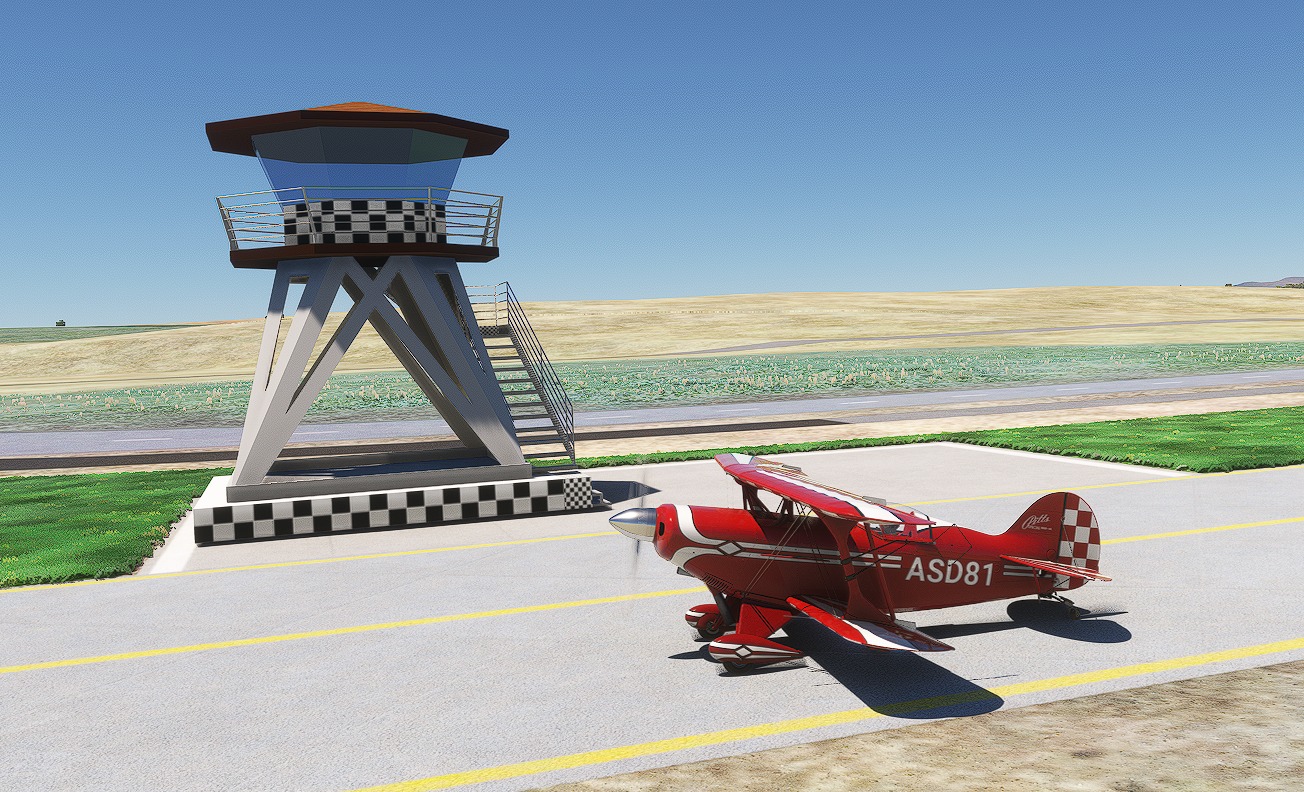
I need some guidance at this point because I am stuck.
Shall I try to change the black-white texture to red-white with Photoshop? Are there any tutorials that you would recommend? How shall I solve this problem!
HELP!
Thank you.
This is my final design in Blender:
Everything exports fine with the latest add-on, except the red-white checker. At first I tried to this with procedural texture of Blender but it didn't show in MSFS. As I am not having problems with other textures, I tried to find a checkered tile texture but couldn't find a red-white texture. I used the black-white tile I've found and tried to change color with a ColorDraw modifier in Blender and that didn't work either. The texture, although seemed red-white in Blender, showed like this in MSFS:
I need some guidance at this point because I am stuck.
Shall I try to change the black-white texture to red-white with Photoshop? Are there any tutorials that you would recommend? How shall I solve this problem!
HELP!
Thank you.

