• Which the release of FS2020 we see an explosition of activity on the forun and of course we are very happy to see this. But having all questions about FS2020 in one forum becomes a bit messy. So therefore we would like to ask you all to use the following guidelines when posting your questions:

    • Tag FS2020 specific questions with the MSFS2020 tag.
    • Questions about making 3D assets can be posted in the 3D asset design forum. Either post them in the subforum of the modelling tool you use or in the general forum if they are general.
    • Questions about aircraft design can be posted in the Aircraft design forum
    • Questions about airport design can be posted in the FS2020 airport design forum. Once airport development tools have been updated for FS2020 you can post tool speciifc questions in the subforums of those tools as well of course.
    • Questions about terrain design can be posted in the FS2020 terrain design forum.
    • Questions about SimConnect can be posted in the SimConnect forum.

    Any other question that is not specific to an aspect of development or tool can be posted in the General chat forum.

    By following these guidelines we make sure that the forums remain easy to read for everybody and also that the right people can find your post to answer it.

MSFS20 Blender Created 3D Model looks incorrect in MSFS 2020 !!!

Messages
7
Country
turkey
Hi guys I have created a Monument in 36 hours with sleepless brain melting hard work for MSFS 2020 using Blender 2.92. Originally the memorial scenery is missing in the game. I am re-creating the city as well because apparently Bing Maps totally had ignored Bydgoszcz despite that google maps have full 3D Photogeometry for it. Anyways The project I have finished which made me learn Blender better looks totally messed up when you insert in sdk. Textures are not there , modifiers are missing and text I have put on the objects are gone too. There is a section on the new blender for MSFS . Do you guys know what do I have to enable for MSFS SDK to apply all the node modifiers and textures ??? Here are the screenshots I took of the original and the SDK version of the model. Please help I dont want my effort gone to the trash. :( Do I have to bake everything ????
 

Attachments

  • monument back original.jpg
    monument back original.jpg
    556.4 KB · Views: 455
  • monument back SDK.jpg
    monument back SDK.jpg
    950.6 KB · Views: 396
  • Monument fron original.jpg
    Monument fron original.jpg
    528.8 KB · Views: 416
  • Monument front SDK.jpg
    Monument front SDK.jpg
    1.3 MB · Views: 430
Last edited:
Blimey, your texture setup looks complicated. I generally only have two nodes!

Are you using pbr textures?

I assume that all of your texture sheet dimensions are as per sdk? They won't show up if not.

Apologies if I am teaching you to suck eggs.

Stinger


Sent from my SM-G935F using Tapatalk
 
Blimey, your texture setup looks complicated. I generally only have two nodes!

Are you using pbr textures?

I assume that all of your texture sheet dimensions are as per sdk? They won't show up if not.

Apologies if I am teaching you to suck eggs.

Stinger


Sent from my SM-G935F using Tapatalk
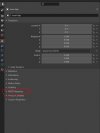
No problem my man , first of all thanks for at least being kind enough to answer :) I am a newby anyways and I had to look up what Pbr texture mean actually ;) I have not used any textures apart from the ones I've generated using the nodes thanks to some tutorials I've watched. And I have used some modifiers such as shrinkwrap and so on which doesn't show up in SDK either :( And I know the pixel ratio rule which should be power of 2's . If I would use them I would have used 8192 x 8192 to bake or whatever. Does it have something to do with the apply button which I should have pressed after everything finished where people are warning during some other tutorials. Or maybe this MSFS section on the properties tab. Where nobody mentions anything in any tutorial that's why I haven't touched and it is disabled on default... When you use nodes some options showing up there . If you dont use nodes clicking the option doesn't even open up any menus...😕
 

Attachments

  • Msfs properties.JPG
    Msfs properties.JPG
    40.3 KB · Views: 262
Yes... all modifiers have to be applied before saving and exported to MSFS. I suggest you make a backup save also before resaving with the modifiers not applied.
 
The easiest way to do this is ctrl+A then tick all transforms.

Sent from my SM-G935F using Tapatalk
CTRL + A doesn't apply modifiers as far as I know, it applies scale and rotation and sets all the values to 1. This is important for many modifiers like Bevel, Solidify or edit tools like inset to work correctly because those functions take the scale and rotation value as a baseline for what they do. If a tool does act weirdly always check if you applied scale and rotation in Object mode.
 
Yes... all modifiers have to be applied before saving and exported to MSFS. I suggest you make a backup save also before resaving with the modifiers not applied.
If I'm not mistaken you can also choose "apply modifiers" under the geometry section of the gltf export menu. That way you can leave your model as it is and make changes to your modifiers later and only apply them during the export process.
 
Hi guys I have created a Monument in 36 hours with sleepless brain melting hard work for MSFS 2020 using Blender 2.92. Originally the memorial scenery is missing in the game. I am re-creating the city as well because apparently Bing Maps totally had ignored Bydgoszcz despite that google maps have full 3D Photogeometry for it. Anyways The project I have finished which made me learn Blender better looks totally messed up when you insert in sdk. Textures are not there , modifiers are missing and text I have put on the objects are gone too. There is a section on the new blender for MSFS . Do you guys know what do I have to enable for MSFS SDK to apply all the node modifiers and textures ??? Here are the screenshots I took of the original and the SDK version of the model. Please help I dont want my effort gone to the trash. :( Do I have to bake everything ????
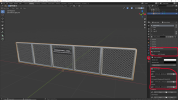
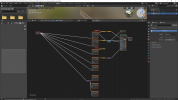
OK, there are several things that don´t seem right in your approach, I´ll try to explain. First, your shader node tree. When I first tried to bring a model from Blender to MSFS, I also thought that I could just do anything I wanted in Blender and the final result would look exactly the same in MSFS. Unfortunately, this is not the case. MSFS expects the materials / textures to have a certain structure. If you do not adhere to this structure, the textures will look wrong or not show up at all. Your shader node tree shows that you are using procedural textures like voronoi, musgrave - I don´t think that MSFS even supports procedural textures. It expect PBR materials made of an albedo, metal and normal texture, all of which are bitmap textures. For the correct shader tree to show you have to select one of the MSFS materials (like MSFS Standarf, MSFS Glass) in the material tab. Then a list of options turns up. You can then select a texture for albedo, metal and normal. The normal has to be in Direct X format to show correctly in Blender, the Metal texture is a combination of AO, roughness and metalness split into separate channels (AO Red, Roughness Green and Metalness Blue). You should select these directly from the pull down menu, don´t ever mess with the shader node tree, even the slightest change will cause your material to not compile correctly.
Screenshot (91).pngScreenshot (92).png

About the modifiers, you can apply them before exporting but once they´re applied you cannot change anything anymore, I´d rather suggest you apply them in the export menu, that way you can keep them unapplied in your file and make changes later.

Screenshot (93).pngScreenshot (94).png

If you insist on using procedural textures, you could bake them but I guess it´s easier to download some free full PBR textures. cc0textures.com has great free textures and even substances if you use substance painter, textures.com has low resolution free sample files of their payware PBR materials (the low res maps are almost always sufficient for scenery design) and poliigon.com also has some free textures as well.

Hope I could help you in some way.

cheers,

Fabian

 
Those are the same questions i have basically. Thanks for giving some insight Fabian.

Im trying to learn Blender for MSFS (i have pre-knowledge with Cinema 4D for still renders) and there seems a lot to be learned. The limitations are high it seems.

Im already at the point where i can use the PBR workflow for msfs somewhat but still so many open questions about the models themself.
 
Those are the same questions i have basically. Thanks for giving some insight Fabian.

Im trying to learn Blender for MSFS (i have pre-knowledge with Cinema 4D for still renders) and there seems a lot to be learned. The limitations are high it seems.

Im already at the point where i can use the PBR workflow for msfs somewhat but still so many open questions about the models themself.
The limitations are there but they are not a problem of Blender but restrictions of the MSFS game engine (or in fact any game engine) that expects a certain structure of its models and materials. If you are using 3DSMax for creating content you will have to handle the exact same limitations.
 
thats what i meant yes. Was meaning the limitations of msfs compared what one can do with still renders or stuff that stays withing Blender etc
 
I guess that's just the difference between a game engine and a pure rendering engine. The game engine has to weigh graphics quality and variability against performance, while a pure rendering engine doesn't need to perform well. Blender Guru published a tutorial where the final 10 second video rendered for 69 hours on a dual RTX 2080 setup - I guess gamers wouldn't accept that 😜
 
Back
Top