• Which the release of FS2020 we see an explosition of activity on the forun and of course we are very happy to see this. But having all questions about FS2020 in one forum becomes a bit messy. So therefore we would like to ask you all to use the following guidelines when posting your questions:

    • Tag FS2020 specific questions with the MSFS2020 tag.
    • Questions about making 3D assets can be posted in the 3D asset design forum. Either post them in the subforum of the modelling tool you use or in the general forum if they are general.
    • Questions about aircraft design can be posted in the Aircraft design forum
    • Questions about airport design can be posted in the FS2020 airport design forum. Once airport development tools have been updated for FS2020 you can post tool speciifc questions in the subforums of those tools as well of course.
    • Questions about terrain design can be posted in the FS2020 terrain design forum.
    • Questions about SimConnect can be posted in the SimConnect forum.

    Any other question that is not specific to an aspect of development or tool can be posted in the General chat forum.

    By following these guidelines we make sure that the forums remain easy to read for everybody and also that the right people can find your post to answer it.

FSX Blender Tool-set Beta For FSX/P3D Test Files

Just a suggestion for @rohn and @krispy1001,

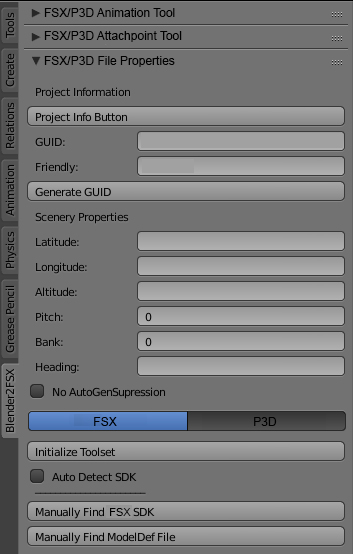
If both of you can combine the toolset on final release, i suggest something like below (This is just my imagination of the toolset appear in blender, you may have a better idea):

FSX:

FSX.jpg


P3D:

P3D.jpg


Thanks,
Manochvarma Raman
 
This is my steam FSX file path for your reference:
F:\Flight Simulators\steamapps\common\FSX

Blue=The folder created by myself in F drive
Red = Actual steam file path created by steam itself when installing FSX

Hi everyone,

For information, neither FSX-Steam nor FSW-Steam have an SDK. So no need to develop for these simulators!
 
Hi everyone,

For information, neither FSX-Steam nor FSW-Steam have an SDK. So no need to develop for these simulators!
That's true about FSW, but not true for FSX-Steam... The latter can use SDK of P3Dv1.4...


Sent from my SM-J700T using Tapatalk
 
but not true for FSX-Steam... The latter can use SDK of P3Dv1.4...

Of course...! Or the FSX or P3dv4 SDK ...! But FSX-STEAM does not have a personal SDK, and in this case, it is useless to have a tool that points to a non-existent SDK ... That's what I meant.
 
I wouldn't say it's useless (especially for those that do have it).... and I wouldn't suggest to those that have FSE have it point to P3Dv4, P3Dv3.x and/ or P3Dv2.x SDKs at all. It's not up to me though... ;)

Sent from my SM-J700T using Tapatalk
 
Hi Everyone!

I have just added a new beta test file for the Blender tool-set for FSX/P3D. This is a combined code of Mr. Ronh's code and mine. I have eliminated the error when using the "Auto Detect SDK" Button for FSX. Or I should say at least on my system the new version works Good.

The New Test File is up where the old beta test file was that I uploaded yesterday. "REMEMBER THIS IS A BETA, DO NOT USE ON PROJECTS THAT ARE UNDER CONSTRUCTION". To test the beta file use a new file or a backup of your project. And If there are any errors please let me know and please make a copy of the error in the Blenders system console.

Thanks, Kris
 
I no longer have FSX SDK installed. but please check

bpy.context.scene.fsx_modeldefpath = ''.join([sdkdir,"Environment Kit\\Modeling SDK\\bin\\modeldef.xml"])


you may need (or we need to check for ending slash):
edit : updated above link. FSX changes

Hi Mr. Ronh, The error was with my code conflicting with yours. I fixed the problem and I have put a new beta test up for testing. Thank you for your update Mr. Ronh!!!!

Thanks, Kris
 
Hi Kris,

Very good Job! It works for me...!

I was able to compile my project (saved before ...;)) with P3Dv3, P3Dv4, and FSX in automatic mode ... As the mdl files look quite different in size, I will test tomorrow these three versions on the simulators to see if I see any differences. I will inform you of the results

Thanks
 
Hi Kris,
I found the Z-Test Alpha radio button seems doesn't have any effect on the properties. When i checked the button, in MCX it still show False. I hope you can check it.

Thanks.
Manochvarma Raman
 
Hi Kris,
I found the Z-Test Alpha radio button seems doesn't have any effect on the properties. When i checked the button, in MCX it still show False. I hope you can check it.

Thanks.
Manochvarma Raman

Ok, I have checked the output of the Blender's .x file and it is change the value of the in-questioned values.

(Below is my test Blender file image)
As you can see I have set the "Z-Test Alpha" to true, I have set it's test value to 160 and I set the type of test to Greater.
upload_2017-7-10_10-22-4.png


Now I will look at the .x file that is exported using the Blenders Tool-set. (Below is the image)

So it can be seen in the image below that the values have been set to the correct values in the .x file. So I do not know why the other program that you are using is showing that it is not set to true.
upload_2017-7-10_10-25-29.png


Are you going just by the output of another program that shows that the value is set to false? Or have you actually tested it in FSX?

Thanks, Kris
 
I found the Z-Test Alpha radio button seems doesn't have any effect on the properties

Hi Kris,

This is a problem I had already raised months ago ...!
http://www.fsdeveloper.com/forum/th...ew-fsx-ver-with-p3d.437484/page-4#post-751933
I think it never worked; It seems that the transfer of this information in the .mdl file does not happen, or is done in a wrong way ...

On the other hand, I continued my tests with the different versions of P3D and FSX, and it seems that the whole works pretty well!

Thanks,
 
Hi Chris! Yes, you and MANOCHVARMA RAMAN are correct. It seams that it is having no effect. It also looks like Specular Map Power Scale is not working correctly as well. I am looking into both of them right now.

Thanks, Kris
 
Ok, I have found the reason why Z-Test Alpha does not work. The Blender tool-set has the value of the AlphaTestValue way out of range. The tool-set was allowing an value 0 - 255 to entered. The FSX SDK Modeling File Formats reads as:AlphaTestValue A value between 0.0 and 1.0 that is used in the test.

So, that is a Big "NO DUH!" on my part. :banghead:

Also, A Very "BIG THANK YOU To Arno!!!!!!!!" for his ModelConverterX APP. Today was the first time I used it. It is going to be a huge help in testing and debugging the Blender tool-set.

(Image Below is testing the tool-sets code change for Z-Test Alpha)
upload_2017-7-10_22-55-6.png


I have made the change to the code, and I will try to have another beta test out within the next 24hours. I will also upload my Blender test file so that others can test it.

Thank you to : Chrismot, and MANOCHVARM A RAMAN for pointing out that error.

Thanks, Kris
 
Hi Chris! Yes, you and MANOCHVARMA RAMAN are correct.It seams that it is having no effect.
Hi Kris,

Thanks for looking at the problem.

It also looks like Specular Map Power Scale is not working correctly as well.
No wonder I don't get the desired effect in the sim.

Also, A Very "BIG THANK YOU To Arno!!!!!!!!" for his ModelConverterX APP. Today was the first time I used it. It is going to be a huge help in testing and debugging the Blender tool-set.
I think MCX will give you big idea of making the toolset much more better. Based on the tool, i have requested few wishlist posted in the link below:
http://www.fsdeveloper.com/forum/th...for-added-functions.439501/page-2#post-772552 (very important feature that should be added in the toolset)
http://www.fsdeveloper.com/forum/th...for-added-functions.439501/page-2#post-774602

Same goes to 'Use Base Material Specular' option. The radio button works vice versa with MCX. The output should be reverse.

I hope that can be implemented in future updates. ;)

Thanks,
Manochvarma Raman
 
Last edited:
Hi Kris,

Thanks for the update.

I felt like there are some issues now:
  1. z-bias is not updating at all in MCX. It shows 0 (in MCX) even if we put -25 in the toolset.
  2. Z-Test Alpha only becoming True (in MCX) if the value in Test Mode is other than NEVER. I think it should be True even if we did not have any value for the Test Mode and Alpha Test Level.
  3. Alpha Test Level value is changing (in MCX) only if the value in Test Mode is other than NEVER.
  4. Specular Level and Specular Power Scale giving its own value.
Example:
in toolset:
Specular Level:0.5 (intensity)
Specular Power Scale: 0


in MCX:

Specular Level:96.07843017578125
Specular Power Scale: 64

5. I am confused with the term of No Base Material Specular (in MCX) and Use Base Material Specular (in toolset). Can you please explain it.

I am not sure whether i am correct, since i don't know how actually the value differ according to the SDK. Maybe you can check on it.

Thanks,
Manochvarma Raman
 
If I recall... according to the SDK, The specular power scale is 64 if '0' is entered... The default value.....

Entering a '0' doesn't turn it off... if that is what you are thinking...

@arno could confirm this
 
Back
Top