
• Which the release of FS2020 we see an explosition of activity on the forun and of course we are very happy to see this. But having all questions about FS2020 in one forum becomes a bit messy. So therefore we would like to ask you all to use the following guidelines when posting your questions:

    • Tag FS2020 specific questions with the MSFS2020 tag.
    • Questions about making 3D assets can be posted in the 3D asset design forum. Either post them in the subforum of the modelling tool you use or in the general forum if they are general.
    • Questions about aircraft design can be posted in the Aircraft design forum
    • Questions about airport design can be posted in the FS2020 airport design forum. Once airport development tools have been updated for FS2020 you can post tool speciifc questions in the subforums of those tools as well of course.
    • Questions about terrain design can be posted in the FS2020 terrain design forum.
    • Questions about SimConnect can be posted in the SimConnect forum.

    Any other question that is not specific to an aspect of development or tool can be posted in the General chat forum.

    By following these guidelines we make sure that the forums remain easy to read for everybody and also that the right people can find your post to answer it.

Blender2FSX errors "vcpaneltex" ( SOLVED )

Deano1973

Resource contributor
Messages
384
Country
unitedkingdom
Hi Folks,

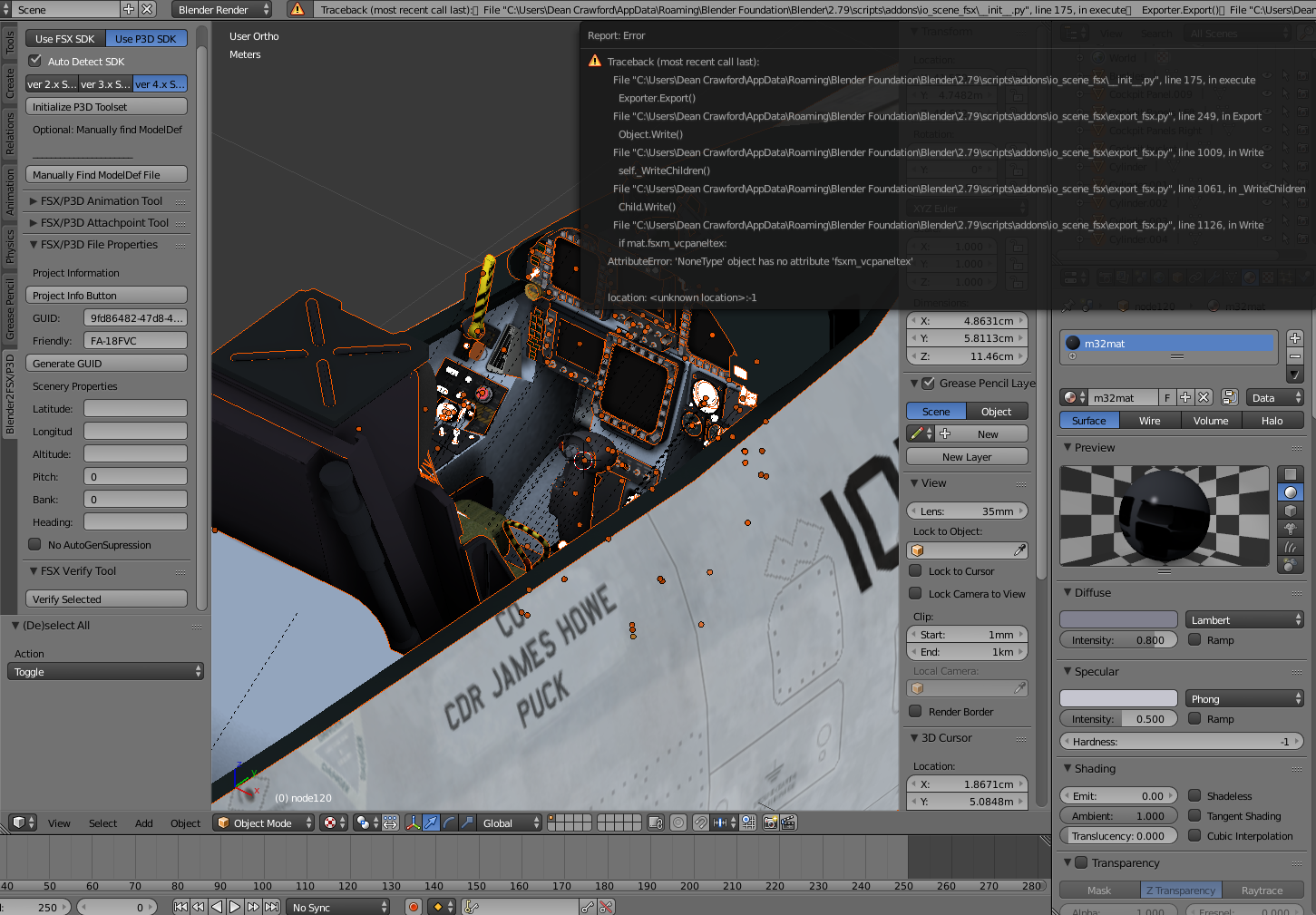
A really tricky one here. Trying to export a model ( other models export okay ) and these errors keep appearing. I have checked all components and nothing is tagged with a VC panel texture, and all objects are parented to a single node. The FSX Verify tool shows no errors, and yet when I export the compile fails and lists the faults as per the attached image.

I can, for instance, select certain items and export them and it works. Others I have identified as causing faults, but they have no faults - materials are assigned, as are textures, no animations yet, no tags assigned etc. Finding it very hard to identify what's wrong. Anybody seen this before and found a solution?
B2FSXError.png
 
Have you checked you are not beyond the 65k vertex limit in one of the materials? (Not even sure ift that's important in v4)
 
Have you checked you are not beyond the 65k vertex limit in one of the materials? (Not even sure ift that's important in v4)

I'll check it out Dave - it's a fairly large model in terms of vertexes but I'm pretty sure the v4 SDK removed that particular limitation.
 
In my experience this error has been to do with something in blender not pointing in the right direction,XtoMDL, modeldef, or toolset not initialised or a bum animation, which would not apply in this case.
 
In my experience this error has been to do with something in blender not pointing in the right direction,XtoMDL, modeldef, or toolset not initialised or a bum animation, which would not apply in this case.

Thanks Robert, I've spent some time on this and managed to discover a small component that had no material attached, which got rid of the "Child" errors in the list, should anybody see the same error. Blender seems a bit temperamental with this model, often showing XtoMDL errors despite the toolset being initialised, things like that. Re-initialise, and suddenly things export okay. There are no materials that exceed vertex limits, so it's just a case of me working my way through 305 objects to try to find the culprit - joy :)
 
OK, after two days of hair-tearing investigation, if anybody should find themselves facing the error in the attached image, the culprit can be just a single material node that doesn't have a texture assigned. That was all it was. The FSX Verify tool does not pick up on this, so if you see the error, go through your object list and check all assignments to locate the problem and resolve.

AttributeError: 'None type' object has no attribute 'fsxm_vcpaneltex'

Blender error.png
 
Back
Top