
-
Which the release of FS2020 we see an explosition of activity on the forun and of course we are very happy to see this. But having all questions about FS2020 in one forum becomes a bit messy. So therefore we would like to ask you all to use the following guidelines when posting your questions:
- Tag FS2020 specific questions with the MSFS2020 tag.
- Questions about making 3D assets can be posted in the 3D asset design forum. Either post them in the subforum of the modelling tool you use or in the general forum if they are general.
- Questions about aircraft design can be posted in the Aircraft design forum
- Questions about airport design can be posted in the FS2020 airport design forum. Once airport development tools have been updated for FS2020 you can post tool speciifc questions in the subforums of those tools as well of course.
- Questions about terrain design can be posted in the FS2020 terrain design forum.
- Questions about SimConnect can be posted in the SimConnect forum.
Any other question that is not specific to an aspect of development or tool can be posted in the General chat forum.
By following these guidelines we make sure that the forums remain easy to read for everybody and also that the right people can find your post to answer it.
You are using an out of date browser. It may not display this or other websites correctly.
You should upgrade or use an alternative browser.
You should upgrade or use an alternative browser.
BMP header is corrupt
- Thread starter jgarnold
- Start date


- Messages
- 1,839
- Country

Hi Gary,
I have completed my Trail Islands using satellite imagery from SID files obtained from SCRD and will add them to the 'package'.
Even managed to get the sand spit looking ok on East Trail Island with 30% grayscale on the blend mask over the parts are partly covered by the Strains of Georgia (shallows).
Thanks for your guidance.


I have completed my Trail Islands using satellite imagery from SID files obtained from SCRD and will add them to the 'package'.
Even managed to get the sand spit looking ok on East Trail Island with 30% grayscale on the blend mask over the parts are partly covered by the Strains of Georgia (shallows).
Thanks for your guidance.
Last edited:

Congratulations, John ...looks good ! 
So, IIUC, when you stated that you "...Even managed to get the sand spit looking OK on East Trail Island with 30% gray-scale on the blend mask over the parts are partly covered by the Straits of Georgia (shallows)", did you use:
* a 30% hardness brush
...or:
* or a 30% transparency feathering gradient
...in the Blend Mask, when applying a 'Black' (or very dark gray scale 'color') in GIMP over the "sand spit" described above ?
Could you show us a screen shot of the Blend Mask and also in FS ...of the area by that "sand spit" described above ?
PS: Would you please also tell us what the Blend Mask 'gray-scale values' are in GIMP for the inland areas of these islands (ex: RGB=x,x,x) which allowed the underlying default land class textures and associated Autogen vegetation annotations to "show through to the top" of the custom aerial imagery land class BGL you made ?
GaryGB
So, IIUC, when you stated that you "...Even managed to get the sand spit looking OK on East Trail Island with 30% gray-scale on the blend mask over the parts are partly covered by the Straits of Georgia (shallows)", did you use:
* a 30% hardness brush
...or:
* or a 30% transparency feathering gradient
...in the Blend Mask, when applying a 'Black' (or very dark gray scale 'color') in GIMP over the "sand spit" described above ?
Could you show us a screen shot of the Blend Mask and also in FS ...of the area by that "sand spit" described above ?
PS: Would you please also tell us what the Blend Mask 'gray-scale values' are in GIMP for the inland areas of these islands (ex: RGB=x,x,x) which allowed the underlying default land class textures and associated Autogen vegetation annotations to "show through to the top" of the custom aerial imagery land class BGL you made ?
GaryGB
Last edited:
- Messages
- 1,839
- Country
Hi Gary,
To achieve the gray scale I didn't use either of your suggestions.
The work flow I think I used is as follows (sorry I tried a few before I was satisfied) -
Firstly used a 100% opacity black brush with 25% 'hardness' (transparency feathering gradient?) to paint AROUND the parts of the sand spit (and the entire island) which are above the water line.
I then used a 30% ERASER tool set to a small diameter and a 25% 'hardness' and then painted over the parts of the sand spit which are under water. I think I used this method as I was copying what K-MAN used
(
).
In retrospect I think that this is not an easiest way to do it as the blend mask then covered the parts under water (in the background image) and so some trial and error was used.
A better method would be to FIRSTLY 'paint' over all the 'shallow water' areas using a 30% opacity black brush and then 'paint' over all the other parts you don't want to see with a 100% opacity black brush with 25% (or 50%) hardness (gradient).
I did the same to create shallow water effect in some of the large 'bays' around the island.
I probably could have done a finer job of it but I am satisfied with how it look from the air.
I have attached 4 images.
Part of the blend mask (of the sand spit)
A 'satellite view' from FSX
A 'forward facing view' from FSX (used an aircraft which doesn't have a 2D panel and then used the 2D panel view which gives an uninterrupted view (tricky eh?).
Part of the blend mask of the entire East Trail Island - note how the image is 'squashed' in the vertical axis. It gets 'fixed' during 'Resample' and looks correct in FSX so I'm not bothered.
To allow the default land class and associated autogen to "show through" I simply 'painted out' large areas of each island (all the dense tree areas in the satellite images) with a 100% opacity black brush with 25% 'hardness'.
I don't know what the RGB values are as I converted by bland mask to a 256 grayscale before saving to a TIFF image.
Hope this helps to answer your questions. Please advise if I have left something unanswered.
Regards


To achieve the gray scale I didn't use either of your suggestions.
The work flow I think I used is as follows (sorry I tried a few before I was satisfied) -
Firstly used a 100% opacity black brush with 25% 'hardness' (transparency feathering gradient?) to paint AROUND the parts of the sand spit (and the entire island) which are above the water line.
I then used a 30% ERASER tool set to a small diameter and a 25% 'hardness' and then painted over the parts of the sand spit which are under water. I think I used this method as I was copying what K-MAN used
(
In retrospect I think that this is not an easiest way to do it as the blend mask then covered the parts under water (in the background image) and so some trial and error was used.
A better method would be to FIRSTLY 'paint' over all the 'shallow water' areas using a 30% opacity black brush and then 'paint' over all the other parts you don't want to see with a 100% opacity black brush with 25% (or 50%) hardness (gradient).
I did the same to create shallow water effect in some of the large 'bays' around the island.
I probably could have done a finer job of it but I am satisfied with how it look from the air.
I have attached 4 images.
Part of the blend mask (of the sand spit)
A 'satellite view' from FSX
A 'forward facing view' from FSX (used an aircraft which doesn't have a 2D panel and then used the 2D panel view which gives an uninterrupted view (tricky eh?).
Part of the blend mask of the entire East Trail Island - note how the image is 'squashed' in the vertical axis. It gets 'fixed' during 'Resample' and looks correct in FSX so I'm not bothered.
To allow the default land class and associated autogen to "show through" I simply 'painted out' large areas of each island (all the dense tree areas in the satellite images) with a 100% opacity black brush with 25% 'hardness'.
I don't know what the RGB values are as I converted by bland mask to a 256 grayscale before saving to a TIFF image.
Hope this helps to answer your questions. Please advise if I have left something unanswered.
Regards
Last edited:
Hi John:
Because there are others who may be trying to learn how to make Blend Masks in GIMP as well as in other graphics applications, this info is a good start.
But, I'd like to derive more information for the FS development knowledge base from this, and your other threads.
Gray-scale values end up in the Blend Mask image file is read as 'Data' by SDK Resample via a Gaussian method.
If we identify in ex: GIMP, what RGB=x,x,x gray-scale 'color' values allowed the underlying aerial image of the 'Sand Spit' that is partly covered by the Straits of Georgia ('water shallows') to "show through to the top" of the custom aerial imagery land class BGL, IIUC, regardless of the actual graphics applications one uses, we can establish a better understanding of what Gray-scale values to use for a relatively predictable result in a similar scenario.
Likewise, if we identify in ex: GIMP, what RGB=x,x,x gray-scale 'color' values allowed the underlying default land class textures and associated Autogen vegetation annotations to "show through to the top" of the custom aerial imagery land class BGL, IIUC, regardless of the actual graphics applications one uses, we can establish a better understanding of what Gray-scale values to use for a relatively predictable result in a similar scenario.
Could you please load up your final Blend Mask into GIMP, and take some readings of the pixel gray-scale values for the 2 above scenery feature areas of interest that I inquired about ?
GIMP docs on how to display the RGB color values for pixels under the cursor position:
https://docs.gimp.org/en/gimp-pointer-info-dialog.html
https://docs.gimp.org/2.2/en/gimp-view-info.html
Thanks in advance for providing some additional info to assist others with these types of tasks in the future.
GaryGB
Because there are others who may be trying to learn how to make Blend Masks in GIMP as well as in other graphics applications, this info is a good start.
But, I'd like to derive more information for the FS development knowledge base from this, and your other threads.
Gray-scale values end up in the Blend Mask image file is read as 'Data' by SDK Resample via a Gaussian method.
If we identify in ex: GIMP, what RGB=x,x,x gray-scale 'color' values allowed the underlying aerial image of the 'Sand Spit' that is partly covered by the Straits of Georgia ('water shallows') to "show through to the top" of the custom aerial imagery land class BGL, IIUC, regardless of the actual graphics applications one uses, we can establish a better understanding of what Gray-scale values to use for a relatively predictable result in a similar scenario.
Likewise, if we identify in ex: GIMP, what RGB=x,x,x gray-scale 'color' values allowed the underlying default land class textures and associated Autogen vegetation annotations to "show through to the top" of the custom aerial imagery land class BGL, IIUC, regardless of the actual graphics applications one uses, we can establish a better understanding of what Gray-scale values to use for a relatively predictable result in a similar scenario.
Could you please load up your final Blend Mask into GIMP, and take some readings of the pixel gray-scale values for the 2 above scenery feature areas of interest that I inquired about ?
GIMP docs on how to display the RGB color values for pixels under the cursor position:
https://docs.gimp.org/en/gimp-pointer-info-dialog.html
https://docs.gimp.org/2.2/en/gimp-view-info.html
Thanks in advance for providing some additional info to assist others with these types of tasks in the future.
GaryGB
- Messages
- 1,839
- Country
Hi Gary,
Not sure exactly what you want me to do but when I 'hover' the mouse pointer over the shaded area which allows the background to partly show through (the shallow area) it gives me the following -
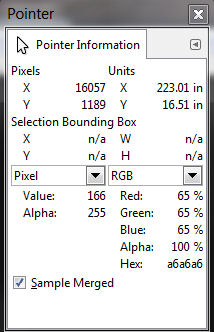
For the area which allows the default land class and associated autogen to "show through" it is 0% for all values.
In case it isn't all the information you require I have attached a zip file containing part of the blend mask (for the East Trail Island) for you to find the information required (easier than you trying to educate me and me not following).
BTW I 'found' a file in my addon scenery obviously created by myself but I cannot work out what it does.
It is in the form ????????_TEXP.BGL
I tried Googling TEXP but couldn't find anything.
I have moved it from the addon scenery/scenery folder and I can't see any different to my Sechelt scenery.
Not sure exactly what you want me to do but when I 'hover' the mouse pointer over the shaded area which allows the background to partly show through (the shallow area) it gives me the following -
For the area which allows the default land class and associated autogen to "show through" it is 0% for all values.
In case it isn't all the information you require I have attached a zip file containing part of the blend mask (for the East Trail Island) for you to find the information required (easier than you trying to educate me and me not following).
BTW I 'found' a file in my addon scenery obviously created by myself but I cannot work out what it does.
It is in the form ????????_TEXP.BGL
I tried Googling TEXP but couldn't find anything.
I have moved it from the addon scenery/scenery folder and I can't see any different to my Sechelt scenery.
Attachments
Hi John:
That appears to be an old VTP-Poly (made with SBuilderfor FS9 ?) when you were working on a Utility corridor.
That is to say, it is a legacy FS8-format Vector Textured Polygon (mesh-clinging, IIUC) compiled with SCASM.
If you open the *.SCA de-compiled file in NotePad, you will see the SCASM / ASM source code.
GaryGB
That appears to be an old VTP-Poly (made with SBuilderfor FS9 ?) when you were working on a Utility corridor.
That is to say, it is a legacy FS8-format Vector Textured Polygon (mesh-clinging, IIUC) compiled with SCASM.
If you open the *.SCA de-compiled file in NotePad, you will see the SCASM / ASM source code.
GaryGB
Attachments
Last edited:
- Messages
- 1,839
- Country
Thanks Gary
I had tried to decompile it with both BGLTOXML and BGLAnalyze but both showed that it was not a valid BGL file.
I don't have SCASM which I thought was for early versions of FS and the only methods of compiling I have used are -
Airport Design Editor
SbuilderX
Resample
Regards
I had tried to decompile it with both BGLTOXML and BGLAnalyze but both showed that it was not a valid BGL file.
I don't have SCASM which I thought was for early versions of FS and the only methods of compiling I have used are -
Airport Design Editor
SbuilderX
Resample
Regards
Last edited:
Hi John:
SBuilderX internally uses a included SCASM compiler from within its own sub-folder chain for certain scenery content BGLs.
SCASM / ASM BGLs can be de-compiled via Winfried Orthmann's original BGLAnalyze version 3.1 for FS2002 (aka "FS8"):
https://library.avsim.net/esearch.php?CatID=fs2002sd&DLID=27375
...or Takuya Murakami's ScDis version 2.3:
https://library.avsim.net/esearch.php?CatID=fs2004util&DLID=37693
FYI: All other subsequent versions of Winfried Orthmann's BGLAnalyze / NewBGLAnalyze etc. are for FS9 and FSX.
GaryGB
SBuilderX internally uses a included SCASM compiler from within its own sub-folder chain for certain scenery content BGLs.
SCASM / ASM BGLs can be de-compiled via Winfried Orthmann's original BGLAnalyze version 3.1 for FS2002 (aka "FS8"):
https://library.avsim.net/esearch.php?CatID=fs2002sd&DLID=27375
...or Takuya Murakami's ScDis version 2.3:
https://library.avsim.net/esearch.php?CatID=fs2004util&DLID=37693
FYI: All other subsequent versions of Winfried Orthmann's BGLAnalyze / NewBGLAnalyze etc. are for FS9 and FSX.
GaryGB
Last edited:
- Messages
- 1,839
- Country
Thanks Gary
I think I remember you or someone else advising in the past that SBX uses SCASM - I had forgotten.
I have disassembled that file and I see what you mean that it doesn't contain much just the 'spread' of latitude and longitude for the (vector) scenery I created using SBX.
Strangely it doesn't exist in the SBX scenery folder where SBX places the BGLs created. Maybe I removed it from there in the past and I can't find it anywhere on my PC apart from where I moved it to when I moved it out of addon scenery/scenery.
I still have some work to do on my scenery before complete including utilising the SID files for my 'east Sechelt Inlet coast', 'west Sechelt Inlet coast' and 'Sechelt sand quarry' photo realistic sceneries and add some 'lighting' to the 'east coast'.
I think I have worked out a 'work flow' to create the night lighting effect that by -
1) using a transparent layer (so that I can see the background 'day' view) to paint in the lighting and then
2) using another layer of 80% black and then
3) 'flattening' the background and 80% black and then
4) 'flattening' the result of that with the 'lighting' layer.
If that doesn't work I will create a transparent layer with the night lighting and then 'select' all the transparent areas and fill it with 80% black and flatten that with the background image to create a night view complete with lighting effects.
I followed a Youtube tutorial which used an already darkened background (night view) to paint in lighting and it's difficult to see when to place the lighting using a 'night view' of the background.
Well that's the theory. Hopefully it will work maybe it won't.
I think I remember you or someone else advising in the past that SBX uses SCASM - I had forgotten.
I have disassembled that file and I see what you mean that it doesn't contain much just the 'spread' of latitude and longitude for the (vector) scenery I created using SBX.
Strangely it doesn't exist in the SBX scenery folder where SBX places the BGLs created. Maybe I removed it from there in the past and I can't find it anywhere on my PC apart from where I moved it to when I moved it out of addon scenery/scenery.
I still have some work to do on my scenery before complete including utilising the SID files for my 'east Sechelt Inlet coast', 'west Sechelt Inlet coast' and 'Sechelt sand quarry' photo realistic sceneries and add some 'lighting' to the 'east coast'.
I think I have worked out a 'work flow' to create the night lighting effect that by -
1) using a transparent layer (so that I can see the background 'day' view) to paint in the lighting and then
2) using another layer of 80% black and then
3) 'flattening' the background and 80% black and then
4) 'flattening' the result of that with the 'lighting' layer.
If that doesn't work I will create a transparent layer with the night lighting and then 'select' all the transparent areas and fill it with 80% black and flatten that with the background image to create a night view complete with lighting effects.
I followed a Youtube tutorial which used an already darkened background (night view) to paint in lighting and it's difficult to see when to place the lighting using a 'night view' of the background.
Well that's the theory. Hopefully it will work maybe it won't.
http://www.fsdeveloper.com/forum/threads/bmp-header-is-corrupt.441662/page-5#post-788860
Hi Gary,
Not sure exactly what you want me to do but when I 'hover' the mouse pointer over the shaded area which allows the background to partly show through (the shallow area) it gives me the following:
Pixel
(Gray) Value: 166
Alpha: 255
RGB
Red: 65%
Green: 65%
Blue: 65%
Alpha: 100%
Hex: a6,a6,a6
For the area which allows the default land class and associated autogen to "show through" it is 0% for all values.
Hi John:
Here's the image linked in your post above:
http://www.fsdeveloper.com/forum/threads/bmp-header-is-corrupt.441662/page-5#post-788860
The "Sand Spit" at the top left that is partially transparent under default water has a:
* 65% Gray-Scale value at 166 out of 256 steps within a 8-Bit Gray-Scale TIFF Blend Mask file (light Gray).
The Water and inland areas intended to be fully transparent, thus allowing underlying default Land / Water Class textures to "show through to the top" of the custom photo-real aerial imagery BGL has a:
* 0% Gray-Scale value at 0 out of 256 steps within a 8-Bit Gray-Scale TIFF Blend Mask file (pure Black).
Thanks for sharing your "worked example" with others for learning purposes.
GaryGB
Attachments
Last edited:
- Messages
- 1,839
- Country
Hi Gary
Well contrary to what I initially put in this post (I am editing it) the method of creating a transparent layer and then 'painting' with a suitable yellow color for night lighting effects seems to work.
What I did which seems to work is as follows -
1) Create a new (transparent) layer (I named 'lighting effects').
2) Using the day view of the background image (satellite image from SID) and with the 'lighting effect' layer SELECTED I 'painted' my lighting effects with a 100% opacity 050 hardness paint brush of a suitable yellow color and size (I have found color R:243 G:244 B:137 with a brush size around 120-150 works well). Most of the time I positioned the cursor at an appropriate place and then without moving clicked the left mouse button once. This will give the effect of a single light which illuminates an area and becomes less intense at the edges. Dragging the mouse pointer will result in a larger area being 'lit'.
3) Make a copy of the background layer and call it 'night view'.
4) Select the 'night view' layer and use the bucket fill to to fill with opacity 80% black and threshold 100 to darken it to a suitable night view. Some experimenting is necessary with the opacity to create a suitable night view in FSX. 85% or even 90% might be preferable.
5) temporarily delete all layers except the 'lighting effects' and the 'night view'
6) Flatten
7) Export in the usual way.
Regards
Well contrary to what I initially put in this post (I am editing it) the method of creating a transparent layer and then 'painting' with a suitable yellow color for night lighting effects seems to work.
What I did which seems to work is as follows -
1) Create a new (transparent) layer (I named 'lighting effects').
2) Using the day view of the background image (satellite image from SID) and with the 'lighting effect' layer SELECTED I 'painted' my lighting effects with a 100% opacity 050 hardness paint brush of a suitable yellow color and size (I have found color R:243 G:244 B:137 with a brush size around 120-150 works well). Most of the time I positioned the cursor at an appropriate place and then without moving clicked the left mouse button once. This will give the effect of a single light which illuminates an area and becomes less intense at the edges. Dragging the mouse pointer will result in a larger area being 'lit'.
3) Make a copy of the background layer and call it 'night view'.
4) Select the 'night view' layer and use the bucket fill to to fill with opacity 80% black and threshold 100 to darken it to a suitable night view. Some experimenting is necessary with the opacity to create a suitable night view in FSX. 85% or even 90% might be preferable.
5) temporarily delete all layers except the 'lighting effects' and the 'night view'
6) Flatten
7) Export in the usual way.
Regards
Last edited: