• Which the release of FS2020 we see an explosition of activity on the forun and of course we are very happy to see this. But having all questions about FS2020 in one forum becomes a bit messy. So therefore we would like to ask you all to use the following guidelines when posting your questions:

    • Tag FS2020 specific questions with the MSFS2020 tag.
    • Questions about making 3D assets can be posted in the 3D asset design forum. Either post them in the subforum of the modelling tool you use or in the general forum if they are general.
    • Questions about aircraft design can be posted in the Aircraft design forum
    • Questions about airport design can be posted in the FS2020 airport design forum. Once airport development tools have been updated for FS2020 you can post tool speciifc questions in the subforums of those tools as well of course.
    • Questions about terrain design can be posted in the FS2020 terrain design forum.
    • Questions about SimConnect can be posted in the SimConnect forum.

    Any other question that is not specific to an aspect of development or tool can be posted in the General chat forum.

    By following these guidelines we make sure that the forums remain easy to read for everybody and also that the right people can find your post to answer it.

Cannot Reinstall ADE

Messages
400
Country
us-texas
Think I found the problem. Understand you can simply remove ADE folder from desired drive.
Went to register edit today and here is what I found. Typed in Find ADE 178. Tried to rename but not
allowed too.
Have removed many times with no luck. How do I correct this? I chose the folder
names *ADE 178 and ADE* during installation with no luck. Also noticed no drive designated in
registry edit.
Appreciate any help.
 

Attachments

  • image_2023-07-05_154430975.png
    image_2023-07-05_154430975.png
    117.5 KB · Views: 156
Last edited:
I don't understand what you mean by cannot reinstall. ADE has no installer - you just unzip it into a clean folder and it should run. To unistall just delete the folder.

I am pretty sure that ADE make no use of the registry for itself.
 
I understand what you are saying. I have for the better of last month tried just
the way you advised with no luck. Last night I asked jyarddog for help. This
morning I tried again and still getting error *sp1a * cannot be found.
In folder setting's there is no red indication of error. Lastly, tried install on
both C:\ and D:\ drives. I hit Fix it and says fixed and I close. No compile.
 
Well then this is the update to FSX and the SDK. What SDK did you install? The one that originally came with FSX? Or are you using the Steam Edition. In any case it is not really to do with ADE. ADE is just telling you that you don't have a workable SDK.

Try installing the P3D v1.4 SDK which is available from the resources section of this web site. It is identical to the FSX SDK you need
 
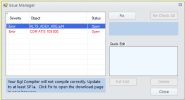
Okay, I installed SP1 first from disc 1 > then SP1A > then SP2 in that order. Just installed the P3D v1.4
Got this. Any idea's? Never had this issue before. Thanks for any help.....
 

Attachments

  • image_2023-07-06_105345681.png
    image_2023-07-06_105345681.png
    14.7 KB · Views: 158
Make sure you have ADE pointing at the P3D v1.4 SDK

Use Tools > New User Wizard and go to this page

1688717466432.png


If you installed the SDK correctly then using the Find Button should get the paths for you. Check that the paths to Shp2Vec and Bglcomp are correct
 
My Scenery.cfg Folder reads this way.
Is that maybe the issue? When I look at View in C:\,
It has checkmark on *show hidden files, folders*. But,
when I open C:\ drive > I get to ProgramData; I can go no further.
I did click the folder but it is empty. My ADE is on D:\.
 

Attachments

  • image_2023-07-07_103154691.png
    image_2023-07-07_103154691.png
    7.6 KB · Views: 162
What does your Wizard dialog box look like? The one that Jon posted a picture of.
 
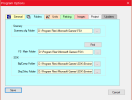
Good day Tom. Here is my Wizard Dialog box. What do you think?
The scenery.cfg file is selected from D:\Program Files\Microsoft Games\FSX\Main file folder.
Right or Wrong??
 

Attachments

  • image_2023-07-07_151711063.png
    image_2023-07-07_151711063.png
    16.5 KB · Views: 159
Hey y'all, I think Jon and I solved it. It had something to do with his fsx sdk bglcomp.exe. I had him switch over to p3d4 and have ADE look for bglcomp from p3d sdk. We did this for shp2vec also. Everything works in ADE for fsx and p3d. They both now compile.
I do have a question myself. Jon pushes his mouse wheel down, and he gets the crosshair arrows with which he can move the ADE screen quickly here and there. Mine won't do that. We tried to match mouse properties... we are the same, but he can move ADE screen centering and I can't. I have to use my keyboard arrow keys. How can I get what he has?
 
Back
Top