• Which the release of FS2020 we see an explosition of activity on the forun and of course we are very happy to see this. But having all questions about FS2020 in one forum becomes a bit messy. So therefore we would like to ask you all to use the following guidelines when posting your questions:

    • Tag FS2020 specific questions with the MSFS2020 tag.
    • Questions about making 3D assets can be posted in the 3D asset design forum. Either post them in the subforum of the modelling tool you use or in the general forum if they are general.
    • Questions about aircraft design can be posted in the Aircraft design forum
    • Questions about airport design can be posted in the FS2020 airport design forum. Once airport development tools have been updated for FS2020 you can post tool speciifc questions in the subforums of those tools as well of course.
    • Questions about terrain design can be posted in the FS2020 terrain design forum.
    • Questions about SimConnect can be posted in the SimConnect forum.

    Any other question that is not specific to an aspect of development or tool can be posted in the General chat forum.

    By following these guidelines we make sure that the forums remain easy to read for everybody and also that the right people can find your post to answer it.

MSFS20 Can't remove an object from scenery

Messages
23
Country
canada
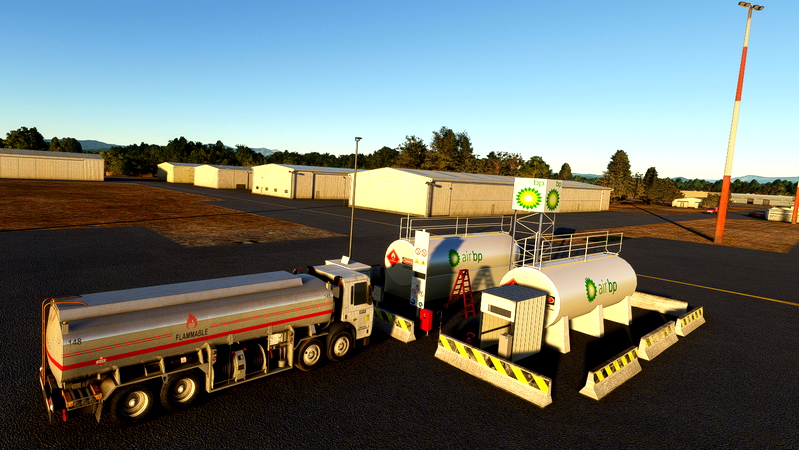
I have a weird problem with a fuel truck, I use the excludepolygon tool and it doesn't work. The funny thing is that sometimes it doesn't show up in the scenery and others do. The community folder is empty, so no other sceneries are present.
The attached pictures show the ASO_FuelTruck.02.xml causing the problem.
Thank you for any help.
Truckf.jpg
 
That truck is not a scenery library object. It is actually part of the "living world AI" and it follows its own rules. It can actually be quite friendly and accomodating, if you learn to tame it.

kttd-troutdale-portland-99659-1679192448-8O7BA.jpg


Sadly, the only practical way to "control" it is the brute force method, vehicle density sliders -or- you can limit available parking to yourself and the AI airplanes and in the consequence holding all most of the fire trucks and ramp vehicles at bay. If you think about it, you only need a few open parking spaces. It's not like you're going to attend a fly in with your local IVAO chapter and I have found that controlling AI vehicle traffic through the use of available parking places allows leaving the vehicle density high for the greatest variety, but we only see few instances, rather than choking it off altogether.
 
That truck is not a scenery library object. It is actually part of the "living world AI" and it follows its own rules. It can actually be quite friendly and accomodating, if you learn to tame it.

kttd-troutdale-portland-99659-1679192448-8O7BA.jpg


Sadly, the only practical way to "control" it is the brute force method, vehicle density sliders -or- you can limit available parking to yourself and the AI airplanes and in the consequence holding all most of the fire trucks and ramp vehicles at bay. If you think about it, you only need a few open parking spaces. It's not like you're going to attend a fly in with your local IVAO chapter and I have found that controlling AI vehicle traffic through the use of available parking places allows leaving the vehicle density high for the greatest variety, but we only see few instances, rather than choking it off altogether.
Funny thing, I never thought that this is caused by the traffic, now is quite clear that this is the case. I don't have too much knowledge to do what you say, so I'll leave things as they are by now. Thank you very much for your help
 
I had a very similar problem last year - a 'rogue' ai boat appearing randomly parked across a dock in the scenery area I developed. I gave up and positioned my dock slightly away from where it should be according to Google so that the ai boat now when it appears is next to my dock. If you can, position your fuel truck slightly away.
 
Back
Top