
• Which the release of FS2020 we see an explosition of activity on the forun and of course we are very happy to see this. But having all questions about FS2020 in one forum becomes a bit messy. So therefore we would like to ask you all to use the following guidelines when posting your questions:

    • Tag FS2020 specific questions with the MSFS2020 tag.
    • Questions about making 3D assets can be posted in the 3D asset design forum. Either post them in the subforum of the modelling tool you use or in the general forum if they are general.
    • Questions about aircraft design can be posted in the Aircraft design forum
    • Questions about airport design can be posted in the FS2020 airport design forum. Once airport development tools have been updated for FS2020 you can post tool speciifc questions in the subforums of those tools as well of course.
    • Questions about terrain design can be posted in the FS2020 terrain design forum.
    • Questions about SimConnect can be posted in the SimConnect forum.

    Any other question that is not specific to an aspect of development or tool can be posted in the General chat forum.

    By following these guidelines we make sure that the forums remain easy to read for everybody and also that the right people can find your post to answer it.

Compiling scenery inside the SDK is very slow, EGPR bug?

Messages
62
Country
unitedkingdom
Running the latest SU8 beta and I'm seeing longer and longer build time if I compile scenery inside the SDK editor. Using fspackagetool.exe to compile is running as normal.

If I click on build the software just sits doing stuff in the background and eventually, like 5-10 minutes later or even longer, the console might pop up saying the build is successful. More often than not I'll use task manager to exit the sim and build the scenery externally where the build takes less than 2 minutes.

If you look at the time stamps from this console screen capture you can see the huge delay after completing the build and before the console window pops up.

The sim is spending 5 minutes trying to do something at EGPR which is completely irrelevant to my location in another country (LFTM in France)

Kev
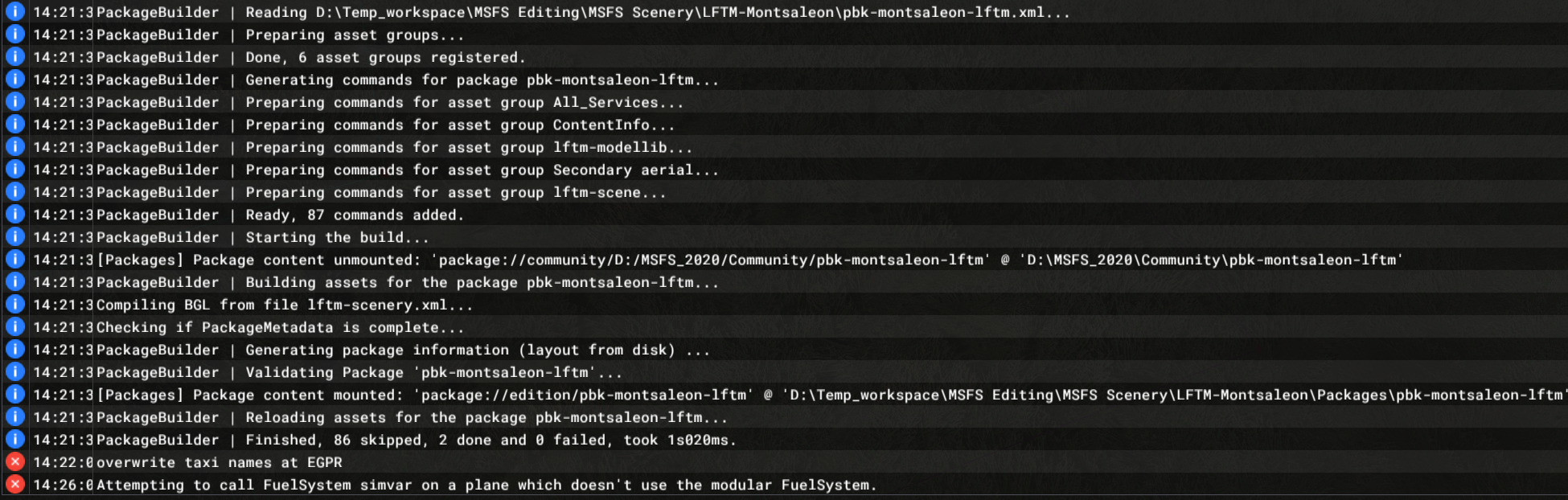
220226_142713.png
 
You might be able to run a batchfile to compile a project externally, even while you are in DevMode:


Bash:
rmdir _PackageInt /q /s
rmdir Packages /q /s

"<full path to FlightSimulator.exe" "-I" ; BuildAssetPackages "<full path to project xml>" "<Project directory>" "<Project directory>"
pause

For example:
rmdir "C:\Users\dickl\Desktop\YCRB_Aerial\_PackageInt" /q /s
rmdir "C:\Users\dickl\Desktop\YCRB_Aerial\Packages" /q /s

D:\Programs\Steam\steamapps\common\MicrosoftFlightSimulator\FlightSimulator.exe "-I" ; BuildAssetPackages "C:\Users\dickl\Desktop\YCRB_Aerial\ycrb-aerial.xml" "C:\Users\dickl\Desktop\YCRB_Aerial" "C:\Users\dickl\Desktop\YCRB_Aerial"


D:\Programs\Steam\steamapps\common\MicrosoftFlightSimulator\FlightSimulator.exe is where the FlightSimulator.exe hides on my system. The first 2 lines remove -PackageInt and the Pckages folder for a complete rebuild.
 
Thank you Dick but to be honest, it's simpler to just save the scenery then quit the sim and build it externally just by dragging the project xml on the fspackagetool.exe, at least that way I can see what the compiler is doing.

It's just really annoying that a custom Asobo airport that is hundreds of miles away from my locations is screwing up building scenery in the SDK. If EGPR wasn't part of the World update I'd delete it permanently.

Kev
 
Back
Top