
• Which the release of FS2020 we see an explosition of activity on the forun and of course we are very happy to see this. But having all questions about FS2020 in one forum becomes a bit messy. So therefore we would like to ask you all to use the following guidelines when posting your questions:

    • Tag FS2020 specific questions with the MSFS2020 tag.
    • Questions about making 3D assets can be posted in the 3D asset design forum. Either post them in the subforum of the modelling tool you use or in the general forum if they are general.
    • Questions about aircraft design can be posted in the Aircraft design forum
    • Questions about airport design can be posted in the FS2020 airport design forum. Once airport development tools have been updated for FS2020 you can post tool speciifc questions in the subforums of those tools as well of course.
    • Questions about terrain design can be posted in the FS2020 terrain design forum.
    • Questions about SimConnect can be posted in the SimConnect forum.

    Any other question that is not specific to an aspect of development or tool can be posted in the General chat forum.

    By following these guidelines we make sure that the forums remain easy to read for everybody and also that the right people can find your post to answer it.

Complete Thumbnail Pack for Version 1.30

scruffyduck

Administrator
Staff member
FSDevConf team
Resource contributor
Messages
34,981
Country
unitedkingdom
We have just uploaded a large thumbnail pack to AVSIM. This contains pretty much all the stock library objects found in FSX including those auto generated buildings in OBX files and location specific objects. Look for Yet Another Big Thumbnail Pack in the AVSIM FSX Scenery Design Section.

To use these:
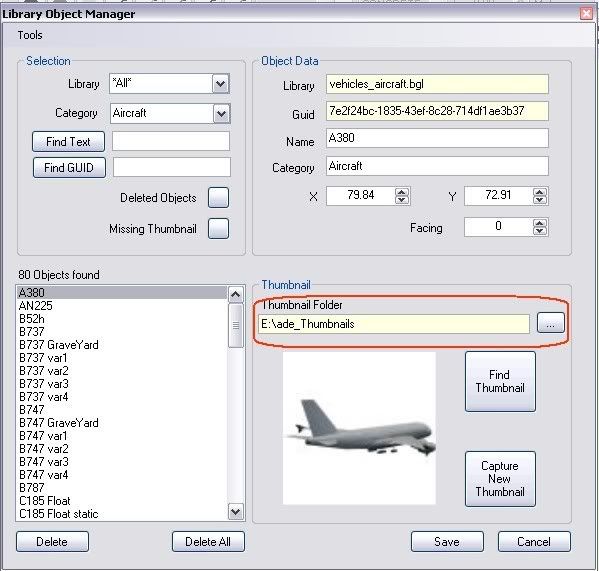
  • Unpack the zip to a suitable location
  • In ADE Open the Library Object Manager (Tools > Library Object Manager
  • Use the small button to open a folder browse dialog and navigate to the thumbnail folder and Save it
  • Save and close the Library Object Manager

ScreenHunter_164A.jpg


You should now have access to many thousands of thumbnails. Please read the section in the release notes on Thumbnails and in particular comments about on-the-fly indexing. You may see a small hesitation in things like the tool tip when a new thumbnail is first accessed but after that it should be pretty much instantaneous.
 
Last edited:
Thanks Lance much appreciated. They make an excellent compliment to ADE and cover most of the extra libraries I suspect people may want to use. I will refer to that download in future documentation.
 
Lance

I have been looking for a stairtruck (non-animated) since none can be located in FSX. Do you know if a sceneryobject exist. I did find one here FSdeveloper but appears to be FS2002.
 
When I navigate to the folder where I have placed the Thumbs (ADE/THUMBS), I can see them, but can not seem to save them for use in ADE. What am I doing wrong?
Gelowims
 
When I navigate to the folder where I have placed the Thumbs (ADE/THUMBS), I can see them, but can not seem to save them for use in ADE. What am I doing wrong?
Gelowims

Go to Tools > Library Object Manager. About half way down on the right is a box to select your thumbnail folder. Use the small button to the right and navigate to where you have them. Click Save to save the changes. Then close and re-start ADE
 
I followed the directions exactly and still cna not get this to work. I installed the thumbnails in the following folder on my computer (G:\ADE\Thumbs). When I point the Library Object Manager to that folder and click save. The window closes as should. I then closed and restarted ADE and the right folder is in the window, but not the right thumbnails. Hope this makes sense to you as it does not to me. Many thanks.
Gelowims
 
I followed the directions exactly and still cna not get this to work. I installed the thumbnails in the following folder on my computer (G:\ADE\Thumbs). When I point the Library Object Manager to that folder and click save. The window closes as should. I then closed and restarted ADE and the right folder is in the window, but not the right thumbnails. Hope this makes sense to you as it does not to me. Many thanks.
Gelowims

Makes sense up to the point you say 'not the right thumbnails' Not sure what that means
 
The GUID for the thumbs from Atlanta.bgl does not appear as I would suppose. The only ones there are the onealready there before I changed the folder location. Many thanks.
Gelowims
 
Jon, when ADE closed, i got the error posted below. any thoughts?

The process cannot access the file 'G:\Airport Design Editor\Thumbs\atlanta.bgl\{7e2f24bc-1835-43ef-8c28-714df1ae3b37}.jpg' because it is being used by another process.

at System.IO.__Error.WinIOError(Int32 errorCode, String maybeFullPath)
at System.IO.File.Delete(String path)
at ScruffyDuck.AirportDesignEditor.Listers.LibraryObjectManager.addNewThumbnail(String sourcefile)
at ScruffyDuck.AirportDesignEditor.Listers.LibraryObjectManager.findThumbnail_Click(Object sender, EventArgs e)
at System.Windows.Forms.Control.OnClick(EventArgs e)
at System.Windows.Forms.Button.OnClick(EventArgs e)
at System.Windows.Forms.Button.OnMouseUp(MouseEventArgs mevent)
at System.Windows.Forms.Control.WmMouseUp(Message& m, MouseButtons button, Int32 clicks)
at System.Windows.Forms.Control.WndProc(Message& m)
at System.Windows.Forms.ButtonBase.WndProc(Message& m)
at System.Windows.Forms.Button.WndProc(Message& m)
at System.Windows.Forms.Control.ControlNativeWindow.OnMessage(Message& m)
at System.Windows.Forms.Control.ControlNativeWindow.WndProc(Message& m)
at System.Windows.Forms.NativeWindow.Callback(IntPtr hWnd, Int32 msg, IntPtr wparam, IntPtr lparam)
 
The GUID for the thumbs from Atlanta.bgl does not appear as I would suppose. The only ones there are the onealready there before I changed the folder location. Many thanks.
Gelowims

Sorry but I still don't understand. Are you saying that the thumbnail pack contains the wrong GUIDs? Can you confirm where you are seeing these? Is it that the Airport has objects that are not showing thumbnails?
 
Here is what I am doing.
I open ADE
I load the airport that I am working on
I then open the tools menu
I open the Library Object Manager
I go down to the place where I change the folder
I change the folder from G;\ADE\Thumbs to G:\ADE\Thumbs\atlanta.bgl
I then hit the save button
Closing of ADE is next.
I then restart ADE
open the airport that I am working on
right click to add a new library object
the correct screen opens, but the thums that are listed in the window on the left side are not those in the atlanta.bgl folder.
Gelowims
 
I read the compiled help and found that ADE should re-index the thumbs when I change folders, that is not happening. Therefore I still see the same thumbs when i close and reopen. Is there a manual way of indexing the thumbs?
Gelowims
 
Firstly you need to add the atlanta.bgl to the Library Object Manager. Select menu item Tools/Add then browse to Scenery\NAMC\Scenery and open atlanta.bgl:


Then click on "OK":


Exit/re-open ADE, load your airport and right-click/Add/Library Object. Select "atlanta.bgl" in the Library box and you should see all of the objects and thumbnails:

 
Wow- :( Ok - having a REAL problem finding the YET ANOTHER BIG THUMBNAIL PACK - anywhere - been to AVSIM - can't find it
Could someone PLEASE post a link? or give me info on where it is?
It would be very much appreciated.
Thanks:)
George
 
i discovered avsim was down when searching for this pack of thumbnails-- can i get it anywhere else?
 
Back
Top