
Hi Gary,
I put in search copy and array and it did not pull up anything about it, so I guess this will be the first one. It seems that copy and array was discussed in some thread but as I said, Search did not find one.
I've been working on an airport in Rhode Island called Providence - KPVD, and working on constructing the terminal. Anyway, a few months past, I've watched youtube sketchup videos on copying and array and it sure is a quick way to get things done. But every time I copy and array the terminal windows, for example, I get those deep dark lines which prevents me from making a selection. Here's an example below:
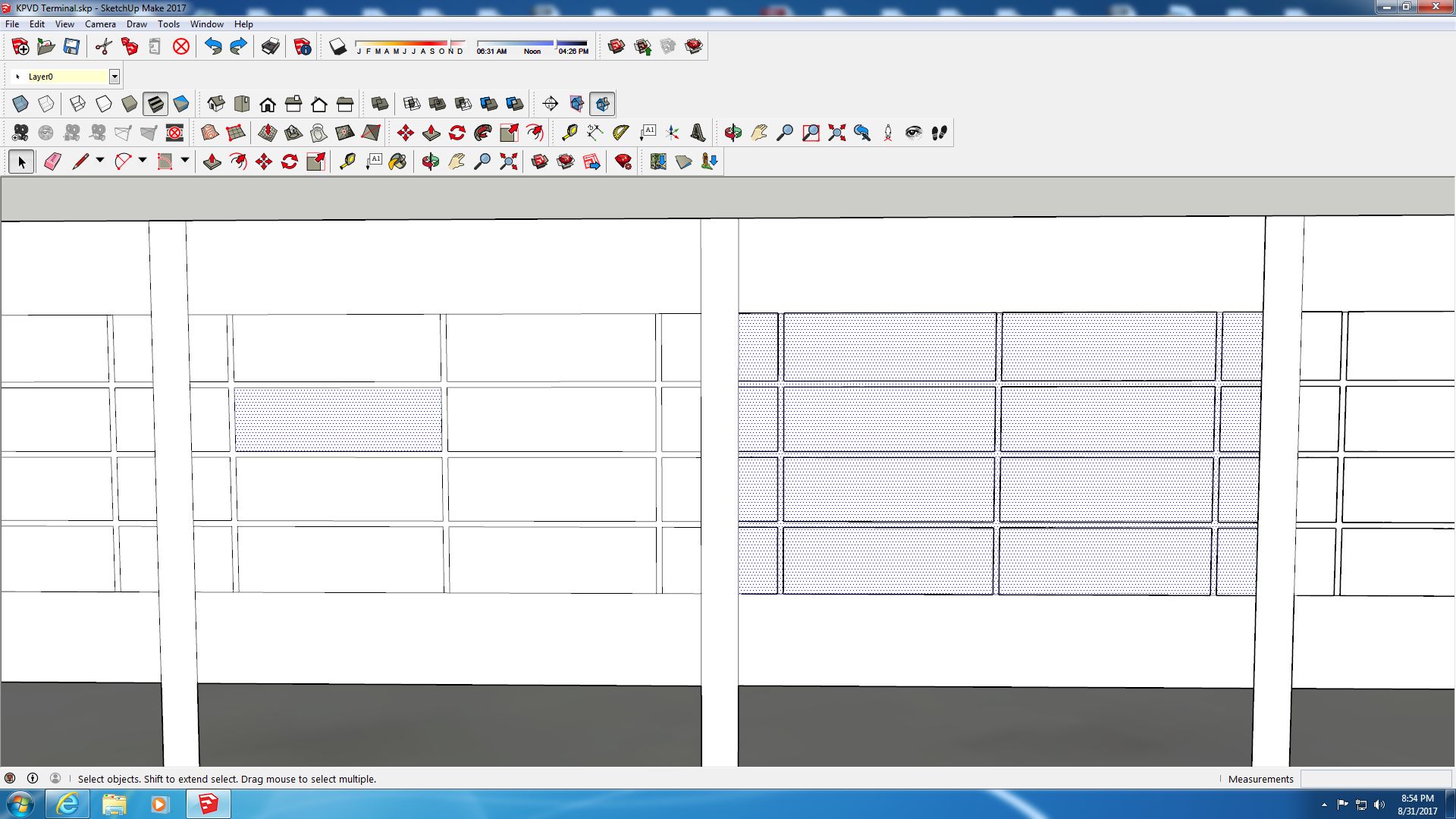
I made 6 copies of these windows and each one has those deep dark lines, but they're not supposed to have these deep dark lines. Noticed that after it has been copied and a selection is made, the one on the right, the entire window is highlighted and selected. But the window on the left can be selected individually. If I were to paint and texture that window on the right, it would paint the entire window, including the frame, or not paint it at all. Noticed the window on the left and the lines are very thin as they should be. I don't understand why copying and array makes these dark, thick, heavy lines, and I have to waste hours trying to heal them by redrawing, and many times, will not heal at all. Any time these lines are dark, thick, and heavy, you cannot make a selection and ruins the entire face.
The thing I've noticed when watching videos on copy and array is that they're not copying and arraying on a surface, or face, as I am, and that could be the issue. I think the problem is that when ever I make a copy and array, it puts another face on top of another face. I often wonder if that happens when I copy and array in this way.
What I have successfully done when working with the KBHM airport, and I guess that's what I should have done in the first place, is to cut holes, or highlight and delete the faces where the windows go, and place the windows that are already textured in the cutouts just like in the real world. I would make these components and keep them in the Paint Bucket program under Components. I don't recall having any issues when copying and array windows, as long as I cut the openings for the windows.
So, is there something I need to do in Sketchup that will prevent the dark thick lines when I make copies and arrays?
Ken.
I put in search copy and array and it did not pull up anything about it, so I guess this will be the first one. It seems that copy and array was discussed in some thread but as I said, Search did not find one.
I've been working on an airport in Rhode Island called Providence - KPVD, and working on constructing the terminal. Anyway, a few months past, I've watched youtube sketchup videos on copying and array and it sure is a quick way to get things done. But every time I copy and array the terminal windows, for example, I get those deep dark lines which prevents me from making a selection. Here's an example below:
I made 6 copies of these windows and each one has those deep dark lines, but they're not supposed to have these deep dark lines. Noticed that after it has been copied and a selection is made, the one on the right, the entire window is highlighted and selected. But the window on the left can be selected individually. If I were to paint and texture that window on the right, it would paint the entire window, including the frame, or not paint it at all. Noticed the window on the left and the lines are very thin as they should be. I don't understand why copying and array makes these dark, thick, heavy lines, and I have to waste hours trying to heal them by redrawing, and many times, will not heal at all. Any time these lines are dark, thick, and heavy, you cannot make a selection and ruins the entire face.
The thing I've noticed when watching videos on copy and array is that they're not copying and arraying on a surface, or face, as I am, and that could be the issue. I think the problem is that when ever I make a copy and array, it puts another face on top of another face. I often wonder if that happens when I copy and array in this way.
What I have successfully done when working with the KBHM airport, and I guess that's what I should have done in the first place, is to cut holes, or highlight and delete the faces where the windows go, and place the windows that are already textured in the cutouts just like in the real world. I would make these components and keep them in the Paint Bucket program under Components. I don't recall having any issues when copying and array windows, as long as I cut the openings for the windows.
So, is there something I need to do in Sketchup that will prevent the dark thick lines when I make copies and arrays?
Ken.
Last edited:
