• Which the release of FS2020 we see an explosition of activity on the forun and of course we are very happy to see this. But having all questions about FS2020 in one forum becomes a bit messy. So therefore we would like to ask you all to use the following guidelines when posting your questions:

    • Tag FS2020 specific questions with the MSFS2020 tag.
    • Questions about making 3D assets can be posted in the 3D asset design forum. Either post them in the subforum of the modelling tool you use or in the general forum if they are general.
    • Questions about aircraft design can be posted in the Aircraft design forum
    • Questions about airport design can be posted in the FS2020 airport design forum. Once airport development tools have been updated for FS2020 you can post tool speciifc questions in the subforums of those tools as well of course.
    • Questions about terrain design can be posted in the FS2020 terrain design forum.
    • Questions about SimConnect can be posted in the SimConnect forum.

    Any other question that is not specific to an aspect of development or tool can be posted in the General chat forum.

    By following these guidelines we make sure that the forums remain easy to read for everybody and also that the right people can find your post to answer it.

Crash box editing...

Messages
66
Country
us-massachusetts
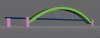
I'm modelling a bridge in GMax. I'd like to make it so it is possible to fly under, but still crash into. I'd also love to attach a hardened surface to make it landable, but that opens yet another can of worms (how to make just the sides crash-causing). Could someone point me to a reference to tell me how to accomplish this...if it's possible.

Thanks!
 
Bridge

Hi, Gridley

Can you elaborate a bit on how you made the bridge and what kind of bridge it is?

Meaning:

Is the object a box with transparent textures or "beam by beam"?

Does the bridge have columns?

Is it a "cage" type bridge (beams forming a box skeleton)?

Making a landable surface is not hard at all. I'll tell you that after you tell me about the bridge.

Fern
 
Of course I'd LOVE to!

Here it is in GMax "space filling" mode - I really want to keep it low-poly:
Solid2.jpg

RealBridge.jpg

The main arch is a solid and I've used alpha to make holes in the side lattice and in the top/bottom surface. That's where making it landable gets dicey - I know how to attach the hardened platform to the road surface, but since I've got that running through the archway, it gets complicated. If I want to make the road surface landable, I should use two arches on the sides, model the connections as individual beams or boxes with alpha holes...that way the road surface is not passing through a solid? Or is there a way to make only the sides of my archway crash-detected?

What else would you like to know about the model - did I cover it all?
 

Attachments

  • Solid2.jpg
    Solid2.jpg
    16.1 KB · Views: 496
Hi Scott,

Making the surface hard, so you can drive on it, should not be too hard with the attach tool script of GMax.

But the crashboxes are more difficult. That script also has a no crash option and you can use it to remove part of the crashboxes, but I think it would be rather hard to make a bridge you can land on, fly under and still crash into at the correct places :).
 
Hi, there

Well, considering you know how to make a landable surface, I will skip that.

I don't see much of a problem modifying your bridge to make it possible to crash as well as land on its road surface, provided you are a good enough pilot to get through the opening.

Here is my suggestion, keeping with the low-poly spirit.

* Make the arch "boxy" only above the end openings and below the deck (it will have three pieces, but polys will be almost the same).

* Texture those with Alpha to show your lattice, as required.

* Make separate lattices at the two ends with sides only, so you can still use few polys and alpha, but keep the openings unobstructed.

I don't think this method will increase the number of polys terribly.

Fern
 
There's a great little utility called FSBox that should help you do everything you're trying to do. Here's a link...

http://mzak.webzdarma.cz/fs/fsbox/index.php?en

You would first add a landing platform and remove default crashes from all objects, in the usual way (Attachtool). Then, FSBox would let you create boxes that will define where crashes occur. For the kind of crash accuracy you're looking for, this is probably the only way to go.
________
Nasty9Teen
 
Last edited:
Back
Top