• Which the release of FS2020 we see an explosition of activity on the forun and of course we are very happy to see this. But having all questions about FS2020 in one forum becomes a bit messy. So therefore we would like to ask you all to use the following guidelines when posting your questions:

    • Tag FS2020 specific questions with the MSFS2020 tag.
    • Questions about making 3D assets can be posted in the 3D asset design forum. Either post them in the subforum of the modelling tool you use or in the general forum if they are general.
    • Questions about aircraft design can be posted in the Aircraft design forum
    • Questions about airport design can be posted in the FS2020 airport design forum. Once airport development tools have been updated for FS2020 you can post tool speciifc questions in the subforums of those tools as well of course.
    • Questions about terrain design can be posted in the FS2020 terrain design forum.
    • Questions about SimConnect can be posted in the SimConnect forum.

    Any other question that is not specific to an aspect of development or tool can be posted in the General chat forum.

    By following these guidelines we make sure that the forums remain easy to read for everybody and also that the right people can find your post to answer it.

Creating A Polygon Has Gone Wacky

Messages
20
Country
unitedstates
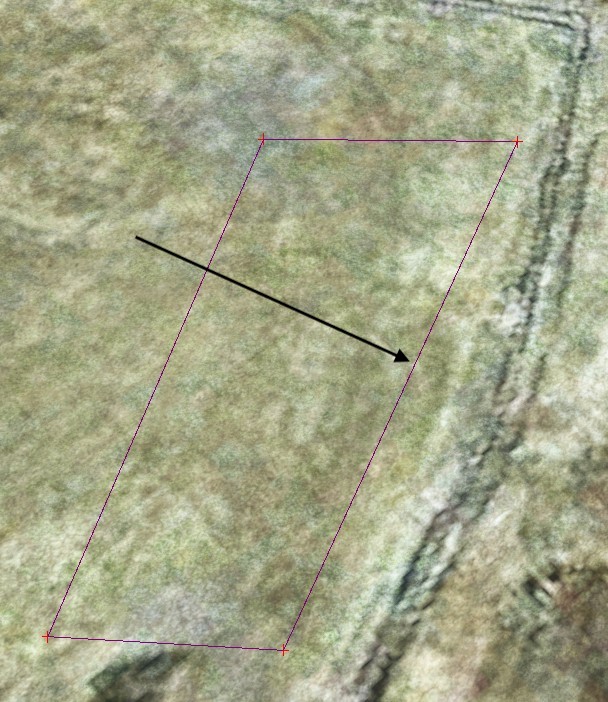
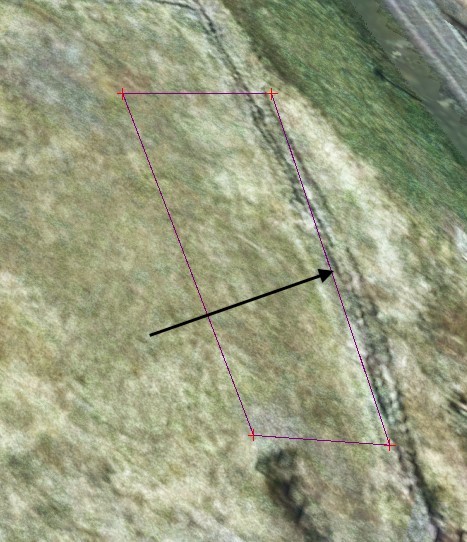
Every polygon I try to create is acting as if it is floating above the earth mesh. Even the little red + pointers do not align with the tip of the mouse pointer. If I change the perspective of what I'm looking down upon, then the polygon moves with the perspective. I've found no setting that makes the polygon points affix to the surface. What could be wrong?


002.jpg
001.jpg
 
Every polygon I try to create is acting as if it is floating above the earth mesh. Even the little red + pointers do not align with the tip of the mouse pointer. If I change the perspective of what I'm looking down upon, then the polygon moves with the perspective. I've found no setting that makes the polygon points affix to the surface. What could be wrong?


View attachment 89754View attachment 89753

Can happen,
To solve select the whole polygon and move it down until is flush with earth surface
 
Can happen,
To solve select the whole polygon and move it down until is flush with earth surface
That does not work as some of the points disappear when dealing with uneven terrain. There is no option that I've ever seen to "Snap to ground"
 
That does not work as some of the points disappear when dealing with uneven terrain. There is no option that I've ever seen to "Snap to ground"

The game doesn't store the height of each vertex of the polygon, only the first one (which can be changed with the method abovementioned). That's the reasons the will never follow terrain contours in "edit mode".
Once compiled they will the draped onto the terrain

Because of their purpose and how they works, it is very unlikely one needs precision when placing them (be aware that when compiled polygon have a known bug and may get distorted).
Aprons are a better choice, especially when used to lay down textures
 
According to some tutorials that are out there, it has a lot to do with "perception" (where the developer's camera is placed). Moving the camera helps it either closer or more of a top-down position.
 
Back
Top