
-
Which the release of FS2020 we see an explosition of activity on the forun and of course we are very happy to see this. But having all questions about FS2020 in one forum becomes a bit messy. So therefore we would like to ask you all to use the following guidelines when posting your questions:
- Tag FS2020 specific questions with the MSFS2020 tag.
- Questions about making 3D assets can be posted in the 3D asset design forum. Either post them in the subforum of the modelling tool you use or in the general forum if they are general.
- Questions about aircraft design can be posted in the Aircraft design forum
- Questions about airport design can be posted in the FS2020 airport design forum. Once airport development tools have been updated for FS2020 you can post tool speciifc questions in the subforums of those tools as well of course.
- Questions about terrain design can be posted in the FS2020 terrain design forum.
- Questions about SimConnect can be posted in the SimConnect forum.
Any other question that is not specific to an aspect of development or tool can be posted in the General chat forum.
By following these guidelines we make sure that the forums remain easy to read for everybody and also that the right people can find your post to answer it.
You are using an out of date browser. It may not display this or other websites correctly.
You should upgrade or use an alternative browser.
You should upgrade or use an alternative browser.
FS2004 Creating apron lights (lightpoles)
- Thread starter mutluckaya
- Start date

- Messages
- 62
- Country

Thanks a lot for your tutorial Southwest, and i found the solution for that problem, i did that with mdltweaker II but yhanks a lot for your reply, now my last two problems are the runway lights and the problem that i wrote before of this (why the taxi light dissapear when i dont see its origin?).

- Messages
- 62
- Country
Sorry for post again, it is because maybe someone didnt see the last question cause it is in the first page of this thread.
Hi all this is the problem:
When i see the origin of the light it turns on but when you arent seeing the origin of the ilght (taxi light) it turns off and i cant find the solution for this.
Please help me, here are the pictures:
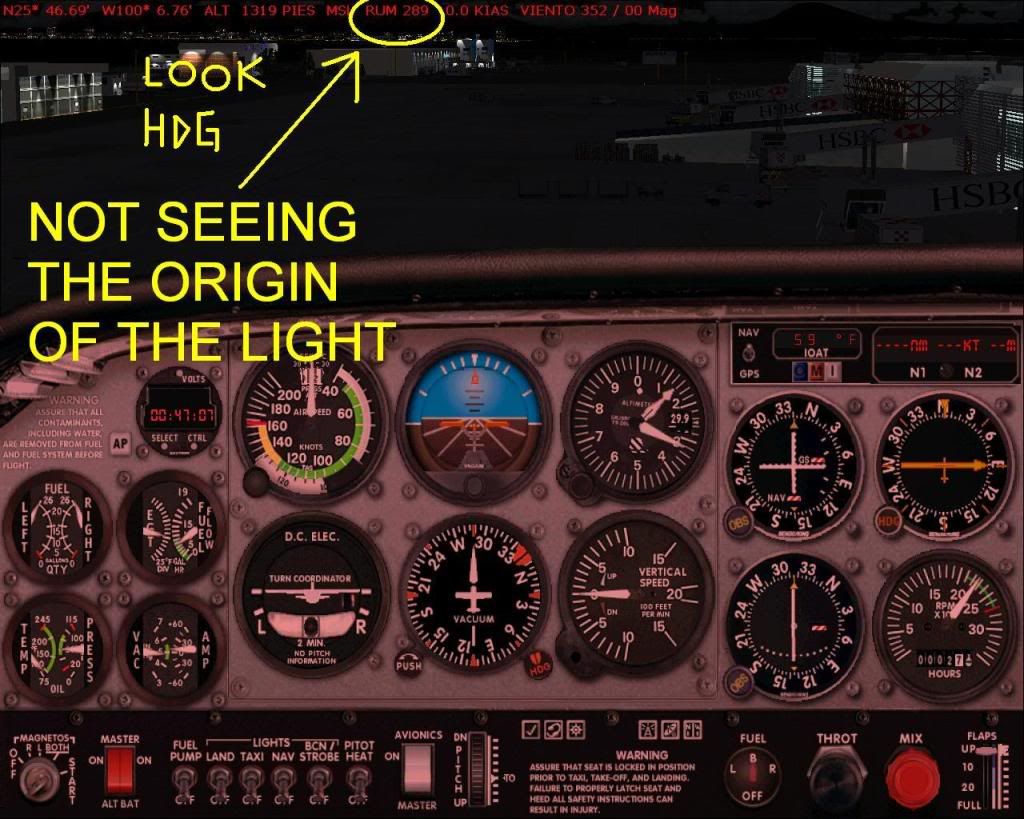

Hi all this is the problem:
When i see the origin of the light it turns on but when you arent seeing the origin of the ilght (taxi light) it turns off and i cant find the solution for this.
Please help me, here are the pictures:
- Messages
- 62
- Country
Hi all, Anybody know what happen with that problem? or someone that can recommend me another way to do this effects for lightpoles.
Thanks in advance.
Thanks in advance.

In FS9, "landing" and "taxi" lights are generated by FS9 based on the part name and the Material Name.
The image shows the "head" of my Single Ramp Light. The two "triangle polys" are linked together. The parent poly's axis is used to "aim" the light and provide the "point source glow" (light bulb). Halo.bmp is used for this.
The child poly is what FS uses to generate the "ground splash." Spotlight.bmp is used by FS for this.
The name of the two triangle polys must be: Light_Taxi_xxx. This name is a "reserved word" in FS which instructs FS to apply it's internal code to the part, and generate the light automatically.
Once exported, we then load/edit the xxx.asm and xxx_0.asm files as described in the archived threads, with the major point being that wherever we find LIGHT_BEACON in the .asm files, we replace it with LIGHT_TAXI.
I try to do this for myself to create a lamp for my airport. Everything worked so far, thanks for your explanation, but one thing left:
The beam's origin is the bottom of the light pole, beaming horizontal, not in the angel I let the polys look down and not coming from this polys. The point source glow is placed correctly indeed, only the beam is placed down on earth. Although I see the proper XYZ setting in the BGL_LIGHT command, I even tried to change altitude there, but didn't had any influence.
But I see the beam correctly in your model.
So is there another trick to get the beam at the right place? (I cannot open the source file of your models, gmax claimes something about missing scripts and missing materials...)
(I tried both a "plane" and a 3sided ngon for the polys - maybe this is wrong?)
CU
hifi
Hi,
Good news: I can load it.
But now things get worse:
When I export to mdl I get a warning:
"The model has an explicit OBED scaling matrix prepended to it.
This is unnecesary and should not be done."
But when I try to compile the resulting .asm files I get:
And by the way the generated asm is very different:
In the DRAW_TRI section I my gmax doesn't generate these lines:
It starts with the MATERIAL 0 line.
The RotateAroundX-Block starts with the IFMSK line, the BGL_FTAG lines are missing.
There is one transform block only. Same with the animation blocks.
So I can't try...
GMAX Version 1.2
Or is bglc the wrong compiler?
CU
hifi
Try loading this .gmax source file...
Good news: I can load it.
But now things get worse:
When I export to mdl I get a warning:
"The model has an explicit OBED scaling matrix prepended to it.
This is unnecesary and should not be done."
But when I try to compile the resulting .asm files I get:
Code:
D:\Programme\gmax\gamepacks\fs2004>\Programme\BGLComp\bglc /mdl rampsingle.asm
Microsoft (R) Flight Simulator BGL Compiler Version 8.00
Copyright (C) Microsoft Corp 1981-2002.  All rights reserved.

 Assembling: rampsingle.azm
D:\Programme\gmax\gamepacks\fs2004\rampsingle_0.asm(152) : error A2008: syntax error : BGL_SET_MATRIX_INDIRECT
D:\Programme\gmax\gamepacks\fs2004\rampsingle_0.asm(160) : error A2008: syntax error : BGL_SET_MATRIX_INDIRECT
D:\Programme\gmax\gamepacks\fs2004\rampsingle_0.asm(281) : error A2008: syntax error : BGL_TRANSFORM_INDIRECT
D:\Programme\gmax\gamepacks\fs2004\rampsingle_0.asm(287) : error A2008: syntax error : BGL_TRANSFORM_INDIRECT
D:\Programme\gmax\gamepacks\fs2004\rampsingle_0.asm(300) : error A2008: syntax error : BGL_SCENEGRAPH_ENTRY
D:\Programme\gmax\gamepacks\fs2004\rampsingle_0.asm(302) : error A2008: syntax error : BGL_SCENEGRAPH_ENTRY
BGLC: Error!In the DRAW_TRI section I my gmax doesn't generate these lines:
Code:
    BGL_FTAG "Box275", 0.00               ; Node 6

    ; Node 6 - Box275 transform:

BGL_SET_MATRIX_INDIRECT 2The RotateAroundX-Block starts with the IFMSK line, the BGL_FTAG lines are missing.
There is one transform block only. Same with the animation blocks.
So I can't try...
GMAX Version 1.2
Or is bglc the wrong compiler?
CU
hifi

n4gix
Resource contributor
- Messages
- 11,674
- Country

You will need to compile the edited .asm files with BGLC_9.exe if I recall correctly (understand, it's been over six years since I created this!)... 
Were I you, I'd first try to compile the pre-edited .asm and 0.asm files provided to make sure that part is working properly.
Okay, I've loaded the sample .gmax file and removed the OBED scaling matrix prepended condition so the "warning" about the dread "OBED Scaling Error" (which is quite harmless, but very annoying!) is gone.
Make absolutely sure you select all objects, the Export Selected and choose Flightsim Scenery Object (*.mdl) from the list!
Once you have the .asm and 0.asm files, compare them with the sample files I provide and make the required edits.
Attachments
Last edited:
You will need to compile the edited .asm files with BGLC_9.exe if I recall correctly (understand, it's been over six years since I created this!)...
I know it's hard to recall old projects (I just try the same with an older scenery I've made...).
I see the resulting .mdl files of bglc.exe and bglc_9.exe are identical.
Once you have the .asm and 0.asm files, compare them with the sample files I provide and make the required edits.
As in the last post - the generated asm files differs from your 2005ers.
I've made the edits, bglc got it before and after the edits now.
And the result is the same as with my own file - see pic attached.
You must have made another trick six years ago... (maybe this was an older version of gmax there?)
I edited the ramplight.asm file to import your 2005er ESDG_RampLight_0.asm, then the beam is correct. But as I said, gmax creates different asm files if I export the source you supplied in your last post.
I think I will take plan B now: model the lamp alone and use the stripped code I found here in the forum somewhere for the beams only. And place them as two seperate objects in the scenery.
[Sure I could use the fs9 ramplights (as I did in some sceneries already). But the lamps look different in my airport and I wanted to try if light_taxi is better then light_landing in the fs9 ramplight (because it seems the beams go up and down while approaching the airport - and I wanted to see if light_taxi wouldn't to this, too). You took light_taxi in the fsx model, afaik.]
But big thanks,
CU
hifi
Attachments

n4gix
Resource contributor
- Messages
- 11,674
- Country
As in the last post - the generated asm files differs from your 2005ers.
I've made the edits, bglc got it before and after the edits now.
And the result is the same as with my own file - see pic attached.
You must have made another trick six years ago... (maybe this was an older version of gmax there?)
I edited the ramplight.asm file to import your 2005er ESDG_RampLight_0.asm, then the beam is correct. But as I said, gmax creates different asm files if I export the source you supplied in your last post.
There is only one version of GMax I've ever used, the last one released: v1.2
I'm also using the FS2004 SDK tools:
FSModelExp.dle 11/24/2003
MakeMDL.exe 5/10/2004
MakeMDL.cfg file:
Code:
[Settings]
LastDir=

[Options]
Debug=1
ViewLog=1
KeepErrorLog=1
Keep=1
I8=1
I=0
FullMat=1
Deffallback=1
WeldPoints=1
Optimize=0
Flatten=0
NoAnimate=0
HasReflectMap=0
HasNightMap=1
HasLightMap=0
HasDamageMap=0
NegateZ=1
NoLeftToRight=0
SwapBH=0
Vis=0
Crash=0
XML=1
Be sure that you have set NegateZ=1, otherwise strange things will happen...
The only time I've ever NOT gotten correct .asm code has been those few times I've accidentally tried the Flightsim Aircraft export instead of Flightsim Scenery...
As I've written elsewhere, the reason for using LIGHT_TAXI was so that user aircraft won't turn them on/off with their landing lights switch!
Same here.There is only one version of GMax I've ever used, the last one released: v1.2
I'm also using the FS2004 SDK tools:
FSModelExp.dle 11/24/2003
MakeMDL.exe 5/10/2004
Be sure that you have set NegateZ=1, otherwise strange things will happen...
Ooops - that's not set in my cfg - I will try with it.
As I've written elsewhere, the reason for using LIGHT_TAXI was so that user aircraft won't turn them on/off with their landing lights switch!
It cannot be turned off because the IFMSK lines are commented out (or removed by mdltweaker). But one can pitch them up/down with Shift-Num8/Num2, and some aircraft uses this together with the landing switch. An I suspect a movement up/down if the landing light beam of the approaching acft hits hills near the runway (the beam - not the acft
.CU
hifi
Ooops - that's not set in my cfg - I will try with it.
Worked finally. If it has been the z-axis or not - I had so many tries, I don't know now what did it, but it did.
http://www.fsdeveloper.com/forum/attachment.php?attachmentid=10616&d=1316035633
Thanks,
hifi
n4gix
Resource contributor
- Messages
- 11,674
- Country
Terrific! It's nearly always the "fiddly-bits" that get you down...
Yes, now that you mention it, it is the landing light "pivoting" that was the reason for using LIGHT_TAXI rather than LIGHT_LANDING...
Somehow it just looks silly to have all the pole-mounted lights "swiveling" if the user uses the landing light adjustments!
Yes, now that you mention it, it is the landing light "pivoting" that was the reason for using LIGHT_TAXI rather than LIGHT_LANDING...
Somehow it just looks silly to have all the pole-mounted lights "swiveling" if the user uses the landing light adjustments!