

- Messages
- 92
- Country

Hi
I've created this effect:
and 3 similar ones (only difference is color) using FXEditor.
I wanted to use them as control indicators in my Vespa's virtual cockpit.
But after they turn on I can see only light border in places where thers is no meshes (I can see ground).
For some reason they popup sometimes when I zoom in or out, but disappear when zoom settles.
Here are some photos:
Without those lights

With them

When I'm in the middle of zooming
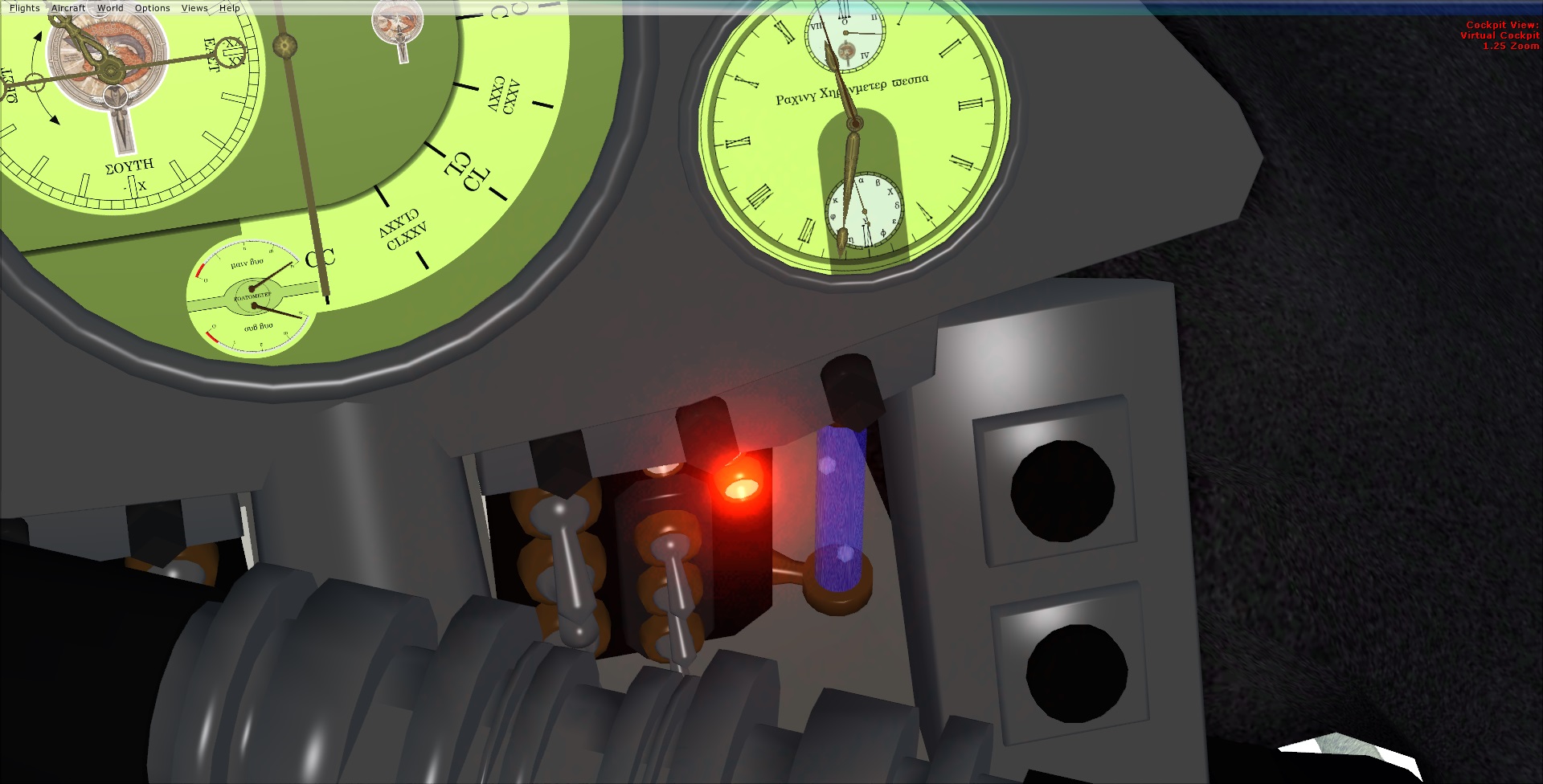
Any ideas why?
I've created this effect:
Code:
[Library Effect]
Lifetime=5
Version=2.00
Radius=0.1

[Properties]
VirtualCockpit=1
Spot=1
Tower=1
Map=1

[Emitter.0]
Lifetime=0.50, 0.50
Delay=0.00, 0.00
Bounce=0.00
Light=1
No Interpolate=1
Rate=1.00, 1.00
X Emitter Velocity=0.00, 0.00
Y Emitter Velocity=0.00, 0.00
Z Emitter Velocity=0.00, 0.00
Drag=0.00, 0.00
X Particle Velocity=0.00, 0.00
Y Particle Velocity=0.00, 0.00
Z Particle Velocity=0.00, 0.00
X Rotation=0.00, 0.00
Y Rotation=0.00, 0.00
Z Rotation=0.00, 0.00
X Offset=0.68, 0.68
Y Offset=0.00, 0.00
Z Offset=-0.18, -0.18

[Particle.0]
Lifetime=0.00, 0.00
Type=19
X Scale=1.00, 1.00
Y Scale=1.00, 1.00
Z Scale=0.00, 0.00
X Scale Rate=0.00, 0.00
Y Scale Rate=0.00, 0.00
Z Scale Rate=0.00, 0.00
Drag=0.00, 0.00
Color Rate=0.00, 0.00
X Offset=0.00, 0.00
Y Offset=0.00, 0.00
Z Offset=0.00, 0.00
Fade In=0.00, 0.00
Fade Out=0.00, 0.00
Rotation=0.00, 0.00
Static=1
Face=1, 1, 1

[ParticleAttributes.0]
Blend Mode=2
Texture=fx_2.bmp
Bounce=0.00
Color Start=0, 0, 50, 1
Color End=0, 0, 60, 0
Jitter Distance=0.00
Jitter Time=0.00
uv1=0.00, 0.00
uv2=0.01, 0.01
X Scale Goal=0.00
Y Scale Goal=0.00
Z Scale Goal=0.00
Extrude Length=0.00
Extrude Pitch Max=0.00
Extrude Heading Max=0.00

[Emitter.1]
Lifetime=0.50, 0.50
Delay=0.00, 0.00
Bounce=0.00
No Interpolate=1
Rate=1.00, 1.00
X Emitter Velocity=0.00, 0.00
Y Emitter Velocity=0.00, 0.00
Z Emitter Velocity=0.00, 0.00
Drag=0.00, 0.00
X Particle Velocity=0.00, 0.00
Y Particle Velocity=0.00, 0.00
Z Particle Velocity=0.00, 0.00
X Rotation=0.00, 0.00
Y Rotation=0.00, 0.00
Z Rotation=0.00, 0.00
X Offset=0.00, 0.00
Y Offset=0.00, 0.00
Z Offset=0.00, 0.00

[Particle.1]
Lifetime=0.00, 0.00
Type=19
X Scale=0.30, 0.30
Y Scale=0.30, 0.30
Z Scale=0.00, 0.00
X Scale Rate=0.00, 0.00
Y Scale Rate=0.00, 0.00
Z Scale Rate=0.00, 0.00
Drag=0.00, 0.00
Color Rate=0.00, 0.00
X Offset=0.00, 0.00
Y Offset=0.00, 0.00
Z Offset=0.00, 0.00
Fade In=0.00, 0.00
Fade Out=0.00, 0.00
Rotation=0.00, 0.00
Static=1
Face=1, 1, 1

[ParticleAttributes.1]
Blend Mode=2
Texture=fx_2.bmp
Bounce=0.00
Color Start=0, 0, 50, 100
Color End=0, 0, 50, 0
Jitter Distance=0.00
Jitter Time=0.00
uv1=0.00, 0.00
uv2=0.50, 0.50
X Scale Goal=0.00
Y Scale Goal=0.00
Z Scale Goal=0.00
Extrude Length=0.00
Extrude Pitch Max=0.00
Extrude Heading Max=0.00

[Emitter.2]
Lifetime=0.50, 0.50
Delay=0.00, 0.00
Bounce=0.00
No Interpolate=1
Rate=1.00, 1.00
X Emitter Velocity=0.00, 0.00
Y Emitter Velocity=0.00, 0.00
Z Emitter Velocity=0.00, 0.00
Drag=0.00, 0.00
X Particle Velocity=0.00, 0.00
Y Particle Velocity=0.00, 0.00
Z Particle Velocity=0.00, 0.00
X Rotation=0.00, 0.00
Y Rotation=0.00, 0.00
Z Rotation=0.00, 0.00
X Offset=0.00, 0.00
Y Offset=0.00, 0.00
Z Offset=0.00, 0.00

[Particle.2]
Lifetime=0.00, 0.00
Type=19
X Scale=0.10, 0.10
Y Scale=0.10, 0.10
Z Scale=0.00, 0.00
X Scale Rate=0.00, 0.00
Y Scale Rate=0.00, 0.00
Z Scale Rate=0.00, 0.00
Drag=0.00, 0.00
Color Rate=0.00, 0.00
X Offset=0.00, 0.00
Y Offset=0.00, 0.00
Z Offset=0.00, 0.00
Fade In=0.00, 0.00
Fade Out=0.00, 0.00
Rotation=0.00, 0.00
Static=1
Face=1, 1, 1

[ParticleAttributes.2]
Blend Mode=2
Texture=fx_2.bmp
Bounce=0.00
Color Start=0, 0, 60, 200
Color End=0, 0, 60, 0
Jitter Distance=0.00
Jitter Time=0.00
uv1=0.00, 0.00
uv2=0.50, 0.50
X Scale Goal=0.00
Y Scale Goal=0.00
Z Scale Goal=0.00
Extrude Length=0.00
Extrude Pitch Max=0.00
Extrude Heading Max=0.00

[Emitter.3]
Lifetime=0.50, 0.50
Delay=0.00, 0.00
Bounce=0.00
No Interpolate=1
Rate=1.00, 1.00
X Emitter Velocity=0.00, 0.00
Y Emitter Velocity=0.00, 0.00
Z Emitter Velocity=0.00, 0.00
Drag=0.00, 0.00
X Particle Velocity=0.00, 0.00
Y Particle Velocity=0.00, 0.00
Z Particle Velocity=0.00, 0.00
X Rotation=0.00, 0.00
Y Rotation=0.00, 0.00
Z Rotation=0.00, 0.00
X Offset=0.00, 0.00
Y Offset=0.00, 0.00
Z Offset=0.00, 0.00

[Particle.3]
Lifetime=0.00, 0.00
Type=19
X Scale=0.10, 0.10
Y Scale=0.10, 0.10
Z Scale=0.00, 0.00
X Scale Rate=0.00, 0.00
Y Scale Rate=0.00, 0.00
Z Scale Rate=0.00, 0.00
Drag=0.00, 0.00
Color Rate=0.00, 0.00
X Offset=0.00, 0.00
Y Offset=0.00, 0.00
Z Offset=0.00, 0.00
Fade In=0.00, 0.00
Fade Out=0.00, 0.00
Rotation=0.00, 0.00
Static=1
Face=1, 1, 1

[ParticleAttributes.3]
Blend Mode=2
Texture=fx_2.bmp
Bounce=0.00
Color Start=0, 50, 100, 255
Color End=0, 50, 100, 0
Jitter Distance=0.00
Jitter Time=0.00
uv1=0.00, 0.00
uv2=0.50, 0.50
X Scale Goal=0.00
Y Scale Goal=0.00
Z Scale Goal=0.00
Extrude Length=0.00
Extrude Pitch Max=0.00
Extrude Heading Max=0.00I wanted to use them as control indicators in my Vespa's virtual cockpit.
But after they turn on I can see only light border in places where thers is no meshes (I can see ground).
For some reason they popup sometimes when I zoom in or out, but disappear when zoom settles.
Here are some photos:
Without those lights
With them
When I'm in the middle of zooming
Any ideas why?


